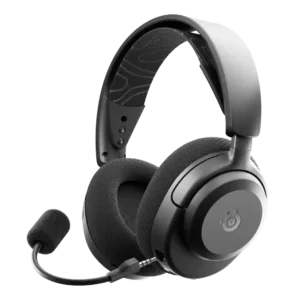
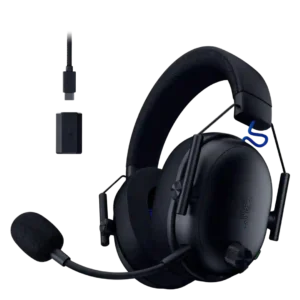
Average score
SteelSeries Arctis Nova 3 Gaming Headset
4.2
Console compatibility limitations
SteelSeries Arctis Nova 3 Gaming Headset
4.0
Console compatibility limitations were limited in current evidence; one Switch 2 concern was followed by successful firmware testing.
Razer BlackShark V3
1.0
One Xbox customer reports that wireless microphone use required an adapter, making the console experience unusable for their intended setup.
Active noise cancellation
SteelSeries Arctis Nova 3 Gaming Headset
2.5
ANC was a weakness because reviewers noted its absence and framed that omission as disappointing or baffling at this price.
Razer BlackShark V3
5.0
Two customers who describe noise cancelling say it works extremely well, including one report of dramatically reducing jet noise during a flight.
Included accessories
SteelSeries Arctis Nova 3 Gaming Headset
2.5
Included accessories were a weak point in one review because the included charging cable fell short of expectations.
Razer BlackShark V3
5.0
The unboxing feedback is positive about the small included touches, with the cable minder specifically earning a thumbs-up.
Multipoint connectivity reliability
SteelSeries Arctis Nova 3 Gaming Headset
2.7
Multipoint reliability was a caveat: reviewers liked switching modes, but several criticized the lack of true simultaneous Bluetooth or device limitations.
Razer BlackShark V3
5.0
Simultaneous 2.4 GHz and Bluetooth audio is repeatedly praised, letting users keep game audio and a phone or second device active together. The reports that actually use the feature describe it as convenient and working well.
Volume output
SteelSeries Arctis Nova 3 Gaming Headset
3.0
Volume output was a mild weakness in the evidence, with reviewers calling the default output quieter or less efficient than some competitors.
Razer BlackShark V3
1.0
Three customers independently complain that maximum output is far too low, even after EQ or setting changes. For listeners who prefer high playback levels, this is the most repeated performance warning.
Noise isolation (passive)
SteelSeries Arctis Nova 3 Gaming Headset
3.1
Passive isolation was acceptable for quieter rooms but not strong, with reviewers saying it blocked some outside sound while leaving plenty of awareness.
Razer BlackShark V3
5.0
The memory-foam earcups block a meaningful amount of outside sound on their own, helping reviewers stay focused without relying on electronic cancellation.
Treble clarity
SteelSeries Arctis Nova 3 Gaming Headset
3.4
Treble drew mixed responses: some heard clearer highs, but others found high tones shouty, recessed, or occasionally irritating.
Razer BlackShark V3
5.0
High frequencies stay detailed and clear without harshness, and vocals remain distinct even when mixes get busy.
Sidetone adjustment quality
SteelSeries Arctis Nova 3 Gaming Headset
4.5
Sidetone quality was a strength in the few reviews that discussed it, especially for real-time, clear monitoring.
Razer BlackShark V3
3.0
Sidetone is polarizing. One reviewer gets a natural, useful monitoring level after adjustment, while another calls it quiet and terrible-sounding enough to be a dealbreaker.
Portability/foldability
SteelSeries Arctis Nova 3 Gaming Headset
4.0
Portability was helped by folding/flat ear cups and an understated look, though this was more prominent on wired or travel-adjacent comments.
Razer BlackShark V3
2.5
Portable use is hurt by the long cabled HyperSpeed dongle, which one reviewer found awkward for Switch 2 and other mobile setups.
Microphone noise reduction
SteelSeries Arctis Nova 3 Gaming Headset
4.4
Microphone noise reduction was one of the stronger mic-related areas, with multiple reviewers praising barking, room, episode, keyboard, or background-noise suppression.
Razer BlackShark V3
3.0
Noise handling is inconsistent across the reports: one expert praises background suppression, while a customer says the mic picks up breathing and lacks noise suppression.
Frequency response accuracy
SteelSeries Arctis Nova 3 Gaming Headset
3.3
Frequency-response commentary was mixed: the tuning served gaming clarity, but some reviewers found music tonal balance less accurate or less pleasant.
Razer BlackShark V3
4.5
Reviewers who discuss tonal balance find the response clear, detailed, and generally controlled. One audio-focused customer considered the response good enough to choose the headset over other gaming options.
Instrument separation
SteelSeries Arctis Nova 3 Gaming Headset
3.8
Separation was generally adequate, but one reviewer noted it could feel jumbled during dense action scenes.
Razer BlackShark V3
5.0
Complex mixes are a strong point, with reviewers saying individual sounds stay distinct even when games or music become crowded.
Midrange clarity
SteelSeries Arctis Nova 3 Gaming Headset
3.8
Midrange was usually clear enough for voices and dialogue, though one measurement-focused reviewer found it recessed before tuning.
Razer BlackShark V3
5.0
The midrange is described as clean and well-defined, helping voices and core musical content remain easy to follow.
Clamping force comfort
SteelSeries Arctis Nova 3 Gaming Headset
4.0
Clamp comfort was mostly positive, balancing secure fit and comfort, though one review described the fit as tight.
Razer BlackShark V3
5.0
The headset stays secure without squeezing too hard, and reviewers specifically praise the lack of excessive side pressure.
Detachable microphone convenience
SteelSeries Arctis Nova 3 Gaming Headset
3.7
Detachable mic convenience was mixed: reviewers liked the cleaner/travel-friendly look, but some preferred retractable mics or worried about losing the boom.
Razer BlackShark V3
4.7
Removing the mic is convenient for music or solo play and helps keep it out of the way. The main drawback is that there is no integrated place to store it once detached.
Bass performance
SteelSeries Arctis Nova 3 Gaming Headset
3.6
Bass feedback was mixed: wireless reviews often praised boom and thump, while several wired or measurement-focused reviews noted restrained sub-bass, boxiness, or less low-end impact.
Razer BlackShark V3
4.6
Bass is generally praised for being deep, punchy, and controlled rather than boomy. One customer, however, found the headset noticeably short on bass.
Preset EQ profile quality
SteelSeries Arctis Nova 3 Gaming Headset
4.4
Preset EQ profiles were repeatedly praised for game-specific tuning and live switching, with only minor caveats that not every preset made a big difference.
Razer BlackShark V3
3.5
Built-in profiles are convenient for some users, but quality is inconsistent. Several like the quick presets, while others call the esports profiles poor or the stock choices unremarkable.
Fit/seal reliability
SteelSeries Arctis Nova 3 Gaming Headset
3.0
Fit/seal reliability was a small caveat because one lab review found sound quality sensitive to positioning and fit.
Razer BlackShark V3
3.8
Fit is generally comfortable and secure, but not perfectly consistent. Two users praise the fit while another says the headset slowly slides down and needs frequent readjustment.
Ear cup padding quality
SteelSeries Arctis Nova 3 Gaming Headset
4.2
Ear cup padding was usually praised for memory foam, fabric, breathability, and glasses comfort, though one reviewer found the material hot and not plush enough.
Razer BlackShark V3
5.0
The memory-foam cushions earn strong praise for softness, depth, and breathability. Several reviewers prefer them to pads on competing or older headsets.
Dongle
SteelSeries Arctis Nova 3 Gaming Headset
3.7
Dongle feedback was mixed: reviewers liked the low-latency, slim, offset design, but some disliked port blocking or lack of onboard storage.
Razer BlackShark V3
2.9
The remote dongle design divides reviewers. Some like being able to position or switch it easily, while others dislike the long cable, laptop clutter, or report a failed dongle switch.
Microphone quality for calls
SteelSeries Arctis Nova 3 Gaming Headset
4.2
Call and chat voice quality was generally clear, with reviewers reporting adequate Zoom/call performance and clear detailed mic sound.
Razer BlackShark V3
4.9
Voice calls are consistently clear and natural, with reviewers reporting compliments from friends, coworkers, and customers. The mic is well suited to Discord, meetings, and work calls.
App
SteelSeries Arctis Nova 3 Gaming Headset
4.4
The app/software was a major value driver because reviewers praised mobile presets, Sonar, GG customization, and usefulness, despite a few complexity complaints.
Razer BlackShark V3
3.7
Software opinions are mixed. Razer Audio is often described as easy and useful, while several Synapse/Android users complain about connection trouble, heavy resource use, or poor interface choices.
Comfort during long use
SteelSeries Arctis Nova 3 Gaming Headset
4.5
Comfort over long sessions was one of the strongest consensus positives, with many reviewers wearing it for full workdays, long gaming sessions, or glasses use comfortably.
Razer BlackShark V3
5.0
Comfort is one of the strongest areas in the set. Reviewers repeatedly wear it for long gaming sessions or workdays without fatigue, pressure, or a strong urge to remove it.
Wireless latency
SteelSeries Arctis Nova 3 Gaming Headset
4.5
Wireless latency was consistently praised, with 2.4GHz and Bluetooth testing producing low-latency or no-lag impressions.
Razer BlackShark V3
5.0
Low latency is one of the most consistent strengths in the set. Reviewers repeatedly report instant, smooth, or effectively lag-free wireless response, including in competitive games.
Software/setup simplicity
SteelSeries Arctis Nova 3 Gaming Headset
3.3
Setup simplicity was mixed: wired setup was plug-and-play, but PC software routing could become confusing.
Razer BlackShark V3
3.8
Setup ranges from plug-and-play and beginner-friendly to genuinely frustrating. Most users have little trouble, but Synapse restart/resource complaints and one repeated power-on problem keep this from being universally simple.
Soundstage width
SteelSeries Arctis Nova 3 Gaming Headset
3.5
Soundstage was serviceable but not universally expansive, with one review saying it lacked full wraparound immersion and another calling the stage wide enough.
Razer BlackShark V3
3.0
Opinions on soundstage are sharply split: one customer calls it amazing, while another finds the music presentation abysmal and lacking spatial scale.
Smudge resistance
SteelSeries Arctis Nova 3 Gaming Headset
4.5
Smudge resistance had limited but positive evidence from one reviewer praising the non-fingerprint-prone ear plate surface.
Razer BlackShark V3
5.0
The matte finish resists fingerprints and dirt well, helping the headset stay clean-looking with regular use.
Stability
SteelSeries Arctis Nova 3 Gaming Headset
4.5
Stability evidence was positive in one review that said the headset did not slip accidentally.
Razer BlackShark V3
5.0
A reviewer specifically notes that the headset stays securely on the head even while bending over, despite its very light weight.
Button control usability
SteelSeries Arctis Nova 3 Gaming Headset
3.9
Control usability was mostly simple and easy, but some reviewers disliked crowded or less intuitive one-hand control layouts.
Razer BlackShark V3
3.4
Physical controls are often praised for tactile feel, placement, and quick access, but not everyone likes them. Two customers find the knobs awkward or excessively slow for large adjustments.
Value for money
SteelSeries Arctis Nova 3 Gaming Headset
4.5
Value was a strong consensus positive across nearly every review, with reviewers repeatedly calling it a good budget or midrange buy.
Razer BlackShark V3
4.2
Most reviewers consider the mid-range price a strong deal because sound, comfort, mic quality, and wireless features approach more expensive headsets. Negative value judgments come from low-volume or nonworking units rather than a broad sense that the feature set is overpriced.
Positional audio accuracy
SteelSeries Arctis Nova 3 Gaming Headset
4.3
Positional audio was a strength for gaming, with many reviewers hearing footsteps, gunfire, reloads, and directional cues clearly.
Razer BlackShark V3
4.6
Directional accuracy is excellent in most reports, making footsteps, gunshots, enemies, and environmental sounds easy to locate. One low-volume customer reports the opposite because important cues were too quiet to hear.
Battery
SteelSeries Arctis Nova 3 Gaming Headset
4.3
Battery life was generally strong for the wireless model, commonly described as enough for days or long sessions, though one lab test found less than the advertised 2.4GHz rating.
Razer BlackShark V3
4.6
Battery life is a major strength, commonly lasting days between charges. The caveats are shorter endurance in ultra-low-latency mode, a few optimistic runtime estimates, and one concern about difficult battery replacement access.
Microphone
SteelSeries Arctis Nova 3 Gaming Headset
4.1
Microphone feedback was generally good for gaming chat, ranging from exceptional to adequate, with some caveats about fuzziness or headset-like tone.
Razer BlackShark V3
4.4
The microphone is usually rated very highly for clarity and voice reproduction, and several reviewers call it among the better wireless-headset mics. Criticism centers on excess background pickup, one long-term degradation report, and one Xbox connection problem.
Sound quality
SteelSeries Arctis Nova 3 Gaming Headset
4.4
Reviewers generally liked the sound, especially after EQ, describing it as detailed, immersive, or impressive for the price; a few wired-model notes called the default profile merely fine.
Razer BlackShark V3
4.6
Sound is the headset’s clearest strength: most reviewers describe it as crisp, detailed, rich, or excellent across games, music, and everyday use. A small minority call it tinny, merely decent, or inferior to alternatives.
Multi-platform compatibility
SteelSeries Arctis Nova 3 Gaming Headset
4.6
Multi-platform compatibility was one of the strongest positives, especially for the 3X model and cross-console/mobile use.
Razer BlackShark V3
4.9
Broad platform support is a consistent strength, with positive use across PC, Mac, PlayStation, Switch, Xbox, phones, and other devices. Hardware switching between systems is generally described as convenient.
Connectivity versatility
SteelSeries Arctis Nova 3 Gaming Headset
4.4
Connectivity versatility was a clear strength, with reviewers praising broad platform use, USB-C, Bluetooth, 2.4GHz, and wired options depending on model.
Razer BlackShark V3
4.7
Reviewers like being able to move among 2.4 GHz wireless, Bluetooth, USB, phones, PCs, and consoles, with simultaneous sources especially useful. One customer is frustrated by missing Bluetooth/wireless mixing in their setup.
Cable quality
SteelSeries Arctis Nova 3 Gaming Headset
2.3
Cable comments were negative, mostly because reviewers disliked the short charging cable or stiff wired headset cables.
Razer BlackShark V3
2.5
Cable convenience is mixed. One customer likes that the included cord is long enough for direct PC use, while others dislike the long HyperSpeed desktop run or find the charging cord too short.
Ear cup swivel/rotation range
SteelSeries Arctis Nova 3 Gaming Headset
4.3
Swivel and rotation were praised for comfort, neck wear, and fit flexibility.
Razer BlackShark V3
4.5
The updated swivel points are viewed as a welcome improvement over the previous generation’s fit hardware.
Footstep sound level scaling feature
SteelSeries Arctis Nova 3 Gaming Headset
4.5
Footstep-focused preset evidence was positive, with one reviewer saying the preset made footsteps more pronounced in stealth gameplay.
Razer BlackShark V3
4.8
The dedicated footstep-scaling control is viewed as a useful, distinctive competitive-gaming feature that makes cue adjustment more convenient.
Weight comfort
SteelSeries Arctis Nova 3 Gaming Headset
4.8
Weight comfort was a major strength, with many reviewers emphasizing the headset’s lightness and reduced fatigue.
Razer BlackShark V3
5.0
Its light weight is repeatedly called out as a major advantage, especially for long sessions. Several users contrast it favorably with heavier premium headsets.
Equalizer customization
SteelSeries Arctis Nova 3 Gaming Headset
4.3
EQ customization was a strength overall, especially on PC and mobile, although some mobile implementations lacked a true custom equalizer.
Razer BlackShark V3
4.6
EQ flexibility is widely appreciated, with game tuning, mic EQ, and saved profiles giving users meaningful control. One enthusiast criticizes the app for offering only a fixed graphic EQ rather than deeper parametric tuning.
Charging
SteelSeries Arctis Nova 3 Gaming Headset
4.9
Fast charging was one of the clearest strengths, with reviewers repeatedly praising the 15-minute charge usefulness.
Razer BlackShark V3
4.7
Fast charging is consistently praised, with several reviews highlighting the six-hours-from-15-minutes claim or quick real-world top-ups. One customer’s only complaint is a short charging cable.
Game/Chat balance control
SteelSeries Arctis Nova 3 Gaming Headset
4.0
Game/chat balance was useful where available, though one reviewer disliked the hold-and-wheel implementation compared with a dedicated wheel.
Razer BlackShark V3
3.8
The dedicated game/chat control is useful for changing mixes without opening software, but one customer finds its adjustment steps far too fine and slow.
Headband adjustability
SteelSeries Arctis Nova 3 Gaming Headset
4.0
Headband feedback was mostly positive for pressure distribution and adjustability, but some reviewers noted sweet-spot or large-head limitations.
Razer BlackShark V3
3.9
Most reports find the sliding adjustment smooth and useful, but there are exceptions. One customer says the extensions slowly slip, while another simply finds adjustability below average.
Build quality
SteelSeries Arctis Nova 3 Gaming Headset
3.9
Build quality was mostly solid for plastic construction, but reviewers also noted plasticky feel or merely steady construction.
Razer BlackShark V3
3.8
Build impressions are mixed. Experts and several customers call it robust or durable, but others say the lightweight plastic feels cheap, fragile, or less sturdy than a competing headset.
Bluetooth
SteelSeries Arctis Nova 3 Gaming Headset
4.2
Bluetooth was viewed positively when tested, especially for painless switching, mobile use, and fallback connectivity.
Razer BlackShark V3
4.1
Bluetooth is usually convenient and smooth, including easy phone pairing and strong dual-source use. One customer reports occasional short Bluetooth dropouts.
Xbox compatibility
SteelSeries Arctis Nova 3 Gaming Headset
4.5
Xbox compatibility was positive for the 3X variant, though buyers must choose the Xbox-capable version.
Razer BlackShark V3
4.4
Xbox results are mostly excellent, with easy setup, strong integration, low-lag play, and precise cues. One customer reports a severe exception where wireless microphone use required an adapter.
Design and Aesthetics
SteelSeries Arctis Nova 3 Gaming Headset
4.4
Design and aesthetics were broadly liked, especially the soft color options, clean look, and less aggressive gaming style.
Razer BlackShark V3
4.3
The understated black styling appeals to reviewers who dislike flashy gaming gear, and several call it sleek or restrained. One reviewer finds the all-black look boring, so the minimalism will not suit everyone.
Spatial audio
SteelSeries Arctis Nova 3 Gaming Headset
4.4
Spatial audio was praised for gaming immersion and directionality, especially through Sonar or console spatial systems.
Razer BlackShark V3
4.4
Spatial processing is usually a strength, especially for competitive games where THX or surround cues improve awareness. One customer, however, felt the spatial effect was almost absent in music.
Built-in DAC and hi-res playback
SteelSeries Arctis Nova 3 Gaming Headset
4.0
The wired model’s USB DAC was useful mainly for extra volume and software access rather than a broad hi-res claim.
Razer BlackShark V3No score yet
Detachable cable convenience
SteelSeries Arctis Nova 3 Gaming Headset
3.5
Detachable cable convenience was split between praise for replaceable/removable cables and criticism of a nonstandard aux-style cable.
Razer BlackShark V3No score yet
Earpad replacement ease
SteelSeries Arctis Nova 3 Gaming Headset
4.0
Earpad replacement ease was supported by a reviewer calling the pads easily replaceable.
Razer BlackShark V3No score yet
Firmware update support
SteelSeries Arctis Nova 3 Gaming HeadsetNo score yet
Razer BlackShark V3
3.0
One enthusiast is specifically waiting for firmware improvements to address low volume, control behavior, and EQ limitations, so confidence in post-launch fixes remains uncertain.
Glasses and hat compatibility
SteelSeries Arctis Nova 3 Gaming HeadsetNo score yet
Razer BlackShark V3
3.5
Glasses comfort is split. One expert wore the headset without the usual temple pressure, while a customer says the cups hurt their ears when wearing glasses.
Hinge durability
SteelSeries Arctis Nova 3 Gaming Headset
4.5
Durability evidence around hinges and arms was positive, with reviewers highlighting flexible construction and stress-resistant support.
Razer BlackShark V3No score yet
Integrated microphone
SteelSeries Arctis Nova 3 Gaming Headset
4.5
The integrated retractable mic on the wired model was praised as convenient and clean when not in use.
Razer BlackShark V3No score yet
Maximum volume clarity
SteelSeries Arctis Nova 3 Gaming Headset
4.5
One reviewer praised maximum-volume bass clarity, noting thump without distortion.
Razer BlackShark V3No score yet
Overall satisfaction
SteelSeries Arctis Nova 3 Gaming HeadsetNo score yet
Razer BlackShark V3
4.1
Overall sentiment is strongly positive: many reviewers call it a favorite, daily driver, excellent upgrade, or easy recommendation. The main dissent comes from low-volume complaints, software frustrations, a few build concerns, and isolated hardware failures.
Packaging quality
SteelSeries Arctis Nova 3 Gaming HeadsetNo score yet
Razer BlackShark V3
5.0
The included hardware arrives neatly packed and secure, with the unboxing reviewer specifically praising the presentation and protection.
Reliability
SteelSeries Arctis Nova 3 Gaming HeadsetNo score yet
Razer BlackShark V3
1.2
A few customers report severe reliability problems, including units that would not work or were difficult to power on. These failures are much less common than the positive reports, but they are serious when they occur.
Replaceable earpads
SteelSeries Arctis Nova 3 Gaming Headset
4.8
Replaceable earpads were praised for interchangeability and long-term support.
Razer BlackShark V3No score yet
RGB lighting customization
SteelSeries Arctis Nova 3 Gaming Headset
4.2
RGB customization was mostly praised on wired models as subtle, customizable, and tasteful, with one reviewer saying options were limited.
Razer BlackShark V3No score yet
Sound leakage
SteelSeries Arctis Nova 3 Gaming Headset
1.0
Sound leakage was the clearest serious drawback, with one reviewer calling leakage shockingly bad even at low volumes.
Razer BlackShark V3No score yet
USB-C
SteelSeries Arctis Nova 3 Gaming Headset
4.0
USB-C was viewed as a useful upgrade because it enabled better connectivity and subtle sound/software advantages.
Razer BlackShark V3No score yet
Wireless range
SteelSeries Arctis Nova 3 Gaming HeadsetNo score yet
Razer BlackShark V3
4.8
Wireless range is consistently strong in the few reports that test it, including stable use across a living room and roughly 10–15 meters without noticeable delay.