P1
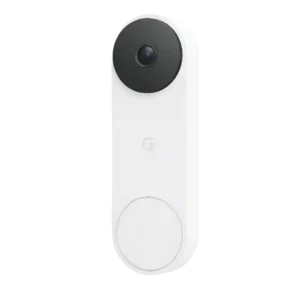
Google Nest Doorbell (Wired, 3rd Gen)
P2
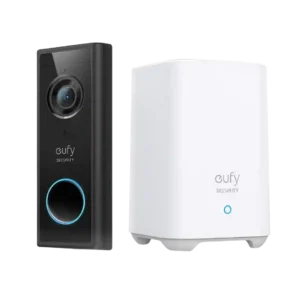
Eufy 2K Video Doorbell S220
Average score
P1
Product 1: Google Nest Doorbell (Wired, 3rd...
3.9
P2
Product 2: Eufy 2K Video Doorbell S220
4.3
AI features
P1
Product 1: Google Nest Doorbell (Wired, 3rd...
4.1
Gemini and AI features impressed several reviewers with summaries, searches, and detailed descriptions, but others found misidentifications and subscription dependence.
P2
Product 2: Eufy 2K Video Doorbell S220
3.7
Reviewers liked the inclusion of no-fee AI/person detection, but evidence also shows it is less advanced than top competitors and can misclassify cats or other objects as humans.
App, software and firmware
P1
Product 1: Google Nest Doorbell (Wired, 3rd...
4.5
The Google Home app earned praise for clean controls, fast live view, excellent setup guidance, and deep integration.
P2
Product 2: Eufy 2K Video Doorbell S220
3.9
The app is generally described as easy, quick, and intuitive, but one long-term reviewer reported disruptive logouts and another noticed slightly glitchy playback.
Audio
P1
Product 1: Google Nest Doorbell (Wired, 3rd...
4.0
Two-way audio was judged reliable and clear, with good noise cancellation and enough sound quality for practical conversations.
P2
Product 2: Eufy 2K Video Doorbell S220
4.3
Two-way audio is usable and often clear or loud, though one long-term reviewer noted the conversation flow can be delayed enough to require waiting.
Automation flexibility
P1
Product 1: Google Nest Doorbell (Wired, 3rd...
5.0
Automation evidence was limited but positive, with one reviewer saying a motion-triggered Google automation worked perfectly.
P2
Product 2: Eufy 2K Video Doorbell S220
4.3
Automation flexibility is supported mainly through custom routines and simple mode switching; reviewers found these controls useful rather than extensive.
Base / Hub integration
P1
Product 1: Google Nest Doorbell (Wired, 3rd...
4.0
Nest Hub integration was considered cool and useful, though one reviewer found the Nest Hub interface itself sluggish.
P2
Product 2: Eufy 2K Video Doorbell S220
4.5
The HomeBase is viewed positively because it works smoothly with the router setup and provides local hub-based storage.
Battery and Charging
P1
Product 1: Google Nest Doorbell (Wired, 3rd...
3.5
The wired design avoids charging hassles, but the lack of a battery is a limitation for homes without suitable wiring.
P2
Product 2: Eufy 2K Video Doorbell S220
3.4
Battery life is useful but highly context-dependent: some reviewers saw roughly three to four months, while high-traffic use fell well short of six months and charging can be inconvenient.
Chime
P1
Product 1: Google Nest Doorbell (Wired, 3rd...
3.5
Chime support was mixed: it can work through existing chimes or Google speakers, but users without compatible chimes may need alternatives.
P2
Product 2: Eufy 2K Video Doorbell S220
4.5
The chime is a strength: reviewers found it loud, usable throughout the house, inexpensive to extend through Echo devices, and adjustable enough for different rooms.
Color options
P1
Product 1: Google Nest Doorbell (Wired, 3rd...
4.5
The Linen colorway received positive attention for looking sophisticated against home exteriors.
P2Product 2: Eufy 2K Video Doorbell S220
No score yetComplete kit in box
P1
Product 1: Google Nest Doorbell (Wired, 3rd...
5.0
The included kit was praised as complete, with the needed mounting parts, connectors, wedge, hardware, and instructions in the box.
P2
Product 2: Eufy 2K Video Doorbell S220
4.5
Reviewers who discussed the box contents felt the kit was complete, with the hardware, chime/HomeBase, cables, brackets, and setup pieces needed to get started.
Controls and indicators
P1Product 1: Google Nest Doorbell (Wired, 3rd...
No score yet
P2
Product 2: Eufy 2K Video Doorbell S220
2.5
Controls and indicators received limited criticism because battery status is not shown as a full percentage except while charging.
Delivery package monitoring
P1
Product 1: Google Nest Doorbell (Wired, 3rd...
4.3
Package monitoring worked well in positive tests, including accurate package callouts and rich package-delivery notifications.
P2Product 2: Eufy 2K Video Doorbell S220
No score yetDesign aesthetics
P1
Product 1: Google Nest Doorbell (Wired, 3rd...
4.8
Design was a standout, with reviewers calling it modern, premium, symmetrical, and among the nicest-looking video doorbells.
P2
Product 2: Eufy 2K Video Doorbell S220
4.5
Design feedback is favorable, with reviewers calling out the matte finish, nicer fit and finish, good looks, and low-profile build.
Face recognition
P1
Product 1: Google Nest Doorbell (Wired, 3rd...
4.0
Face recognition improved over earlier models and often worked well, but some reviewers still saw misses or limits with covered faces.
P2Product 2: Eufy 2K Video Doorbell S220
No score yetField of view and framing
P1
Product 1: Google Nest Doorbell (Wired, 3rd...
4.4
The square framing and wide field of view were repeatedly praised for showing visitors, packages, porch areas, and more of the entryway.
P2
Product 2: Eufy 2K Video Doorbell S220
4.5
Reviewers praised the wide view and taller framing because it captures broad porch, driveway, street, and above/below coverage.
Installation and Mounting
P1
Product 1: Google Nest Doorbell (Wired, 3rd...
4.6
Installation was widely praised, especially the guided app setup, included hardware, easy wiring, and fast upgrade path from the prior wired model.
P2
Product 2: Eufy 2K Video Doorbell S220
4.4
Installation is consistently presented as easy, app-guided, and quick, though brick mounting may require extra drilling effort.
lag)
P1
Product 1: Google Nest Doorbell (Wired, 3rd...
3.9
Latency was mostly good, with fast live view, quick doorbell display, and near-instant notifications, though event logs or phone alerts could lag.
P2
Product 2: Eufy 2K Video Doorbell S220
3.4
Latency is mixed: live view can be quick, but several reviews note motion, audio, or video loading delays ranging from a second or two to around ten seconds.
Lens distortion handling
P1
Product 1: Google Nest Doorbell (Wired, 3rd...
3.8
Lens distortion was treated as a manageable tradeoff: reviewers noticed slight barrel or fisheye distortion but accepted it for the broader view.
P2Product 2: Eufy 2K Video Doorbell S220
No score yetLow-light and Night vision
P1
Product 1: Google Nest Doorbell (Wired, 3rd...
4.3
Low-light and night footage drew strong praise, especially for clearer faces, crisp black-and-white infrared footage, and improved low-light performance.
P2
Product 2: Eufy 2K Video Doorbell S220
3.8
Night vision works, especially at close range, but reviewers noted it becomes less clear as subjects move farther away.
Motion detection
P1
Product 1: Google Nest Doorbell (Wired, 3rd...
4.5
Motion detection was generally fast and useful, with reviewers citing swift alerts, more captured events, and strong overnight or street-level pickup.
P2
Product 2: Eufy 2K Video Doorbell S220
4.0
Motion detection earns mixed-to-positive marks: it is adjustable and can be quick after tuning, but some reviewers still found motion alerts slower than ideal.
Notifications
P1
Product 1: Google Nest Doorbell (Wired, 3rd...
4.0
Notifications were often fast and rich, but usefulness depended on subscriptions for enhanced previews, and one test found a delay longer than desired.
P2
Product 2: Eufy 2K Video Doorbell S220
4.5
Notifications are mostly praised as fast, especially for doorbell presses, although motion alerts can lag depending on settings and app behavior.
Object and person detection
P1
Product 1: Google Nest Doorbell (Wired, 3rd...
3.7
Object and person detection was useful but imperfect: reviewers praised package, person, and face-related detection while noting pet misidentifications.
P2
Product 2: Eufy 2K Video Doorbell S220
4.1
Person/object detection is useful for reducing alerts and adding face thumbnails, but multiple reviews show it is not perfectly accurate.
Ongoing ownership costs
P1
Product 1: Google Nest Doorbell (Wired, 3rd...
2.7
Ownership costs were the biggest value tension: several reviewers disliked the monthly pricing, while one found premium worthwhile for serious monitoring.
P2
Product 2: Eufy 2K Video Doorbell S220
5.0
Reviewers repeatedly value the low ongoing cost because local storage and no required subscription reduce long-term expense.
Peace of mind
P1
Product 1: Google Nest Doorbell (Wired, 3rd...
4.5
Reviewers linked the device to home security and confidence, especially when premium recording made it easier to see what happened.
P2
Product 2: Eufy 2K Video Doorbell S220
4.7
Peace of mind is a clear benefit for reviewers who use it to monitor the door, talk remotely, and feel more secure while away.
Personalization options
P1Product 1: Google Nest Doorbell (Wired, 3rd...
No score yet
P2
Product 2: Eufy 2K Video Doorbell S220
4.5
Personalization is a plus where reviewers mention clip length, trigger intervals, view angles, and motion settings that can be tuned to the home.
Power Options and Compatibility
P1
Product 1: Google Nest Doorbell (Wired, 3rd...
3.7
Power compatibility was generally manageable with proper wiring or a power adapter, though transformer and wire requirements can complicate installation.
P2
Product 2: Eufy 2K Video Doorbell S220
4.5
Power flexibility is a major advantage because the battery model can be mounted wire-free or hardwired to avoid charging concerns.
Pre-roll buffer
P1
Product 1: Google Nest Doorbell (Wired, 3rd...
4.5
Pre-roll evidence was positive but limited, with one reviewer saying the camera captured a bit before and after events.
P2Product 2: Eufy 2K Video Doorbell S220
No score yetPrice and value
P1
Product 1: Google Nest Doorbell (Wired, 3rd...
4.0
Value depended heavily on use case; reviewers liked the hardware and upgrade value but warned subscriptions and ecosystem needs affect the calculation.
P2
Product 2: Eufy 2K Video Doorbell S220
4.8
Value is strong in the reviews, especially on sale or at lower current prices, with reviewers saying they would pay the asking price because fees are avoided.
Privacy
P1Product 1: Google Nest Doorbell (Wired, 3rd...
No score yet
P2
Product 2: Eufy 2K Video Doorbell S220
5.0
Privacy sentiment is positive because reviewers emphasize local, private storage rather than footage floating around on servers.
Quick-reply / pre-recorded message usefulness
P1
Product 1: Google Nest Doorbell (Wired, 3rd...
3.3
Quick replies were useful for simple interactions, but reviewers criticized the lack of custom canned messages.
P2Product 2: Eufy 2K Video Doorbell S220
No score yetQuiet-time / do-not-disturb scheduling
P1
Product 1: Google Nest Doorbell (Wired, 3rd...
4.5
Quiet time was treated as a useful convenience, especially for muting rings during naps or other interruptions.
P2
Product 2: Eufy 2K Video Doorbell S220
4.8
Quiet-time controls are useful for naps or temporary silence because reviewers appreciated snoozing alerts and having them resume later.
Recommendation for new buyers
P1
Product 1: Google Nest Doorbell (Wired, 3rd...
4.0
Most reviewers recommended it for Google-centered buyers or those wanting a strong doorbell, while one limited praise to Google Home users.
P2
Product 2: Eufy 2K Video Doorbell S220
4.8
Recommendations are broadly positive, especially for buyers who want a wire-free doorbell with sharp video, local storage, and no required fee.
Recording
P1
Product 1: Google Nest Doorbell (Wired, 3rd...
3.2
Recording was a mixed area: free event clips were better than some rivals, but short history and premium dependence remained major caveats.
P2
Product 2: Eufy 2K Video Doorbell S220
3.3
Recording is the main tradeoff: event recording is useful and often quick, but reviewers repeatedly note no 24/7 monitoring and clip-length gaps or limits.
Reliability (general)
P1
Product 1: Google Nest Doorbell (Wired, 3rd...
3.0
General reliability was mostly good, but one reviewer noted that missed clips can happen occasionally, making paid continuous recording safer.
P2
Product 2: Eufy 2K Video Doorbell S220
4.3
General reliability is mostly positive after long-term use, with reviewers calling it reliable, working well, and satisfying over one to two years.
Security ecosystem integration
P1
Product 1: Google Nest Doorbell (Wired, 3rd...
2.0
Security ecosystem integration was a weakness because reviewers noted Google no longer offers a comprehensive security system around the doorbell.
P2
Product 2: Eufy 2K Video Doorbell S220
5.0
Security ecosystem integration is strong when used with other Eufy devices because one reviewer found the full camera, lock, and doorbell setup worked well together.
Size and form factor
P1
Product 1: Google Nest Doorbell (Wired, 3rd...
4.5
The form factor was praised for upgrade continuity and smaller size, especially when moving from battery-powered Nest hardware.
P2
Product 2: Eufy 2K Video Doorbell S220
4.5
The form factor is considered compact, unobtrusive, low-profile, and smartly designed rather than bulky.
Smart-home integration (Alexa, Google, Siri, HomeKit, Matter, Thread)
P1
Product 1: Google Nest Doorbell (Wired, 3rd...
4.0
Google ecosystem integration was a major strength, while Alexa support was basic and Apple HomeKit or broader platform support remained a limitation.
P2
Product 2: Eufy 2K Video Doorbell S220
2.7
Smart-home integration is mixed: Alexa/Google/Echo support is useful, but reviewers cite SmartThings and HomeKit limitations depending on the model/context.
Snapshot capture
P1Product 1: Google Nest Doorbell (Wired, 3rd...
No score yet
P2
Product 2: Eufy 2K Video Doorbell S220
4.9
Snapshot capture is a standout convenience because reviewers liked seeing a face/photo preview quickly without fully opening the app.
Storage
P1
Product 1: Google Nest Doorbell (Wired, 3rd...
2.7
Storage was a clear tradeoff: the free cloud tier helped, but no local storage and short free history frustrated reviewers.
P2
Product 2: Eufy 2K Video Doorbell S220
4.5
Storage is a major advantage through free local HomeBase storage, though users may need to manage or purge clips when it fills.
Subscription
P1
Product 1: Google Nest Doorbell (Wired, 3rd...
2.7
Subscription sentiment was mixed to negative: premium features can be powerful, but reviewers repeatedly called the paid tiers expensive or confusing.
P2
Product 2: Eufy 2K Video Doorbell S220
4.9
Subscription feedback is very strong because reviewers repeatedly praise no required monthly fees, while optional cloud storage remains separate.
System completeness
P1
Product 1: Google Nest Doorbell (Wired, 3rd...
3.3
System completeness was split: the doorbell itself felt complete, but Google’s wider security ecosystem was criticized as incomplete.
P2
Product 2: Eufy 2K Video Doorbell S220
4.5
Reviewers describe the product as a complete system when discussing the included base, chime, local storage, and core doorbell features.
Theft and Tamper
P1Product 1: Google Nest Doorbell (Wired, 3rd...
No score yet
P2
Product 2: Eufy 2K Video Doorbell S220
3.5
Tamper protection is mixed: stored footage on the hub helps if the doorbell is stolen, but the physical mount can be released with a small pin.
Upgrade value vs previous model
P1
Product 1: Google Nest Doorbell (Wired, 3rd...
4.3
Upgrade value was positive, especially from older wired or battery Nest models, due to easier installation, wider framing, and sharper video.
P2Product 2: Eufy 2K Video Doorbell S220
No score yetVideo resolution and detail
P1
Product 1: Google Nest Doorbell (Wired, 3rd...
4.4
Reviewers consistently found the 2K video sharp, crisp, colorful, and detailed, though one comparison noted higher-resolution 4K competitors exist.
P2
Product 2: Eufy 2K Video Doorbell S220
4.6
Video quality is one of the strongest areas, with reviewers praising the sharp 2K image, clear detail, bright image, and usable face detail.
Video sharing options
P1Product 1: Google Nest Doorbell (Wired, 3rd...
No score yet
P2
Product 2: Eufy 2K Video Doorbell S220
4.5
Video sharing and export options get positive but limited support because one reviewer highlighted downloading clips to a phone and backing them up to Google Drive.
Warranty and Support
P1Product 1: Google Nest Doorbell (Wired, 3rd...
No score yet
P2
Product 2: Eufy 2K Video Doorbell S220
4.5
Support is only briefly covered, but the available evidence says Eufy has a reputation for good customer service.
Weather and temperature tolerance
P1
Product 1: Google Nest Doorbell (Wired, 3rd...
4.0
Weather tolerance was viewed positively, with the IP65 design and heavy-rain durability considered adequate for most outdoor conditions.
P2
Product 2: Eufy 2K Video Doorbell S220
4.0
Weather protection is positively viewed in limited evidence, with reviewers noting IP65-style protection and confidence against water ingress.
Wi-Fi range and stability
P1Product 1: Google Nest Doorbell (Wired, 3rd...
No score yet
P2
Product 2: Eufy 2K Video Doorbell S220
3.5
Wi-Fi stability is a caveat because one reviewer explicitly warned that the doorbell needs a stable signal at the installation location.
Zones and activity areas
P1
Product 1: Google Nest Doorbell (Wired, 3rd...
4.0
Activity zones were treated as useful for narrowing alerts and deciding which parts of the frame should trigger notifications.
P2
Product 2: Eufy 2K Video Doorbell S220
4.5
Activity zones are useful for reducing unwanted detection, solving false alerts, and focusing motion detection on selected areas.