P1
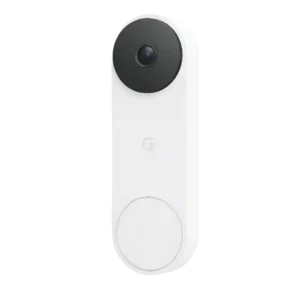
Google Nest Doorbell (Wired, 3rd Gen)
P2
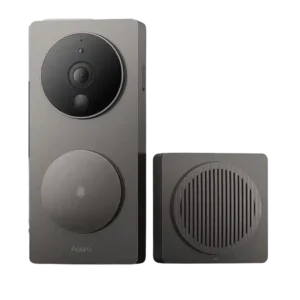
Aqara G4 Video Doorbell
Average score
P1
Product 1: Google Nest Doorbell (Wired, 3rd...
3.9
P2
Product 2: Aqara G4 Video Doorbell
3.7
AI features
P1
Product 1: Google Nest Doorbell (Wired, 3rd...
4.1
Gemini and AI features impressed several reviewers with summaries, searches, and detailed descriptions, but others found misidentifications and subscription dependence.
P2
Product 2: Aqara G4 Video Doorbell
4.0
AI features were praised for local processing and breadth, but one reviewer found the AI feature inconsistent.
App, software and firmware
P1
Product 1: Google Nest Doorbell (Wired, 3rd...
4.5
The Google Home app earned praise for clean controls, fast live view, excellent setup guidance, and deep integration.
P2
Product 2: Aqara G4 Video Doorbell
3.2
Software impressions were mixed, with praise for app depth and clip browsing but criticism of unfinished views, binding problems, and quirky integration.
Audio
P1
Product 1: Google Nest Doorbell (Wired, 3rd...
4.0
Two-way audio was judged reliable and clear, with good noise cancellation and enough sound quality for practical conversations.
P2
Product 2: Aqara G4 Video Doorbell
4.5
Two-way audio was generally judged usable to strong, with reviewers saying the microphone was good enough, clear both ways, or great for package situations.
Automation flexibility
P1
Product 1: Google Nest Doorbell (Wired, 3rd...
5.0
Automation evidence was limited but positive, with one reviewer saying a motion-triggered Google automation worked perfectly.
P2
Product 2: Aqara G4 Video Doorbell
3.8
Automation flexibility was mixed: Aqara routines sounded powerful, but HomeKit automations were criticized as too all-or-nothing.
Base / Hub integration
P1
Product 1: Google Nest Doorbell (Wired, 3rd...
4.0
Nest Hub integration was considered cool and useful, though one reviewer found the Nest Hub interface itself sluggish.
P2
Product 2: Aqara G4 Video Doorbell
5.0
The chime/base integration was praised as a clever part of the system architecture.
Battery and Charging
P1
Product 1: Google Nest Doorbell (Wired, 3rd...
3.5
The wired design avoids charging hassles, but the lack of a battery is a limitation for homes without suitable wiring.
P2
Product 2: Aqara G4 Video Doorbell
3.3
Battery feedback was highly mixed, from easy AA swaps and on-track estimates to short real-world life and weekly battery changes.
Chime
P1
Product 1: Google Nest Doorbell (Wired, 3rd...
3.5
Chime support was mixed: it can work through existing chimes or Google speakers, but users without compatible chimes may need alternatives.
P2
Product 2: Aqara G4 Video Doorbell
4.3
The chime was a strength: reviewers liked its loudness, optional use, repeater/hub role, and one user noted it did not startle their dog.
Color options
P1
Product 1: Google Nest Doorbell (Wired, 3rd...
4.5
The Linen colorway received positive attention for looking sophisticated against home exteriors.
P2
Product 2: Aqara G4 Video Doorbell
2.5
Color options were limited, with one review calling the two available colors almost identical.
Complete kit in box
P1
Product 1: Google Nest Doorbell (Wired, 3rd...
5.0
The included kit was praised as complete, with the needed mounting parts, connectors, wedge, hardware, and instructions in the box.
P2
Product 2: Aqara G4 Video Doorbell
4.3
The kit was generally complete, but one review noted that the buyer still needs to supply the USB-C AC adapter.
Controls and indicators
P1Product 1: Google Nest Doorbell (Wired, 3rd...
No score yet
P2
Product 2: Aqara G4 Video Doorbell
5.0
The large button and LED indicators were praised as obvious and easy to use, including in the dark.
Delivery package monitoring
P1
Product 1: Google Nest Doorbell (Wired, 3rd...
4.3
Package monitoring worked well in positive tests, including accurate package callouts and rich package-delivery notifications.
P2
Product 2: Aqara G4 Video Doorbell
2.2
Delivery package monitoring was a repeated weakness because the horizontal camera view often misses the porch floor.
Design aesthetics
P1
Product 1: Google Nest Doorbell (Wired, 3rd...
4.8
Design was a standout, with reviewers calling it modern, premium, symmetrical, and among the nicest-looking video doorbells.
P2
Product 2: Aqara G4 Video Doorbell
4.1
Design feedback was mostly positive, though one reviewer thought it felt less premium and others noted its large, dark form.
Faceplate/accessory inclusion
P1Product 1: Google Nest Doorbell (Wired, 3rd...
No score yet
P2
Product 2: Aqara G4 Video Doorbell
2.5
Accessory inclusion had a mounting limitation: the supplied wedge did not solve one reviewer's angle needs.
Face recognition
P1
Product 1: Google Nest Doorbell (Wired, 3rd...
4.0
Face recognition improved over earlier models and often worked well, but some reviewers still saw misses or limits with covered faces.
P2
Product 2: Aqara G4 Video Doorbell
3.4
Face recognition was inconsistent: some reviewers found it fast or surprisingly good, while others said it was finicky, slow, or rarely recognized them.
Field of view and framing
P1
Product 1: Google Nest Doorbell (Wired, 3rd...
4.4
The square framing and wide field of view were repeatedly praised for showing visitors, packages, porch areas, and more of the entryway.
P2
Product 2: Aqara G4 Video Doorbell
2.8
The horizontal 16:9 view was repeatedly described as wide, but reviewers also warned it can miss the porch floor and make package visibility weaker.
Installation and Mounting
P1
Product 1: Google Nest Doorbell (Wired, 3rd...
4.6
Installation was widely praised, especially the guided app setup, included hardware, easy wiring, and fast upgrade path from the prior wired model.
P2
Product 2: Aqara G4 Video Doorbell
3.7
Installation was often easy, but some reviewers had mounting or setup frustrations, including adhesive failure and confusing first-time setup.
lag)
P1
Product 1: Google Nest Doorbell (Wired, 3rd...
3.9
Latency was mostly good, with fast live view, quick doorbell display, and near-instant notifications, though event logs or phone alerts could lag.
P2
Product 2: Aqara G4 Video Doorbell
5.0
Responsiveness and lag were praised strongly, with reviewers saying the feed and two-way talk reacted very quickly.
Lens distortion handling
P1
Product 1: Google Nest Doorbell (Wired, 3rd...
3.8
Lens distortion was treated as a manageable tradeoff: reviewers noticed slight barrel or fisheye distortion but accepted it for the broader view.
P2
Product 2: Aqara G4 Video Doorbell
3.0
Only one review judged distortion directly, describing the view as broad but visibly distorted.
Light adjustability
P1Product 1: Google Nest Doorbell (Wired, 3rd...
No score yet
P2
Product 2: Aqara G4 Video Doorbell
4.5
Light controls had limited positive evidence, with one reviewer praising the camera status and night-vision light toggles.
Low-light and Night vision
P1
Product 1: Google Nest Doorbell (Wired, 3rd...
4.3
Low-light and night footage drew strong praise, especially for clearer faces, crisp black-and-white infrared footage, and improved low-light performance.
P2
Product 2: Aqara G4 Video Doorbell
3.5
Low-light feedback was mixed: some praised infrared or night vision, while others found nighttime faces washed out or merely fine.
Motion detection
P1
Product 1: Google Nest Doorbell (Wired, 3rd...
4.5
Motion detection was generally fast and useful, with reviewers citing swift alerts, more captured events, and strong overnight or street-level pickup.
P2
Product 2: Aqara G4 Video Doorbell
2.0
Motion detection was one of the more repeated weaknesses, with finicky alerts, missed events, and inconsistent detection mentioned across reviews.
Multi-user sharing ease
P1Product 1: Google Nest Doorbell (Wired, 3rd...
No score yet
P2
Product 2: Aqara G4 Video Doorbell
4.5
Multi-user control had limited but positive evidence through HomeKit privacy permissions for household members.
Notifications
P1
Product 1: Google Nest Doorbell (Wired, 3rd...
4.0
Notifications were often fast and rich, but usefulness depended on subscriptions for enhanced previews, and one test found a delay longer than desired.
P2
Product 2: Aqara G4 Video Doorbell
4.5
Notifications were often praised as fast and useful, especially in HomeKit, though one reviewer reported 5-10 second notification delays for detected faces.
Object and person detection
P1
Product 1: Google Nest Doorbell (Wired, 3rd...
3.7
Object and person detection was useful but imperfect: reviewers praised package, person, and face-related detection while noting pet misidentifications.
P2
Product 2: Aqara G4 Video Doorbell
4.0
Object and person detection had limited but positive direct evidence, with one reviewer calling object recognition consistent.
Ongoing ownership costs
P1
Product 1: Google Nest Doorbell (Wired, 3rd...
2.7
Ownership costs were the biggest value tension: several reviewers disliked the monthly pricing, while one found premium worthwhile for serious monitoring.
P2
Product 2: Aqara G4 Video Doorbell
5.0
Ongoing costs were praised because reviewers emphasized that the doorbell avoids burning a hole in the buyer's pocket.
Peace of mind
P1
Product 1: Google Nest Doorbell (Wired, 3rd...
4.5
Reviewers linked the device to home security and confidence, especially when premium recording made it easier to see what happened.
P2
Product 2: Aqara G4 Video Doorbell
4.0
Peace-of-mind evidence was limited but positive, with one review calling it competent for home security.
Personalization options
P1Product 1: Google Nest Doorbell (Wired, 3rd...
No score yet
P2
Product 2: Aqara G4 Video Doorbell
5.0
Personalization options were praised for custom MP3 ringtones and signature chime sounds.
Power Options and Compatibility
P1
Product 1: Google Nest Doorbell (Wired, 3rd...
3.7
Power compatibility was generally manageable with proper wiring or a power adapter, though transformer and wire requirements can complicate installation.
P2
Product 2: Aqara G4 Video Doorbell
4.4
Power flexibility was a strength because the G4 supports battery and wired use, though one review criticized the wiring route design.
Pre-roll buffer
P1
Product 1: Google Nest Doorbell (Wired, 3rd...
4.5
Pre-roll evidence was positive but limited, with one reviewer saying the camera captured a bit before and after events.
P2Product 2: Aqara G4 Video Doorbell
No score yetPrice and value
P1
Product 1: Google Nest Doorbell (Wired, 3rd...
4.0
Value depended heavily on use case; reviewers liked the hardware and upgrade value but warned subscriptions and ecosystem needs affect the calculation.
P2
Product 2: Aqara G4 Video Doorbell
4.7
Value was a consistent strength, with reviewers praising the aggressive price, feature set, and affordability relative to competing doorbells.
Privacy
P1Product 1: Google Nest Doorbell (Wired, 3rd...
No score yet
P2
Product 2: Aqara G4 Video Doorbell
4.3
Privacy was a strength thanks to local operation, voice disguising, and privacy occlusion controls.
Quick-reply / pre-recorded message usefulness
P1
Product 1: Google Nest Doorbell (Wired, 3rd...
3.3
Quick replies were useful for simple interactions, but reviewers criticized the lack of custom canned messages.
P2Product 2: Aqara G4 Video Doorbell
No score yetQuiet-time / do-not-disturb scheduling
P1
Product 1: Google Nest Doorbell (Wired, 3rd...
4.5
Quiet time was treated as a useful convenience, especially for muting rings during naps or other interruptions.
P2Product 2: Aqara G4 Video Doorbell
No score yetRecommendation for new buyers
P1
Product 1: Google Nest Doorbell (Wired, 3rd...
4.0
Most reviewers recommended it for Google-centered buyers or those wanting a strong doorbell, while one limited praise to Google Home users.
P2
Product 2: Aqara G4 Video Doorbell
4.3
Recommendation sentiment leaned positive, especially for HomeKit users and value seekers, but some reviewers limited the recommendation to specific needs.
Recording
P1
Product 1: Google Nest Doorbell (Wired, 3rd...
3.2
Recording was a mixed area: free event clips were better than some rivals, but short history and premium dependence remained major caveats.
P2
Product 2: Aqara G4 Video Doorbell
4.0
Recording was split: 24/7 and local recording were praised, but short 6- or 12-second clips were criticized.
Reliability (general)
P1
Product 1: Google Nest Doorbell (Wired, 3rd...
3.0
General reliability was mostly good, but one reviewer noted that missed clips can happen occasionally, making paid continuous recording safer.
P2
Product 2: Aqara G4 Video Doorbell
2.7
Reliability was mixed-to-negative: responsiveness could be excellent, but reviewers also reported offline states, missed events, and missing video.
RTSP stream availability
P1Product 1: Google Nest Doorbell (Wired, 3rd...
No score yet
P2
Product 2: Aqara G4 Video Doorbell
1.0
RTSP availability was a major miss for one reviewer, who wanted wired-mode RTSP support and found its absence limiting.
Security ecosystem integration
P1
Product 1: Google Nest Doorbell (Wired, 3rd...
2.0
Security ecosystem integration was a weakness because reviewers noted Google no longer offers a comprehensive security system around the doorbell.
P2
Product 2: Aqara G4 Video Doorbell
2.0
Security ecosystem integration was weak for Home Assistant users because HomeKit Secure Video prevented the expected integration path.
Size and form factor
P1
Product 1: Google Nest Doorbell (Wired, 3rd...
4.5
The form factor was praised for upgrade continuity and smaller size, especially when moving from battery-powered Nest hardware.
P2
Product 2: Aqara G4 Video Doorbell
2.5
The form factor was a drawback for some reviewers because the doorbell was described as chunky, large, or dark.
Smart-home integration (Alexa, Google, Siri, HomeKit, Matter, Thread)
P1
Product 1: Google Nest Doorbell (Wired, 3rd...
4.0
Google ecosystem integration was a major strength, while Alexa support was basic and Apple HomeKit or broader platform support remained a limitation.
P2
Product 2: Aqara G4 Video Doorbell
4.5
Smart-home integration was the product's clearest strength, especially HomeKit Secure Video, with additional positive mentions for Alexa and Google support.
Snapshot capture
P1Product 1: Google Nest Doorbell (Wired, 3rd...
No score yet
P2
Product 2: Aqara G4 Video Doorbell
5.0
Snapshot capture was praised through HomeKit rich notifications that include a snippet of the visitor.
Storage
P1
Product 1: Google Nest Doorbell (Wired, 3rd...
2.7
Storage was a clear tradeoff: the free cloud tier helped, but no local storage and short free history frustrated reviewers.
P2
Product 2: Aqara G4 Video Doorbell
4.8
Storage was praised for keeping the microSD card inside the chime rather than the exposed doorbell, reducing theft risk.
Subscription
P1
Product 1: Google Nest Doorbell (Wired, 3rd...
2.7
Subscription sentiment was mixed to negative: premium features can be powerful, but reviewers repeatedly called the paid tiers expensive or confusing.
P2
Product 2: Aqara G4 Video Doorbell
4.8
Subscription value was strong because Aqara/local use avoids required subscriptions, although HomeKit Secure Video can involve an iCloud plan.
System completeness
P1
Product 1: Google Nest Doorbell (Wired, 3rd...
3.3
System completeness was split: the doorbell itself felt complete, but Google’s wider security ecosystem was criticized as incomplete.
P2
Product 2: Aqara G4 Video Doorbell
4.0
System completeness scored well because the doorbell checked many feature boxes despite notable oversights.
Theft and Tamper
P1Product 1: Google Nest Doorbell (Wired, 3rd...
No score yet
P2
Product 2: Aqara G4 Video Doorbell
4.0
Tamper protection had limited but positive evidence, with one review calling the anti-tampering feature good.
Upgrade value vs previous model
P1
Product 1: Google Nest Doorbell (Wired, 3rd...
4.3
Upgrade value was positive, especially from older wired or battery Nest models, due to easier installation, wider framing, and sharper video.
P2Product 2: Aqara G4 Video Doorbell
No score yetVideo resolution and detail
P1
Product 1: Google Nest Doorbell (Wired, 3rd...
4.4
Reviewers consistently found the 2K video sharp, crisp, colorful, and detailed, though one comparison noted higher-resolution 4K competitors exist.
P2
Product 2: Aqara G4 Video Doorbell
2.9
Reviewers generally found daytime detail adequate, but several said the 1080p/no-HDR image was dated, pixelated, or not great, especially for faces in difficult light.
Weather and temperature tolerance
P1
Product 1: Google Nest Doorbell (Wired, 3rd...
4.0
Weather tolerance was viewed positively, with the IP65 design and heavy-rain durability considered adequate for most outdoor conditions.
P2
Product 2: Aqara G4 Video Doorbell
2.7
Weather tolerance was split: one long test had no rain, snow, or cold issues, while two reviews warned the doorbell should stay under cover.
Wi-Fi range and stability
P1Product 1: Google Nest Doorbell (Wired, 3rd...
No score yet
P2
Product 2: Aqara G4 Video Doorbell
2.0
Wi-Fi range and stability had limited evidence, but one reviewer repeatedly saw a poor-network warning.
Zones and activity areas
P1
Product 1: Google Nest Doorbell (Wired, 3rd...
4.0
Activity zones were treated as useful for narrowing alerts and deciding which parts of the frame should trigger notifications.
P2
Product 2: Aqara G4 Video Doorbell
3.8
Zones were useful in HomeKit and Aqara contexts for filtering alerts, though one reviewer said motion zones were missing in the Aqara app.