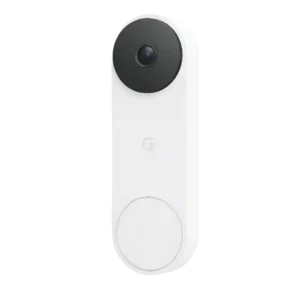
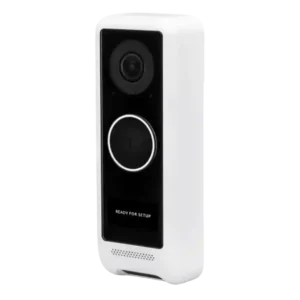
Gemini features are a major draw for this doorbell, with richer descriptions, search, and familiar-face tools, but reviews were split on how consistently accurate the AI felt.
AI and smart detections are discussed as present in parts (person, vehicle, package depending on model/software), but not consistently best-in-class. Reviewers repeatedly wish for stronger package alerts, richer notifications, and face recognition to match leading consumer doorbells.
The Google Home app is a clear strength thanks to intuitive controls, guided setup, and smooth firmware/setup handling.
UniFi Protect is praised for enterprise-style controls, responsive timeline scrubbing (especially with SSD storage), and robust camera settings. Critiques include missing or inconsistent features across versions, occasional bugs, and limitations like talkback not being available in the web interface in some experiences.
Two-way audio is consistently usable, with clear visitor voices and reliable conversation quality across reviews.
Microphone quality is generally described as good enough to understand visitors even with ambient noise, but speaker output is frequently criticized as too quiet. Several reviews also mention talkback awkwardness or lag, especially outdoors or near traffic.
Google Home automation adds practical flexibility, including motion-triggered actions with other smart devices.
Automation-oriented controls like recording schedules, notification schedules, and some system organization features are mentioned across reviews. A notable limitation described is that certain grouping behaviors and platform gaps feel unfinished depending on Protect version.
Google speakers and Nest Hub displays integrate well for announcements, live view, and voice interaction.
Integration with UniFi Protect hardware is a defining requirement and benefit: it behaves like a first-class Protect camera, and can be used alongside other UniFi devices and displays. The dependency is also a barrier for buyers who want a standalone doorbell.
The doorbell is repeatedly described as a wired product rather than battery-powered, and comparison reviewers call out that it does not offer battery swap convenience. This is a clear differentiator versus many mainstream competitors.
The doorbell works with existing wired chimes and Google speakers/displays, though there is no included standalone chime.
Chime support is widely discussed, including mechanical vs digital configurations and included chime adapters. Some installs required transformer upgrades or tuning to avoid unreliable ringing behavior, while others report it working fine once wired correctly.
Buyers get three finish choices, and reviewers consistently noted the available color options.
Color choice is described as limited, with at least one reviewer noting it effectively comes in a single look. This is contrasted with competitors that ship multiple faceplates to better match exterior finishes.
Multiple reviews say the box includes the core mounting and wiring accessories needed for installation.
Most reviews describe a strong in-box bundle, including mounts (flush and angled), screws/anchors, leveling aids, wiring adapters, and chime components. EU packaging is noted as sometimes including a transformer, improving out-of-box completeness.
Status LEDs and button lighting provide clear visual feedback for setup and recording states.
Controls and indicators like the status light/ring, display messaging, and status sounds are widely referenced. Some recommend disabling conspicuous lights to reduce theft temptation, and several note the display is cool but small in real use.
The app exposes at least a basic low-bandwidth mode, giving some control over data use.
Package monitoring is a real feature here, with reviewers noting package detection and accurate delivery callouts.
Delivery monitoring is strongest on dual-camera models, with reviewers praising the ability to see packages at the doorstep. A key limitation noted is that package alerts may only trigger when the package is within the package camera view, leaving blind spots that the main camera could otherwise see.
Design is one of the most consistently praised aspects, with reviewers describing the doorbell as especially attractive and premium-looking.
Aesthetics feedback is generally positive, with mentions of clean design, neat screen messaging, and a modern look. Counterpoints include size increases on the Pro and the lack of alternate covers for better exterior matching.
Included wedges, mounting plates, and install accessories help adapt the doorbell to different mounting situations.
At least one reviewer calls out the lack of alternate faceplates compared with competing doorbells that include multiple covers. This makes the product feel less customizable out of the box for matching exterior finishes.
Familiar-face detection can be impressive when it works, but at least one review still saw recognition misses.
Face recognition is repeatedly described as a missing feature compared with some competitors. Reviewers frame it as a desired future capability rather than something available today.
The square 1:1 framing and wide field of view give a broad head-to-toe porch view, with several reviewers praising better left-right coverage and package visibility.
Framing is frequently praised for being very wide, helping cover porch area and approach paths. One comparison review notes the standard doorbell view is more squarish than truly vertical, while dual-camera models (like the Pro) reduce blind spots for deliveries.
Installation is widely praised, especially the app guidance and the easy upgrade path for existing Nest owners.
No summary yet.
Wired responsiveness is a real upgrade in use, with one reviewer calling the faster screen load a major improvement.
Latency is praised for fast ring/motion notification delivery, but talkback can feel delayed or awkward during real conversations. A few reviewers also mention delays when opening the app from a notification or when accessing remote Protect instances.
Reviewers noted only mild barrel or fisheye distortion, and generally treated it as an acceptable tradeoff for wider framing.
Multiple reviewers report strong HDR handling in harsh sunlight with minimal lens flare, helping retain shadow detail when the door faces direct morning sun. Wide framing can still feel like a typical wide-angle lens, but distortion complaints are limited.
The status light can be adjusted between high, auto, and low.
Reviewers mention control over IR behavior and picture adjustments (brightness, saturation, hue, and related settings). Most treat these as standard but welcome tools for improving tough lighting situations.
Night performance is a strong point, with good contrast and visibly better low-light clarity than older Nest models.
Night performance is consistently characterized as solid, with IR illumination doing a good job on nearby subjects. Reviewers note it holds up well even with bright strobes or porch lighting in the scene.
Motion alerts were described as quick and accurate in testing.
Motion detection is often described as reliable in daily use, but at least one long-term user reports missed motion compared with another nearby UniFi camera. Detection tuning and zones help reduce nuisance triggers on busy streets. Motion customization is repeatedly praised, including motion zones, detection timing, and configurable pre/post recording windows. These controls are framed as especially useful for reducing street traffic triggers and focusing on the porch approach.
Multi-user access is described as workable, including separate accounts for spouses and shared notifications. Some users complain about periodic re-login friction or needing to reconfigure settings after resets, which adds household overhead.
Alerts are usually fast and detailed, but one review found Gemini-written descriptions inaccurate enough to weaken trust.
Notifications are commonly reported as fast, typically reaching the phone within about 1 to 2 seconds for rings or motion. Some users note that launching Protect from a cold start can take a few seconds, and richer notification content varies by model and settings.
Recognition of people, pets, vehicles, and packages is treated as one of the standout detection strengths.
Person detection is repeatedly referenced as helpful for reducing false alerts. Package and vehicle detection are discussed as available in some setups or versions, but reviewers also describe gaps and inconsistency depending on model and software.
Ongoing ownership cost is a weak point because the best Gemini and history features push buyers toward pricey monthly plans.
Long-term costs are framed favorably due to no cloud subscription, but the ecosystem requires upfront investment in UniFi Protect hardware and storage. Reviewers repeatedly caution that the doorbell is not truly a standalone purchase.
At least one review directly frames the doorbell as a strong home-security device that adds reassurance.
Users can personalize zoom defaults, themes, and other behavior more than with a bare-bones video doorbell.
Custom messages on the doorbell display and adjustable overlays/picture settings are repeatedly mentioned as useful personalization. However, some reviewers say the screen is small and can be hard to notice, especially in direct sunlight.
One comparison review highlights Unifi as offering a faster phone-call style response path for communication versus standard push-then-open-app workflows. Other reviews focus more on talkback inside the Protect mobile app than on telephony-specific features.
The entry/porch light is usually described as helpful but not extremely bright. Some see it as a useful convenience and mild deterrent, while others consider it underpowered compared to dedicated porch lighting.
Being wired limits flexibility somewhat, but reviewers confirm compatibility with standard doorbell transformers and even plug-in adapters.
Power is commonly described as hardwired using standard low-voltage doorbell wiring, while network connectivity is Wi-Fi. Pro variants are discussed as offering USB-C or PoE-powered options, but multiple reviewers still express a preference for a truly PoE-connected doorbell.
One review explicitly notes some pre-recording before detected motion events.
Pre-roll style recording is described as configurable, with reviewers citing settings that capture several seconds before and after motion triggers. This helps provide context without needing to manually scrub long continuous footage.
Hardware value is generally good for buyers who want a premium Google doorbell, but subscription pricing weakens the value story.
Value perceptions split by buyer context: those already invested in UniFi Protect often feel the pricing is reasonable given local recording and integration, while comparisons call the Pro pricing expensive versus competitors offering similar or better smart features.
The app includes straightforward privacy control such as turning the camera off when needed.
Privacy is frequently cited as a core advantage because recordings remain local rather than being stored in a third-party cloud. Privacy zones are also mentioned as a way to block out sensitive areas, though some users still want stronger local-only account behavior during service outages.
Pre-recorded replies are handy and easy to trigger, but the fixed message set is limited because custom responses are not available.
Quiet time is easy to set and can mute ringing for up to three hours.
Reviews highlight that alert delivery can be scheduled, allowing quiet hours or office-hour patterns. This scheduling flexibility is mentioned as part of the broader Protect notifications configuration.
Reviewers broadly recommend it for buyers who want a premium Google-first video doorbell, with clear caveats around subscriptions and ecosystem fit.
Recommendations are typically conditional: strong endorsement if you are already invested in UniFi Protect and want local, subscription-free recording, but weaker if you want a standalone smart doorbell with advanced consumer features.
Free event history is more generous than some rivals, and premium tiers add longer clips and 24/7 history, but local recording is absent.
Recording behavior is consistently described as a core strength due to continuous local recording, easy event review, and fast scrubbing through timelines. Several reviewers emphasize that it behaves like a proper CCTV-style camera inside Protect rather than a clip-only doorbell.
Core operation felt dependable in testing, with quick detection and working voice/display integrations.
Reliability feedback is mixed: some report weeks of trouble-free operation, while others cite occasional app connection failures, disconnects after updates, and resets in cold weather. The reset and re-adoption flow is described as straightforward, which helps recovery.
RTSP support is mentioned in multiple reviews as the main external streaming option. Reviewers typically frame it as useful for exporting to other systems, while noting broader protocol support is limited.
The doorbell fits best inside Google’s ecosystem, but reviewers note Google’s broader security stack is less complete than some rivals.
Security ecosystem integration is consistently framed as excellent within UniFi Protect, including treating the doorbell like any other camera and optionally displaying it on UniFi Viewport. The product is repeatedly recommended mainly for people already building a UniFi camera stack.
The wired third gen is relatively slim and slightly smaller than the battery model it resembles.
Size impressions vary: the standard doorbell is called fairly large but manageable, while the Pro is repeatedly described as noticeably bigger and more likely to overhang smaller mounting blocks. Measurements and fit concerns are mentioned by reviewers doing replacements.
Integration is strongest with Google and basic Alexa support, while HomeKit-style flexibility is absent.
Rich preview notifications can surface the event visually without needing to open the app first.
Snapshot capabilities show up in two ways: some reviewers praise rich notifications with snapshots out of the box, while others specifically wish the platform added a thumbnail to push notifications more consistently. In-app screenshot capture is also mentioned as useful.
Cloud-only storage and the lack of local storage are repeated complaints across reviews.
Storage is described as local on UniFi Protect hardware, with continuous recording and easy clip review. One reviewer reports a major responsiveness boost when switching to SSD storage, improving timeline loading and scrubbing speed.
Subscriptions unlock many of the most appealing features, and several reviews call the pricing expensive or frustrating.
Across reviews, the lack of a mandatory subscription is a central selling point. Local storage on UniFi Protect hardware is emphasized as the reason ongoing fees are avoided.
As a doorbell it can feel like a complete package, but Google’s missing wider sensor and monitoring pieces keep the broader system from feeling fully rounded.
The system is widely described as incomplete as a standalone solution, because it requires UniFi Protect hardware and storage to function fully. Within that ecosystem, it is considered a cohesive addition that rounds out multi-camera setups.
Included security hardware adds a basic tamper-resistance step during installation.
Physical security is mixed: some versions add a security screw, but multiple reviewers point out the unit can be removed fairly easily if the release is accessible. Practical mitigations mentioned include disabling obvious status lighting and physically blocking latch access.
The third gen looks like a worthwhile upgrade mainly for better video, wider framing, and an easy swap-in installation path.
Reviews consistently describe sharp, detailed 2K footage, with meaningful clarity gains over prior Nest models.
Video is generally described as clear enough to identify visitors, with reviewers calling it good day and night. Some note it is not as sharp as larger UniFi cameras due to doorbell form-factor compromises, while others still see it as a meaningful step up from older 1080p doorbells.
Users can save or download clips, with longer exports available on premium plans.
Sharing and exporting is described as functional (including batch download in some software versions), but not always streamlined for doorbell-specific workflows. One reviewer complains about having to combine multiple motion clips to reconstruct a single doorbell interaction.
The hardware is built for outdoor use, with IP65 protection and a defined cold-to-hot operating range.
No summary yet.
Review evidence points to fast loading and stable live access, though range itself was not deeply tested.
Wi-Fi is a recurring theme: reviewers stress needing strong coverage at the door, and some report weak-signal warnings, band-steering issues, or reconnect/reset events after updates. Others describe stable day-to-day operation once the Wi-Fi setup is dialed in.
Motion and activity zones are available and easy to configure.
Zones are frequently highlighted as a practical strength, including motion zones, smart-detection zones, and privacy zones. These are used to reduce nuisance alerts and to block sensitive areas from recording.