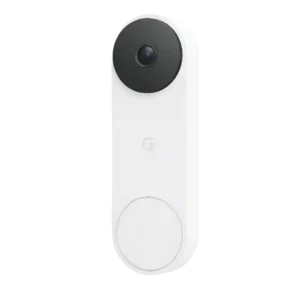
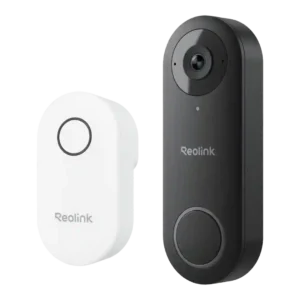
Gemini features are a major draw for this doorbell, with richer descriptions, search, and familiar-face tools, but reviews were split on how consistently accurate the AI felt.
AI is viewed as practical but limited: onboard person detection helps reduce noise, yet reviewers repeatedly want more advanced recognition features (packages, animals, vehicles, faces).
The Google Home app is a clear strength thanks to intuitive controls, guided setup, and smooth firmware/setup handling.
Across sources, the Reolink app is described as straightforward and feature-rich (live view, playback, zones, schedules, quick replies), with many reporting stable performance; a few mention minor UX quirks such as confusing flows, slow loads in some conditions, or a doorbell-press screen that should jump to live view.
Two-way audio is consistently usable, with clear visitor voices and reliable conversation quality across reviews.
Two-way talk is repeatedly described as usable and often loud and clear, including full-duplex conversation in at least one test.
Google Home automation adds practical flexibility, including motion-triggered actions with other smart devices.
It supports local-friendly integrations like RTSP/ONVIF, NVR recording, FTP, and Home Assistant automations, but lack of IFTTT is a recurring complaint for broader third-party automation.
Google speakers and Nest Hub displays integrate well for announcements, live view, and voice interaction.
This model line is wired-only in the reviewed configurations; multiple sources explicitly note there is no battery-power option.
The doorbell works with existing wired chimes and Google speakers/displays, though there is no included standalone chime.
A plug-in indoor chime is included and can be loud with selectable tones/volume, but the system typically cannot use an existing mechanical chime and the module takes up an outlet.
Buyers get three finish choices, and reviewers consistently noted the available color options.
Multiple reviews say the box includes the core mounting and wiring accessories needed for installation.
Multiple reviews call out a generous box: doorbell, plug-in chime, mounts/wedges, wiring jumpers, Ethernet cable, power adapter/extension, and templates are commonly included.
Status LEDs and button lighting provide clear visual feedback for setup and recording states.
Physical status indicators are well-explained, including the LED ring behavior for motion, doorbell presses, and setup states, with options to toggle them in-app.
The app exposes at least a basic low-bandwidth mode, giving some control over data use.
Bandwidth/bitrate controls let you trade image quality for lower data use, with reviewers citing meaningful differences between low and high settings.
Package monitoring is a real feature here, with reviewers noting package detection and accurate delivery callouts.
Design is one of the most consistently praised aspects, with reviewers describing the doorbell as especially attractive and premium-looking.
Design is described as compact and understated, with a matte finish that blends into most entryways better than bulkier rivals.
Included wedges, mounting plates, and install accessories help adapt the doorbell to different mounting situations.
Familiar-face detection can be impressive when it works, but at least one review still saw recognition misses.
The square 1:1 framing and wide field of view give a broad head-to-toe porch view, with several reviewers praising better left-right coverage and package visibility.
The roughly 180-degree diagonal view offers broad porch coverage in a 4:3-ish framing, but it is not the widest option and placement matters if you want to see more of the doorstep or avoid neighbors.
Installation is widely praised, especially the app guidance and the easy upgrade path for existing Nest owners.
No summary yet.
Wired responsiveness is a real upgrade in use, with one reviewer calling the faster screen load a major improvement.
Live view and alert responsiveness are usually described as fast, though some lag can appear when away from home and one reviewer reports the app opening an event recording instead of live video after a doorbell press.
Reviewers noted only mild barrel or fisheye distortion, and generally treated it as an acceptable tradeoff for wider framing.
The status light can be adjusted between high, auto, and low.
No summary yet.
Night performance is a strong point, with good contrast and visibly better low-light clarity than older Nest models.
Infrared night vision is generally clear and usable, but motion at night can look choppy because frame rate tops out around 20 fps and there is no built-in spotlight for color night video.
Motion alerts were described as quick and accurate in testing.
Motion capture is generally reliable, yet multiple reviewers mention false alerts from flags, trees, sidewalks, or distant street traffic unless you fine-tune settings. Customization is deep, including motion zones, sensitivity sliders, object-size thresholds, alarm delay, and recording/notification schedules; one reviewer finds the zone-painting UI less convenient than simple boxes.
Sharing is supported, including adding household members and creating users with limited permissions.
Alerts are usually fast and detailed, but one review found Gemini-written descriptions inaccurate enough to weaken trust.
Push alerts are often described as quick, with options for visitor/person alerts and scheduling; rich notification thumbnails are cloud-based, and one review notes a doorbell-press workflow that opens a recording instead of live view.
Recognition of people, pets, vehicles, and packages is treated as one of the standout detection strengths.
Detection is largely centered on people (with some references to car filtering), and reviewers repeatedly call out missing package/animal/vehicle detection and face recognition compared to newer premium doorbells.
Ongoing ownership cost is a weak point because the best Gemini and history features push buyers toward pricey monthly plans.
At least one review directly frames the doorbell as a strong home-security device that adds reassurance.
Users can personalize zoom defaults, themes, and other behavior more than with a bare-bones video doorbell.
Several reviews describe call-style alerts and incoming-call behavior on phones when the doorbell is pressed (configurable in settings).
Being wired limits flexibility somewhat, but reviewers confirm compatibility with standard doorbell transformers and even plug-in adapters.
Power options are unusually flexible for a wired doorbell: it can use existing 12-24V wiring, an included adapter/extension, Ethernet for data, and a PoE variant for power+data; there is no battery mode.
One review explicitly notes some pre-recording before detected motion events.
Pre-roll is a standout: multiple sources reference a six-second buffer (and some report longer lead-in), helping capture what happened immediately before a motion or doorbell event starts.
Hardware value is generally good for buyers who want a premium Google doorbell, but subscription pricing weakens the value story.
At roughly $80 to $100, reviewers repeatedly frame it as strong value because it delivers sharp video and local recording without mandatory monthly fees.
The app includes straightforward privacy control such as turning the camera off when needed.
Privacy is mixed: reviewers note video streaming uses HTTPS rather than end-to-end encryption, but the app offers privacy masks/non-detection zones and angled mounting to avoid capturing neighbors.
Pre-recorded replies are handy and easy to trigger, but the fixed message set is limited because custom responses are not available.
Quick replies are a strength: you get preset messages, can record custom responses, and some reviews mention auto-reply after a delay if you do not answer.
Quiet time is easy to set and can mute ringing for up to three hours.
Notification scheduling and critical-alert behavior are available, enabling quiet hours or do-not-disturb style control without fully disabling the doorbell.
Reviewers broadly recommend it for buyers who want a premium Google-first video doorbell, with clear caveats around subscriptions and ecosystem fit.
Free event history is more generous than some rivals, and premium tiers add longer clips and 24/7 history, but local recording is absent.
Recording supports motion clips and 24/7 capture (especially when paired with an NVR), with strong context thanks to the pre-roll buffer; cloud recording is optional rather than required.
Core operation felt dependable in testing, with quick detection and working voice/display integrations.
Overall stability is described as good once set up, but Wi-Fi edge cases, occasional connection quirks, and even microSD seating/removal hassles show up; hardwiring Ethernet tends to improve reliability.
RTSP (and ONVIF) support is explicitly cited, enabling third-party NVRs and software recorders beyond Reolink's own NVRs.
The doorbell fits best inside Google’s ecosystem, but reviewers note Google’s broader security stack is less complete than some rivals.
Within the Reolink ecosystem, the doorbell pairs well with Reolink NVRs and other Reolink cameras, and some setups layer cloud backup/rich notifications on top of local recording.
The doorbell includes a built-in siren option, though at least one reviewer wanted it louder and treats it as a secondary deterrent feature.
The wired third gen is relatively slim and slightly smaller than the battery model it resembles.
The unit is repeatedly described as relatively compact for a doorbell camera, avoiding the oversized look of some competitors.
Integration is strongest with Google and basic Alexa support, while HomeKit-style flexibility is absent.
Smart-home support focuses on Alexa and Google Assistant for live viewing on compatible displays; Apple HomeKit is repeatedly cited as missing, and some note limited chime/announcement behavior on smart speakers.
Rich preview notifications can surface the event visually without needing to open the app first.
Snapshot tools are built into the app, and rich notification thumbnails are available via cloud services; some users also rely on Home Assistant for thumbnail-style previews.
Cloud-only storage and the lack of local storage are repeated complaints across reviews.
Storage flexibility is a major highlight: microSD up to 256GB plus Reolink NVR and optional cloud plans; some caution that a card in the doorbell itself can be harder to access/seat and may be less tamper-resistant than hub-based storage.
Subscriptions unlock many of the most appealing features, and several reviews call the pricing expensive or frustrating.
Local recording works without a subscription, while Reolink's optional cloud plans add longer history and features like rich notifications; several reviews prefer staying local unless they want thumbnails or offsite backup.
As a doorbell it can feel like a complete package, but Google’s missing wider sensor and monitoring pieces keep the broader system from feeling fully rounded.
Included security hardware adds a basic tamper-resistance step during installation.
The third gen looks like a worthwhile upgrade mainly for better video, wider framing, and an easy swap-in installation path.
Reviews consistently describe sharp, detailed 2K footage, with meaningful clarity gains over prior Nest models.
Reviews consistently describe the 2K/5MP image as sharp with strong daytime detail; several note it can even capture small details like license plates, though one source calls playback clear but not the crispest versus top rivals.
Users can save or download clips, with longer exports available on premium plans.
The app allows downloading clips to a phone and sharing/exporting them as needed.
The hardware is built for outdoor use, with IP65 protection and a defined cold-to-hot operating range.
Build is described as outdoor-ready with IP65 and an operating range around -10 to 55C (14F to 131F), with a caveat that extreme winters may be challenging.
Review evidence points to fast loading and stable live access, though range itself was not deeply tested.
Dual-band 2.4/5 GHz Wi-Fi is a plus and several reviews highlight Ethernet/PoE options, but thick exterior walls can cause Wi-Fi instability and multiple sources recommend running Ethernet when possible.
Motion and activity zones are available and easy to configure.
Activity areas are supported via motion/non-detection zones to exclude sidewalks, streets, or neighboring areas from triggering alerts.