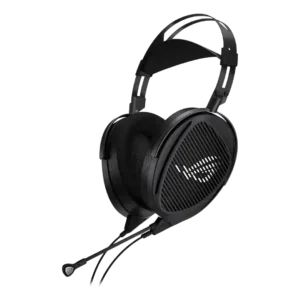
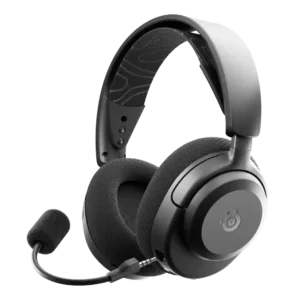
Reviews explicitly say the Kithara lacks ANC, so noise canceling features are absent rather than weakly implemented.
There is no active noise canceling, and multiple reviews call it a missing feature if you plan to use the headset in noisy environments.
Android compatibility is explicitly listed in review specs and compatibility coverage.
Reviews describe the headset as plug-and-play and explicitly note there is no Armoury Crate app integration.
The companion apps (Arctis mobile app and SteelSeries GG/Sonar on PC) are a major differentiator, enabling presets, mic settings, sidetone, and firmware updates; PC features are usually deeper than mobile.
The 2.4GHz dongle mode is repeatedly praised for low-latency gaming and quick switching between wireless modes, keeping audio and on-screen action in sync.
Bass is generally described as clean and controlled rather than booming. Some reviewers note solid texture or more bass than certain rivals, but most say it is not basshead-friendly and sub-bass is limited.
Bass is generally punchy and satisfying once tuned, but several impressions note either less sub-bass/thump than premium sets or a stock mid-bass emphasis that can sound a bit boxy until EQ is applied.
Battery life is commonly cited around 30 hours on 2.4GHz and about 40 hours on Bluetooth, though at least one standardized test reported notably lower 2.4GHz runtime.
Reviews explicitly describe the Kithara as wired-only and lacking Bluetooth.
Bluetooth performance is generally stable with painless switching between devices, and Bluetooth 5.3 is frequently cited across reviews. True simultaneous 2.4GHz plus Bluetooth audio is generally not the norm here; most usage centers on quick-switching, with any simultaneous behavior being limited or platform-dependent.
Build quality is a recurring strength, with repeated praise for the metal or aluminum frame, sturdier construction, and premium feel, though a few parts are described as thin or less premium.
Build is largely plastic to keep weight down; many reviewers still find it sturdy, but some describe a cheaper in-hand feel and surfaces that can show wear more readily.
Inline controls exist for mute and volume, but reviewers repeatedly call the wheel overly smooth or sensitive rather than precise.
Controls cover the essentials (mute, volume, quick-switch), but chat-mix and multifunction control schemes can be less intuitive than headsets with dedicated wheels or simpler routing.
The included cables are generally described as durable, braided, premium-feeling, and flexible, though one review notes long-term durability remains to be seen.
Cables get mixed feedback: they work, but several reviews complain about short lengths, stiffness, or a proprietary feel that is less convenient than standard cables.
One review specifically calls out the missing bag or hard case as a disappointment given the number of included cables and adapters.
Fast charging is consistently highlighted, commonly framed as about 15 minutes of charging for around 9 hours of use.
Clamping force is generally described as moderate or relaxed, helping comfort rather than creating hotspot pressure.
Clamp is generally secure for gaming; some describe it as snug or tight at first, while others like the stability and seal it creates.
Where codecs are discussed, Bluetooth support is basic (AAC/SBC), prioritizing broad compatibility over advanced high-bitrate options.
Comfort is widely praised for long desk sessions, with many reviewers calling it comfortable for hours. The main tradeoffs are weight, occasional slider issues, and mixed fit on smaller heads.
Comfort is a standout theme: the headset is very light and the suspension-style headband spreads pressure well for long sessions, though a few users report heat or fabric scratchiness depending on pads and fit.
Connectivity versatility is a major selling point, with multiple cables, swappable plugs, and adapters covering a wide range of wired sources and setups.
Console use is possible, but there are clear limitations around controller volume, mic routing, and especially Xbox support, so console convenience is not universal.
The design is consistently described as premium, understated, and more audiophile than typical gaming-headset styling.
Design feedback is mostly positive thanks to clean lines and fun color options (like aqua and lavender), with the main critique being that the mostly plastic shell can look or feel less premium.
Multiple detachable cables and swappable terminations make it easier to adapt the headset for different sources and use cases.
Detachable/replaceable cables are appreciated on the wired versions for longevity and easy swapping between USB-C, USB-A, and 3.5mm setups.
The removable boom mic adds flexibility, letting the headset function more like a pure headphone when the mic is not needed.
The detachable boom mic is convenient for travel or a cleaner look, but some users prefer retractable designs to avoid misplacing the mic.
The included USB-C dongle is useful for compatibility and can improve output on some devices, but reviewers disagree on how much it improves audio beyond convenience.
The slim USB-C 2.4GHz dongle is a key strength for low-latency play and broad device support; a few notes mention port-blocking in tight spaces or wishing for better storage for the dongle.
Pad comfort is a frequent positive, with reviewers describing the pads as soft, plush, or cooler depending on the material. The main tradeoff is that different pads change seal, warmth, and bass.
Breathable fabric or AirWeave-style pads are widely praised for comfort, but some describe them as stiffer or less plush than premium earpads, and a few note warmth or texture over time.
The earcups provide meaningful swivel and lay-flat movement, which helps fit and packing.
Earcups typically swivel and can lay flatter for fit and storage, helping comfort and making it easier to rest the headset around the neck or pack it away.
The earpads are removable and swapping them is described as fairly easy.
The drivers are described as responsive to EQ, allowing tonal adjustment, but this is external EQ rather than an onboard app feature.
EQ flexibility depends on platform: PC Sonar can be highly adjustable (including parametric-style tuning), while the mobile app is often more preset-driven with simpler tone controls.
Fit and seal are mixed. Some reviewers praise the seal, especially with leatherette pads, while others report looseness or sliding during movement.
Reviews and measurements describe the tuning as clean, linear, and consistent, with good channel matching and balanced response.
Reviewers specifically note the absence of chat-mix style controls, so gamers wanting dedicated game/chat balance will miss this feature.
Game/chat balancing is available via Sonar or headset controls, but the experience can feel finicky compared with headsets that have a dedicated, separate chat-mix wheel.
The headband is adjustable, but multiple reviews report loose or slipping adjustment mechanisms on at least some units.
The ski-goggle or elastic suspension headband design is effective, but adjustments can feel stiff, and some larger heads may find the sizing range more limited than expected.
Hinges are described as sturdy and able to take abuse, supporting the headset's premium build impression.
Accessories are repeatedly highlighted as a standout strength, with multiple cables, plugs, pads, adapters, and extra documentation in the box.
Box contents typically cover the basics (dongle and charging cable), and wired versions often include multiple adapter cables; some reviewers wish included cables were longer or more convenient.
Instrument layering and separation are called out as a major strength, especially for music and complex game audio.
Separation is adequate for the price, but busy scenes can blend together compared with premium drivers, which can reduce clarity when lots of effects stack up at once.
At least one review notes the drivers retain enough control and headroom to raise volume aggressively without sounding strained.
At very high volumes, bass-heavy tracks remain controlled with minimal distortion in testing, helping the headset stay clear when pushed loud.
Microphone performance is generally good enough for gaming and calls, with some reviewers calling it above average, though it is not treated as a flagship streaming mic.
Noise handling is generally solid for a headset mic, with good background-noise rejection and reduced bleed in many tests, but plosives and some leakage caveats still appear.
Noise handling is a strong point: software options (including AI-style noise reduction where available) and mic tuning help cut distractions like keyboard noise and room sounds in typical gaming/office use.
For voice chat, calls, and meetings, the mic is generally described as clear, natural enough, and reliably usable.
The ClearCast boom mic is generally clear enough for party chat, Zoom, and calls, but it can sound slightly fuzzy or less crisp than the microphones on step-up models or a standalone mic.
Midrange performance is mostly positive, with reviews praising clarity and superiority to many gaming headsets, though one review notes some recession depending on tuning or pads.
Dialogue and vocals come through clearly for gaming and media, though some tunings sound slightly recessed in the mids until a preset or EQ profile is enabled.
The Kithara is presented as broadly compatible across PC, PlayStation, Switch, phones, and other wired-capable sources.
Compatibility is a strong point across PC, PlayStation, Switch/handhelds, and mobile; the main caveat is selecting the correct variant for Xbox wireless needs.
Multipoint behavior is limited and inconsistent across platforms: many users should expect to switch sources rather than rely on seamless multi-device audio at the same time.
Passive isolation is minimal because of the open-back design, so outside noise remains audible.
Passive isolation is average: it reduces some higher-frequency noise but leaves plenty of awareness of your environment, and at least one review warns sound leakage can be noticeable.
Packaging and presentation are treated as premium, with special mention of the sound signature certificate and upscale box feel.
The cups can lay flat for packing, but overall portability is limited by the large, wired, open-back design.
Portability is helped by swivel-flat earcups and (on wireless models) a detachable mic, but average isolation and occasional sound leakage mean it is better suited to home or quiet travel than noisy commutes.
Positional performance is a frequent strength, especially in shooters. Most reviews praise clear directional cues, though a few stop short of calling it class-leading.
Game-specific presets are a headline feature and frequently improve footsteps, weapon cues, and dialogue clarity; not every preset is dramatic, but the library depth is a consistent positive.
The earpads are removable and replaceable, and at least one review explicitly notes replacing them with a new pair.
Earpads are removable and replaceable, which helps maintenance and allows upgrades to improve isolation or comfort.
RGB features are prominent on the wired model (customizable via software and easy to disable), while wireless models lean more on physical colorways than flashy lighting.
Sidetone (mic monitoring) is available and adjustable; some like its clarity, while others find the default-on behavior odd until it is dialed back in the app.
Materials and finishes vary: some surfaces resist fingerprints well, but other plastics and coatings can show scratches or wear if handled roughly.
Setup is simple and software-free, with repeated plug-and-play comments and no requirement for an app.
Software can be powerful but not always seamless: PC Sonar features add complexity to system audio routing for some, while the mobile app experience is simpler and more 'all upside' for console use.
Sound leakage is an inherent tradeoff of the open-back design. Several reviews say others can hear your audio, though one reviewer found leakage less severe than expected at normal listening levels.
Sound quality is the headset's clearest strength, with repeated praise for detail, clarity, openness, and a more audiophile-style presentation than typical gaming headsets.
Overall sound is strong for the price and tends to improve noticeably with presets/EQ; out of the box it can sound flatter or less lively than pricier models, and it is not as resolving in complex scenes as flagship headsets. In wired use (USB/3.5mm on the wired model), sound stays consistent across connections; USB is mainly about enabling software features and RGB rather than a dramatic sonic transformation.
A wide, spacious soundstage is one of the most consistently praised audio traits across the reviews.
Soundstage and immersion are respectable for a budget headset, with solid directional cues, but it does not fully 'wrap around' the way higher-end models can.
Reviews explicitly note the lack of virtual surround or other spatial-audio processing features.
Spatial/positional audio support and tuned presets help competitive play, making footsteps and directional cues easier to place, though overall immersion still trails top-tier headsets.
Physical stability is mixed because several reviewers report sliding earcups or headband movement during normal use.
Treble is generally clear and detailed, but several reviews also describe it as bright or potentially fatiguing.
Treble varies by tuning: some reviews describe softer highs, while others note brighter peaks that can be fatiguing; presets and EQ help balance sparkle versus harshness.
USB-C support is a recurring convenience point thanks to the included adapter and broad device compatibility.
USB-C is central for charging and connectivity, and adapters are commonly included to support USB-A or other setups depending on model and use case.
Value is mixed: some reviews call it a strong planar/open-back value, while others say the price is hard to justify against cheaper or more versatile options.
Volume output depends heavily on source power. Some devices drive it loudly, while others leave it sounding limited without a stronger DAC, amp, or dongle path.
Volume is typically sufficient for gaming, but some note it is quieter out of the box or lower-sensitivity than rivals; software settings and volume boost can help, and high volumes may worsen sound leak in public spaces.
The headset is undeniably heavy, but opinions split on whether weight distribution offsets that enough for comfort.
Weight is repeatedly described as extremely light for an over-ear gaming headset (often around 250-260g), which helps reduce fatigue over multi-hour use.
Xbox compatibility is limited and often compromised, usually relying on controller audio with reduced or absent mic functionality.
Xbox support is tied to the 3X variant and its dongle switch, while other versions focus on PlayStation; choosing the right model matters if you want wireless Xbox compatibility.