Average score
P1
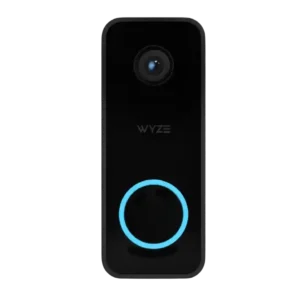
Product 1: Wyze Video Doorbell v2
3.5
P2
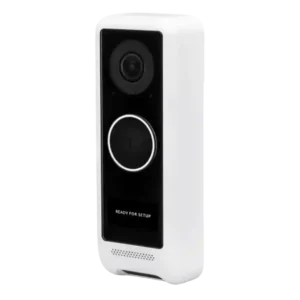
Product 2: Ubiquiti UniFi Protect G4 Doorbell
3.9
AI features
P1
Product 1: Wyze Video Doorbell v2
4.0
AI features were useful for filtering people, packages, vehicles, and other events, but the useful parts were repeatedly tied to Cam Plus.
P2
Product 2: Ubiquiti UniFi Protect G4 Doorbell
2.5
One reviewer treated AI image processing as a desired future improvement rather than a mature strength.
App, software and firmware
P1
Product 1: Wyze Video Doorbell v2
3.7
The Wyze app was mostly seen as useful and integrated, though reviewers criticized the SD timeline, snapshot behavior, and some quirks.
P2
Product 2: Ubiquiti UniFi Protect G4 Doorbell
4.2
Protect software was praised as responsive, easy, and enterprise-grade, though one long-term reviewer still reported bugs and setup issues.
Audio
P1
Product 1: Wyze Video Doorbell v2
3.7
Two-way audio ranged from clean and loud to merely good, though one reviewer found it broke up when Alexa doorbell notifications were enabled.
P2
Product 2: Ubiquiti UniFi Protect G4 Doorbell
2.8
Audio evidence is mixed: microphones can pick up visitors well, but speaker volume, audibility, and talkback quality drew repeated complaints.
Automation flexibility
P1
Product 1: Wyze Video Doorbell v2
4.0
Automation flexibility was viewed positively where reviewers discussed Wyze rules, schedules, and doorbell-triggered actions.
P2
Product 2: Ubiquiti UniFi Protect G4 Doorbell
4.5
Custom scheduling for alerts was viewed positively and gives the doorbell useful automation flexibility.
Base / Hub integration
P1Product 1: Wyze Video Doorbell v2
No score yet
P2
Product 2: Ubiquiti UniFi Protect G4 Doorbell
4.5
Reviewers liked the way the doorbell integrates into UniFi NVR, UDM Pro, Cloud Key, and the wider Protect system.
Chime
P1
Product 1: Wyze Video Doorbell v2
3.0
Existing chime support was welcomed, but chime-controller setup and documentation created confusion for multiple reviewers.
P2
Product 2: Ubiquiti UniFi Protect G4 Doorbell
4.3
Chime compatibility was generally positive once wiring was completed correctly, with reviewers reporting that existing chimes worked.
Complete kit in box
P1
Product 1: Wyze Video Doorbell v2
4.0
Reviewers found the box well packed and complete, with the needed controller, mounting hardware, wedge, wall plate, and wiring accessories.
P2
Product 2: Ubiquiti UniFi Protect G4 Doorbell
5.0
Reviewers said the box included the needed installation hardware and accessories for a complete install.
Controls and indicators
P1
Product 1: Wyze Video Doorbell v2
4.3
Controls and indicators were viewed positively, with simple hardware, a clearer button, and useful status-light feedback.
P2
Product 2: Ubiquiti UniFi Protect G4 Doorbell
3.3
Controls and indicators are mixed: reviewers liked overlays and custom display cues, but criticized the small screen’s visibility and sunlight readability.
Data-usage efficiency (bandwidth)
P1
Product 1: Wyze Video Doorbell v2
4.0
Bandwidth demands were not seen as a major issue, with one reviewer saying 2.4 GHz was more than enough even with 2K video.
P2Product 2: Ubiquiti UniFi Protect G4 Doorbell
No score yetDelivery package monitoring
P1
Product 1: Wyze Video Doorbell v2
2.6
Package monitoring was useful in concept but uneven in practice due to hit-or-miss detection and insufficient downward view.
P2
Product 2: Ubiquiti UniFi Protect G4 Doorbell
4.5
Package monitoring is a major strength in dual-camera reviews, with package viewing and detection described as very useful, though implementation was not always perfect.
Design aesthetics
P1
Product 1: Wyze Video Doorbell v2
4.3
Design sentiment was positive overall, with reviewers calling it nicer, solid, slick, compact, and well-designed.
P2Product 2: Ubiquiti UniFi Protect G4 Doorbell
No score yetFaceplate/accessory inclusion
P1
Product 1: Wyze Video Doorbell v2
2.0
Accessory quality had at least one complaint, with a reviewer calling the included wall plate flimsy.
P2Product 2: Ubiquiti UniFi Protect G4 Doorbell
No score yetFace recognition
P1Product 1: Wyze Video Doorbell v2
No score yet
P2
Product 2: Ubiquiti UniFi Protect G4 Doorbell
2.0
Face recognition was mentioned as a wanted feature, not a current strength in the reviewed evidence.
Field of view and framing
P1
Product 1: Wyze Video Doorbell v2
3.4
The wider view is an upgrade and can cover porches well, but several reviewers still wanted more vertical framing for packages directly under the doorbell.
P2
Product 2: Ubiquiti UniFi Protect G4 Doorbell
5.0
Field of view is a clear strength, with reviewers repeatedly praising the wide-angle coverage and framing.
Installation and Mounting
P1
Product 1: Wyze Video Doorbell v2
3.8
Installation was generally easy or straightforward, but chime-controller size, wiring, and documentation added friction in some setups.
P2
Product 2: Ubiquiti UniFi Protect G4 Doorbell
4.1
Installation was often called easy or straightforward, but chime wiring, regional instructions, and mounting quirks could add friction.
lag)
P1
Product 1: Wyze Video Doorbell v2
3.5
Live view and button notifications could be quick, but one teardown-style test still disliked the chime delay.
P2
Product 2: Ubiquiti UniFi Protect G4 Doorbell
2.5
Latency evidence is mixed, with fast phone alerts in some reviews but awkward conversation lag in smart-doorbell use.
Lens distortion handling
P1Product 1: Wyze Video Doorbell v2
No score yet
P2
Product 2: Ubiquiti UniFi Protect G4 Doorbell
4.5
Lens flare and direct-light handling were praised, with one reviewer reporting minimal flares and no visibility problem.
Low-light and Night vision
P1
Product 1: Wyze Video Doorbell v2
3.3
Low-light results were mixed: color night vision impressed some reviewers when ambient light was available, while others found unlit or dim entryways weak.
P2
Product 2: Ubiquiti UniFi Protect G4 Doorbell
4.3
Night performance was positive overall, with reviewers saying IR illumination and nighttime visibility worked well.
Motion detection
P1
Product 1: Wyze Video Doorbell v2
3.3
Motion detection usually worked, but reviewers reported car false alerts, some delay before motion notifications, and a need to tune zones or subscriptions.
P2
Product 2: Ubiquiti UniFi Protect G4 Doorbell
3.3
Motion detection can be useful, especially for deliveries, but one long-term reviewer said the doorbell sometimes missed motion.
Multi-user sharing ease
P1
Product 1: Wyze Video Doorbell v2
4.0
One reviewer positively called out the ability to share alerts and app access with another user.
P2
Product 2: Ubiquiti UniFi Protect G4 Doorbell
3.5
Multi-user sharing is helpful for household notifications, though one reviewer found recurring login/reset friction for a spouse’s phone.
Notifications
P1
Product 1: Wyze Video Doorbell v2
3.2
Notification performance was sharply split, with instant or granular alerts in some tests but a criticized five-minute cooldown and weaker free-tier behavior.
P2
Product 2: Ubiquiti UniFi Protect G4 Doorbell
4.5
Notifications were usually fast, often near instant, but one reviewer still wanted notification behavior to be more feature-rich.
Object and person detection
P1
Product 1: Wyze Video Doorbell v2
3.0
Person detection drew praise, but vehicle and package classification were less consistent, making the object-detection story uneven.
P2
Product 2: Ubiquiti UniFi Protect G4 Doorbell
5.0
Person detection was praised for reducing false alarms from moving shadows.
Ongoing ownership costs
P1
Product 1: Wyze Video Doorbell v2
3.2
Ownership costs were divisive: the free experience was criticized, but several reviewers noted Wyze’s subscription pricing was very low.
P2
Product 2: Ubiquiti UniFi Protect G4 Doorbell
5.0
Low ongoing cost is a major advantage because local recording avoids continuing subscription fees.
Peace of mind
P1
Product 1: Wyze Video Doorbell v2
4.0
One review framed the product as an affordable way to gain extra front-door peace of mind.
P2
Product 2: Ubiquiti UniFi Protect G4 Doorbell
4.5
Reviewers connected the doorbell to reassurance at home, especially remote awareness and shared household notifications.
Personalization options
P1
Product 1: Wyze Video Doorbell v2
5.0
Customization was praised for letting users tune notifications, detection, recordings, and smart-event behavior.
P2
Product 2: Ubiquiti UniFi Protect G4 Doorbell
5.0
Personalization is a strength when using custom messages on the display, with one reviewer finding that feature especially cool.
Phone call integration
P1
Product 1: Wyze Video Doorbell v2
4.5
Phone call-style answering was praised as a convenient way to respond when someone presses the doorbell.
P2
Product 2: Ubiquiti UniFi Protect G4 Doorbell
4.5
Phone-call-style communication was valued because it can make speaking with the visitor quicker and less laggy.
Porch light brightness
P1
Product 1: Wyze Video Doorbell v2
2.0
The doorbell needs a well-lit entryway for best results, and reviewers warned that unlit porches or weak ambient light hurt image quality.
P2
Product 2: Ubiquiti UniFi Protect G4 Doorbell
3.9
The porch light is mixed: several reviewers found it useful or great, while others said it was not very bright.
Power Options and Compatibility
P1
Product 1: Wyze Video Doorbell v2
3.0
Power flexibility is limited because the doorbell is wired-only, which excludes buyers without existing wiring unless they use workarounds.
P2
Product 2: Ubiquiti UniFi Protect G4 Doorbell
2.9
Power options are a tradeoff: USB-C/PoE options were appreciated in Pro context, but reviewers wished for wired networking or stronger power flexibility on the standard model.
Pre-roll buffer
P1
Product 1: Wyze Video Doorbell v2
3.0
Pre-roll evidence was mixed, with one reviewer finding it confusing and another saying the three-second pre-roll was pretty good.
P2Product 2: Ubiquiti UniFi Protect G4 Doorbell
No score yetPrice and value
P1
Product 1: Wyze Video Doorbell v2
4.7
Price and value had the strongest positive consensus, with reviewers repeatedly calling it inexpensive, affordable, a good value, or hard to beat.
P2
Product 2: Ubiquiti UniFi Protect G4 Doorbell
3.6
Value depends heavily on context: reviewers liked the no-fee economics and reasonable original pricing, but the Pro pricing was criticized as expensive.
Privacy
P1
Product 1: Wyze Video Doorbell v2
1.0
Privacy scored poorly because one reviewed source cited Wyze privacy breaches and related camera-feed exposure concerns.
P2
Product 2: Ubiquiti UniFi Protect G4 Doorbell
5.0
Privacy was a strong point because local storage reduces cloud and third-party access concerns.
Quick-reply / pre-recorded message usefulness
P1
Product 1: Wyze Video Doorbell v2
4.2
Quick replies were considered useful, especially because they let users respond without awkward live two-way conversation.
P2
Product 2: Ubiquiti UniFi Protect G4 Doorbell
3.2
Quick-reply messages split reviewers: custom messages were praised, but the small display can be too easy for visitors to miss.
Quiet-time / do-not-disturb scheduling
P1
Product 1: Wyze Video Doorbell v2
5.0
Do-not-disturb mode was specifically appreciated because it can silence the indoor chime while preserving phone notifications.
P2
Product 2: Ubiquiti UniFi Protect G4 Doorbell
4.5
Quiet-time scheduling was positively described because custom alert schedules can suppress notifications during chosen hours.
Recommendation for new buyers
P1
Product 1: Wyze Video Doorbell v2
5.0
Reviewers who gave buying guidance generally recommended it for budget-focused wired-doorbell shoppers.
P2
Product 2: Ubiquiti UniFi Protect G4 Doorbell
3.6
Recommendation sentiment is context-dependent: the doorbell is recommended for UniFi users, but less compelling for shoppers outside Protect.
Recording
P1
Product 1: Wyze Video Doorbell v2
5.0
Continuous 24/7 recording was one of the most praised features because it captures events that motion detection can miss.
P2
Product 2: Ubiquiti UniFi Protect G4 Doorbell
4.8
Recording is a strength, especially continuous recording, local timelines, and playback that make it easier to review past footage.
Reliability (general)
P1
Product 1: Wyze Video Doorbell v2
2.0
Reliability concerns were limited but real, with one reviewer reporting that notifications stopped until a reboot fixed the device.
P2
Product 2: Ubiquiti UniFi Protect G4 Doorbell
3.5
Reliability is mixed, ranging from no problems in one review to app connection and reset issues in longer-term use.
RTSP stream availability
P1Product 1: Wyze Video Doorbell v2
No score yet
P2
Product 2: Ubiquiti UniFi Protect G4 Doorbell
3.5
RTSP availability is useful, but reviewers also noted that protocol support is otherwise limited.
Security ecosystem integration
P1
Product 1: Wyze Video Doorbell v2
4.0
Wyze ecosystem integration was useful for owners of other Wyze devices, including pairing with a Wyze lock and using the same app.
P2
Product 2: Ubiquiti UniFi Protect G4 Doorbell
4.2
Security ecosystem integration is strong inside UniFi Protect, where the doorbell works like another camera in the larger system.
Security policy history
P1
Product 1: Wyze Video Doorbell v2
1.0
Security-policy history scored poorly because PCMag explicitly stopped recommending Wyze security products after security failures.
P2
Product 2: Ubiquiti UniFi Protect G4 Doorbell
2.5
One reviewer raised concern about Ubiquiti’s product-support history and possible early end-of-life risk.
Size and form factor
P1
Product 1: Wyze Video Doorbell v2
4.8
The compact form factor was consistently positive, especially for tight door trim and limited installation spaces.
P2
Product 2: Ubiquiti UniFi Protect G4 Doorbell
3.3
Size and form factor are mixed: reviewers called it large or bigger than the prior model, but not always a dealbreaker.
Smart-home integration (Alexa, Google, Siri, HomeKit, Matter, Thread)
P1
Product 1: Wyze Video Doorbell v2
3.5
Smart-home integration was useful with Alexa and Google in some tests, but one reviewer reported Google Home showed the doorbell offline.
P2
Product 2: Ubiquiti UniFi Protect G4 Doorbell
3.0
Smart-home integration evidence was limited and tilted toward a desire for more third-party openness.
Snapshot capture
P1
Product 1: Wyze Video Doorbell v2
2.0
Snapshot-only free-tier behavior was criticized because reviewers wanted motion videos rather than still images.
P2
Product 2: Ubiquiti UniFi Protect G4 Doorbell
5.0
Snapshot capture in notifications was considered very useful for quickly deciding whether to open the app.
Storage
P1
Product 1: Wyze Video Doorbell v2
4.3
Storage was one of the product’s biggest strengths thanks to microSD and continuous recording, although the exposed slot hurt the implementation.
P2
Product 2: Ubiquiti UniFi Protect G4 Doorbell
5.0
Storage is a clear strength because reviewers valued local storage and easy access to recorded video.
Subscription
P1
Product 1: Wyze Video Doorbell v2
2.6
Subscription evidence was mixed: reviewers disliked paywalled alerts and AI features but also noted cheap plans and some included cloud clips.
P2
Product 2: Ubiquiti UniFi Protect G4 Doorbell
5.0
No monthly subscription fees were repeatedly praised as one of the main reasons to choose this doorbell.
System completeness
P1
Product 1: Wyze Video Doorbell v2
5.0
One reviewer strongly praised the combined software and hardware package as among the best wired doorbell options.
P2
Product 2: Ubiquiti UniFi Protect G4 Doorbell
3.0
System completeness is a tradeoff: the doorbell completes a UniFi Protect setup but is not a standalone product.
Theft and Tamper
P1
Product 1: Wyze Video Doorbell v2
1.7
The most repeated concern was tamper resistance: reviewers disliked the exposed microSD slot and the lack of a more secure mounting lock.
P2
Product 2: Ubiquiti UniFi Protect G4 Doorbell
3.0
Tamper protection is mixed: the Pro security screw helps, while original G4 reviews found it physically easy to remove.
Upgrade value vs previous model
P1
Product 1: Wyze Video Doorbell v2
4.3
Reviewers saw it as a meaningful upgrade over earlier Wyze doorbells because of 2K video, wider framing, chime support, and microSD recording.
P2
Product 2: Ubiquiti UniFi Protect G4 Doorbell
4.5
The Pro model was viewed as a worthwhile upgrade over the original, especially for package detection and newer power options.
Video resolution and detail
P1
Product 1: Wyze Video Doorbell v2
4.1
Reviewers generally found the 2K video good for the price, with several calling it sharp or clear, but some noted overexposure, motion artifacts, and merely decent quality.
P2
Product 2: Ubiquiti UniFi Protect G4 Doorbell
4.4
Video quality was generally strong enough to identify visitors, though one reviewer noted it is not equal to larger UniFi cameras.
Video sharing options
P1Product 1: Wyze Video Doorbell v2
No score yet
P2
Product 2: Ubiquiti UniFi Protect G4 Doorbell
2.5
Video export and sharing are mixed, with local download praised but event splicing and sharing workflow criticized.
Weather and temperature tolerance
P1Product 1: Wyze Video Doorbell v2
No score yet
P2
Product 2: Ubiquiti UniFi Protect G4 Doorbell
3.5
Weather tolerance evidence is mixed, with one reviewer concerned about high heat and another impressed by winter snow/cold performance.
Wi-Fi range and stability
P1
Product 1: Wyze Video Doorbell v2
3.0
The 2.4 GHz-only Wi-Fi requirement was treated as a limitation, though one reviewer said 2.4 GHz was enough for the 2K video stream.
P2
Product 2: Ubiquiti UniFi Protect G4 Doorbell
2.3
Wi-Fi stability is a repeated concern because reviewers described flaky Wi-Fi risk and actual connection problems.
Zones and activity areas
P1
Product 1: Wyze Video Doorbell v2
3.7
Activity zones were useful and sometimes effective, but one reviewer still received car alerts despite setting zones.
P2
Product 2: Ubiquiti UniFi Protect G4 Doorbell
4.5
Activity zones were praised for reducing unwanted motion events and focusing detection on relevant areas.