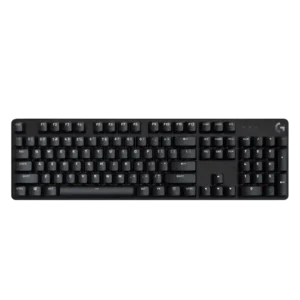
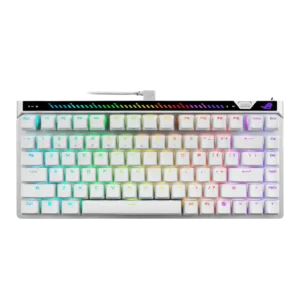
Sound impressions lean negative overall, with reviewers calling the keyboard unpleasant, scratchy, pingy, or only modestly refined.
Reviews describe a controlled, mature sound that avoids the hollow, pingy character common on gaming boards, and one reviewer says it sounds better than expected.
One review specifically found the tactile bump inconsistent from key to key, with some switches feeling lighter or heavier than others.
One review specifically calls out very consistent key response, supporting precise Hall-effect actuation behavior across the board.
Analog-style input is absent; one reviewer explicitly states that there is no analog mode here.
Reviewers consistently found the white backlight bright, with multiple brightness levels or intensity adjustment available.
RGB backlighting is described as bright and evenly lit in the reviews that mention brightness directly.
Across reviews, the board is described as solid, sturdy, and better built than many budget peers despite its stripped-down feature set.
Across reviews, the keyboard is repeatedly described as solid, premium, and well assembled, with strong fit and finish.
The attached cable is repeatedly described as basic, non-detachable, and unbraided, which feels cheap for the price.
One review says the included L-shaped cable works but looks awkward in a typical desk setup.
Multiple reviews specifically highlight the lack of Logitech G Hub compatibility, limiting ecosystem integration.
The web-based setup is praised for working across different computers, giving the board good multi-system flexibility.
Reviews describe a wired, non-detachable connection that works but offers little flexibility.
Connectivity is stable and fast over a wired connection, but several reviewers criticize the lack of any wireless option.
Reviewers consistently say customization is minimal, with little to no remapping, layout changes, or deeper tweaking available.
Customization is a major strength, with reviewers praising easy tuning for actuation, rapid trigger, mappings, and other settings.
The compact footprint, slim bezel design, and TKL option leave more room on the desk, especially for mouse movement.
The 75% layout is repeatedly framed as compact while still preserving important keys, which helps desk efficiency.
PBT caps and sturdy metal-backed construction are repeatedly framed as long-lasting, heat- and wear-resistant design choices.
Durability looks strong from the available evidence, with wear-resistant keycaps and wear-free magnetic switch operation highlighted.
One reviewer notes switch replacement is not straightforward and would require tools or modification rather than simple user swapping.
Switch swapping is supported, but reviewers note that compatible magnetic options are limited, which reduces modding freedom.
Ergonomics are mixed: some reviewers liked the low-profile angle and adjustable feet, while another found the board uncomfortable without a wrist rest.
General comfort is good, but the rear touchbar gets mixed ergonomic feedback because some reviewers find it awkward to reach.
The keyboard covers basic gaming needs with anti-ghosting and six-key rollover, but reviewers repeatedly say its feature set is minimal and misses staples like game mode.
The board offers a rich competitive feature set, including rapid trigger, SOCD-style features, on-board controls, and fast tuning tools.
Reviews consistently report very little flex, giving the chassis a firm, rigid feel.
Rigidity is a clear strength, with reviewers describing the chassis as solid and free from flex.
In games, the board generally keeps up and registers commands well, but several reviewers say it lacks the richer gaming-focused feature set expected at this price.
Gaming performance is one of the clearest positives, with reviewers praising fast movement, precise control, and very responsive feel.
Multiple reviews explicitly state the switches are not hot-swappable.
Hot-swap support is present, but the practical upside is reduced by limited magnetic switch compatibility.
PBT keycaps are a clear strength, with reviewers praising their texture, durability, and better-than-expected material quality for the price.
Keycaps are consistently praised for their feel and quality, with multiple reviews highlighting PBT caps and solid finishing.
Reviews that addressed responsiveness say inputs register quickly and feedback is fast enough for gaming.
Input response is described as immediate and controlled, giving the keys a very quick feel in play.
Reviewers describe the spacing as comfortable overall, though one noted the keys feel a bit narrower than typical.
One reviewer found the spacebar stable with little wobble.
Key stability is strong in the reviews, with minimal wobble and solid larger-key behavior called out directly.
The few reviews that discussed response speed describe the board as nippy and fast enough for quick in-game inputs.
Wired performance is described as latency-free, matching the product’s competitive focus.
Availability in both full-size and TKL is a plus, but one reviewer criticized the TKL layout for omitting expected keys.
The 75% layout is widely praised for balancing compact size with useful extras like arrows, F-keys, and a small nav cluster.
Visibility is a weakness, with legends described as hard to see without the backlight and some function labels unlit.
Legend styling is divisive: reviewers note clean alignment and shine-through support, but several dislike the aggressive ROG font.
Reviews consistently say macro creation is unavailable or effectively unsupported.
Macro and advanced mapping support are available through Gear Link, including macros and more advanced remap functions.
The brushed aluminum or aluminum-magnesium top plate is repeatedly described as premium-feeling and sturdy.
Materials are generally well regarded, especially the metal top construction, though some reviewers still note mixed-material tradeoffs at this price.
Media access is present mainly through Fn shortcuts, but reviewers frequently note the lack of dedicated controls.
Media control is well covered through the touch area and physical controls, though some users find the touchbar less intuitive than the wheel.
Noise impressions vary from moderate to fairly loud, but the board is generally not positioned as especially quiet.
Noise control is a strength, with reviewers describing restrained acoustics and reduced ping or hollowness.
One review says settings revert to default because there is no built-in memory.
Multiple reviews call out the removal or absence of USB passthrough.
Reviewers say the lighting cannot be individually customized, even though the keys are backlit.
One review explicitly warns not to expect especially high polling rates.
Polling rate support is a headline feature, with multiple reviews calling out the 8K capability.
The TKL version and relatively light build make the keyboard easy to carry and easier to fit into travel or event setups.
Portability is helped by the included carrying case, which reviewers call out as a useful travel extra.
One review specifically notes there is no way to create profiles.
Profiles can be stored in the cloud, giving the board practical profile management across multiple systems.
Rapid Trigger support is heavily praised and positioned as one of the keyboard’s standout competitive features.
One reviewer praised the updated switches for avoiding the double-typing issue they associated with older keys.
Reliability looks strong from the available evidence, with wear-free switch design and stable in-game performance both highlighted.
Reviewers repeatedly note white-only lighting and no RGB options, so personalization is essentially absent.
RGB customization is well supported, with reviewers noting flexible lighting controls through both software and on-board inputs.
The white lighting is generally bright and clean-looking, with a few modes, but it remains limited for users who want richer effects.
Lighting quality is generally praised, with reviewers calling the RGB well integrated, bright, and evenly lit.
Reviewers repeatedly call the board compact for its class, with slim proportions and both full-size and TKL options.
Reviewers repeatedly present the form factor as a sweet spot, offering compact dimensions without giving up everyday usability.
The dominant software story is negative: most reviews highlight no G Hub support or no companion software at all.
Gear Link is consistently viewed as a strong point: it is lighter, faster, and easier to live with than older Armoury Crate workflows.
Sound control is mixed, with one review calling out ping while another praised the lack of echo or reverb.
Internal dampening is a recurring positive, with multiple reviews pointing to layered foam and reduced resonance.
Stabilizer impressions are mixed but lean negative overall, with one review noting ticking and another noting only slight wobble on larger keys.
Stabilizers are praised for low rattle and a solid feel on larger keys.
Switch feel is the product’s most divisive area, with many reviewers calling the switches mushy, stiff, clunky, or inconsistent, though a few found them smooth or acceptably light.
Switch feel is widely praised for being smooth and controlled, though some reviewers find the feel lighter or less engaging than other HE options.
One review explicitly criticizes the board for offering only brown switches.
ROG offers multiple compatible magnetic switch options, but reviewers still describe the overall ecosystem as limited.
Typing comfort is mixed; some reviewers found the board comfortable or fatigue-free, while others found it less comfortable than alternatives.
Typing comfort is strong overall, with reviewers saying long sessions stay comfortable and low-fatigue once settings are dialed in.
Typing feel lands in the middle overall, with some reviewers enjoying the response and tactility but others describing dullness, mushiness, or friction.
Typing feel is generally described as controlled, easy, and satisfying rather than harsh or sloppy.
Value is mixed-to-negative overall: some reviewers appreciate the simple, sturdy package, but many argue the missing features and competition make the asking price hard to justify.
Value is the biggest tradeoff: several reviewers like the board but still question the price against cheaper rivals.
Volume adjustment is available through Fn-layer shortcuts rather than dedicated hardware.
Volume adjustment is easy to access through the touch controls and related physical inputs.
Wireless performance is effectively absent because the board is wired-only and reviewers repeatedly call out the missing wireless option.
Reviews repeatedly note that there is no included wrist rest.
One reviewer specifically criticizes the lack of any included wrist rest at this price.