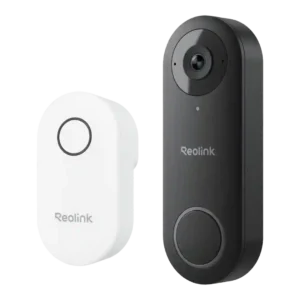
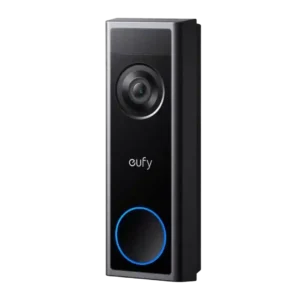
Average score
P1
Product 1: Reolink Video Doorbell
4.0
P2
Product 2: eufy Video Doorbell C31
4.1
AI features
P1
Product 1: Reolink Video Doorbell
3.1
AI is viewed as practical but limited: onboard person detection helps reduce noise, yet reviewers repeatedly want more advanced recognition features (packages, animals, vehicles, faces).
P2
Product 2: eufy Video Doorbell C31
4.2
AI capabilities are described as basic on the standalone doorbell (often human-focused detection), with expanded Edge AI when paired to HomeBase. Several reviews mention additional classification (pet/vehicle) and smarter labeling when using the base.
App, software and firmware
P1
Product 1: Reolink Video Doorbell
4.1
Across sources, the Reolink app is described as straightforward and feature-rich (live view, playback, zones, schedules, quick replies), with many reporting stable performance; a few mention minor UX quirks such as confusing flows, slow loads in some conditions, or a doorbell-press screen that should jump to live view.
P2
Product 2: eufy Video Doorbell C31
4.2
Setup is repeatedly described as simple (QR-based pairing) and the app as feature-rich with many settings. Most reviewers find it easy to use, while one notes the depth of menus can feel less user-friendly because there are so many submenus and options.
Audio
P1
Product 1: Reolink Video Doorbell
4.1
Two-way talk is repeatedly described as usable and often loud and clear, including full-duplex conversation in at least one test.
P2
Product 2: eufy Video Doorbell C31
4.0
Two-way talk is consistently supported and described as clear enough (phone-speaker level), with full-duplex mentioned in one review. A notable limitation appears in one test where recordings captured only the doorbell side during conversations, and another reviewer observed A/V sync inconsistencies.
Automation flexibility
P1
Product 1: Reolink Video Doorbell
4.0
It supports local-friendly integrations like RTSP/ONVIF, NVR recording, FTP, and Home Assistant automations, but lack of IFTTT is a recurring complaint for broader third-party automation.
P2Product 2: eufy Video Doorbell C31
No score yetBase / Hub integration
P1Product 1: Reolink Video Doorbell
No score yet
P2
Product 2: eufy Video Doorbell C31
4.2
HomeBase pairing is presented as a way to add a chime function, centralize storage, and unlock more AI/recognition features. A key nuance is that not all continuous recording behaviors carry over identically when recording to HomeBase versus local storage.
Battery and Charging
P1
Product 1: Reolink Video Doorbell
1.1
This model line is wired-only in the reviewed configurations; multiple sources explicitly note there is no battery-power option.
P2
Product 2: eufy Video Doorbell C31
4.1
The removable 6,500mAh battery is repeatedly highlighted, with one reviewer estimating roughly 3 to 4 months and others noting usage depends heavily on trigger volume. Hot-swapping/spare batteries are mentioned as a way to avoid downtime; one review cites about 8 hours to charge from flat.
Chime
P1
Product 1: Reolink Video Doorbell
4.1
A plug-in indoor chime is included and can be loud with selectable tones/volume, but the system typically cannot use an existing mechanical chime and the module takes up an outlet.
P2
Product 2: eufy Video Doorbell C31
3.9
Chime options are broad (existing mechanical chime in some cases, HomeBase as a chime, plug-in chimes, Alexa, and phone alerts). The biggest caveat is a reported wiring tradeoff where enabling pre-roll/continuous features may prevent using the existing indoor chime simultaneously.
Complete kit in box
P1
Product 1: Reolink Video Doorbell
4.8
Multiple reviews call out a generous box: doorbell, plug-in chime, mounts/wedges, wiring jumpers, Ethernet cable, power adapter/extension, and templates are commonly included.
P2
Product 2: eufy Video Doorbell C31
4.5
Unboxings consistently show useful included accessories (mounts, angled wedge/spacer, screws/anchors, release pin, and cables), and at least one review includes a bundled microSD card. The kit is generally portrayed as ready-to-install without extra purchases beyond storage choices.
Controls and indicators
P1
Product 1: Reolink Video Doorbell
4.1
Physical status indicators are well-explained, including the LED ring behavior for motion, doorbell presses, and setup states, with options to toggle them in-app.
P2Product 2: eufy Video Doorbell C31
No score yetData-usage efficiency (bandwidth)
P1
Product 1: Reolink Video Doorbell
4.5
Bandwidth/bitrate controls let you trade image quality for lower data use, with reviewers citing meaningful differences between low and high settings.
P2Product 2: eufy Video Doorbell C31
No score yetDelivery package monitoring
P1Product 1: Reolink Video Doorbell
No score yet
P2
Product 2: eufy Video Doorbell C31
2.4
The C31 is positioned as a single-camera doorbell; reviewers comparing it to dual-camera models note it lacks a dedicated downward view for packages and doorstep close-ups. It can still capture delivery events, but not with the same package-focused framing.
Design aesthetics
P1
Product 1: Reolink Video Doorbell
4.2
Design is described as compact and understated, with a matte finish that blends into most entryways better than bulkier rivals.
P2
Product 2: eufy Video Doorbell C31
4.6
Design is repeatedly called simple and sleek, intended to blend into common door frames and porches. Multiple reviewers explicitly mention liking the look and the button/LED ring presentation.
Face recognition
P1Product 1: Reolink Video Doorbell
No score yet
P2
Product 2: eufy Video Doorbell C31
4.1
Facial recognition is repeatedly tied to HomeBase-based Edge AI rather than standalone operation. When enabled, reviewers describe it as useful for distinguishing recognized people from strangers in event logs.
Field of view and framing
P1
Product 1: Reolink Video Doorbell
4.2
The roughly 180-degree diagonal view offers broad porch coverage in a 4:3-ish framing, but it is not the widest option and placement matters if you want to see more of the doorstep or avoid neighbors.
P2
Product 2: eufy Video Doorbell C31
4.4
The C31 is repeatedly framed as wide-angle with a 4:3-style view that captures more of the porch/approach; one review cites a 160 degree field of vision. Wide coverage helps situational awareness, but can bring edge artifacts.
Installation and Mounting
P1
Product 1: Reolink Video Doorbell
4.1
No summary yet.
P2
Product 2: eufy Video Doorbell C31
4.2
No summary yet.
lag)
P1
Product 1: Reolink Video Doorbell
4.0
Live view and alert responsiveness are usually described as fast, though some lag can appear when away from home and one reviewer reports the app opening an event recording instead of live video after a doorbell press.
P2
Product 2: eufy Video Doorbell C31
3.8
Live view and alert responsiveness are often called quick, particularly in wired use, but delay can increase when routing through HomeBase in at least one setup. Overall, latency is portrayed as good for the category, with some variability by configuration.
Lens distortion handling
P1Product 1: Reolink Video Doorbell
No score yet
P2
Product 2: eufy Video Doorbell C31
3.8
One reviewer explicitly notes edge bending on the wide view but prefers the broader coverage over a tighter frame. Distortion is treated as an acceptable side effect rather than a dealbreaker.
Light adjustability
P1
Product 1: Reolink Video Doorbell
4.1
No summary yet.
P2Product 2: eufy Video Doorbell C31
No score yetLow-light and Night vision
P1
Product 1: Reolink Video Doorbell
3.8
Infrared night vision is generally clear and usable, but motion at night can look choppy because frame rate tops out around 20 fps and there is no built-in spotlight for color night video.
P2
Product 2: eufy Video Doorbell C31
4.1
Infrared night vision is generally described as clear enough to identify visitors close to the door, and some call it impressive. The most consistent caveat is that aggressive compression can reduce nighttime detail compared to what 2K implies.
Motion detection
P1
Product 1: Reolink Video Doorbell
3.6
Motion capture is generally reliable, yet multiple reviewers mention false alerts from flags, trees, sidewalks, or distant street traffic unless you fine-tune settings. Customization is deep, including motion zones, sensitivity sliders, object-size thresholds, alarm delay, and recording/notification schedules; one reviewer finds the zone-painting UI less convenient than simple boxes.
P2
Product 2: eufy Video Doorbell C31
4.0
Motion detection is described as PIR-based (battery-saving) and generally responsive, but can trigger slightly late in some scenarios. One reviewer reports occasional missed detections, while others present it as reliable for typical porch activity. Across reviews, the app offers sensitivity controls and selectable detection modes (human-focused, and broader modes when supported), giving users room to tune alerts. Reviewers repeatedly show or mention customization depth rather than a fixed one-size setup.
Multi-user sharing ease
P1
Product 1: Reolink Video Doorbell
4.2
Sharing is supported, including adding household members and creating users with limited permissions.
P2
Product 2: eufy Video Doorbell C31
4.3
Device sharing is explicitly mentioned as available, letting family or trusted users access the doorbell through the app. This is positioned as a straightforward built-in feature rather than a complicated add-on.
Notifications
P1
Product 1: Reolink Video Doorbell
4.1
Push alerts are often described as quick, with options for visitor/person alerts and scheduling; rich notification thumbnails are cloud-based, and one review notes a doorbell-press workflow that opens a recording instead of live view.
P2
Product 2: eufy Video Doorbell C31
4.3
Notifications are frequently described as fast, with options like richer alert styles (text plus snapshot) and flexible behavior depending on user preference. Several reviews show doorbell-press alerts arriving quickly and opening events/live view smoothly.
Object and person detection
P1
Product 1: Reolink Video Doorbell
3.4
Detection is largely centered on people (with some references to car filtering), and reviewers repeatedly call out missing package/animal/vehicle detection and face recognition compared to newer premium doorbells.
P2
Product 2: eufy Video Doorbell C31
4.1
Person/human detection is consistently discussed as a core behavior, while broader categories (pet/vehicle) show up as available in certain configurations (notably with HomeBase). One reviewer notes package detection is not part of the system they tested.
Personalization options
P1Product 1: Reolink Video Doorbell
No score yet
P2
Product 2: eufy Video Doorbell C31
4.2
Personalization shows up through configurable alert styles, power modes, quick replies (including custom recordings), watermark toggles, orientation changes, and other app-level tweaks. Users can tailor the doorbell to either hands-off or high-control behavior.
Phone call integration
P1
Product 1: Reolink Video Doorbell
4.1
Several reviews describe call-style alerts and incoming-call behavior on phones when the doorbell is pressed (configurable in settings).
P2
Product 2: eufy Video Doorbell C31
4.2
One review highlights an option for doorbell presses to trigger a phone call-style alert to your phone rather than relying only on standard app notifications. This is positioned as a useful way to avoid missing someone at the door.
Power Options and Compatibility
P1
Product 1: Reolink Video Doorbell
4.3
Power options are unusually flexible for a wired doorbell: it can use existing 12-24V wiring, an included adapter/extension, Ethernet for data, and a PoE variant for power+data; there is no battery mode.
P2
Product 2: eufy Video Doorbell C31
4.3
Dual power is consistently emphasized: battery for easy installs, wired for constant power and continuous features, with some reviewers noting automatic fallback to battery during outages. Wiring can have practical caveats (battery may still be needed and chime/feature tradeoffs can apply).
Pre-roll buffer
P1
Product 1: Reolink Video Doorbell
4.6
Pre-roll is a standout: multiple sources reference a six-second buffer (and some report longer lead-in), helping capture what happened immediately before a motion or doorbell event starts.
P2
Product 2: eufy Video Doorbell C31
4.2
Pre-roll is described as available when the unit is wired (including a cited 5-second pre-record buffer in one review). Reviewers also note that battery-only operation does not unlock these pre-record/continuous options.
Price and value
P1
Product 1: Reolink Video Doorbell
4.5
At roughly $80 to $100, reviewers repeatedly frame it as strong value because it delivers sharp video and local recording without mandatory monthly fees.
P2
Product 2: eufy Video Doorbell C31
4.3
Value is repeatedly framed around avoiding subscriptions while still getting modern features like 2K video, wide coverage, and local storage. Some reviewers cite aggressive pricing (including sales) as making the C31 particularly compelling versus subscription competitors.
Privacy
P1
Product 1: Reolink Video Doorbell
3.8
Privacy is mixed: reviewers note video streaming uses HTTPS rather than end-to-end encryption, but the app offers privacy masks/non-detection zones and angled mounting to avoid capturing neighbors.
P2
Product 2: eufy Video Doorbell C31
4.2
Privacy-related controls appear via privacy zones (blacked-out areas) and mention of secured local clips that are accessed through the app rather than easily read off a card. Sharing controls are also discussed as part of managing who can view footage.
Quick-reply / pre-recorded message usefulness
P1
Product 1: Reolink Video Doorbell
4.3
Quick replies are a strength: you get preset messages, can record custom responses, and some reviews mention auto-reply after a delay if you do not answer.
P2
Product 2: eufy Video Doorbell C31
4.3
Quick replies/pre-recorded messages are repeatedly shown as genuinely useful for deliveries and when you cannot talk live, with several reviews demonstrating built-in canned replies plus custom recordings. This is one of the most consistently praised day-to-day features.
Quiet-time / do-not-disturb scheduling
P1
Product 1: Reolink Video Doorbell
4.2
Notification scheduling and critical-alert behavior are available, enabling quiet hours or do-not-disturb style control without fully disabling the doorbell.
P2
Product 2: eufy Video Doorbell C31
4.0
Quiet-time/scheduling is described as available, allowing alerts to be limited to specific hours or behaviors to change overnight. This sits within a broader set of app customization features that can take time to explore.
Recording
P1
Product 1: Reolink Video Doorbell
4.4
Recording supports motion clips and 24/7 capture (especially when paired with an NVR), with strong context thanks to the pre-roll buffer; cloud recording is optional rather than required.
P2
Product 2: eufy Video Doorbell C31
4.0
Reviewers describe motion-event recording as standard and continuous recording as available when hardwired. One reviewer adds a nuance that wired-to-HomeBase recording may remain motion-only rather than true 24/7 to the base, depending on configuration.
Reliability (general)
P1
Product 1: Reolink Video Doorbell
4.1
Overall stability is described as good once set up, but Wi-Fi edge cases, occasional connection quirks, and even microSD seating/removal hassles show up; hardwiring Ethernet tends to improve reliability.
P2
Product 2: eufy Video Doorbell C31
3.7
Overall reliability is portrayed as good for typical use, with reviewers describing the doorbell as responsive and functional. One reviewer reports occasional missed PIR triggers, suggesting performance can vary by placement and environment.
RTSP stream availability
P1
Product 1: Reolink Video Doorbell
4.7
RTSP (and ONVIF) support is explicitly cited, enabling third-party NVRs and software recorders beyond Reolink's own NVRs.
P2Product 2: eufy Video Doorbell C31
No score yetSecurity ecosystem integration
P1
Product 1: Reolink Video Doorbell
4.2
Within the Reolink ecosystem, the doorbell pairs well with Reolink NVRs and other Reolink cameras, and some setups layer cloud backup/rich notifications on top of local recording.
P2Product 2: eufy Video Doorbell C31
No score yetSiren loudness (if built-in)
P1
Product 1: Reolink Video Doorbell
3.2
The doorbell includes a built-in siren option, though at least one reviewer wanted it louder and treats it as a secondary deterrent feature.
P2Product 2: eufy Video Doorbell C31
No score yetSize and form factor
P1
Product 1: Reolink Video Doorbell
4.4
The unit is repeatedly described as relatively compact for a doorbell camera, avoiding the oversized look of some competitors.
P2Product 2: eufy Video Doorbell C31
No score yetSmart-home integration (Alexa, Google, Siri, HomeKit, Matter, Thread)
P1
Product 1: Reolink Video Doorbell
3.6
Smart-home support focuses on Alexa and Google Assistant for live viewing on compatible displays; Apple HomeKit is repeatedly cited as missing, and some note limited chime/announcement behavior on smart speakers.
P2
Product 2: eufy Video Doorbell C31
3.9
Smart-home support is discussed most often around Alexa (and also Google assistants in one comparison), including using smart speakers as a chime. A minor quirk is reported where Alexa announces the model identifier instead of the friendly device name.
Snapshot capture
P1
Product 1: Reolink Video Doorbell
4.0
Snapshot tools are built into the app, and rich notification thumbnails are available via cloud services; some users also rely on Home Assistant for thumbnail-style previews.
P2Product 2: eufy Video Doorbell C31
No score yetStorage
P1
Product 1: Reolink Video Doorbell
4.5
Storage flexibility is a major highlight: microSD up to 256GB plus Reolink NVR and optional cloud plans; some caution that a card in the doorbell itself can be harder to access/seat and may be less tamper-resistant than hub-based storage.
P2
Product 2: eufy Video Doorbell C31
4.3
Storage flexibility is a major theme: multiple reviews cite microSD (commonly up to 128GB) plus the option to use HomeBase 3 for centralized storage. Some bundles are shown including a 32GB microSD card, reinforcing the no-fee local-storage angle.
Subscription
P1
Product 1: Reolink Video Doorbell
4.4
Local recording works without a subscription, while Reolink's optional cloud plans add longer history and features like rich notifications; several reviews prefer staying local unless they want thumbnails or offsite backup.
P2
Product 2: eufy Video Doorbell C31
5.0
No monthly fees is one of the most repeated selling points across reviews, especially compared to subscription-driven competitors. Cloud storage is mentioned as optional in at least one review, but local storage is the core story.
Video resolution and detail
P1
Product 1: Reolink Video Doorbell
4.3
Reviews consistently describe the 2K/5MP image as sharp with strong daytime detail; several note it can even capture small details like license plates, though one source calls playback clear but not the crispest versus top rivals.
P2
Product 2: eufy Video Doorbell C31
4.0
Reviews consistently describe 2K capture as clear in good light, but at least one reviewer criticizes very heavy compression/low bitrate that can undermine real detail (especially in low light). Expect solid everyday clarity, not premium forensic sharpness.
Video sharing options
P1
Product 1: Reolink Video Doorbell
4.1
The app allows downloading clips to a phone and sharing/exporting them as needed.
P2Product 2: eufy Video Doorbell C31
No score yetWeather and temperature tolerance
P1
Product 1: Reolink Video Doorbell
4.1
Build is described as outdoor-ready with IP65 and an operating range around -10 to 55C (14F to 131F), with a caveat that extreme winters may be challenging.
P2
Product 2: eufy Video Doorbell C31
4.3
IP65 weather resistance is explicitly stated and treated as suitable for outdoor exposure (rain/sun/snow in reviewer wording). Maintaining seals/flaps is mentioned as important for preserving the rating.
Wi-Fi range and stability
P1
Product 1: Reolink Video Doorbell
3.9
Dual-band 2.4/5 GHz Wi-Fi is a plus and several reviews highlight Ethernet/PoE options, but thick exterior walls can cause Wi-Fi instability and multiple sources recommend running Ethernet when possible.
P2Product 2: eufy Video Doorbell C31
No score yetZones and activity areas
P1
Product 1: Reolink Video Doorbell
4.4
Activity areas are supported via motion/non-detection zones to exclude sidewalks, streets, or neighboring areas from triggering alerts.
P2
Product 2: eufy Video Doorbell C31
4.2
Activity zones are repeatedly highlighted as a practical way to reduce unwanted alerts, especially for doors facing streets or driveways. Users can limit detection to the areas that matter most (porch, walkway, doorstep).