Compare GravaStar Mercury V75 Pro vs Alienware Pro Wireless Gaming Keyboard

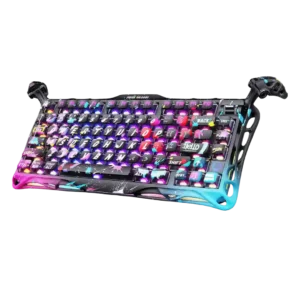
P1 GravaStar Mercury V75 Pro
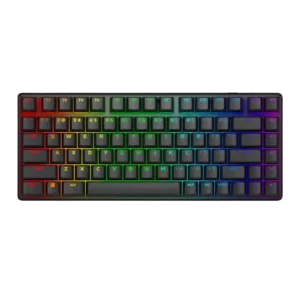
P2 Alienware Pro Wireless Gaming Keyboard

Comparison Takeaways

GravaStar Mercury V75 Pro

Where It Has the Edge

  • rapid trigger support is 4.5 vs 1.5. Rapid trigger was repeatedly praised as useful for gaming, competitive advantage, and quick key deactivation.
  • extra gaming features is 4.5 vs 2.8. Reviewers valued the extra Hall-effect gaming features, especially Rapid Trigger, LKP, and customizable behavior.
  • volume control is 4.2 vs 3.1. The volume lever/flipper was generally liked for tactile feel and practical usefulness.
  • key spacing is 4.4 vs 3.6. One reviewer praised the layout gaps and spacing for making arrow navigation easy by touch.

Alienware Pro Wireless Gaming Keyboard

Where It Has the Edge

  • connectivity is 4.6 vs 2.0. Connectivity was a strength overall thanks to wired, 2.4GHz, and Bluetooth options, though one reviewer disliked the hidden...
  • cable quality is 4.5 vs 2.0. Cable quality had limited but positive evidence, with one reviewer calling the included USB-C cable high quality.
  • portability is 4.7 vs 2.3. Portability was praised for the compact, travel-friendly design and backpack-friendly size.
  • switch options is 4.6 vs 2.7. Switch flexibility was praised because reviewers noted support for 3-pin and 5-pin alternatives, giving owners room to change...
Average score
Product 1: GravaStar Mercury V75 Pro
4.1
Product 2: Alienware Pro Wireless Gaming Keyboard
4.3
acoustics
Product 1: GravaStar Mercury V75 Pro
4.1

Sound impressions were generally positive and clacky, though one review framed it as a louder, more direct sound.

Product 2: Alienware Pro Wireless Gaming Keyboard
4.5

Acoustics were mostly praised for a satisfying thock, tock, or clack, although some reviewers found the sound chattery or polarizing.

actuation consistency
Product 1: GravaStar Mercury V75 Pro
4.4

Actuation tuning was viewed positively where tested, with reviewers describing it as accurate and working well.

Product 2: Alienware Pro Wireless Gaming Keyboard
4.8

Actuation consistency was praised through accurate, reproducible presses and repeated reports that keystrokes did not fail to register.

backlight brightness
Product 1: GravaStar Mercury V75 Pro
4.3

One reviewer said the RGB backlighting gets pretty bright.

Product 2: Alienware Pro Wireless Gaming Keyboard
5.0

Backlight brightness had limited but very positive evidence, with the lighting described as crisp, bright, and even.

battery life
Product 1: GravaStar Mercury V75 Pro
No score yet
Product 2: Alienware Pro Wireless Gaming Keyboard
4.6

Battery life was mostly praised as long or exceptional, but reviewers noted RGB lighting sharply reduces endurance.

build quality
Product 1: GravaStar Mercury V75 Pro
4.6

Build quality received strong praise across reviews, with repeated comments about premium feel, sturdy construction, and high quality.

Product 2: Alienware Pro Wireless Gaming Keyboard
4.9

Build quality was one of the strongest consensus points, with repeated praise for the solid, sturdy, premium-feeling chassis.

cable quality
Product 1: GravaStar Mercury V75 Pro
2.0

The included cable disappointed one reviewer because it was not braided.

Product 2: Alienware Pro Wireless Gaming Keyboard
4.5

Cable quality had limited but positive evidence, with one reviewer calling the included USB-C cable high quality.

compatibility
Product 1: GravaStar Mercury V75 Pro
4.0

Compatibility comments were modestly positive for keycap support and Windows/Mac switching.

Product 2: Alienware Pro Wireless Gaming Keyboard
3.2

Compatibility was mixed: Mac testing and switch support helped, but non-standard key sizing complicated keycap replacement.

connectivity
Product 1: GravaStar Mercury V75 Pro
2.0

Connectivity was a notable drawback for reviewers who wanted wireless, because the keyboard is wired-only.

Product 2: Alienware Pro Wireless Gaming Keyboard
4.6

Connectivity was a strength overall thanks to wired, 2.4GHz, and Bluetooth options, though one reviewer disliked the hidden connection controls.

customization options
Product 1: GravaStar Mercury V75 Pro
4.5

Customization was praised for Hall-effect tuning, broad feature access, and the number of available controls.

Product 2: Alienware Pro Wireless Gaming Keyboard
4.3

Customization options were good for switches, lighting, and key behavior, but reviewers noted the lack of Hall effect-style advanced actuation.

design aesthetics
Product 1: GravaStar Mercury V75 Pro
4.0

Design was the most polarizing trait, ranging from love and excitement to strong dislike of the Neon Graffiti look.

Product 2: Alienware Pro Wireless Gaming Keyboard
4.7

Design aesthetics were widely praised, especially the rounded compact body, white finish, premium styling, and strong desk presence.

desk space efficiency
Product 1: GravaStar Mercury V75 Pro
4.0

One reviewer found the 75% layout not too sparse while still keeping most needed keys outside the numpad.

Product 2: Alienware Pro Wireless Gaming Keyboard
4.7

Desk space efficiency was a clear strength, with reviewers valuing the smaller footprint for extra mouse room and cleaner setups.

durability
Product 1: GravaStar Mercury V75 Pro
4.7

One review expected the keyboard to withstand years of use.

Product 2: Alienware Pro Wireless Gaming Keyboard
4.8

Durability evidence was positive, focused on long-rated switch life, durable keycaps, and a robust wireless build.

ease of switch replacement
Product 1: GravaStar Mercury V75 Pro
4.4

One reviewer said the switches can be swapped easily.

Product 2: Alienware Pro Wireless Gaming Keyboard
4.6

Ease of switch replacement was positive, with reviewers describing switch swapping as easy or part of the board's practical customization.

ergonomics
Product 1: GravaStar Mercury V75 Pro
4.1

The adjustable legs were viewed positively for typing angle control and satisfying physical feedback.

Product 2: Alienware Pro Wireless Gaming Keyboard
3.8

Ergonomics were mixed: the typing angle and comfort could be good, but the lack of a palm rest created issues for some users.

extra gaming features
Product 1: GravaStar Mercury V75 Pro
4.5

Reviewers valued the extra Hall-effect gaming features, especially Rapid Trigger, LKP, and customizable behavior.

Product 2: Alienware Pro Wireless Gaming Keyboard
2.8

Extra gaming features were a weakness versus rivals, with reviewers noting few killer features, no advanced controls, and a lighter feature set.

frame rigidity
Product 1: GravaStar Mercury V75 Pro
4.6

The frame and case were praised as heavy duty, sturdy, high quality, and unusually detailed.

Product 2: Alienware Pro Wireless Gaming Keyboard
4.9

Frame rigidity was excellent across the reviews that tested it, with reviewers reporting little to no flex.

gaming performance
Product 1: GravaStar Mercury V75 Pro
4.6

Gaming performance was one of the strongest areas, with reviewers calling it a clear gamer improvement and strong in fast-paced play.

Product 2: Alienware Pro Wireless Gaming Keyboard
4.8

Gaming performance drew broad praise, especially for fast-paced play, with reviewers repeatedly calling it responsive, accurate, stable, and confidence-building.

hot-swappable switches
Product 1: GravaStar Mercury V75 Pro
4.4

One reviewer highlighted the Hall-effect switches as easy to swap.

Product 2: Alienware Pro Wireless Gaming Keyboard
4.7

Hot-swappable switches were widely appreciated as a practical way to extend the board and tailor its feel.

keycap quality
Product 1: GravaStar Mercury V75 Pro
3.7

Keycap opinions split sharply: several reviewers liked the texture or quality, while one strongly disliked the painted feel.

Product 2: Alienware Pro Wireless Gaming Keyboard
4.6

Keycap quality was praised for durable PBT texture and feel, though compatibility with replacement sets was limited by non-standard sizing.

key responsiveness
Product 1: GravaStar Mercury V75 Pro
4.7

Responsiveness was a consistent strength, with reviewers reporting prompt command registration and instant key presses.

Product 2: Alienware Pro Wireless Gaming Keyboard
4.9

Key responsiveness was one of the strongest areas, with reviewers reporting accurate, fast, and reliable presses during both typing and games.

key spacing
Product 1: GravaStar Mercury V75 Pro
4.4

One reviewer praised the layout gaps and spacing for making arrow navigation easy by touch.

Product 2: Alienware Pro Wireless Gaming Keyboard
3.6

Key spacing drew mixed feedback: some reviewers struggled with cramped keys, while others praised smart spacing and avoided mis-presses.

key stability
Product 1: GravaStar Mercury V75 Pro
4.6

One reviewer praised the switches as stable with minimal wiggle or wobble.

Product 2: Alienware Pro Wireless Gaming Keyboard
5.0

Key stability received limited but very positive evidence, with switch wobble described as minimal.

latency
Product 1: GravaStar Mercury V75 Pro
4.7

Latency impressions were very positive, with reviewers reporting no lag and one latency test calling the measured result crazy fast.

Product 2: Alienware Pro Wireless Gaming Keyboard
4.9

Latency feedback was strongly positive: multiple reviewers reported no noticeable lag or delay over 2.4GHz wireless, wired use, or general testing.

layout options
Product 1: GravaStar Mercury V75 Pro
4.4

Layout-related feedback was positive for alternative layout presets and a liked layout with function layers.

Product 2: Alienware Pro Wireless Gaming Keyboard
No score yet
legend visibility
Product 1: GravaStar Mercury V75 Pro
4.8

A reviewer praised the oversized themed legends as still very legible despite the bold styling.

Product 2: Alienware Pro Wireless Gaming Keyboard
4.9

Legend visibility was strong, with reviewers praising consistent lighting through keys and a legible key font.

macro customization
Product 1: GravaStar Mercury V75 Pro
No score yet
Product 2: Alienware Pro Wireless Gaming Keyboard
4.1

Macro customization was useful in several reviews, but Windows Central found Alienware's macro feature awkward and limited.

materials quality
Product 1: GravaStar Mercury V75 Pro
4.6

Materials were praised for metal feel, premium heft, and high-quality aluminum construction.

Product 2: Alienware Pro Wireless Gaming Keyboard
4.8

Materials quality was praised for its premium feel, aluminum construction, and overall high-quality presentation.

media controls
Product 1: GravaStar Mercury V75 Pro
4.2

Media controls were received positively as tactile and useful, especially for editing and day-to-day use.

Product 2: Alienware Pro Wireless Gaming Keyboard
4.3

Media controls were generally useful and accessible, especially given the compact layout, though they are not as full-featured as a wheel or dial.

noise level
Product 1: GravaStar Mercury V75 Pro
3.9

Noise feedback was mixed-positive: one reviewer found it louder and clacky, while another noted it did not sound scratchy.

Product 2: Alienware Pro Wireless Gaming Keyboard
3.2

Noise level was mixed: some reviewers found it surprisingly quiet, while others said the sound carried, clicked, or was too loud for shared spaces.

onboard memory
Product 1: GravaStar Mercury V75 Pro
No score yet
Product 2: Alienware Pro Wireless Gaming Keyboard
4.8

Onboard memory was useful for carrying lighting and profile settings, with reviewers valuing quick access to saved profiles.

per-key lighting control
Product 1: GravaStar Mercury V75 Pro
No score yet
Product 2: Alienware Pro Wireless Gaming Keyboard
4.8

Per-key lighting control was positively received, with reviewers calling it well executed and easy to customize.

polling rate
Product 1: GravaStar Mercury V75 Pro
4.1

Most reviewers treated the 8,000Hz polling as effective or accurate, though one called the practical benefit a marketing gimmick.

Product 2: Alienware Pro Wireless Gaming Keyboard
3.9

Reviewers found the 1KHz polling rate good enough for most users, but several noted it trails higher-polling competitive boards.

portability
Product 1: GravaStar Mercury V75 Pro
2.3

Portability was a weakness because reviewers pointed to the board's weight, legs, and lack of Bluetooth for travel use.

Product 2: Alienware Pro Wireless Gaming Keyboard
4.7

Portability was praised for the compact, travel-friendly design and backpack-friendly size.

profile management
Product 1: GravaStar Mercury V75 Pro
4.6

One reviewer found profile switching easy.

Product 2: Alienware Pro Wireless Gaming Keyboard
4.3

Profile management was often praised for quick switching and onboard presets, but one review found expected profile controls missing at the time of writing.

rapid trigger support
Product 1: GravaStar Mercury V75 Pro
4.5

Rapid trigger was repeatedly praised as useful for gaming, competitive advantage, and quick key deactivation.

Product 2: Alienware Pro Wireless Gaming Keyboard
1.5

Rapid trigger support was a clear omission for at least one reviewer, who said it was the main missing feature for competitive movement-heavy games.

reliability
Product 1: GravaStar Mercury V75 Pro
3.6

Reliability was mostly fine in one review, but rare spacebar double clicking kept the score from being high.

Product 2: Alienware Pro Wireless Gaming Keyboard
4.8

Reliability was strong, with reviewers reporting stable desk grip, reliable wireless behavior, and confidence that the keyboard would not fail mid-session.

RGB customization
Product 1: GravaStar Mercury V75 Pro
4.4

RGB customization was viewed favorably through dual-system personalization, many effects, and customizable modes.

Product 2: Alienware Pro Wireless Gaming Keyboard
4.5

RGB customization was generally praised as easy and flexible, though software quality sometimes limited the broader customization experience.

RGB lighting quality
Product 1: GravaStar Mercury V75 Pro
4.6

Lighting quality drew broad praise for underglow, dual RGB systems, glow, side lights, and leg lights.

Product 2: Alienware Pro Wireless Gaming Keyboard
4.9

RGB lighting quality was a major strength, described as breathtaking, stunning, bright, consistent, and visually premium.

size and form factor
Product 1: GravaStar Mercury V75 Pro
4.2

The 75% form factor was considered usable and not overly crowded, with enough keys for most needs outside a numpad.

Product 2: Alienware Pro Wireless Gaming Keyboard
4.3

The 75% form factor was widely praised as compact while retaining important keys, though a few reviewers noted adjustment or cramped-layout compromises.

software quality
Product 1: GravaStar Mercury V75 Pro
4.2

Software feedback leaned positive for web-based customization and ease of use, though one reviewer experienced an early stuck state.

Product 2: Alienware Pro Wireless Gaming Keyboard
3.5

Software quality was the most inconsistent area, ranging from easy and useful to unreliable, janky, basic, or feature-light.

sound dampening
Product 1: GravaStar Mercury V75 Pro
4.2

Reviewers connected the board's dampened build with a clean, clacky sound and visible effort to improve acoustics.

Product 2: Alienware Pro Wireless Gaming Keyboard
4.5

Sound dampening generally worked well to reduce hollowness, rattle, ping, and metallic resonance, but it did not make the board universally quiet.

stabilizer quality
Product 1: GravaStar Mercury V75 Pro
4.4

One reviewer said the stabilizers sounded pretty good.

Product 2: Alienware Pro Wireless Gaming Keyboard
4.7

Stabilizer quality was praised by the reviewers who addressed it, with smooth or above-average stabilizers on larger keys.

switch feel
Product 1: GravaStar Mercury V75 Pro
4.6

Reviewers liked the Gateron Jade feel, describing the switches as nice to type on and hard to beat among linears.

Product 2: Alienware Pro Wireless Gaming Keyboard
4.7

Reviewers consistently liked the stock linear switches, describing them as smooth, light, sturdy, and satisfying, with only a few preferences for other tactile or competitor switches.

switch options
Product 1: GravaStar Mercury V75 Pro
2.7

Switch choice was a limitation: reviewers noted Hall-effect switches are restricted to linears and wished for more stock options.

Product 2: Alienware Pro Wireless Gaming Keyboard
4.6

Switch flexibility was praised because reviewers noted support for 3-pin and 5-pin alternatives, giving owners room to change the stock feel.

typing comfort
Product 1: GravaStar Mercury V75 Pro
3.3

Typing comfort was acceptable but not excellent in one review, mainly because the keycap feel limited the experience.

Product 2: Alienware Pro Wireless Gaming Keyboard
4.1

Typing comfort was mostly positive for longer sessions, but not universal, with one reviewer finding the stroke too long for their productivity preference.

typing feel
Product 1: GravaStar Mercury V75 Pro
3.8

Typing feel was mixed: one review praised the out-of-box experience, while another said the keycap surface took away from it.

Product 2: Alienware Pro Wireless Gaming Keyboard
4.5

Typing feel was generally strong thanks to smooth, satisfying switches, though a few reviewers found it merely respectable or less ideal for long productivity sessions.

value for money
Product 1: GravaStar Mercury V75 Pro
3.5

Value was highly split: some reviewers felt the price was justified, while others called it expensive or not worth the money.

Product 2: Alienware Pro Wireless Gaming Keyboard
3.3

Value for money was divided: some reviewers justified the premium, while many said the high price needed discounts or more features.

volume control
Product 1: GravaStar Mercury V75 Pro
4.2

The volume lever/flipper was generally liked for tactile feel and practical usefulness.

Product 2: Alienware Pro Wireless Gaming Keyboard
3.1

Volume control was mixed: dedicated buttons exist, but several reviewers missed a roller or knob and found quick access less ideal.

wireless performance
Product 1: GravaStar Mercury V75 Pro
No score yet
Product 2: Alienware Pro Wireless Gaming Keyboard
4.9

Wireless performance was broadly praised as stable, fast, and lag-free, with multiple reviewers trusting the 2.4GHz mode for gaming.

wrist rest quality
Product 1: GravaStar Mercury V75 Pro
No score yet
Product 2: Alienware Pro Wireless Gaming Keyboard
2.3

Wrist rest feedback was negative because the keyboard does not include one, and reviewers tied that omission to comfort or accidental-key problems.