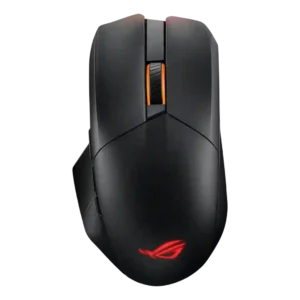

Compare ASUS ROG Chakram X vs Logitech G203 LightSync

P1 ASUS ROG Chakram X
P2 Logitech G203 LightSync

Comparison Takeaways

ASUS ROG Chakram X

Where It Has the Edge

  • portability is 4.3 vs 1.8. Portability was supported by the pouch and versatile connection options.
  • premium feel is 4.9 vs 2.5. Premium feel was a consistent positive, with reviewers describing the mouse as dreamlike, above the competition, or premium.
  • click noise is 4.0 vs 2.7. Click noise was liked in the one review that addressed it, with a dampened sound profile.
  • materials quality is 4.5 vs 3.5. Materials felt premium to reviewers, especially the matte or plastic finish and hand feel.

Logitech G203 LightSync

Where It Has the Edge

  • software stability is 4.0 vs 1.2. Software stability gets limited positive evidence from one review that found G Hub stable and light on system...
  • FPS gaming suitability is 4.3 vs 1.5. FPS gaming suitability is positive for casual and budget play, helped by light weight, precision, and response, but...
  • left and right click quality is 4.4 vs 2.0. Left and right click quality is a major positive, with reviewers praising sharpness, feedback, reliability, tactile snap, and...
  • side button quality is 3.7 vs 1.9. Side button quality is mixed: several reviewers liked their accessibility and click feel, while others found them small,...
Average score
Product 1: ASUS ROG Chakram X
3.7
Product 2: Logitech G203 LightSync
4.0
2.4GHz connectivity
Product 1: ASUS ROG Chakram X
3.9

2.4GHz connectivity was regarded as versatile and generally usable, though one reviewer found its polling-rate drop only adequate for slower games.

Product 2: Logitech G203 LightSync
No score yet
acceleration control
Product 1: ASUS ROG Chakram X
No score yet
Product 2: Logitech G203 LightSync
5.0

Acceleration control receives limited but strong praise from one reviewer who called the sensor acceleration and response times fantastic.

Accuracy and tracking precision
Product 1: ASUS ROG Chakram X
4.6

Tracking accuracy drew strong praise, with reviewers reporting precise aim, useful accuracy tools, and good in-game outcomes.

Product 2: Logitech G203 LightSync
4.5

Reviewers repeatedly found the mouse precise for aiming, targeting, productivity selections, and graphic work, with only one review tying precision limits to esports-level ghosting.

analog joystick usability
Product 1: ASUS ROG Chakram X
2.8

Reviewers were sharply split: some praised the side joystick as useful and customizable, while many found it awkward, stiff, poorly placed, or not worthwhile for gaming.

Product 2: Logitech G203 LightSync
No score yet
balance and weight distribution
Product 1: ASUS ROG Chakram X
4.5

Weight balance was praised more than raw weight, with reviewers noting a planted, stable, or well-balanced feel.

Product 2: Logitech G203 LightSync
4.0

Weighting receives one positive judgment from a reviewer who felt Logitech got the mouse's weighting right.

battery life
Product 1: ASUS ROG Chakram X
4.4

Battery life was a standout strength, with repeated praise for long runtime, though RGB use reduced endurance in one review.

Product 2: Logitech G203 LightSync
No score yet
Bluetooth support
Product 1: ASUS ROG Chakram X
3.7

Bluetooth was useful for productivity and multiple devices but not treated as a serious gaming mode.

Product 2: Logitech G203 LightSync
No score yet
build quality
Product 1: ASUS ROG Chakram X
4.2

Build quality was viewed positively, with reviewers describing the construction as sturdy, proper, or solid.

Product 2: Logitech G203 LightSync
4.4

Build quality is consistently good for the budget segment, with reviewers describing the mouse as solid, sturdy, creak-free, durable-feeling, and well made.

button customization
Product 1: ASUS ROG Chakram X
4.3

Button customization was a major strength, with extensive remapping and joystick mode flexibility, despite software caveats.

Product 2: Logitech G203 LightSync
4.5

Button customization through G Hub is consistently praised as easy, flexible, and broad, covering remaps, commands, profiles, lighting, and per-app behavior.

button responsiveness
Product 1: ASUS ROG Chakram X
4.3

Core button response was generally praised as responsive, fast, and well weighted.

Product 2: Logitech G203 LightSync
4.4

Button responsiveness is one of the clearest strengths, with most reviewers describing quick, snappy, responsive, or fantastic click behavior, though one noted accidental misfires from hand position.

cable flexibility
Product 1: ASUS ROG Chakram X
3.5

Cable feel was mixed: one reviewer praised flexibility, while another found the paracord stiffer than expected.

Product 2: Logitech G203 LightSync
3.6

Cable flexibility is mixed-to-positive, with several reviewers finding the rubber cable flexible or snag-free, while others wanted braided or flex-cable performance.

charging convenience
Product 1: ASUS ROG Chakram X
4.0

Charging convenience was mostly praised for quick charging, Qi support, and accessible charging, with one caveat about keeping USB-C nearby.

Product 2: Logitech G203 LightSync
No score yet
claw grip comfort
Product 1: ASUS ROG Chakram X
4.3

Claw grip support was positive in the reviews that addressed it, especially for medium to large hands.

Product 2: Logitech G203 LightSync
4.1

Claw grip comfort is generally good, especially for the compact low-profile body, though a few reviewers found it only acceptable or hand-position dependent.

click latency
Product 1: ASUS ROG Chakram X
3.0

Click response felt fast, but one reviewer found the light actuation too trigger-happy.

Product 2: Logitech G203 LightSync
4.7

Click latency is a strength across the evidence, with reviewers reporting virtually no lag, no delayed clicks, and unusually fast budget-mouse response.

click noise
Product 1: ASUS ROG Chakram X
4.0

Click noise was liked in the one review that addressed it, with a dampened sound profile.

Product 2: Logitech G203 LightSync
2.7

Click noise is mixed-to-negative: some enjoyed the audible click, but several reviewers found the buttons loud, too clicky, or unsuitable around others.

connection stability
Product 1: ASUS ROG Chakram X
No score yet
Product 2: Logitech G203 LightSync
4.8

Connection stability has limited but positive evidence, with reviewers reporting no connection differences through a dock and no weird disconnection issues over time.

cross-platform compatibility
Product 1: ASUS ROG Chakram X
4.3

Cross-platform or multi-device use was praised for switching between systems and productivity devices.

Product 2: Logitech G203 LightSync
No score yet
dock compatibility
Product 1: ASUS ROG Chakram X
No score yet
Product 2: Logitech G203 LightSync
5.0

Dock compatibility has one positive report: connection behavior stayed unchanged when the mouse was used through a docking station.

DPI range
Product 1: ASUS ROG Chakram X
4.3

The DPI range was viewed as very broad and highly adjustable, though one review considered the top end overkill for most players.

Product 2: Logitech G203 LightSync
4.1

The 200-8,000 DPI range is usually viewed as sufficient and flexible for casual gaming, with some reviewers praising fine increments while noting higher-end mice offer more range.

durability over time
Product 1: ASUS ROG Chakram X
3.5

Durability over time was mixed because switch longevity was praised, while joystick usefulness over time was doubted.

Product 2: Logitech G203 LightSync
4.7

Durability over time is mostly positive in long-use evidence, with reviewers expecting it to last or reporting it still felt new after extended use.

ecosystem integration
Product 1: ASUS ROG Chakram X
4.5

ROG ecosystem integration was praised for syncing the mouse with an ASUS desktop setup.

Product 2: Logitech G203 LightSync
4.3

Ecosystem integration has limited positive evidence, with reviewers liking easy lighting sync and Windows dynamic-lighting support.

ergonomic design
Product 1: ASUS ROG Chakram X
4.3

Ergonomics were generally praised, especially for right-handed and larger-hand use.

Product 2: Logitech G203 LightSync
3.8

Ergonomic design splits reviewers: some found it ergonomic or comfortable for hours, while others disliked the low, flat, non-humped shape.

fingertip grip comfort
Product 1: ASUS ROG Chakram X
3.0

Fingertip comfort was mixed, with one reviewer saying the right side lacked grip while another found the shape could aid fingertip aimers.

Product 2: Logitech G203 LightSync
4.6

Fingertip grip comfort is one of the stronger grip-fit cases, with multiple reviewers calling it comfortable, natural, or awesome for the mouse's compact shape.

firmware reliability
Product 1: ASUS ROG Chakram X
2.0

Firmware reliability had a negative mention because setup forced a firmware update and restart.

Product 2: Logitech G203 LightSync
No score yet
FPS gaming suitability
Product 1: ASUS ROG Chakram X
1.5

FPS suitability was weak overall because competitive misclick concerns and lightweight-performance alternatives were raised.

Product 2: Logitech G203 LightSync
4.3

FPS gaming suitability is positive for casual and budget play, helped by light weight, precision, and response, but one review warned about esports disadvantages.

glide smoothness
Product 1: ASUS ROG Chakram X
4.5

Glide smoothness was one of the most consistent positives, with reviewers praising PTFE feet and slick, smooth motion.

Product 2: Logitech G203 LightSync
4.1

Glide smoothness is usually positive, with many reviewers saying the feet glide smoothly or easily, though a few noted drag or imperfect glide.

grip texture
Product 1: ASUS ROG Chakram X
3.7

Grip texture was mostly helpful, with praise for textured areas, though one review found the hold still not fully confident.

Product 2: Logitech G203 LightSync
3.8

Grip texture is mixed: lightly textured or grippy sides help some reviewers, but others found the smooth plastic slippy or lacking a dedicated foothold.

handedness options
Product 1: ASUS ROG Chakram X
1.8

Handedness was a clear limitation because reviewers noted the mouse favors right-handed users and can be uncomfortable for lefties.

Product 2: Logitech G203 LightSync
3.0

Handedness evidence is mixed because the shell is symmetrical or usable left-handed, but side buttons make it functionally more right-handed.

left and right click quality
Product 1: ASUS ROG Chakram X
2.0

Left and right clicks were divisive: some liked the tactile feel, while others reported accidental activation or heavier clicks.

Product 2: Logitech G203 LightSync
4.4

Left and right click quality is a major positive, with reviewers praising sharpness, feedback, reliability, tactile snap, and even improved in-game firing feel.

lift-off distance
Product 1: ASUS ROG Chakram X
No score yet
Product 2: Logitech G203 LightSync
4.2

Lift-off distance is mixed: one review calls it higher than some budget rivals, while others praise its low lift-off behavior for repositioning and pro-style play.

long-session comfort
Product 1: ASUS ROG Chakram X
3.5

Long-session comfort was mixed, with praise for support and balance but complaints about fatigue or hand pain in specific uses.

Product 2: Logitech G203 LightSync
4.6

Long-session comfort is a clear strength for many reviewers, who reported hours of comfortable use and little hand cramping, especially with suitable hand sizes.

macro support
Product 1: ASUS ROG Chakram X
4.5

Macro support was treated as important for getting full use from the mouse.

Product 2: Logitech G203 LightSync
4.6

Macro support is a strong software benefit, with reviewers repeatedly noting macro creation, command sequences, and integrations that exceed expectations at the price.

materials quality
Product 1: ASUS ROG Chakram X
4.5

Materials felt premium to reviewers, especially the matte or plastic finish and hand feel.

Product 2: Logitech G203 LightSync
3.5

Materials quality is acceptable but not luxurious: some liked the finish or plastic quality, while others emphasized basic plastic and visible coating wear.

MMO gaming suitability
Product 1: ASUS ROG Chakram X
2.8

MMO suitability was mixed: situational bindings helped in one MMO-style game, but misclick concerns remained a serious caveat.

Product 2: Logitech G203 LightSync
3.0

MMO gaming suitability is only moderate because one reviewer found it usable casually but light on buttons for hardcore MMO players.

motion consistency
Product 1: ASUS ROG Chakram X
4.5

Motion control was praised in-game, with reviewers noting smooth tracking and responsive movement.

Product 2: Logitech G203 LightSync
4.3

Motion consistency is generally strong, with reviewers reporting no spinouts, no stutter, clean sensor-test behavior, and consistent movement, apart from one ghosting complaint.

onboard memory
Product 1: ASUS ROG Chakram X
No score yet
Product 2: Logitech G203 LightSync
2.5

Onboard memory is a weakness in the evidence: one review valued it, but two reviews either could not get it working or said profiles were locked to the device.

palm grip comfort
Product 1: ASUS ROG Chakram X
4.0

Palm grip support was mostly positive, especially for smaller or larger palm-grip users depending on the reviewer.

Product 2: Logitech G203 LightSync
3.4

Palm grip comfort is mixed: some reviewers liked the raised rear or palm support, while others found the small, flat shape awkward or finger-dragging.

polling rate
Product 1: ASUS ROG Chakram X
4.0

Wired 8,000Hz polling impressed several reviewers, but others found the difference noticeable only modestly or hard to feel.

Product 2: Logitech G203 LightSync
4.2

Polling-rate evidence is positive but limited: reviewers describe fast reporting or standard 1000Hz behavior that keeps input delay low.

portability
Product 1: ASUS ROG Chakram X
4.3

Portability was supported by the pouch and versatile connection options.

Product 2: Logitech G203 LightSync
1.8

Portability is weak where profiles are concerned, because reviewers disliked failed onboard memory or profiles being locked to the device.

premium feel
Product 1: ASUS ROG Chakram X
4.9

Premium feel was a consistent positive, with reviewers describing the mouse as dreamlike, above the competition, or premium.

Product 2: Logitech G203 LightSync
2.5

Premium feel is limited by the budget shell, with one reviewer saying the mouse felt bland when picked up despite its performance strengths.

profile switching
Product 1: ASUS ROG Chakram X
4.3

Profile switching was praised for making it easy to move between games or setups.

Product 2: Logitech G203 LightSync
4.1

Profile switching is useful when tied to DPI shifts, CPI presets, or game profiles, but one review found profile management unnecessarily painful.

programmable buttons
Product 1: ASUS ROG Chakram X
4.3

Programmable controls were valued for remapping, extra commands, and game-specific actions.

Product 2: Logitech G203 LightSync
3.6

Programmable-button coverage is useful for a basic mouse, but reviewers frame the six-button layout as simple and limited compared with richer gaming mice.

RGB features
Product 1: ASUS ROG Chakram X
3.8

RGB was generally liked for execution, visibility, and dark-room usefulness, though one video review disliked the blurred rear logo effect.

Product 2: Logitech G203 LightSync
4.2

RGB features are widely praised for color, zones, brightness, blending, and customization, but logo control and nighttime brightness drew recurring caveats.

scroll wheel quality
Product 1: ASUS ROG Chakram X
4.2

The scroll wheel received steady praise for grip, smoothness, tactile steps, and satisfying operation.

Product 2: Logitech G203 LightSync
4.2

Scroll wheel quality is mostly positive for notched, defined, grippy scrolling, though two reviews complained about cheap feel or abrasive upward-scroll noise.

sensor performance
Product 1: ASUS ROG Chakram X
4.6

The AimPoint sensor was consistently described as fast, precise, and gaming-capable.

Product 2: Logitech G203 LightSync
4.2

Sensor performance is broadly judged dependable and responsive for budget gaming, though several reviewers note it is not a cutting-edge or premium-class sensor.

shape comfort
Product 1: ASUS ROG Chakram X
3.4

Shape comfort varied by hand size: some found general use comfortable, while larger or smaller hands exposed fit issues.

Product 2: Logitech G203 LightSync
4.1

Shape comfort is broadly positive for small-to-medium hands and claw/fingertip use, but flatter geometry and larger-hand fit create mixed reactions.

side button quality
Product 1: ASUS ROG Chakram X
1.9

Side buttons were a repeated weakness, criticized for being tiny, awkward, too far apart, or easy to hit accidentally.

Product 2: Logitech G203 LightSync
3.7

Side button quality is mixed: several reviewers liked their accessibility and click feel, while others found them small, thin, mushy, or too tiny for comfort.

skate durability
Product 1: ASUS ROG Chakram X
No score yet
Product 2: Logitech G203 LightSync
2.7

Skate durability is a concern area: reviewers worried about small feet, repair-related skate removal, and potential scratching or glide impact.

software stability
Product 1: ASUS ROG Chakram X
1.2

Software stability was a major concern in negative reviews, including failed settings access, endless loading, and background CPU use.

Product 2: Logitech G203 LightSync
4.0

Software stability gets limited positive evidence from one review that found G Hub stable and light on system resources.

software usability
Product 1: ASUS ROG Chakram X
2.8

Software usability was highly polarized, from easy and user-friendly to frustrating, slow, or deeply disliked.

Product 2: Logitech G203 LightSync
4.3

Software usability is one of the strongest attributes, with G Hub described as comprehensive, intuitive, easy, flexible, and feature-rich, despite one dislike of extra software.

surface compatibility
Product 1: ASUS ROG Chakram X
4.0

Surface calibration was praised in one review as a useful way to tune performance for a mouse pad.

Product 2: Logitech G203 LightSync
3.8

Surface compatibility is adequate, with the mouse working on desk or mat surfaces, but one review said a bare desk was less smooth than a mouse pad.

switch durability
Product 1: ASUS ROG Chakram X
4.3

Switch longevity was viewed positively because reviewers highlighted the high click rating and lasting stock switches.

Product 2: Logitech G203 LightSync
3.5

Switch durability is mixed: one long-term owner reported occasional double-clicking after extended use, while other evidence found the clicks stayed snappy or only raised durability as an uncertainty.

switch feel
Product 1: ASUS ROG Chakram X
3.8

Switch feel was mostly liked for tactile or satisfying feedback, though one review found the lighter switches too sensitive.

Product 2: Logitech G203 LightSync
4.5

Switch feel is usually praised as crisp, tactile, light, distinct, and satisfying, making the main clicks feel better than expected for the price.

value for money
Product 1: ASUS ROG Chakram X
3.1

Value was mixed: some saw the feature set as worth it, while others found the high price hard to justify given flaws.

Product 2: Logitech G203 LightSync
4.7

Value for money is the strongest consensus attribute, with nearly every reviewer praising the G203 as affordable, budget-friendly, or unusually capable for the price.

weight
Product 1: ASUS ROG Chakram X
2.6

Weight was one of the main compromises: reviewers often called it heavy, though one found the added mass acceptable for its features.

Product 2: Logitech G203 LightSync
3.9

Weight opinions depend on preference: many reviewers liked the light or fair weight, while others found it slightly heavy for its size or not ultralight.

weight tuning
Product 1: ASUS ROG Chakram X
2.0

Lack of interchangeable weights was noted as a missed opportunity by a reviewer who otherwise liked the mouse.

Product 2: Logitech G203 LightSync
No score yet
wireless latency
Product 1: ASUS ROG Chakram X
3.8

Wireless latency was mixed by mode: 2.4GHz was usable or strong, while slower-paced caveats appeared in one review.

Product 2: Logitech G203 LightSync
No score yet
wireless performance
Product 1: ASUS ROG Chakram X
4.5

Wireless performance was praised when connected through the higher-performance wireless modes, especially for aiming and speed.

Product 2: Logitech G203 LightSync
No score yet