Average score
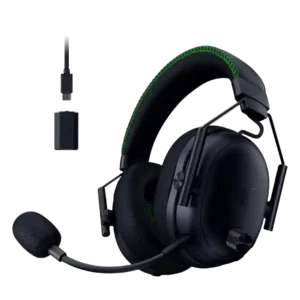
Razer BlackShark V3 Pro
4.1
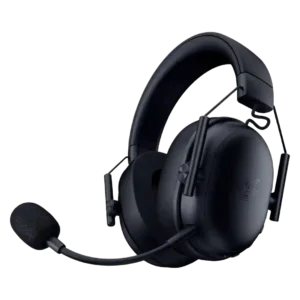
Razer BlackShark V3 X HyperSpeed
4.0
Cable quality
Razer BlackShark V3 Pro
2.0
Cable quality had one clear negative note: the USB-C-to-3.5mm cable produced distracting cable noise when brushing clothing.
Razer BlackShark V3 X HyperSpeed
5.0
The included charging and port-extension cables earned unusually strong praise for feeling smooth, practical, and well made.
Multipoint connectivity reliability
Razer BlackShark V3 Pro
4.5
Multipoint and simultaneous audio reliability was mostly strong, with reviewers noting calls and dual-device mixing worked well; one found the switching implementation clunky.
Razer BlackShark V3 X HyperSpeed
2.0
A key limitation is the inability to listen to PC/2.4GHz audio and Bluetooth audio simultaneously, which matters for buyers wanting true dual-source playback.
Volume output
Razer BlackShark V3 Pro
2.7
One reviewer found the available volume headroom initially disappointing until changing PC audio settings.
Razer BlackShark V3 X HyperSpeed
5.0
Output can get plenty loud while retaining the generally good sound character reported by the same buyer.
Dongle
Razer BlackShark V3 Pro
2.6
Dongle feedback was the clearest hardware complaint: most reviewers disliked the wired/bulky dongle, though one praised its technology and range.
Razer BlackShark V3 X HyperSpeed
4.7
The USB-C wireless dongle is a standout practical detail: compact, unobtrusive, and repeatedly described as simply working without blocking nearby ports.
Active noise cancellation
Razer BlackShark V3 Pro
4.1
ANC drew strong praise from many reviewers for blocking fans, AC, transit, or household noise, but some found it weaker or dependent on seal and pad design.
Razer BlackShark V3 X HyperSpeed
2.0
ANC is a clear omission for noise-sensitive buyers. The customers who called it out said passive isolation was not enough to fully shut out busy surroundings.
Soundstage width
Razer BlackShark V3 Pro
4.1
Soundstage impressions were mostly positive for gaming, with reviewers hearing wider or more open presentation, though one found it narrower and another said it was not open-back wide.
Razer BlackShark V3 X HyperSpeed
2.0
The virtual 7.1 processing did not convincingly widen the presentation for the expert who evaluated it; instead, it sounded thin and artificial.
Treble clarity
Razer BlackShark V3 Pro
2.9
Treble was the most repeated audio caveat: several reviewers found harshness, distortion, spiky peaks, or fatiguing high-end energy despite some tunability.
Razer BlackShark V3 X HyperSpeed
4.3
Customers who broke out the frequency ranges praised clear, detailed highs, but the expert assessment was more restrained and found the extreme treble somewhat dull.
Clamping force comfort
Razer BlackShark V3 Pro
4.5
Clamp comfort evidence was limited but positive, with one reviewer appreciating the reduced clamp force for longer wear.
Razer BlackShark V3 X HyperSpeed
3.2
Clamp is highly head-shape dependent. Several users praised the balanced, secure pressure, while others reported squeezed ears, headaches, or pain within minutes.
Included accessories
Razer BlackShark V3 Pro
4.5
Included accessories had limited positive evidence, with one reviewer appreciating the included 3.5mm cable for passive use.
Razer BlackShark V3 X HyperSpeed
3.3
The box can be impressively complete, with useful cables, adapters, and a compact dongle. Two customers, however, received units missing the microphone windscreen/foam.
Preset EQ profile quality
Razer BlackShark V3 Pro
2.0
Preset EQ evidence was negative from SoundGuys, especially for the Music preset, which they said worsened balance and listening quality.
Razer BlackShark V3 X HyperSpeed
3.3
Preset EQ quality is mixed. One buyer found some gaming profiles harsh or muddy, while another liked having several presets alongside custom EQ.
Earpad replacement ease
Razer BlackShark V3 Pro
3.8
Earpad replacement evidence was limited but mildly positive because removable pads support repairability, even if the clip mechanism could be better.
Razer BlackShark V3 X HyperSpeed
5.0
The pads peel off at the edge, making replacement straightforward when compatible pads are available.
App
Razer BlackShark V3 Pro
4.2
The companion apps and software were useful for EQ and mobile/PC control, but one reviewer found the app workflow awkward in simultaneous mode.
Razer BlackShark V3 X HyperSpeed
3.0
The mobile app can be handy for EQ and basic settings, but the software experience is uneven. Some found it useful and easy, while others described it as limited, confusing, or needlessly bloated.
Detachable microphone convenience
Razer BlackShark V3 Pro
3.0
Detachable microphone convenience had limited evidence and was mildly negative because one reviewer disliked detachable mic design as a personal preference.
Razer BlackShark V3 X HyperSpeed
4.2
A detachable boom is convenient for mobile or non-chat use and one owner especially liked being able to remove it. Another preferred a permanently attached flip-up design and worried about jack wear.
Noise isolation (passive)
Razer BlackShark V3 Pro
3.2
Passive isolation was mixed because the cloth pads and fit can leak noise, though one reviewer thought passive isolation was enough for typical gaming.
Razer BlackShark V3 X HyperSpeed
4.4
Passive isolation is usually effective, with many users saying the large cushions block substantial outside noise. One expert found the seal much leakier to exterior sound, so results may depend on fit.
Ear cup swivel/rotation range
Razer BlackShark V3 Pro
4.1
The added swivel/rotation was welcomed as a comfort and fit improvement, even if the headset still does not rotate fully flat.
Razer BlackShark V3 X HyperSpeed
3.0
The cups move freely enough for one expert despite lacking full swivel, but another owner specifically disliked that they do not rotate.
Microphone noise reduction
Razer BlackShark V3 Pro
3.7
Mic noise reduction was highly variable, from excellent background suppression to complaints about weak rejection or EQ/noise tools changing the voice tone.
Razer BlackShark V3 X HyperSpeed
4.8
Mic noise reduction is a strong point, with multiple users praising clean voice pickup and effective suppression of keyboard noise, static, or background interference.
Frequency response accuracy
Razer BlackShark V3 Pro
3.6
Frequency response was seen as improved but imperfect, with good tonal accuracy or enjoyable tuning offset by V-shaped balance and treble/bass issues.
Razer BlackShark V3 X HyperSpeed
4.5
The tuning is praised for staying balanced rather than chasing exaggerated impact. Strong bass can coexist with clear detail, though one expert still found the extremes a little dull.
Midrange clarity
Razer BlackShark V3 Pro
4.1
Midrange comments leaned positive, with reviewers noting natural voices, present mids, and improved accuracy compared with earlier tuning.
Razer BlackShark V3 X HyperSpeed
5.0
The midrange stays full and clear in the strongest customer feedback, helping voices and game detail remain easy to hear.
Battery
Razer BlackShark V3 Pro
4.1
Battery life was mostly praised as long or solid, though some reviewers noted feature use can reduce runtime and that the 70-hour claim is not always the whole story.
Razer BlackShark V3 X HyperSpeed
5.0
Battery life is one of the clearest strengths, repeatedly lasting through long sessions and often multiple days between charges. One expert exceeded the 70-hour claim in real use.
Weight comfort
Razer BlackShark V3 Pro
4.2
Weight comfort was generally good because the headset does not feel too heavy, though a few reviewers noted lighter alternatives or extra weight from new features.
Razer BlackShark V3 X HyperSpeed
5.0
The lightweight feel is nearly universally praised, often described as disappearing on the head even during long sessions.
Build quality
Razer BlackShark V3 Pro
4.8
Build quality was strongly praised across reviews, with comments on sturdiness, premium finish, improved robustness, and well-built construction.
Razer BlackShark V3 X HyperSpeed
4.0
Most owners describe the headset as solid, well made, and impressively finished for the price. Durability is less consistent, with isolated reports of plastic feel, broken controls, and a unit breaking after a short drop.
Replaceable earpads
Razer BlackShark V3 Pro
4.5
Replaceable earpads had limited positive evidence, with one reviewer noting the pads are user-serviceable.
Razer BlackShark V3 X HyperSpeed
3.8
The pads themselves are designed to come off easily, which is useful for maintenance. One customer still wished replacement cushions were more readily offered as part of the ownership experience.
Spatial audio
Razer BlackShark V3 Pro
4.3
Spatial audio was usually positive for immersion and positional depth, though some reviewers preferred stereo for competitive play or found ANC narrowed the presentation.
Razer BlackShark V3 X HyperSpeed
3.6
Spatial audio is sharply mixed. Some players love 7.1 for gaming and directional immersion, while others hear little benefit, dislike the artificial sound, or resent extra software and paid processing.
Ear cup padding quality
Razer BlackShark V3 Pro
4.5
Ear cup padding was praised for breathability, sweat control, and softness, though one reviewer found the pads getting warm after about an hour.
Razer BlackShark V3 X HyperSpeed
3.8
Padding feedback is mostly positive, with many calling the cushions plush, soft, breathable, or cozy. Fit-sensitive users sometimes found the pads too thin, too small, rough inside, or lacking enough depth.
Microphone quality for calls
Razer BlackShark V3 Pro
3.6
Call and chat mic quality was split: PCMag praised Discord clarity after EQ, while other reviewers found it muffled or merely usable.
Razer BlackShark V3 X HyperSpeed
4.2
Most buyers found the mic clear, crisp, or unusually good for a wireless gaming headset. The main counterpoint is output level: an expert and several users found it quiet, thin, or inconsistent across apps and platforms.
Value for money
Razer BlackShark V3 Pro
3.7
Value was sharply split: some reviewers said the premium was justified or competitive, while others preferred cheaper V2 or non-Pro alternatives.
Razer BlackShark V3 X HyperSpeed
4.3
Value is one of the strongest themes, especially around sale prices from roughly $75 to $100 and the mix of wireless features, comfort, and battery life. Lower scores come from buyers bothered by software paywalls, weak sound, or durability.
Stability
Razer BlackShark V3 Pro
3.5
Stability was mixed: one reviewer had game-audio reliability issues, while another praised the wireless range and signal performance.
Razer BlackShark V3 X HyperSpeed
4.1
The 2.4GHz connection is usually rock-solid with few or no dropouts. A smaller set of users reported micro-pauses, Bluetooth glitches, or frequent disconnects.
Comfort during long use
Razer BlackShark V3 Pro
4.7
Comfort was one of the strongest consensus positives, with many reviewers wearing it for long sessions without fatigue, pressure, or discomfort.
Razer BlackShark V3 X HyperSpeed
4.2
Long-session comfort is a major strength for most buyers thanks to the low weight and soft padding. A meaningful minority struggled with tight clamping, limited ear space, or rough inner material.
Fit/seal reliability
Razer BlackShark V3 Pro
3.4
Fit and seal were mixed: one reviewer liked the seal, while SoundGuys found the yoke and fabric made a reliable seal difficult.
Razer BlackShark V3 X HyperSpeed
3.9
Fit is excellent for many users, but size extremes can be awkward. Some smaller-headed users found the headset too loose even at minimum adjustment, while others felt the ear space was cramped.
Headband adjustability
Razer BlackShark V3 Pro
4.2
Headband adjustment had limited positive evidence, with one reviewer finding the sliding earcup mechanism refreshingly different and effective.
Razer BlackShark V3 X HyperSpeed
3.8
The familiar BlackShark adjustment system generally holds its position and offers useful range, but the mechanism can feel clunky and does not fit every head size equally well.
Button control usability
Razer BlackShark V3 Pro
3.7
Physical controls were generally useful and snappy, but reviewers disagreed on usability, with some loving them and others finding buttons hard to distinguish or unintuitive.
Razer BlackShark V3 X HyperSpeed
4.0
The physical controls are usually simple, tactile, and convenient, especially for mute and volume. There are smaller usability complaints about finding the mute button quickly, plus one broken volume wheel.
Sidetone adjustment quality
Razer BlackShark V3 Pro
3.2
Sidetone adjustment was mixed: some reviewers found it fuzzy or unpleasant, while others liked its real-time performance and usability.
Razer BlackShark V3 X HyperSpeed
3.5
Sidetone is useful at moderate settings, but the control experience is imperfect: placement can feel odd and the highest level can be excessively loud or briefly finicky.
Game/Chat balance control
Razer BlackShark V3 Pro
4.7
Game/chat balance control was praised as an extremely welcome and practical control, especially for quickly shifting focus between chat and gameplay.
Razer BlackShark V3 X HyperSpeed
5.0
The dedicated game/chat balance wheel is a premium-style control that an expert was especially pleased to find on a sub-$100 headset.
Microphone
Razer BlackShark V3 Pro
3.8
Microphone quality was the most divisive feature: some reviewers found it clear or excellent, while others saw it as muffled, stuffy, or a downgrade from V2 Pro.
Razer BlackShark V3 X HyperSpeed
3.5
The boom mic is functional overall: one expert found it merely serviceable, while another user said positioning took a moment but worked well once adjusted.
Equalizer customization
Razer BlackShark V3 Pro
4.4
EQ customization was a major strength, with reviewers praising onboard EQ, 10-band controls, Synapse depth, and game-specific tuning flexibility.
Razer BlackShark V3 X HyperSpeed
4.2
Custom EQ is one of the most useful software features and can noticeably improve thin or dry stock tuning. Frustrations center on missing mic-EQ options and some EQ features being restricted or paywalled.
Positional audio accuracy
Razer BlackShark V3 Pro
4.7
Positional audio was a standout strength, with reviewers repeatedly locating footsteps, gunshots, enemies, and environmental cues accurately.
Razer BlackShark V3 X HyperSpeed
5.0
Directional gaming performance is consistently excellent in the comments that test it, especially for footsteps and locating enemies moving from behind or beside the player.
Wireless latency
Razer BlackShark V3 Pro
4.7
Wireless latency was one of the strongest technical positives, repeatedly described as ultra-low, imperceptible, and among the fastest available.
Razer BlackShark V3 X HyperSpeed
5.0
Wireless latency is exceptionally strong across every opinionated report, with repeated descriptions of no noticeable lag or near-zero delay in gaming.
Software/setup simplicity
Razer BlackShark V3 Pro
3.3
Software/setup simplicity was mixed to negative: setup could be easy, but Synapse and mode switching were described as finicky, clunky, or buggy.
Razer BlackShark V3 X HyperSpeed
3.0
Setup is one of the most divisive parts of the headset. Some users were running in minutes, while others fought Synapse, registration, multiple apps, long setup steps, paywalls, or confusing console configuration.
Instrument separation
Razer BlackShark V3 Pro
4.7
Instrument separation and detail were praised, especially by reviewers who heard clearer instruments, better tonal separation, and less congestion than older models.
Razer BlackShark V3 X HyperSpeed
4.5
In busy gameplay, the drivers separate cues well enough to make individual movement and positioning easier to follow when the scene is not overwhelmed by effects.
Hinge durability
Razer BlackShark V3 Pro
3.7
Hinge durability evidence was mixed: reviewers noted smoother or reinforced parts, but one still wished the earlier weak spot had been better addressed.
Razer BlackShark V3 X HyperSpeed
3.5
The adjustment rods held their tension after weeks of use, although the reviewer noted that BlackShark mechanisms can loosen somewhat over time.
Sound quality
Razer BlackShark V3 Pro
4.4
Reviewers broadly praised the headset for strong gaming sound, with several calling it fantastic or greatly improved, while a few found it less convincing for music or all-around use.
Razer BlackShark V3 X HyperSpeed
4.5
Most buyers rate the sound highly for gaming, with clear detail and strong directional performance. The less enthusiastic reports describe it as hollow, metallic, thin, or less lively for music and compared with pricier BlackShark models.
Bass performance
Razer BlackShark V3 Pro
4.0
Bass was generally viewed as punchy and useful for games, though some reviewers said it was only above average, too boosted, or not a true bass-monster.
Razer BlackShark V3 X HyperSpeed
3.9
Bass is generally satisfying, with several buyers praising its punch and depth without masking detail. A few listeners found the low end dull, dry, or weak compared with richer-sounding alternatives.
Bluetooth
Razer BlackShark V3 Pro
4.5
Bluetooth was consistently valued for simultaneous or extra-device audio, with reviewers calling it a huge win or a blessing despite some implementation quirks.
Razer BlackShark V3 X HyperSpeed
4.5
Bluetooth is useful for phone use and easy switching alongside the 2.4GHz connection. Most experiences were positive, though one buyer reported recurring Bluetooth chopping and glitches.
Design and Aesthetics
Razer BlackShark V3 Pro
4.7
Design and aesthetics were highly praised for the aviation-inspired look, premium finish, sleek styling, and recognizable BlackShark identity.
Razer BlackShark V3 X HyperSpeed
4.7
The clean BlackShark shape, matte finish, and restrained non-RGB look are consistently attractive to the people who commented on design.
Connectivity versatility
Razer BlackShark V3 Pro
4.6
Connectivity versatility was a major selling point because reviewers valued Bluetooth, 2.4GHz, USB, analog, simultaneous audio, and broad device flexibility.
Razer BlackShark V3 X HyperSpeed
4.6
Wireless flexibility is a major appeal, from 2.4GHz and Bluetooth to easy phone switching and freedom from cables. It is less versatile for buyers expecting simultaneous dual-source audio or seamless compatibility with every console.
Multi-platform compatibility
Razer BlackShark V3 Pro
5.0
Multi-platform compatibility had limited but very positive evidence, with one reviewer saying it could cover an entire gaming ecosystem.
Razer BlackShark V3 X HyperSpeed
5.0
The headset worked well across combinations of PC, PlayStation, phones, and other devices in the positive compatibility reports, making it useful beyond a single setup.
Audio-video sync accuracy
Razer BlackShark V3 Pro
5.0
Audio-video sync evidence was limited but excellent, with SoundGuys reporting no noticeable delay on the low-latency wireless connection.
Razer BlackShark V3 X HyperSpeedNo score yet
Charging
Razer BlackShark V3 ProNo score yet
Razer BlackShark V3 X HyperSpeed
5.0
Charging is quick over USB-C, complementing the already long battery life well.
Console compatibility limitations
Razer BlackShark V3 ProNo score yet
Razer BlackShark V3 X HyperSpeed
1.5
Console flexibility is a weak point: one expert noted separate PlayStation and Xbox editions, and one customer could not connect the unit they bought to either Xbox Series S or PS5.
Firmware update support
Razer BlackShark V3 ProNo score yet
Razer BlackShark V3 X HyperSpeed
1.5
Firmware support is a sore point in the one detailed complaint: the owner saw the lack of post-launch updates as a major frustration and wanted ongoing fixes and refinement.
Footstep sound level scaling feature
Razer BlackShark V3 Pro
3.6
Footstep scaling divided reviewers: some liked it as a competitive extra, while others found it gimmicky, game-dependent, or disruptive to other sounds.
Razer BlackShark V3 X HyperSpeedNo score yet
Glasses and hat compatibility
Razer BlackShark V3 ProNo score yet
Razer BlackShark V3 X HyperSpeed
4.7
Glasses wearers were consistently positive, saying the headset sits well without excessive pressure and remains comfortable for long sessions.
Maximum volume clarity
Razer BlackShark V3 Pro
3.9
Maximum-volume clarity was mixed: one reviewer heard off-sounds at higher volume or peaks, while another heard no crackle or distortion even very loud.
Razer BlackShark V3 X HyperSpeedNo score yet
Microphone port design
Razer BlackShark V3 ProNo score yet
Razer BlackShark V3 X HyperSpeed
2.0
The microphone jack works as a 3.5mm connection, but one owner still disliked the irregular port shape and listed it among the headset’s drawbacks.
Overall satisfaction
Razer BlackShark V3 ProNo score yet
Razer BlackShark V3 X HyperSpeed
4.2
Overall sentiment is strongly positive, especially around comfort, battery life, wireless performance, and value. The negative experiences cluster around mic volume, clamping, software friction, console compatibility, and isolated durability problems.
Packaging quality
Razer BlackShark V3 ProNo score yet
Razer BlackShark V3 X HyperSpeed
3.5
Packaging experiences are split: one buyer was especially pleased with the presentation, while another found the newer packaging unusually plain.
Portability/foldability
Razer BlackShark V3 Pro
2.5
Portability was weak because the headset does not fold or rotate flat and is not ideal for travel or handheld setups with the dongle.
Razer BlackShark V3 X HyperSpeedNo score yet
Replaceable ear plates
Razer BlackShark V3 Pro
3.8
Replaceable ear plates were viewed as easy and potentially cool, but some reviewers considered them limited or not very useful out of the box.
Razer BlackShark V3 X HyperSpeedNo score yet
Transparency mode quality
Razer BlackShark V3 Pro
4.0
Transparency or ambient mode had limited but positive evidence, with one reviewer valuing it for hearing surroundings while wearing the headset.
Razer BlackShark V3 X HyperSpeedNo score yet
USB-C
Razer BlackShark V3 ProNo score yet
Razer BlackShark V3 X HyperSpeed
4.5
USB-C is a practical strength here, supporting the headset's very fast charging experience.
Wireless range
Razer BlackShark V3 ProNo score yet
Razer BlackShark V3 X HyperSpeed
4.7
Range is usually very strong, covering rooms or even a house without signal loss. One owner called it merely okay, but the broader pattern is positive.
Xbox compatibility
Razer BlackShark V3 ProNo score yet
Razer BlackShark V3 X HyperSpeed
1.0
The customers who specifically tried Xbox reported failure to connect, making Xbox use a significant caution unless the exact edition and setup are confirmed.