- Review score
- 4.3
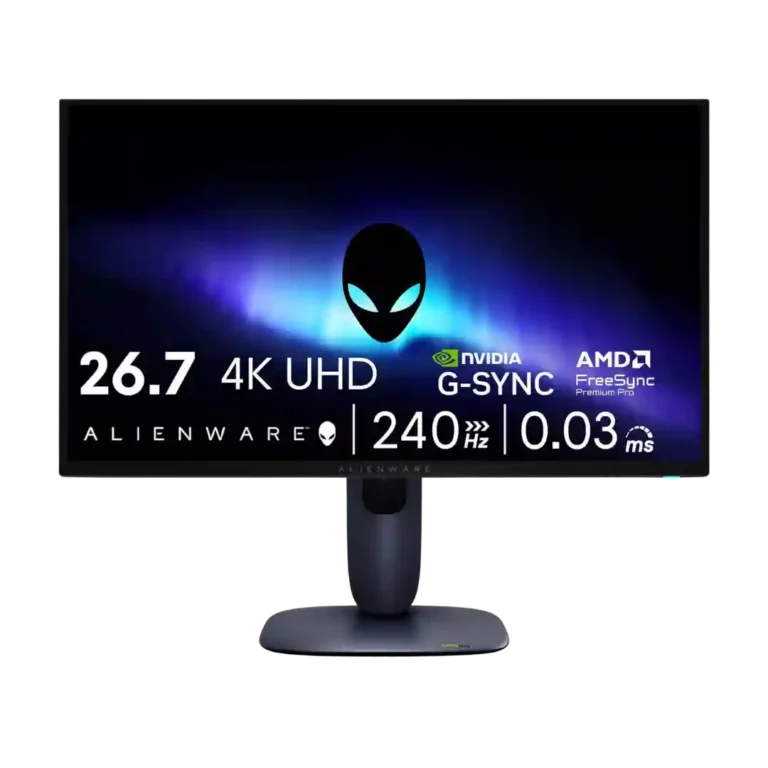
Alienware 27 4K Gaming Monitor AW2725Q Review
Bottom Line
Choose the AW2725Q if you want a compact 27-inch 4K QD-OLED with elite sharpness, OLED contrast, and smooth 240Hz gaming. Skip it if you need high SDR brightness, KVM/USB-C display convenience, speakers, or DisplayPort 2.1.
Best for PC or console gamers who want a compact 27-inch OLED with 4K sharpness, vivid HDR-leaning contrast, and very smooth 240Hz motion. It also fits users who value desk space and text clarity more than a larger, more immersive screen.
Not for users who need a bright-room productivity hub with KVM, one-cable USB-C laptop docking, built-in speakers, or DisplayPort 2.1. It is also harder to justify for people who already own a strong OLED monitor or mainly play at lower resolutions.
The Alienware AW2725Q’s strongest case is its 27-inch 4K QD-OLED panel: reviewers repeatedly praised the crisp pixel density, saturated color, deep blacks, fast response, and smooth 240Hz gaming. It also earns credit for a refreshed compact design, useful ergonomic stand, solid HDMI 2.1 console support, and relatively attractive pricing versus rival 27-inch 4K OLEDs. The tradeoff is that Alienware trimmed convenience features to hit that value point. Bright-room SDR use, DisplayPort 2.1, KVM, USB-C display input, stronger USB-C charging, and built-in audio all came up as limitations, so the monitor feels more like a focused gaming display than a do-everything desktop hub.
Feature Scorecards
Summary
47 reviewed features- Very positive 4.5-5.0 55% 26 features
- Positive 3.5-4.4 28% 13 features
- Neutral 2.5-3.4 13% 6 features
- Negative 1.5-2.4 4% 2 features
- Very negative below 1.5 0% 0 features
Pros
-
Sharpness was one of the clearest areas of agreement, with many reviewers calling the 27-inch 4K image and text exceptionally crisp.
-
Response time was described as essentially instant, with reviewers tying it to sharp motion and excellent gaming feel.
-
Contrast was universally praised, with reviewers emphasizing OLED’s deep range and strong visual depth.
-
Ghosting control was excellent, with reviewers reporting no ghosting, tearing, or inverse ghosting in use.
-
HDMI 2.1 support was praised as enough to get the best out of current consoles and support the monitor’s main gaming features.
-
Local dimming was treated as a strength because OLED’s per-pixel control minimized blooming in high-contrast scenes.
-
Overdrive behavior was effectively excellent because OLED response consistency created a single-overdrive-style experience.
-
Viewing angles received strong praise in the technical review that evaluated them directly.
-
Motion clarity was one of the strongest points, with reviewers repeatedly noting smoothness, minimal blur, and reactive performance.
-
Input lag was consistently praised as low or immediate, making the monitor feel responsive in gaming.
-
The QD-OLED/OLED panel drew broad praise for vivid image quality and was treated as the core strength of the monitor.
-
Reviewers consistently praised the 4K resolution for making the 27-inch screen exceptionally crisp and detailed.
-
Console compatibility was praised thanks to HDMI support and strong PS5/Xbox signal handling, despite the panel exceeding console frame-rate needs.
-
Black levels were a major strength in darker rooms, though some reviewers noted raised blacks in brighter environments.
-
Adaptive sync and G-Sync/FreeSync support were praised for smoothing frames and reducing tearing.
-
VRR compatibility was strong overall, with broad format support and smooth results, despite one review noting OLED VRR flicker in some dark scenes.
-
Screen uniformity was rated positively, with reviewers noting good uniformity and strong color consistency.
-
Single-player cinematic gaming was a clear strength because the monitor combines high resolution, HDR, deep blacks, and fast response.
-
Color gamut and saturation were repeatedly praised, especially for gaming, HDR, and vivid media.
-
PC gaming compatibility was strong when paired with capable hardware, though reviewers stressed that 4K/240Hz needs a powerful system.
-
Design and aesthetics were broadly praised for the new blue AW30 look, compact stand, and cleaner desk presence.
-
HDR performance was widely liked for OLED contrast, rich highlights, and cinematic depth, though brightness limits kept it from being flawless.
-
The 240Hz refresh rate was considered smooth and future-proof for most users, even if faster esports-focused OLEDs exist.
-
Stand adjustability was praised for stability, small footprint, and full ergonomic movement.
-
Premium feel was strong, with reviewers calling the stand premium and the finish above typical gaming displays.
-
VESA compatibility was positively assessed in the review that used it on a monitor arm without problems.
-
Color accuracy was generally strong out of the box, but calibration and mode-specific caveats appeared in more technical reviews.
-
Cable management was consistently viewed positively, from the stand channel to the integrated power supply and tidier setup.
-
The 27-inch size was seen as compact and desk-friendly, though some reviewers preferred larger 32-inch displays for immersion.
-
Value was broadly positive relative to competing 27-inch 4K OLEDs, but reviewers still stressed that the monitor is expensive.
-
OSD usability was mostly positive, though one reviewer still found the on-screen display awkward.
-
Competitive gaming suitability was strong for 4K/240Hz responsiveness, though hardcore esports players may still prefer faster lower-resolution panels.
-
Build quality was mostly strong, with stable construction and premium materials, though one review warned the finish marks or scratches easily.
-
Gaming presets and visibility modes were useful but not central, with reviewers noting practical modes for different genres and visibility needs.
-
Heat management was viewed positively, with the active fan described as inaudible in normal use.
-
Black-equalizer-like visibility tools were considered useful for games with poor visibility or reticle settings.
-
Port selection was generally adequate to good, but reviewers often framed it as trimmed versus pricier rivals.
-
Reliability evidence was mixed: one reviewer had a wake bug, while a six-month update reported no burn-in or image retention.
-
Reflection handling was mixed: glare control could be good, but glossy QD-OLED behavior and bright rooms could raise blacks or reflections.
Cons
-
Productivity versatility was mixed: excellent text clarity helped, but burn-in risk, no KVM, and weak USB-C limited work setups.
-
Brightness was the most mixed display trait: some reviewers found HDR or perceived brightness strong, but SDR and bright-room use were repeated concerns.
-
PiP/PbP support exists, but one reviewer framed it as less useful than full KVM functionality.
-
USB hub functionality was mixed to weak: convenient ports helped, but 15W USB-C, no USB-C display input, and no KVM were recurring limits.
-
DisplayPort connectivity was a weakness because reviewers repeatedly criticized the lack of DisplayPort 2.1.
-
Eye comfort was a caveat because one reviewer warned PWM-sensitive users could still experience fatigue or headaches.
-
Software support was criticized by one reviewer, mainly for Alienware Command Center nags and poor layout.
-
Built-in speaker support was poor because multiple reviewers noted there are no integrated speakers, sometimes alongside no headphone jack.
FAQ
Is the Alienware AW2725Q image quality good?
Yes. Reviewers repeatedly praised the 27-inch 4K QD-OLED panel for sharpness, vibrant color, deep blacks, and strong contrast.
Is 240Hz worth it on this monitor?
It is most useful with a powerful PC that can push high frame rates at 4K. Reviewers still found the monitor smooth and responsive, but consoles top out below the panel’s full 240Hz capability.
Is brightness a problem?
Brightness is the biggest display caveat. Some reviewers liked HDR highlights or found brightness sufficient, but many noted lower SDR brightness or weaker performance near direct sunlight.
Is it good for productivity work?
It can be, mainly because the 166 PPI 4K panel gives very sharp text. The downsides are OLED burn-in risk, no KVM, no USB-C display input, and limited USB-C charging.
How are the ports?
The HDMI 2.1 support and basic USB hub are useful, but reviews repeatedly called out the lack of DisplayPort 2.1, KVM, and proper USB-C display/charging support.
Should existing OLED monitor owners upgrade?
Not automatically. Reviewers saw the AW2725Q as a great first OLED or compact 4K upgrade, but less compelling if you already own a strong OLED, especially a larger 32-inch or ultrawide model.
Sample Expert Reviews We Analyzed
These are a few of the reviews included in our analysis.
Video Reviews
- Review score
- 4.5
- Review score
- 4.9
- Review score
- 4.0
Article Reviews
- Review score
- 4.4
- Review score
- 4.1
- Review score
- 3.9
- Review score
- 4.0
- Review score
- 4.4
Compared in Reviews
Products reviewers directly compared with this model, grouped into quick takeaways.
Alienware 34 Curved QD-OLED (AW3423DWF)
- Similar: brightness characteristics The reviewer compares the AW2725Q's brightness specs to Alienware's older 34-inch curved QD-OLED.
Alienware’s AW2725DF
- Better: refresh rate and price The reviewer says the AW2725DF remains faster and cheaper, limiting the upgrade case for existing OLED owners.
Asus pg27 ucdm
- Better: calibration and feature set The reviewer says the Asus model is better overall, while the Alienware is the value-oriented choice.
Consider This Instead
If you want better DisplayPort connectivity
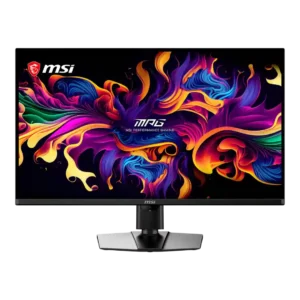
Choose MSI MPG 322UR QD-OLED X24. It scores 5.0 vs 2.8 for DisplayPort connectivity, with a 4.4 overall score.
Top Monitors to Consider
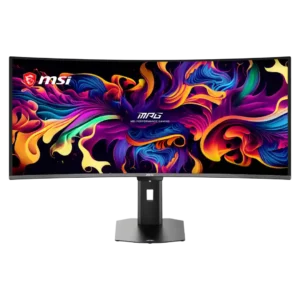
Best for exceptional 4K HDR, accurate color, fast 240Hz gaming, and strong work connectivity. Skip it if you need built-in speakers, ultrawide immersion, television-level HDR brightness, or a budget-friendly upgrade.
Pros: panel type, response time
Cons: built-in speakers, curved screen immersion