Dreametech D10 plus Robot Vacuum and Mop Review
Bottom Line
Choose the Dreame D10 Plus for a budget self-empty robot with strong hard-floor pickup and fast mapping. Skip it if you need reliable cord and clutter avoidance or expect deep carpet cleaning and scrub-level mopping.
Busy households with mostly hard floors and reasonably tidy rooms who want hands-off daily maintenance, room-by-room scheduling, and an auto-empty dock without flagship pricing.
Homes with lots of cords, toys, or tight docking space, or anyone expecting true obstacle recognition, deep carpet extraction, or scrub-style mopping.
Across these reviews, the D10 Plus stands out for strong debris pickup on hard floors and solid everyday carpet cleaning for the money, paired with LiDAR mapping that enables room and zone scheduling and orderly coverage. The self-empty dock cuts down on hands-on bin emptying and keeps dust contained, but the station is bulky and the emptying burst is loud. The biggest tradeoff is intelligence: cord and clutter avoidance is inconsistent and some testers reported frequent rescues or docking misses unless floors were prepped. Its mop is a simple damp-pad wipe that helps with maintenance but will not scrub out stains, and it adds ongoing pad, filter, and bag upkeep.
Scored Features
Pros
-
Hair pickup is excellent, with multiple tests reporting near-total removal on carpet when suction is appropriately set.
-
High-pile performance can be very strong in controlled tests, including pet-hair pickup, but real-world clutter and fine dust can still require higher suction and occasional manual help.
-
In at least one particulate test during auto-emptying, the system did not noticeably increase airborne dust, suggesting good sealing and containment.
-
Auto-emptying generally leaves the onboard bin nearly clean and reduces mess versus manual dumping, though moving the robot can let some debris fall from internal cavities.
-
Cliff and anti-drop sensors worked reliably in testing, with reviewers comfortable letting it clean near stair edges.
-
Repeatedly framed as a standout value under about $400, with some reviewers calling its feature set and performance closer to pricier models.
-
Reviews consistently report strong pet-hair pickup and the convenience of self-emptying for fur, though keeping cords and clutter off the floor helps prevent interruptions.
-
Auto-emptying was generally effective at clearing dense debris, and one review credits a DualBoost-style airflow design with reducing clogs during emptying.
-
With schedules, room targeting, and auto-emptying, day-to-day use can be largely hands-off, but it works best when floors are prepped and mopping is treated as a light maintenance feature.
-
Bagged self-emptying and filters help keep dust contained; one review notes an E12 HEPA filter and another highlights cleaner, more sanitary emptying versus manual dumping.
-
For its price tier, reviewers highlight a rare combination of LiDAR mapping, auto-emptying, and granular app control; the main missing innovation versus flagships is consistent AI object recognition (except in the D10s Plus variant review).
-
Overall sentiment is strongly positive, emphasizing reliability, mapping, and self-empty convenience, with most reservations centered on basic mopping and clutter handling.
-
On sealed hard floors, mopping is reported to leave minimal streaks or water marks at moderate water settings; heavier wet settings can leave faint marks similar to a normal mop.
-
Battery life is frequently praised, with quoted runtimes around 150 to 180 minutes on lower power and the ability to recharge and resume. Recharging can take roughly 4.5 to 6 hours, and max power drains the battery much faster.
-
Hard-floor pickup is consistently excellent, often near complete removal in lab tests. Very low suction modes may leave some fine dust, but Standard or Turbo typically finishes the job.
-
Large debris pickup on hard floors is strong overall, though a single side brush can occasionally flick particles and may benefit from a second pass or higher power for complete cleanup.
-
Child lock and do-not-disturb style settings are available via the app to prevent accidental starts and noisy auto-emptying at night.
-
The onboard bin is small (around 400mL in several specs) but the dock’s sealed bag (commonly 2.5L; one D10s Plus review cites 4L) enables weeks of hands-off emptying. A few notes mention debris can spill if the robot is carried between rooms.
-
When the robot successfully returns home, emptying is highly reliable and clears even dense debris; however, in cluttered environments some reviewers saw missed docks or mid-run stranding that prevents auto-emptying until rescued.
-
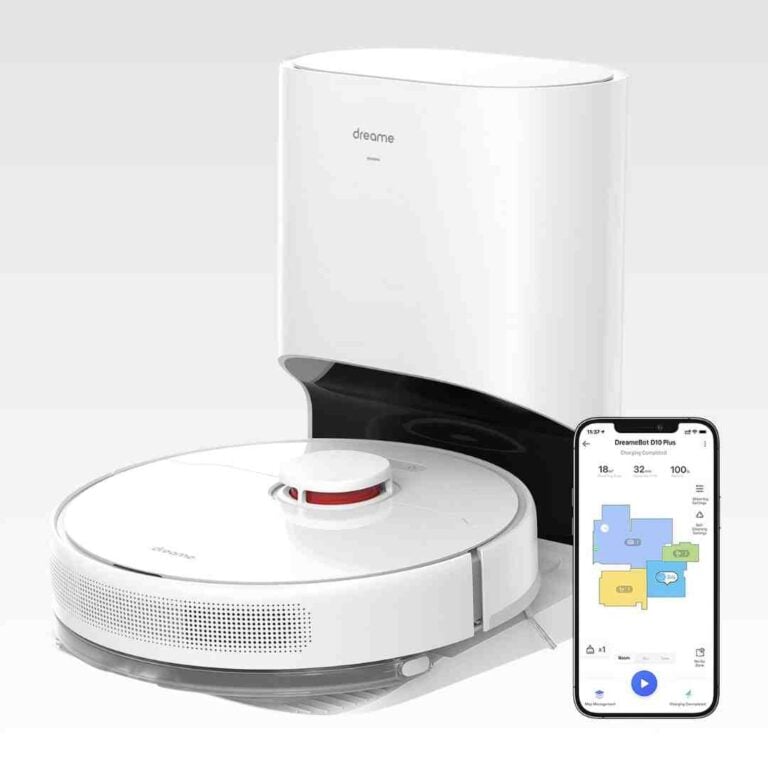
The Mi Home or Dreame app suite provides robust mapping edits, no-go and no-mop zones, schedules, and per-room power and water settings. Usability is generally strong, but some reviewers note menus can feel busy and Wi‑Fi is 2.4GHz only.
-
Most testers describe suction as strong for the price (often cited at 4,000Pa, with one related D10s Plus review noting 5,000Pa). Standard mode handles everyday debris well; fine dust in carpet can require Turbo.
-
Physical buttons are simple for start, home, and spot cleaning, backed by app controls. Several reviewers mention helpful (if sometimes unnecessary) voice prompts.
-
The white, minimal design is generally seen as sleek and less visually intrusive than darker robots, though the large dock is still prominent.
-
The dock’s cable routing and coil holder help tidy excess cord slack behind the base, improving placement neatness.
-
LiDAR mapping is fast and accurate, enabling tidy, efficient cleaning paths and strong room segmentation. Multi-map and changing door or dock positions can occasionally disrupt schedules or docking.
-
Low-pile carpet results are generally good, with most debris removed in tests; occasional misses on fine dust or sugary or kitty-litter style particles were noted.
-
In a multi-robot budget comparison, it scored near the top for cleaning while delivering the best value per dollar, though a Roborock competitor led overall.
-
The app can track accessory life, including filter and brush runtime, helping prompt cleaning or replacement.
-
Moderate water flow dries quickly for maintenance cleaning, while the highest water setting takes longer to dry.
-
Physical setup is quick (attach side brush, insert bag, charge), but optimal placement of the dock and app pairing take more attention, especially for mapping multiple floors.
-
At roughly 3.8 inches tall, it fits under many sofas and cabinets, improving under-furniture reach for routine cleaning.
-
On lower modes it is generally quiet and unobtrusive, while Turbo is noticeably louder. Several tests put cleaning around the high 40s to mid 60s dB depending on mode.
-
Carpet performance is solid for maintenance cleaning but can struggle with fine flour-like dust without higher suction. One comparative test placed it near the top for budget robots, though it is not a deep-clean replacement for an upright.
-
The water tank is small (often 145mL; one related model cites a larger tank), with adjustable water flow. Large hard-floor areas may require refills.
-
Routine upkeep includes swapping dock bags every few weeks, cleaning filters and sensors periodically, clearing hair from brushes, and rinsing or air-drying the mop pad after use.
-
Experiences vary: some testers saw frequent snags on cords or tight spots, while others reported only occasional hang-ups. Threshold and transition handling is decent but not unlimited.
-
Expect recurring costs for dock bags plus periodic filter and mop-pad replacements, though one reviewer estimates bag costs can be relatively low annually depending on use.
-
Mopping is a basic cloth pad wipe: helpful for light maintenance and freshening hard floors, but not effective on dried-on grime or deep stains, and it requires manual pad care.
Cons
-
Auto-emptying is loud but brief (a few seconds), commonly reported around the low 60 dB range and often compared to a quick jet-like burst.
-
Because mopping is a wet-pad drag system, reviewers recommend using no-mop zones and removing the module for carpets; one cautions porous flooring near the dock if the wet pad is left attached.
-
Most D10 Plus reviews describe basic bumper-based avoidance that can hit cords and small objects, so no-go zones and tidier floors help. A separate D10s Plus review highlights AI camera avoidance that performs much better with clutter.
-
Control typically runs through the Mi Home or Dreame app, and one reviewer notes account and profile creation can feel intrusive. A related D10s Plus review describes an onboard camera for remote monitoring, which may raise additional privacy considerations.
-
The stock brush can wrap long hair, requiring periodic clearing with the included cutter tool. Some reviewers note optional brush upgrades can greatly reduce tangling.
-
The self-empty base is sizeable and needs generous clearance for consistent docking, making placement harder in small homes or tight corners.
FAQ
How often do I need to replace the dock dust bag?
Most reviews point to roughly 4–6 weeks or about 45 days per bag in typical use, but it varies with floor area, pets, and how often you run it. One related D10s Plus review cites a larger bag lasting closer to two months.
Can it vacuum and mop at the same time?
It can vacuum and run its mop pad together on hard floors, but the mop is a simple damp cloth system. For mixed homes, reviewers recommend using no-mop zones or removing the mop module so you do not drag a wet pad onto carpet.
How well does it handle pet hair and long hair?
Hair pickup is generally excellent, including on carpet, but several testers found long hair can wrap on the main brush. The included cleaning tool helps, and some reviews note optional brush upgrades can reduce tangling.
Is it noisy?
Cleaning is usually quiet on lower modes and louder on Turbo. Auto-emptying is the loudest moment, but it typically lasts only a few seconds and is often reported around the low 60 dB range.
Will it get stuck on cords or clutter?
Many D10 Plus reviews describe basic bumper-based avoidance, so cords, small objects, and tight spaces can still cause hang-ups unless floors are prepped and no-go zones are set. A separate D10s Plus review highlights AI camera avoidance that performs better with clutter.
Video Reviews
Article Reviews
Best Robotic Vacuums Alternatives
Choose the Roborock Qrevo Curv for a low-touch vacuum+mop that cleans edges/corners well and clears thresholds better than most. Skip if you have lots of floor-level cables or...
Pros: Hard Floor — Fine Dust Pickup, Hard Floor — Large Debris Intake, Hair Pickup — Hard Floors, Battery &, Charging, Docking &, Auto-Empty Reliability (Robot)
Cons: None
Choose it for exceptional vacuuming, obstacle avoidance, and true hands-off mop swapping. Skip it if you want longer battery life, a smaller dock, or stronger out-of-box stain removal.
Pros: Hair‑Wrap / Tangle Resistance, Adaptive chassis lift, Innovation compared to competitors, Hard Floor — Fine Dust Pickup, Suction and Airflow, Pet-Ready Features, Tool-change simplicity
Cons: Dirty water sensor, Suitability for small spaces, Storage footprint and upright-stand stability, Streaking / Residue, Battery and Charging, Runtime
Choose the Eufy S2 Omni for low-maintenance hard-floor mopping, hair control, and strong suction. Skip it if deep carpet cleaning, aggressive edge work, or advanced smart-home control matters...
Pros: Clogging and debris prevention, Streaking / Residue, Hair Pickup — Carpets, Suction and Airflow, Cyclone performance, Filtration / Dust Containment, Overall cleaning convenience
Cons: Bag-full indicator, Edge‑Following Accuracy (Robot), Noise level, Value-for-money
Choose Saros 10 if you want a slim, premium robot that vacuums hard, climbs thresholds, and runs a truly hands-off dock. Skip it if your top priority is...
Pros: Pet-Ready Features, Low-profile design, Suction &, Airflow, Mop lifting system, Aesthetic design &, finish
Cons: Streaking / Residue, Stuck resistance