eufy Security HomeBase S380 (HomeBase 3) Review
Bottom Line
Choose HomeBase 3 if you want expandable local storage, useful AI, and no monthly fees in a Eufy-only setup. Skip it if dependable HomeKit support and uniformly bug-free compatibility matter more than local-first value.
Best for Eufy households that want one place for local footage, smarter recognition, and fewer recurring fees. It especially suits bigger properties or users planning to add multiple compatible cameras and sensors.
Not for buyers who need strong Apple HomeKit support, mixed-brand smart-home flexibility, or absolute confidence that every compatible camera will behave perfectly out of the box. It is also a weaker fit if brand-level privacy controversies are a dealbreaker.
HomeBase 3 is a strong hub for people already invested in Eufy because it turns scattered cameras and sensors into a more capable, local-first system with expandable storage, familiar-face recognition, and good alert control. The biggest value comes from avoiding recurring cloud fees while gaining better AI and centralized footage. The tradeoff is that the experience is not perfectly polished: HomeKit support is effectively absent, some camera models have had recording-resolution or migration quirks, and privacy questions still shadow the brand. Even so, reviewers generally feel the hub delivers real day-to-day benefit when you want a self-monitored system that stays mostly inside the Eufy ecosystem.
Scored Features
Pros
-
A core advantage is that HomeBase 3 works well without ongoing subscription fees. Because the local-storage experience is strong, paid cloud plans look optional rather than essential for most owners.
-
Drive installation is straightforward and widely praised, with support for common 2.5-inch SATA SSDs and HDDs plus USB-based backup or accessories in some reviews.
-
Storage headroom is excellent, ranging from built-in memory to very large drive expansions that reviewers say can hold weeks, months, or even years of footage.
-
QR-code pairing, sync-button prompts, and clear in-app steps make first-time setup unusually guided for this category.
-
The system is easy to expand with additional cameras, sensors, and storage once the hub is in place.
-
At least one reviewer saw strong performance through three interior walls, suggesting better-than-average penetration.
-
Wireless reach is a major strength, with successful real-world use reported far from the hub.
-
Fresh installs are consistently described as quick and approachable, though upgrades from older hubs can be more tedious.
-
Local recording is central to the product appeal and is available out of the box. Storage expansion is one of the standout strengths, with support for large 2.5-inch drives frequently highlighted. Reviewers repeatedly recommend the HomeBase as the best way to keep footage stored locally instead of paying for cloud plans.
-
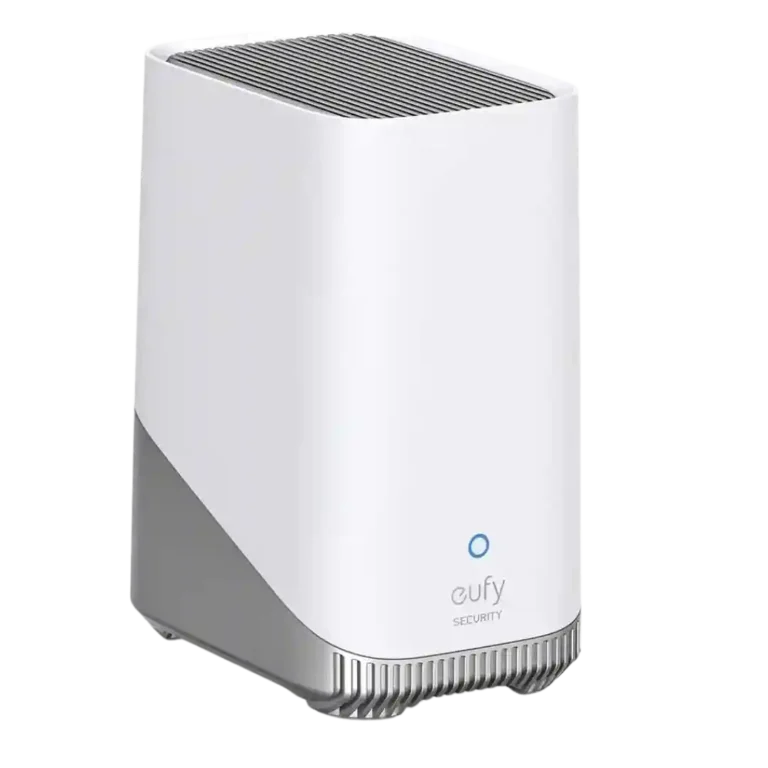
Multiple reviewers praise the HomeBase 3 premium finish and solid feel despite its compact size.
-
A major appeal is that HomeBase 3 minimizes dependence on paid cloud storage, though some reviewers still raise concerns about thumbnails or metadata touching cloud services.
-
Human detection is widely praised and becomes more useful once tied to familiar-face learning.
-
For DIY users, the system works well as a self-monitored setup with local clips, app alerts, and hub alarms.
-
Core hub performance is described as stable over long stretches, though firmware quirks and compatibility transitions occasionally interrupt the otherwise dependable experience.
-
Long reach, centralized storage, and higher device limits make the platform a sensible fit for larger homes, provided the hub is placed carefully.
-
Alarm actions appear to trigger quickly from tamper or motion events in the better-supported camera combinations.
-
Anti-theft and tamper features are a real value add, triggering alerts and hub alarms if someone tries to remove a camera.
-
Central local clips and event browsing make it easy to verify what triggered an alert without paying for cloud review tools.
-
One reviewer said motion alerts arrived seamlessly, suggesting prompt notifications once the system is tuned.
-
Reviews highlight meaningful control over what actions fire on motion, including notifications, recordings, and alarm behavior.
-
Reviewers confirm the hub can sound an indoor alarm when outside cameras detect motion or tampering.
-
At least one reviewer explicitly described pulling up stored clips as quick and convenient, suggesting the centralized event archive is fast enough for normal day-to-day review.
-
At least one long-range test reported a strong, stable connection even through multiple walls and over 100 feet.
-
Cross-camera surveillance and hub-level actions make multi-device behavior feel smarter than isolated camera-only setups.
-
Centralized events and archived clips are easy to access from the app once devices are connected.
-
Cross-camera stitched videos make it easier to understand a person path across the property instead of piecing together separate clips.
-
A key advantage is that recognition workloads run on the HomeBase instead of burdening individual cameras.
-
Hub-level AI materially improves how connected cameras classify motion events compared with some stand-alone operation.
-
Between camera limits, sensor support, and centralized storage, reviewers see HomeBase 3 as capable of anchoring a full-property Eufy setup.
-
Vehicle detection is regularly cited as available and useful, especially when paired with custom notification rules.
-
Pet detection is available and often effective, though not every reviewer trusts it equally in complex scenes.
-
The hub acts as a central bridge for cameras, doorbells, and sensors, adding storage, alarms, chime functions, and AI features to connected devices.
-
Reviewer-cited capacity is high enough for multi-sensor households, though published counts vary slightly between 32 and 34.
-
Up-front costs can be high, but avoiding monthly fees materially improves long-run value.
-
BionicMind generally sorts people, vehicles, pets, and familiar faces well, but several reviewers note occasional false positives or confusion in busier scenes.
-
Alerting is usually well targeted when configured for specific subjects, though AI misses and privacy doubts keep it from feeling flawless.
-
The ecosystem feels polished day to day, but compatibility gaps, migration friction, and a few firmware quirks keep it short of seamless.
-
Firmware updates have added major capabilities such as Wi-Fi support and helped resolve recording issues, with reviewers generally reporting smooth update behavior.
-
The app offers strong control over what generates alerts, though some reviewers still want finer filtering on specific camera combinations.
-
The familiar-face feature is one of the strongest reasons to buy HomeBase 3, with reviewers praising how it learns household members and cuts nuisance alerts.
-
HomeBase 3 broadly improves support for older Eufy gear and can add newer AI features to legacy cameras, but migration from older hubs is not always seamless.
-
Door and other security sensors are repeatedly cited as supported parts of the HomeBase ecosystem.
-
Google Assistant support is mentioned positively for voice-viewing cameras and general smart-home use.
-
The newer processor and ongoing compatibility and firmware work make the platform feel more future-oriented than earlier HomeBases.
-
Ethernet and Wi-Fi flexibility give the hub some fallback potential, but reviewers provide only limited evidence on true failover behavior during outages.
-
The built-in alarm is described as meaningfully audible, with one review citing a 100 dB output.
-
Face recognition is genuinely useful and improves with use, but it can still stumble in crowded or messy scenes.
-
The first-run experience is usually clear and beginner-friendly, though upgrade workflows are clumsier than fresh installs.
-
Alexa support is repeatedly cited as available and useful for viewing cameras, though some devices need the HomeBase in the loop.
-
The front LED is easy to interpret and provides clear at-a-glance status feedback.
-
The hub includes practical rear controls such as sync and alarm buttons, plus accessible ports.
-
Smart-home integration is solid with Alexa and Google Assistant, but the lack of HomeKit keeps breadth below the best multi-platform systems.
-
One reviewer notes a Wi-Fi repeater mode and flexible wired-or-wireless networking, but this remains a lightly discussed secondary feature.
-
Support comes off as mixed but improving: reviewers cite acknowledged bugs and working fixes, yet some issues took time to resolve.
-
The hub is not cheap, but reviewers usually feel the hardware earns its price through storage expansion, AI features, and subscription savings.
-
Placement is somewhat flexible thanks to good wireless reach and later Wi-Fi support, but central positioning still matters and some users resort to longer cables.
-
It works well as a central recorder and AI hub for many Eufy cameras, but some models have tradeoffs such as lower recorded resolution, pairing friction, or limited 24/7 behavior. Support for up to 16 cameras gives the system enough headroom for larger Eufy deployments.
Cons
-
AI filtering reduces some noise, yet several reviewers still report false positives, incomplete tracking, or inconsistent motion discrimination on certain cameras.
-
Local storage gives owners more control over where footage lives, but past reports of cloud-handled thumbnails weaken total trust.
-
Local-first storage helps privacy on paper, but cloud-thumbnail controversies make reviewers more cautious than enthusiastic.
-
Within Eufy the hub is broad and useful, but several reviewers stress that it is not the right choice for mixed-brand smart homes.
-
Early user reports show some cameras saving lower-than-advertised resolution when routed through HomeBase 3, but a later reviewer demonstrated a settings reset that restored full-quality recording on affected models.
-
Pairing generally works, but upgrades from older hubs and some camera migrations can require manual re-adding or proximity workarounds. Adding new cameras and sensors is usually fast and low-friction, especially once devices are near the hub.
-
Battery-based setups can miss the opening seconds of motion events, so pre-event capture remains a clear weakness.
-
HomeKit is the clearest ecosystem weakness: reviewers consistently call out missing or poor support compared with older Eufy generations.
FAQ
Does HomeBase 3 require a monthly subscription?
No. Reviewers consistently highlight built-in local storage and optional drive expansion as the main alternative to paying recurring cloud fees.
Can HomeBase 3 work with older Eufy devices?
Usually yes, and some reviewers say it even adds newer AI features to older cameras. The catch is that upgrades from older HomeBases may require manual re-pairing instead of a seamless migration.
Does HomeBase 3 support Wi-Fi, or does it have to be wired?
Several reviews describe Ethernet setup first, and one later review says firmware added Wi-Fi support with automatic preference for Ethernet when both are available. Wired use is still preferred in some setups, especially for certain continuous-recording cases.
What are the biggest downsides?
The most repeated drawbacks are missing HomeKit support, occasional AI false positives, migration friction from older hubs, and camera-specific recording quirks such as reduced saved resolution on some models before a reset or fix.
Video Reviews
Article Reviews
Best Home Security Systems Alternatives
Choose HomeBase 3 if you want expandable local storage, useful AI, and no monthly fees in a Eufy-only setup. Skip it if dependable HomeKit support and uniformly bug-free...
Pros: subscription dependency, USB/SATA expansion support, local storage expandability, Local storage option, wireless range, signal penetration through walls, app-guided installation quality
Cons: HomeKit compatibility, camera pre-roll or pre-event support, Device pairing reliability, hub recording resolution fidelity, ecosystem compatibility breadth, privacy controls, data ownership