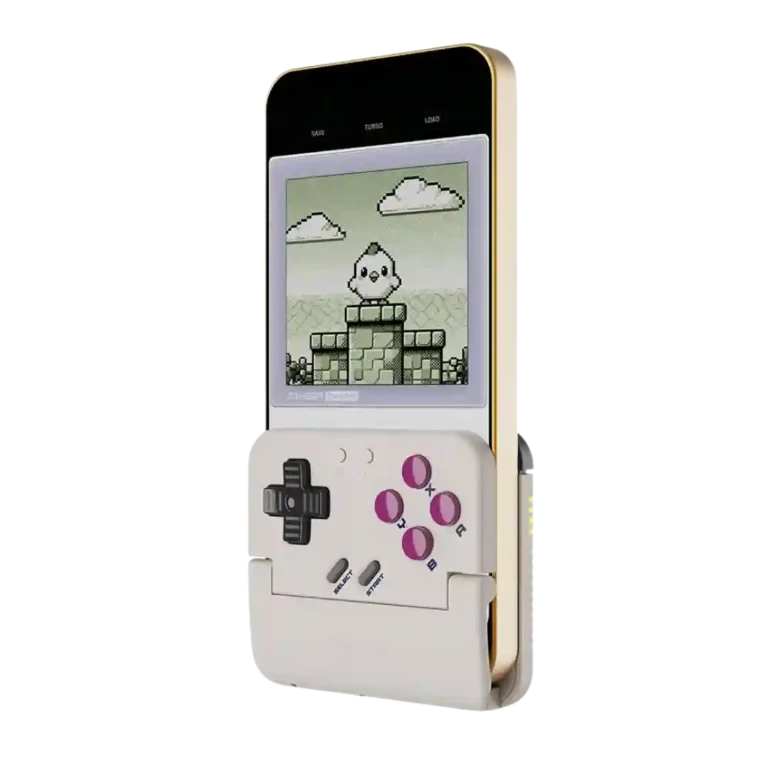
Choose the Pocket Taco for cheap, pocketable retro phone emulation with real buttons. Skip it if you need dependable D-pad precision, easy iPhone setup, or a full-size controller for modern games.
Best for
Best for retro emulation fans who want a cheap, pocketable Game Boy-style controller for short phone sessions and are comfortable adjusting emulator layouts or app settings.
Not for
Not for players who need flawless D-pad accuracy, analog sticks, modern landscape-game controls, or guaranteed plug-and-play iPhone and Delta setup.
Verdict
The GameSir Pocket Taco wins when it is treated as a tiny retro accessory rather than a universal mobile controller. Reviewers love the Game Boy feel, pocketable size, long battery life, included case, and the ability to charge a phone while playing. It is especially convincing with Game Boy, GBA, NES, SNES, DS, and arcade-style emulation. The tradeoff is reliability and fit: several customers report missed D-pad inputs, right-direction failures, awkward Delta or iPhone setup, and screen coverage that needs emulator skins or layout tweaks. At around $35, it is a charming buy for tolerant retro fans, but a risky one for precision platformers or anyone expecting effortless compatibility.
Compared in Reviews
Products reviewers directly compared with this model, grouped into quick takeaways.
8BitDo FlipPad
Compared: build and feature expectationsThe reviewer expects the Pocket Taco to compare well unless 8BitDo’s rival dramatically outdoes it.
Backbone One 2nd Gen
Better: native mobile gaming docked experienceThe Pocket Taco is framed as clunkier for native docked play than Backbone-style mobile controllers.
GameSir X2s Type-C
More expensive: priceThe Pocket Taco is called cheaper than GameSir’s own budget mobile controller pick.
Travel friendliness is a strength when the controller is treated as a toss-in accessory. It is small enough for planes, trains, bags, or quick trips, especially with the case.
Portability is a major win. Reviewers repeatedly called it tiny, light, pocketable, easy to carry, and a controller they would actually bring along just in case.
Button remapping is a useful strength, especially for swapping A/B layouts between Nintendo-style and Xbox-style games. It helps classic titles feel more natural.
Customization depth is stronger than the size suggests. Reviewers mention modes, shortcuts, remapping, keyboard mode, and D-pad-as-stick behavior, but that flexibility can also make setup feel busier.
Most expert testing found little or no noticeable input lag during retro games. A small number of customer comments still called it laggy, so latency seems fine for casual play but not guaranteed for every unit.
Casual gaming suits the Pocket Taco well. Reviewers liked it for retro, arcade, and short phone sessions, not for serious landscape or competitive games.
The Pocket Taco can handle simple retro racing controls well enough, including boost-drift style inputs. It is still better suited to classic handheld and arcade games than to racing games that need analog steering or full-size triggers.
Battery life is one of the more consistently positive traits. Reviewers regularly cited long runtime, 30-hour claims, or simply not having to think about charging often.
Software customization is deeper than the tiny controller suggests, with remapping, layout swaps, turbo, D-pad tuning, screen tools, and touch mapping all mentioned.
Value is strong when the hardware works. Reviewers repeatedly called the roughly $35 price affordable, a steal, or worth it, though defective D-pad reports make that value riskier for unlucky buyers.
retro gaming suitability: 4.4, based on 21 reviews
Retro gaming is the Pocket Taco’s clearest strength. When used for Game Boy, GBA, NES, SNES, DS, or arcade-style emulation, reviewers often described it as nostalgic, authentic, fun, and purpose-built.
Build quality is generally praised for such a small, inexpensive plastic controller, with reviewers calling it well-made, solid, and better than expected.
The phone grip usually earns praise for silicone padding, secure clamping, and case tolerance, though a few users found thick cases or loose fit problematic.
Bumper responsiveness gets limited but positive coverage. One expert had no trouble using them in Mario Kart DS, and a customer said the shoulders were fine even when other buttons missed inputs.
Firmware support is a quiet plus, with reviewers mentioning updates and Bluetooth fixes through the app. It helps, but it does not fully remove the setup friction some users reported.
compatibility with Nintendo Switch: 4.2, based on 1 review
Switch support appears as part of the controller’s broader multi-platform pitch. Reviewers treated it as a nice extra, not the reason to buy the Pocket Taco.
Connection reliability is polarized. Some users got instant reconnects and seamless iPhone pairing, while others saw iOS input failures or unreliable PC connections.
The face controls are often praised for nostalgic membrane feel and usable tactility, but several customers found them mushy, sticky, clicky, or only adequate.
Face button travel is short and retro-feeling rather than modern and crisp. Reviewers generally found it usable, with enough movement or clickiness for classic games.
Charging speed has only light coverage, but one reviewer reported a full charge in about an hour and a half. Battery endurance mattered more to reviewers than recharge time.
Material quality is practical rather than fancy. One reviewer said the plastic does not feel cheap or hollow, which is a good result for a very light budget accessory.
Profile storage is lightly covered through the companion app’s saved layouts. It is useful for tinkerers, but not a major reason reviewers recommended the controller.
USB-C convenience is mostly praised because the bottom cutout lets the phone charge while playing. The caveat is clearance: multiple reviewers said not every USB-C cable fits through the opening.
Wireless latency is acceptable for casual retro gaming, but reviewers still recognize Bluetooth as a compromise versus wired play. It is not positioned for esports-level responsiveness.
face button responsiveness: 3.6, based on 9 reviews
Button responsiveness is strong in many expert tests, but customer complaints about missed inputs, stuck A/B buttons, and failed right-direction presses show quality control can undercut that experience.
D-pad feel ranges from excellent and nostalgic to loose, mushy, and spongy. The positive reviews like its Game Boy-style character, while the negative reviews make it the main dealbreaker.
Setup ranges from seamless to frustrating. Some reviewers paired it in seconds, while others needed firmware, app setup, emulator skins, or repeated Bluetooth attempts before it behaved.
PC compatibility is treated as a bonus. Reviewers confirmed wired PC use and broader device support, but the small retro layout limits how much PC gaming it replaces.
Comfort lands all over the map: several reviewers found the small shell surprisingly pleasant for retro sessions, while others with larger hands called it cramped or awkward.
Overall satisfaction is mixed but leans positive among experts and early enthusiasts, especially at the price. Customer reviews add a warning: the concept is loved, but D-pad defects and iPhone/app issues can turn it into a return.
Compatibility is broad but not effortless. Reviewers used it with iPhone, Android, and emulators, while some customers hit iPhone failures, case problems, or apps that centered the game under the controller.
The shoulder and trigger buttons add useful controls for systems beyond Game Boy, but the tiny layout makes them a compromise. Several reviewers said they work, while others found them small, close together, or harder to press.
Premium feel is mixed. One reviewer thought it felt better than the price suggests, while another said it felt cheap to the touch, so expectations should stay budget-minded.
Bluetooth performance is usually good once paired, and several reviewers liked quick pairing or stable wireless play. The bad cases are severe, especially where iOS stopped registering inputs or reconnecting.
Durability is uncertain. One customer praised survival after drops, while another saw repeated D-pad trouble across two units, so long-term confidence depends heavily on unit quality.
Grip texture only comes up as a mild drawback. One reviewer said it can get slippery in faster play, while most other fit praise centers on the silicone phone pads.
The upper/back button placement is cramped by design. Reviewers liked having extra controls, but L2/R2 and shoulder placement can be awkward for larger hands or combo-heavy play.
The companion app is one of the bigger friction points. It enables testing, remapping, firmware, and screen tools, but reviewers also called it confusing, limited, or unhelpful.
platformer control precision: 2.5, based on 7 reviews
Platformer precision is sharply split. Some reviewers played action platformers confidently, but customers with faulty D-pads said missed inputs made many genres or precision platformers unusable.
size suitability for different hand sizes: 2.4, based on 7 reviews
Phone and hand-size fit is mixed. Smaller or normal setups can feel secure and compact, while larger hands, thick cases, or certain phone sizes make the controller cramped or imperfect.
screen obstruction and app fit: 2.2, based on 7 reviews
The vertical form factor solves touchscreen smudging for retro games, but it can also cover the lower screen or require emulator skins and careful layout settings.
D-pad accuracy is the most divisive trait. Experts often liked its pivot and texture, but many customers reported missed right inputs, false diagonals, barely registering presses, or unusable play.
The learning curve is real for newcomers. People comfortable with emulators and controller settings had better results than reviewers who expected the app to guide them clearly.
Brand support drew a negative customer signal from someone who felt GameSir was aware of first-batch D-pad problems. That sits alongside separate customer-support feedback, which was more positive.
consistency across sessions: 1.5, based on 1 review
Consistency across sessions is a real concern. One customer said it was great for a month before D-pad false diagonals and sticking appeared, while other reviews had smooth reconnect behavior.
Compared With Category Average
Compared with other Video Game Controller, this product is below average in consistency across sessions, d-pad accuracy, brand software support.
Summary
8 compared features
Above average0.4+ pts higher0%
0 features
Same as averagewithin 0.3 pts0%
0 features
Below average0.4+ pts lower100%
8 features
Attribute
This product
Category average
Difference
consistency across sessions
1.5
3.8
-2.3
d-pad accuracy
2.1
3.8
-1.7
brand software support
1.5
3.4
-1.9
size suitability for different hand sizes
2.4
3.9
-1.5
grip texture
3.0
4.5
-1.5
companion app quality
2.6
3.9
-1.3
back button placement
2.6
4.0
-1.3
trigger responsiveness
3.4
4.5
-1.2
FAQ
Is the GameSir Pocket Taco good for retro games?
Yes, that is its strongest use case. Reviewers liked it most for Game Boy, GBA, NES, SNES, DS, arcade, and other 2D-style games.
Does the D-pad work well?
Expert reviews often praised the D-pad, but many customers reported missed inputs, false diagonals, or right-direction failures. It is the biggest reliability risk.
Is setup easy on iPhone?
Sometimes, but not always. Some reviewers paired quickly, while others needed firmware updates, GameSir app steps, Delta skins, or repeated Bluetooth attempts.
Can you charge your phone while using it?
Yes, the bottom cutout is praised for phone charging during play. A few reviewers warned that thicker USB-C cable heads may not fit through the opening.
Is it comfortable for large hands?
It can feel cramped for larger hands or longer sessions. Several reviewers found it surprisingly comfortable, but others mentioned hand cramps or hard-to-reach shoulder buttons.
Can it replace a full mobile controller?
No. It lacks analog sticks and is built around vertical retro play, so modern 3D, FPS, cloud, or competitive games are better served by a full-size controller.
Sample Expert Reviews We Analyzed
These are a few of the reviews included in our analysis.
Choose the GameSir Cyclone 2 if you want a low-cost PC/Switch/mobile controller with precise sticks, deep customization, and a dock. Skip it if Xbox/PS5 support, premium buttons, or flawless dock/battery...
Pros: hand fatigue over long sessions, macro support
Cons: compatibility with Xbox, compatibility with PlayStation
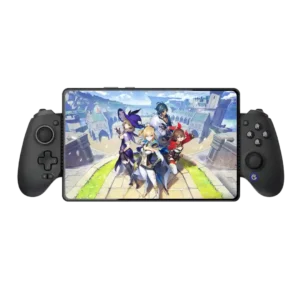
Choose the X5 Lite for cheap, low-lag mobile and cloud gaming with strong Hall sticks. Skip it if you need analog triggers, a reliable D-pad, rumble, or roomy grips.
Pros: trigger smoothness, connection reliability
Cons: firmware update support, analog trigger precision
Choose the Razer Kitsune if you want a premium, portable leverless controller for serious fighting games on PS5 or PC. Skip it if you’re new to leverless, need PS4/Xbox support,...
Pros: ease of setup, compatibility with PC
Cons: included accessories, programmable button support
Choose the Scuf Valor Pro Wireless if you want secure grips, TMR sticks, fast triggers, rear controls, and deep tuning for Xbox/PC play. Skip it if price, beta-ish software, middling...
Pros: grip texture, analog stick smoothness
Cons: compatibility with Nintendo Switch, platformer control precision