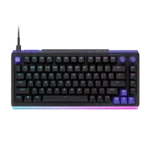
Logitech G512 X Feature Scores
Explore all 50 feature scores for Logitech G512 X, organized into pros and cons.
Scores by Feature
Summary
50 reviewed features-
Very positive 4.5-5.010 (20%)
-
Positive 3.5-4.428 (56%)
-
Neutral 2.5-3.410 (20%)
-
Negative 1.5-2.42 (4%)
Pros
Sort
-
The ability to combine standard three- or five-pin mechanical switches with TMR analog switches is the product’s defining advantage. It offers rare flexibility without forcing users to abandon familiar mechanical feel.
-
This is one of the board’s clearest strengths: users can mix switch types, tune actuation, set Rapid Trigger and dual actions, remap keys, and personalize lighting. The depth rewards experimentation but can feel excessive to buyers who want a simple setup.
-
Rapid Trigger is consistently praised for faster resets, counter-strafing, and repeated movement inputs. It is one of the hybrid system’s strongest practical gaming benefits.
-
Analog keys can feel extremely quick and precise, with clear benefits for counter-strafing and rapid actions. Stock tactile switches are also responsive, though sensitivity needs careful adjustment.
-
Compact sizing, a detachable cable, onboard switch storage, and pullers that double as feet make the board easier to move than expected. Wired-only operation and the board’s weight still favor a mostly fixed desk setup.
-
The black-and-purple and white-and-mint colorways, retro accents, and glowing front edge won over most reviewers. A minority found the ridged plastic and gamer styling toy-like or overdesigned.
-
The bright per-key lighting and dramatic front bar are major visual highlights, especially with the acrylic rest. Some found the effect overly intense, and one unit showed dark analog keys after a swap.
-
G Hub offers extensive color, pattern, brightness, and light-bar control, often down to individual zones or LEDs. Reviewers found the system both flexible and easy to personalize.
-
Swapping switches is generally quick and approachable, helped by onboard pullers, storage, and a scan button. Repeated game-by-game changes can still become tedious, and fragile pins require care.
-
TMR switches, shallow actuation, and Rapid Trigger make movement and repeated inputs feel immediate, especially in shooters. The gains are real but require setup, and they do not transform every genre or player’s results.
-
The true 8,000Hz report rate is a legitimate competitive specification and pairs well with the TMR switches. Reviewers repeatedly note that most non-elite players will struggle to notice the difference from 1,000Hz.
-
Both layouts use space well, especially the 75% model for wide mouse movement and the 96/98% model for retaining a numpad without full-size width.
-
The two programmable dials are easy to reach and commonly used for volume and RGB brightness. Their tactile action and remapping flexibility make them a practical daily feature.
-
The doubleshot PBT caps are widely praised for grip, texture, and resistance to shine. They contribute to a comfortable, durable typing surface.
-
The dedicated volume dial is easy to find, pleasant to turn, and remappable. It is one of the most consistently appreciated everyday conveniences.
-
G Hub is usually described as clear, powerful, and much improved, with strong visualization for analog settings. Bugs, long onboarding, startup delays, and dependence on the app remain recurring caveats.
-
The compact 75% model favors mouse room and travel, while the 96/98% version preserves a numpad in a manageable footprint. Both feel substantial rather than low-profile.
-
PBT keycaps, durable hot-swap sockets, and positive wear testing suggest good long-term resilience. Several reviewers saw no visible wear after heavy use.
-
Game Mode, SOCD or Key Priority, dual actions, and per-key actuation give competitive players a broad toolkit. Some multi-action functions are niche and may conflict with game rules or become hard to remember.
-
Multiple foam layers and gasket-style mounting keep the case from sounding hollow and suppress rattle, ping, and echo effectively.
-
The choice between compact 75% and near-full-size 96/98% layouts covers both mouse-space priorities and numpad needs.
-
The wired 8,000Hz mode and very low quoted response time deliver exceptionally direct input. Most ordinary players may not consciously perceive the full advantage.
-
The G512 X inspires unusually strong enthusiasm from reviewers who enjoy tinkering, responsive gaming, and bold design. Others see an expensive, overcomplicated hybrid whose plastic build and partial analog implementation keep it from greatness.
-
Most reviewers found the board pleasantly deep or clacky, with strong internal tuning that avoids hollow case noise. A few units had ordinary sound or stabilizer rattle, so it is good rather than uniformly enthusiast-grade.
-
Many reviewers typed or played for hours with little fatigue, especially with the optional palm rest. Mixed switch types and the tall profile made long sessions less comfortable for a smaller group.
-
The mechanical setup is generally smooth, responsive, and satisfying, though not consistently on the level of premium custom boards. Mixed analog and tactile keys range from unobtrusive to awkward depending on the reviewer.
-
Every mechanical socket is easy to replace, while 39 positions also accept TMR switches. Reviewers liked the rare hybrid flexibility but often criticized the limited analog coverage and the inclusion of only nine magnetic switches.
-
The tactile mechanical switches are smooth, lightly weighted, and satisfyingly clacky, while the TMR switches feel fast and linear. Mixing them works for some reviewers but feels inconsistent to others.
-
Dual-stage presses can map walking and sprinting or other paired actions, and several reviewers found the idea memorable and useful. Others disliked the SAPP ring feel or noted that the keys cannot deliver true progressive controller-style input.
-
G Hub supports macros, layered commands, application shortcuts, and productivity actions. The tools are broad enough for both gaming and work.
-
Several reviewers heard no rattle or ping from larger keys, but one detailed teardown found stabilizer rattle across much of the board. Quality may vary by unit.
-
Internal construction and some review samples felt robust, but the broader consensus is less flattering: the plastic chassis can flex, creak, or feel insufficiently premium for the price.
-
The keyboard is audible without being excessively loud. Its muted-to-clacky character is generally easy to live with for work and gaming.
-
Game-specific profiles are the practical way to separate hair-trigger gaming settings from normal typing. G Hub makes profiles approachable, though software dependence and reset limitations reduce independence.
-
Per-key illumination covers almost all legends well, with only a few multi-character keys receiving uneven coverage.
-
The 75% layout keeps spacing comfortable, while the compressed 98% layout may briefly challenge full-size muscle memory, particularly around the numpad.
-
The detachable 1.8-meter cable is practical for storage, transport, and desk positioning, though it receives little special praise beyond that convenience.
-
Three onboard profile layers are useful, but one reviewer found that advanced functions still depend heavily on G Hub running, limiting true hardware independence.
Cons
Sort
-
The detachable wired connection supports low-latency 8K operation, but the lack of Bluetooth or 2.4GHz wireless is one of the most repeated complaints at this price.
-
Very shallow settings can cause accidental movement, and one mixed-switch setup produced erratic shifted inputs. Careful tuning is needed before the analog functions feel predictable.
-
The hybrid engineering and advanced controls partly justify the premium, but most reviewers consider $180–$200 steep for a plastic, wired-only board with only nine analog switches. Sale-priced full-analog rivals can offer more hardware for similar money.
-
Internal damping is good, but some reviewers noticed key wobble. Stability is acceptable for gaming use rather than exemplary.
-
PBT keycaps and metal dials feel good, but the chassis is overwhelmingly plastic. Some reviewers accepted the quality and recycled content, while others expected metal at this price.
-
Rigidity varies by sample, but many reviewers found noticeable flex in the center, corners, or lower bezel. A few units felt solid and stable, yet metal rivals set a higher standard.
-
Windows use is straightforward. Mac users can remap the Windows and Alt keys successfully, but the missing Command and Option legends make the out-of-box experience less polished.
-
Primary legends are generally readable with lighting on, but some characters are not illuminated evenly and the keys can be hard to identify in darker rooms when RGB is off.
-
The dedicated dial makes brightness easy to adjust, but the front lighting can become distracting or shine into the eyes in a dark room.
-
Most testers found the hardware or software dependable in normal use, but isolated switch-pin damage, lighting wake issues, and G Hub bugs show that the experience is not flawless.
-
The optional acrylic rest improves comfort for many users and dramatically extends the RGB effect. Its hard surface, loose placement, and separate $35–$45 price make it a mixed-value accessory.
-
The default angle and optional palm rest can support long sessions, but the tall profile and awkward puller-feet setup did not suit everyone. Low-profile keyboard users were most likely to report wrist fatigue.