Average score
P1
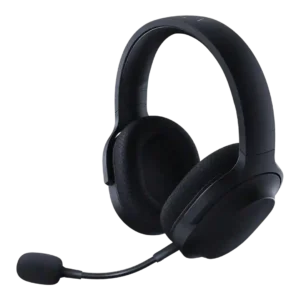
Product 1: Razer Barracuda X
4.1
P2
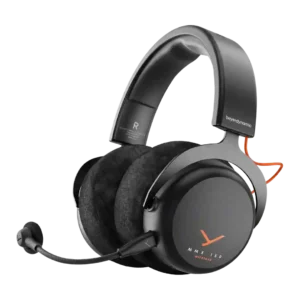
Product 2: beyerdynamic MMX 150 Wireless Over-Ear...
4.0
Active noise cancellation
P1Product 1: Razer Barracuda X
No score yet
P2
Product 2: beyerdynamic MMX 150 Wireless Over-Ear...
1.0
No review describes true ANC. Noise reduction is achieved through the closed-back seal (passive isolation) and an ambient/augmented mode, not active cancellation.
Android compatibility
P1
Product 1: Razer Barracuda X
4.6
Android support is a clear plus, especially on models that lean on USB-C or Bluetooth for easy mobile pairing.
P2Product 2: beyerdynamic MMX 150 Wireless Over-Ear...
No score yetApp
P1
Product 1: Razer Barracuda X
4.0
The companion apps are useful for mode switching and tweaks, but reviewers disagree on convenience and feature completeness across mobile and PC.
P2
Product 2: beyerdynamic MMX 150 Wireless Over-Ear...
4.1
Wireless-focused reviews describe a companion app that manages presets, EQ, button behavior, sidetone toggles, and power settings. Other reviews describe a no-software experience, implying feature depth may vary by model or connection path.
Audio-video sync accuracy
P1
Product 1: Razer Barracuda X
4.3
Latency is generally low enough for gaming, especially with the wireless dongle or game mode, though the advantage is smaller over Bluetooth.
P2
Product 2: beyerdynamic MMX 150 Wireless Over-Ear...
4.4
Wireless-focused reviews describe the low-latency dongle as subjectively delivering negligible lag between on-screen action and audio cues.
Bass performance
P1
Product 1: Razer Barracuda X
4.1
Bass is generally punchy and full, helping games feel lively, but some reviewers found it a bit too forward or aggressive and less controlled than pricier alternatives.
P2
Product 2: beyerdynamic MMX 150 Wireless Over-Ear...
3.6
Bass is the most divisive tuning element. Several reviews describe it as subdued or under-emphasized unless EQ/presets are used, while another review characterizes bass as strong; expectations and EQ use appear to drive the experience.
Battery
P1
Product 1: Razer Barracuda X
4.4
Battery life is a standout strength overall, ranging from good on the original model to excellent on newer versions and Chroma with lighting off.
P2
Product 2: beyerdynamic MMX 150 Wireless Over-Ear...
4.7
Battery life is repeatedly framed as a strength: multiple reviews cite 50 hours, and one reviewer reports real-world estimates closer to roughly 68–71 hours at moderate volume.
Bluetooth
P1
Product 1: Razer Barracuda X
4.1
Bluetooth-enabled versions usually connect and switch reliably, but at least one long-term user reported frustrating handoff and reconnection problems. The reviewed Chroma material points to fast switching rather than true mixed dual-audio playback, so simultaneous wireless and Bluetooth listening remains a weakness.
P2
Product 2: beyerdynamic MMX 150 Wireless Over-Ear...
4.4
Bluetooth pairing and day-to-day stability are described as reliable, with quick connections and no major dropouts reported in the wireless-focused reviews.
Build quality
P1
Product 1: Razer Barracuda X
4.4
Build quality is usually judged solid for the price, with plastic shells and reinforced bands feeling sturdier than expected.
P2
Product 2: beyerdynamic MMX 150 Wireless Over-Ear...
3.9
Build impressions are split: several reviewers call the construction sturdy and dependable (often noting metal elements), while others describe the shell as lightweight or plasticky for the price.
Button control usability
P1
Product 1: Razer Barracuda X
4.5
Physical controls are generally easy to find and use, with the volume wheel and mute button earning especially positive feedback.
P2
Product 2: beyerdynamic MMX 150 Wireless Over-Ear...
4.1
The single wheel/button control scheme is viewed as intuitive (volume, mute, mode toggles), but some reviewers dislike that it feels clicky or that button/wheel noises can carry through the headset or mic.
Cable quality
P1Product 1: Razer Barracuda X
No score yet
P2
Product 2: beyerdynamic MMX 150 Wireless Over-Ear...
4.0
Cables are often praised as thick/braided and durable, but one reviewer reports audible cable rub/microphonics in the earcups when the cable brushes clothing.
Carry case quality
P1
Product 1: Razer Barracuda X
2.3
Storage is inconsistent across revisions: some reviews appreciate the included pouch, while others specifically complain that no case or bag is included.
P2Product 2: beyerdynamic MMX 150 Wireless Over-Ear...
No score yetCharging
P1
Product 1: Razer Barracuda X
4.8
Charging performance is acceptable to strong, with quick top-up praise in some Chroma coverage and otherwise unremarkable recharge times.
P2
Product 2: beyerdynamic MMX 150 Wireless Over-Ear...
4.5
Fast charging is called out as convenient, with a commonly cited example of about 15 minutes of charge yielding around five hours of use.
Clamping force comfort
P1
Product 1: Razer Barracuda X
4.2
Clamp is usually judged well-balanced, but impressions vary by head shape; some found it just right, while others thought it a touch too loose.
P2
Product 2: beyerdynamic MMX 150 Wireless Over-Ear...
4.2
Clamp force is commonly described as just right for staying secure without squishing, though a minority note it can feel a little tight over extended wear.
Codec support
P1
Product 1: Razer Barracuda X
2.0
Bluetooth codec support is a weak point in the reviewed Bluetooth models, with SBC-only support called out as limiting.
P2
Product 2: beyerdynamic MMX 150 Wireless Over-Ear...
3.5
Codec support is only lightly documented in the provided reviews: SBC and LC3 are explicitly mentioned, while higher-end codecs are not confirmed.
Comfort during long use
P1
Product 1: Razer Barracuda X
4.7
Comfort is one of the line's biggest strengths, with repeated praise for long-session wear, soft pads, and low fatigue.
P2
Product 2: beyerdynamic MMX 150 Wireless Over-Ear...
4.2
Comfort is usually rated very high thanks to plush velour/memory-foam pads and balanced weight, but at least one reviewer with larger ears reports long-day discomfort from shallow, round cups that press on the ears.
Design and Aesthetics
P1
Product 1: Razer Barracuda X
4.6
Reviewers consistently like the understated look, calling it cleaner and less flashy than typical gaming headsets.
P2
Product 2: beyerdynamic MMX 150 Wireless Over-Ear...
3.9
Aesthetics lean gamer-forward (notably orange accents). Some reviewers like the sophisticated two-tone look, while others find it not discreet enough for everyday public use.
Detachable cable convenience
P1Product 1: Razer Barracuda X
No score yet
P2
Product 2: beyerdynamic MMX 150 Wireless Over-Ear...
4.5
Detachable cables make it easier to swap devices and replace worn parts. Multiple reviews note that some features and controls are reduced or unavailable when using the analog 3.5mm path.
Detachable microphone convenience
P1
Product 1: Razer Barracuda X
4.5
The detachable boom is widely appreciated for making the headset easier to travel with and less conspicuous off the desk.
P2
Product 2: beyerdynamic MMX 150 Wireless Over-Ear...
4.5
The detachable boom mic is consistently framed as a practical win, letting you remove it for music or when using a dedicated external mic.
Dongle
P1
Product 1: Razer Barracuda X
4.2
The USB-C dongle is a major part of the headset's appeal, delivering easy cross-platform use, though its size, port blocking, or occasional hiccups draw some complaints.
P2
Product 2: beyerdynamic MMX 150 Wireless Over-Ear...
4.5
The low-latency dongle is highlighted as a strong option for gaming, with reports of easy pairing and very responsive feel in play.
Ear cup padding quality
P1
Product 1: Razer Barracuda X
4.4
The fabric memory-foam pads are usually praised for breathability and softness, though a few reviewers wished for a little more depth.
P2
Product 2: beyerdynamic MMX 150 Wireless Over-Ear...
4.2
Pad material and plushness are praised, but cup depth/shape can be a comfort limiter for some users, with reports of ears touching drivers or being squeezed after long use.
Ear cup swivel/rotation range
P1
Product 1: Razer Barracuda X
3.4
Swivel is functional but divisive: some like the flexibility and flat-lay storage, while others dislike the unusual rotation direction.
P2
Product 2: beyerdynamic MMX 150 Wireless Over-Ear...
3.6
Cups are described as tilting to help achieve a seal, but not offering full swivel in at least one review.
Equalizer customization
P1
Product 1: Razer Barracuda X
4.2
Custom EQ support is appreciated where available, especially on mobile, and helps tune the sound away from bass-heavy defaults.
P2
Product 2: beyerdynamic MMX 150 Wireless Over-Ear...
4.2
EQ customization is considered useful and often recommended, particularly for adding low-end presence if the stock tuning feels restrained.
Frequency response accuracy
P1Product 1: Razer Barracuda X
No score yet
P2
Product 2: beyerdynamic MMX 150 Wireless Over-Ear...
4.2
Multiple reviews characterize the tuning as balanced, neutral, or flat, emphasizing accuracy over exaggerated bass or treble boosts.
Headband adjustability
P1Product 1: Razer Barracuda X
No score yet
P2
Product 2: beyerdynamic MMX 150 Wireless Over-Ear...
4.3
Fit adjustment is described as straightforward with a wide range, making it easy to dial in height and seal even while wearing the headset.
Hinge durability
P1Product 1: Razer Barracuda X
No score yet
P2
Product 2: beyerdynamic MMX 150 Wireless Over-Ear...
4.1
Hinges/yokes are generally presented as solid and confidence-inspiring, with no durability failures reported in the provided reviews.
Included accessories
P1
Product 1: Razer Barracuda X
4.5
Accessories are generally generous for the price, often including useful cables, adapters, and sometimes a travel pouch.
P2
Product 2: beyerdynamic MMX 150 Wireless Over-Ear...
4.3
Included accessories are consistently described as practical for multi-device use, typically including a detachable mic and multiple cables; wireless-focused reviews also reference a low-latency dongle.
Instrument separation
P1
Product 1: Razer Barracuda X
4.0
When the tuning clicks, reviewers report clear layering and good positional detail, though a few found the cheaper models less open and less revealing of subtle textures.
P2
Product 2: beyerdynamic MMX 150 Wireless Over-Ear...
4.3
Separation and layering are described as strong, keeping dialogue, music, and effects distinct even in busy game mixes.
Maximum volume clarity
P1
Product 1: Razer Barracuda X
4.7
Volume stays clean at high output in the stronger reviews, with little obvious distortion, though the loudest settings can become uncomfortable.
P2Product 2: beyerdynamic MMX 150 Wireless Over-Ear...
No score yetMicrophone noise reduction
P1
Product 1: Razer Barracuda X
4.6
Noise rejection is a consistent strength, with multiple reviews saying background hum and side noise stay controlled while speech remains intelligible.
P2
Product 2: beyerdynamic MMX 150 Wireless Over-Ear...
4.5
Noise reduction on the mic is repeatedly praised for rejecting keyboard clacks and room noise. A platform caveat appears in one review, where background reduction was less effective in a console test compared with PC.
Microphone quality for calls
P1
Product 1: Razer Barracuda X
4.1
Mic performance ranges from usable to genuinely impressive depending on revision; the best takes call it clear and natural, while others note only decent chat quality.
P2
Product 2: beyerdynamic MMX 150 Wireless Over-Ear...
4.4
Microphone quality is a standout across reviews, with clear, natural voice capture that works well for team chat and work calls. One reviewer notes it can sound quieter on PlayStation than on PC.
Midrange clarity
P1Product 1: Razer Barracuda X
No score yet
P2
Product 2: beyerdynamic MMX 150 Wireless Over-Ear...
4.4
Midrange clarity is consistently a highlight, helping voices and key game cues cut through with definition and natural detail.
Multi-platform compatibility
P1
Product 1: Razer Barracuda X
4.7
Cross-platform flexibility is one of the product family's defining strengths, with repeated praise for easy switching between PC, console, and mobile use.
P2
Product 2: beyerdynamic MMX 150 Wireless Over-Ear...
4.1
Across reviews, the headset is positioned as broadly compatible (PC, PlayStation, and mobile), with feature access varying by connection type. Xbox support is the least consistent in the provided reviews.
Multipoint connectivity reliability
P1Product 1: Razer Barracuda X
No score yet
P2
Product 2: beyerdynamic MMX 150 Wireless Over-Ear...
4.7
Multipoint is explicitly described as seamless in at least one review, letting the headset stay connected across devices without manual switching.
Noise isolation (passive)
P1
Product 1: Razer Barracuda X
3.6
Passive isolation is average to good: enough for home gaming and some travel, but not strong enough to hush louder low-frequency environments.
P2
Product 2: beyerdynamic MMX 150 Wireless Over-Ear...
4.1
Passive isolation is generally described as good for voices and incidental noise, helped by thick pads and a solid seal, but it is less effective against constant low-frequency hum like engines or appliances.
Preset EQ profile quality
P1
Product 1: Razer Barracuda X
3.7
Preset sound modes are helpful but inconsistent, with some profiles sounding solid and others hurting fidelity more than helping.
P2
Product 2: beyerdynamic MMX 150 Wireless Over-Ear...
4.2
Preset profiles are generally described as effective but subtle, offering practical tweaks for genres like shooters or action games rather than drastic changes.
Replaceable earpads
P1Product 1: Razer Barracuda X
No score yet
P2
Product 2: beyerdynamic MMX 150 Wireless Over-Ear...
4.7
Replaceable earpads/parts are repeatedly highlighted as a long-term value feature, making it easier to refresh comfort and maintain the headset over time.
RGB lighting customization
P1
Product 1: Razer Barracuda X
4.4
Chroma lighting is customizable and better executed than expected, though not everyone sees it as worth the battery tradeoff.
P2Product 2: beyerdynamic MMX 150 Wireless Over-Ear...
No score yetSidetone adjustment quality
P1Product 1: Razer Barracuda X
No score yet
P2
Product 2: beyerdynamic MMX 150 Wireless Over-Ear...
2.7
Mic-monitoring/sidetone-style modes are mixed: one reviewer reports a noticeable hiss when enabled, while others focus on its usefulness rather than its noise floor.
Software/setup simplicity
P1
Product 1: Razer Barracuda X
3.6
Setup is often simple plug-and-play, but some revisions lose points for scattered apps, account requirements, or occasional connection quirks.
P2
Product 2: beyerdynamic MMX 150 Wireless Over-Ear...
4.6
Setup is generally described as straightforward and plug-and-play. The main complexity comes from choosing the connection type, since certain functions are reported to depend on USB power and/or the app.
Sound quality
P1
Product 1: Razer Barracuda X
4.4
Across the reviews, the Barracuda X line usually sounds good to excellent for gaming, with a warm, engaging presentation; criticism centers on some variants sounding less refined for pure music listening. Wired fallback is useful and generally sounds solid, making Xbox or low-battery use viable even if wireless is the main draw.
P2
Product 2: beyerdynamic MMX 150 Wireless Over-Ear...
4.2
Overall sound is described as detailed, clear, and immersive, with a more neutral/accurate tilt than bass-boosted consumer tuning, making it strong for competitive gaming and solid for general listening. Wired USB listening is sometimes described as a bit cleaner and less prone to interference than analog, and one review suggests wired USB can slightly tame problematic treble behavior.
Soundstage width
P1Product 1: Razer Barracuda X
No score yet
P2
Product 2: beyerdynamic MMX 150 Wireless Over-Ear...
4.3
Soundstage and positional imaging are repeatedly praised for being wide and precise, helping with directional cues like footsteps and gunfire.
Spatial audio
P1
Product 1: Razer Barracuda X
4.0
Spatial and virtual surround features add directionality and immersion, but most reviews stop short of calling them class-leading or essential.
P2Product 2: beyerdynamic MMX 150 Wireless Over-Ear...
No score yetTransparency mode quality
P1Product 1: Razer Barracuda X
No score yet
P2
Product 2: beyerdynamic MMX 150 Wireless Over-Ear...
4.3
An ambient/augmented listening mode is described as convincing and genuinely useful for hearing the room or holding a conversation without removing the headset. Several reviews note this functionality depends on connection/power, and it is not a full-featured headphone-style transparency experience in every setup.
Treble clarity
P1Product 1: Razer Barracuda X
No score yet
P2
Product 2: beyerdynamic MMX 150 Wireless Over-Ear...
3.5
Treble is described as lively and detailed, but some reviewers report occasional harshness or distortion depending on source and settings.
USB-C
P1Product 1: Razer Barracuda X
No score yet
P2
Product 2: beyerdynamic MMX 150 Wireless Over-Ear...
4.4
USB-C is central to the design for both charging/power and wired audio paths, and several reviews treat the USB connection as the primary way to unlock full functionality.
Volume output
P1Product 1: Razer Barracuda X
No score yet
P2
Product 2: beyerdynamic MMX 150 Wireless Over-Ear...
2.6
Maximum loudness is usually adequate, but at least one review reports controller/analog output being too quiet for proper immersion on some consoles.
Weight comfort
P1
Product 1: Razer Barracuda X
4.8
Low weight is repeatedly highlighted as a major advantage, making the headset feel easy to wear for hours or while moving around.
P2
Product 2: beyerdynamic MMX 150 Wireless Over-Ear...
4.2
The headset is repeatedly described as feeling light on the head (low-to-mid 300g range cited in some reviews), which supports long-session comfort.
Xbox compatibility
P1
Product 1: Razer Barracuda X
2.7
Xbox support is the main compatibility compromise, with wired use typically working but native wireless support absent.
P2
Product 2: beyerdynamic MMX 150 Wireless Over-Ear...
1.5
Xbox results are inconsistent: at least one review reports USB not working on Xbox and low volume over controller analog, while other reviews claim Xbox compatibility. Treat Xbox support as connection-dependent and verify your intended setup.