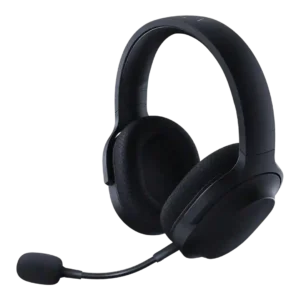
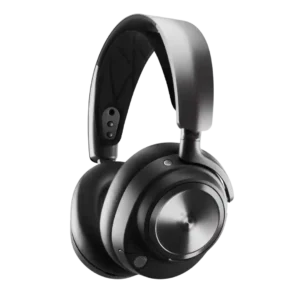
Average score
P1
Product 1: Razer Barracuda X
4.1
P2
Product 2: SteelSeries Arctis Nova Pro Wireless...
4.1
Active noise cancellation
P1Product 1: Razer Barracuda X
No score yet
P2
Product 2: SteelSeries Arctis Nova Pro Wireless...
4.0
ANC is effective for steady noises like HVAC, fans, and general room hum, and many find it meaningful for immersion. It is also commonly described as weaker than top consumer ANC headphones and may vary with fit, comfort, or long-term wear. You can toggle ANC and often adjust transparency, but control over ANC strength itself is limited in some reports. Overall, adjustability is seen as useful but not as granular as premium travel headphones.
Android compatibility
P1
Product 1: Razer Barracuda X
4.6
Android support is a clear plus, especially on models that lean on USB-C or Bluetooth for easy mobile pairing.
P2Product 2: SteelSeries Arctis Nova Pro Wireless...
No score yetApp
P1
Product 1: Razer Barracuda X
4.0
The companion apps are useful for mode switching and tweaks, but reviewers disagree on convenience and feature completeness across mobile and PC.
P2
Product 2: SteelSeries Arctis Nova Pro Wireless...
3.8
SteelSeries GG and Sonar are praised for power and depth, especially for audio routing, EQ, and mic processing. At the same time, multiple reviewers complain about updater friction, UI clutter, or limitations on non-PC platforms.
aptX
P1Product 1: Razer Barracuda X
No score yet
P2
Product 2: SteelSeries Arctis Nova Pro Wireless...
1.0
Reviews that discuss codecs indicate aptX is not supported for Bluetooth playback.
Audio-video sync accuracy
P1
Product 1: Razer Barracuda X
4.3
Latency is generally low enough for gaming, especially with the wireless dongle or game mode, though the advantage is smaller over Bluetooth.
P2Product 2: SteelSeries Arctis Nova Pro Wireless...
No score yetBass performance
P1
Product 1: Razer Barracuda X
4.1
Bass is generally punchy and full, helping games feel lively, but some reviewers found it a bit too forward or aggressive and less controlled than pricier alternatives.
P2
Product 2: SteelSeries Arctis Nova Pro Wireless...
4.4
Bass is typically slightly boosted yet controlled, giving impact for games and music without turning muddy. Several reviewers note it does not become subwoofer-like even with EQ, but it stays punchy and clean.
Battery
P1
Product 1: Razer Barracuda X
4.4
Battery life is a standout strength overall, ranging from good on the original model to excellent on newer versions and Chroma with lighting off.
P2
Product 2: SteelSeries Arctis Nova Pro Wireless...
4.6
Per-battery runtime is commonly cited around 18 to 22 hours, with some reports of higher depending on mode and settings. Even when batteries age, the dual-battery system makes downtime rare. The hot-swappable, replaceable battery system is widely viewed as best-in-class and a primary reason to buy. It effectively eliminates charging downtime and should extend the headset’s usable lifespan.
Bluetooth
P1
Product 1: Razer Barracuda X
4.1
Bluetooth-enabled versions usually connect and switch reliably, but at least one long-term user reported frustrating handoff and reconnection problems. The reviewed Chroma material points to fast switching rather than true mixed dual-audio playback, so simultaneous wireless and Bluetooth listening remains a weakness.
P2
Product 2: SteelSeries Arctis Nova Pro Wireless...
3.9
Bluetooth is often stable for basic listening, but multiple long-term users report annoying device switching behavior and occasional glitches or brief distortion. Overall stability is good, yet not flawless across every phone and PC setup.
Build quality
P1
Product 1: Razer Barracuda X
4.4
Build quality is usually judged solid for the price, with plastic shells and reinforced bands feeling sturdier than expected.
P2
Product 2: SteelSeries Arctis Nova Pro Wireless...
4.5
Build quality is routinely described as premium and sturdy, combining metal structure with solid plastics. Multi-year owners report the headset holds up well with minimal visible wear.
Button control usability
P1
Product 1: Razer Barracuda X
4.5
Physical controls are generally easy to find and use, with the volume wheel and mute button earning especially positive feedback.
P2
Product 2: SteelSeries Arctis Nova Pro Wireless...
4.5
On-head controls are generally praised for being well-spaced, tactile, and easy to find, with a clear mic-mute indicator. A common nitpick is the lack of a quick mute for headset audio on the wireless model.
Carry case quality
P1
Product 1: Razer Barracuda X
2.3
Storage is inconsistent across revisions: some reviews appreciate the included pouch, while others specifically complain that no case or bag is included.
P2Product 2: SteelSeries Arctis Nova Pro Wireless...
No score yetCharging
P1
Product 1: Razer Barracuda X
4.8
Charging performance is acceptable to strong, with quick top-up praise in some Chroma coverage and otherwise unremarkable recharge times.
P2
Product 2: SteelSeries Arctis Nova Pro Wireless...
4.6
Charging is highly convenient because the base station charges a spare battery while you play, enabling quick swaps. USB-C charging exists for travel, but several reviewers call its placement awkward and use it less often.
Clamping force comfort
P1
Product 1: Razer Barracuda X
4.2
Clamp is usually judged well-balanced, but impressions vary by head shape; some found it just right, while others thought it a touch too loose.
P2
Product 2: SteelSeries Arctis Nova Pro Wireless...
4.0
Clamping is generally described as snug to support isolation and ANC, with many finding it comfortable after break-in. Larger heads or pressure-sensitive users may notice the clamp more than average.
Codec support
P1
Product 1: Razer Barracuda X
2.0
Bluetooth codec support is a weak point in the reviewed Bluetooth models, with SBC-only support called out as limiting.
P2
Product 2: SteelSeries Arctis Nova Pro Wireless...
2.2
Codec support is treated as functional rather than audiophile-focused, with stability and latency prioritized over high-res Bluetooth features. If you care about premium Bluetooth codecs, this is not the headset’s main strength.
Comfort during long use
P1
Product 1: Razer Barracuda X
4.7
Comfort is one of the line's biggest strengths, with repeated praise for long-session wear, soft pads, and low fatigue.
P2
Product 2: SteelSeries Arctis Nova Pro Wireless...
4.4
Long-session comfort is a strong point for many thanks to the suspension strap and balanced weight. The most common drawbacks are warm leatherette pads, clamping that may need break-in, and a minority comfort issue tied to the inner ANC mic nub for certain ear shapes.
Design and Aesthetics
P1
Product 1: Razer Barracuda X
4.6
Reviewers consistently like the understated look, calling it cleaner and less flashy than typical gaming headsets.
P2
Product 2: SteelSeries Arctis Nova Pro Wireless...
4.6
The design is widely liked for looking sleek and not overly gamer-styled, making it plausible as everyday headphones. Customization options like alternate plates/headbands are also mentioned as a nice bonus.
Detachable microphone convenience
P1
Product 1: Razer Barracuda X
4.5
The detachable boom is widely appreciated for making the headset easier to travel with and less conspicuous off the desk.
P2
Product 2: SteelSeries Arctis Nova Pro Wireless...
4.3
The retractable boom mic is convenient and keeps the headset looking clean when not in use. Several reviewers note the mechanism can feel stiff, and audio quality is very poor if you try to use the mic fully retracted.
Dongle
P1
Product 1: Razer Barracuda X
4.2
The USB-C dongle is a major part of the headset's appeal, delivering easy cross-platform use, though its size, port blocking, or occasional hiccups draw some complaints.
P2
Product 2: SteelSeries Arctis Nova Pro Wireless...
4.6
The base station/DAC is a signature feature that centralizes settings, battery charging, and input switching with an OLED screen. A recurring complaint is that the unit is light, so pressing the knob can require a stabilizing hand.
Ear cup padding quality
P1
Product 1: Razer Barracuda X
4.4
The fabric memory-foam pads are usually praised for breathability and softness, though a few reviewers wished for a little more depth.
P2
Product 2: SteelSeries Arctis Nova Pro Wireless...
4.0
The pads provide a solid seal and feel plush, but heat buildup is frequently mentioned. Some users also call the stock pads thin or prefer aftermarket options for better depth and comfort.
Ear cup swivel/rotation range
P1
Product 1: Razer Barracuda X
3.4
Swivel is functional but divisive: some like the flexibility and flat-lay storage, while others dislike the unusual rotation direction.
P2
Product 2: SteelSeries Arctis Nova Pro Wireless...
4.5
The earcups swivel enough to help fit and let the headset lay flat, which reviewers appreciate. Wearing it around the neck can feel tight for some users despite the swivel.
Equalizer customization
P1
Product 1: Razer Barracuda X
4.2
Custom EQ support is appreciated where available, especially on mobile, and helps tune the sound away from bass-heavy defaults.
P2
Product 2: SteelSeries Arctis Nova Pro Wireless...
4.6
EQ control is a major strength, ranging from simple presets to deep parametric adjustments in Sonar. Several reviewers say EQ changes are clearly audible and can tailor the headset for specific games and music tastes.
Frequency response accuracy
P1Product 1: Razer Barracuda X
No score yet
P2
Product 2: SteelSeries Arctis Nova Pro Wireless...
4.0
Measured or described tuning is close to neutral with a modest bass lift and some upper-mid/treble shaping. Most agree it responds very well to EQ if you want to fine-tune accuracy.
Game/Chat balance control
P1Product 1: Razer Barracuda X
No score yet
P2
Product 2: SteelSeries Arctis Nova Pro Wireless...
4.6
Game and chat balancing is one of the headset’s standout features, available via the base station and supported by Sonar routing. The common caveat is that the chat output path can sound less hi-fi than the main game/media path.
Headband adjustability
P1Product 1: Razer Barracuda X
No score yet
P2
Product 2: SteelSeries Arctis Nova Pro Wireless...
4.6
Adjustability is improved with telescoping arms and a multi-position suspension strap, helping it fit a wide range of head sizes. Several large-head reviewers explicitly call the new fit more forgiving than older Arctis designs.
Hinge durability
P1Product 1: Razer Barracuda X
No score yet
P2
Product 2: SteelSeries Arctis Nova Pro Wireless...
3.7
Overall construction is viewed as robust, but multiple reviewers still flag plastic hinges/slides as the main long-term durability question. Most concerns are preventative rather than reports of actual failures.
Included accessories
P1
Product 1: Razer Barracuda X
4.5
Accessories are generally generous for the price, often including useful cables, adapters, and sometimes a travel pouch.
P2
Product 2: SteelSeries Arctis Nova Pro Wireless...
4.6
Included accessories are typically generous for a gaming headset, commonly including two batteries, multiple cables, a pop filter, and a carry bag. Some also mention optional accessory kits for cosmetic customization.
Instrument separation
P1
Product 1: Razer Barracuda X
4.0
When the tuning clicks, reviewers report clear layering and good positional detail, though a few found the cheaper models less open and less revealing of subtle textures.
P2
Product 2: SteelSeries Arctis Nova Pro Wireless...
4.5
Instrument and cue separation is a highlight, repeatedly praised for pulling out fine details like footsteps and layered music elements. Multiple reviewers describe the sound as precise rather than just loud.
LDAC
P1Product 1: Razer Barracuda X
No score yet
P2
Product 2: SteelSeries Arctis Nova Pro Wireless...
1.0
Reviews that discuss codecs indicate LDAC is not supported for Bluetooth playback.
Maximum volume clarity
P1
Product 1: Razer Barracuda X
4.7
Volume stays clean at high output in the stronger reviews, with little obvious distortion, though the loudest settings can become uncomfortable.
P2
Product 2: SteelSeries Arctis Nova Pro Wireless...
4.7
At very high volumes, the headset is reported to keep bass hits and transients clear without obvious distortion. This is repeatedly cited as a premium trait versus cheaper wireless headsets.
Microphone noise reduction
P1
Product 1: Razer Barracuda X
4.6
Noise rejection is a consistent strength, with multiple reviews saying background hum and side noise stay controlled while speech remains intelligible.
P2
Product 2: SteelSeries Arctis Nova Pro Wireless...
4.3
Noise reduction features like ClearCast AI, noise gates, and smart leveling are often effective at cutting fan noise, birds, and keyboard clatter. A few still notice minor wireless artifacts or remaining background hiss depending on settings.
Microphone quality for calls
P1
Product 1: Razer Barracuda X
4.1
Mic performance ranges from usable to genuinely impressive depending on revision; the best takes call it clear and natural, while others note only decent chat quality.
P2
Product 2: SteelSeries Arctis Nova Pro Wireless...
3.9
For chat and work calls, the boom mic is generally serviceable to good, especially once Sonar presets and processing are applied. Out of the box, several users describe it as quiet, compressed, or just average for the price.
Midrange clarity
P1Product 1: Razer Barracuda X
No score yet
P2
Product 2: SteelSeries Arctis Nova Pro Wireless...
4.5
Midrange stays clear enough for dialogue and positional cues, and most do not describe it as muddy. A recurring note is that the secondary chat driver sounds less refined than the main audio driver.
Multi-platform compatibility
P1
Product 1: Razer Barracuda X
4.7
Cross-platform flexibility is one of the product family's defining strengths, with repeated praise for easy switching between PC, console, and mobile use.
P2
Product 2: SteelSeries Arctis Nova Pro Wireless...
4.5
Compatibility is broad across PC, PlayStation, Switch, and mobile Bluetooth use. Xbox support depends on buying the Xbox-specific version, which also influences how the two USB ports on the base station are labeled/used.
Multipoint connectivity reliability
P1Product 1: Razer Barracuda X
No score yet
P2
Product 2: SteelSeries Arctis Nova Pro Wireless...
4.3
The dual-USB base station plus Bluetooth mixing is repeatedly called a standout for reliability and convenience. The main pain points are juggling source volumes and, in some cases, awkward switching between Bluetooth devices or modes.
Noise isolation (passive)
P1
Product 1: Razer Barracuda X
3.6
Passive isolation is average to good: enough for home gaming and some travel, but not strong enough to hush louder low-frequency environments.
P2
Product 2: SteelSeries Arctis Nova Pro Wireless...
4.2
Passive isolation is strong for a closed-back gaming headset thanks to the leatherette seal. Several users note it remains effective even when ANC performance is only average or turned off.
Preset EQ profile quality
P1
Product 1: Razer Barracuda X
3.7
Preset sound modes are helpful but inconsistent, with some profiles sounding solid and others hurting fidelity more than helping.
P2
Product 2: SteelSeries Arctis Nova Pro Wireless...
4.5
Preset profiles are widely considered useful, with game-specific options that emphasize cues and clarity. Some presets can sound aggressive or require small tweaks to avoid over-bright or over-scooped results.
Replaceable earpads
P1Product 1: Razer Barracuda X
No score yet
P2
Product 2: SteelSeries Arctis Nova Pro Wireless...
3.7
Replaceability is reported inconsistently: some sources describe the stock earpads as not user-swappable, while others treat pad swapping as straightforward and many owners use aftermarket pads. In practice, assume you can refresh comfort, but details may depend on model, pad choice, and how you define replaceable.
RGB lighting customization
P1
Product 1: Razer Barracuda X
4.4
Chroma lighting is customizable and better executed than expected, though not everyone sees it as worth the battery tradeoff.
P2Product 2: SteelSeries Arctis Nova Pro Wireless...
No score yetSidetone adjustment quality
P1Product 1: Razer Barracuda X
No score yet
P2
Product 2: SteelSeries Arctis Nova Pro Wireless...
4.1
Sidetone is adjustable through the base station and software, helping you monitor your speaking volume. A few reviewers note it can still feel too quiet even at maximum.
Smudge resistance
P1Product 1: Razer Barracuda X
No score yet
P2
Product 2: SteelSeries Arctis Nova Pro Wireless...
2.7
The magnetic side plates tend to collect dust, fingerprints, and gunk, and some finishes feel easy to scuff. Expect occasional wiping if aesthetics matter.
Software/setup simplicity
P1
Product 1: Razer Barracuda X
3.6
Setup is often simple plug-and-play, but some revisions lose points for scattered apps, account requirements, or occasional connection quirks.
P2
Product 2: SteelSeries Arctis Nova Pro Wireless...
3.6
Basic setup is usually easy, but optimal results often require firmware updates and some Sonar configuration. Several reviewers also note that key Sonar features are PC-centric and may not fully carry over to every console use case.
Sound quality
P1
Product 1: Razer Barracuda X
4.4
Across the reviews, the Barracuda X line usually sounds good to excellent for gaming, with a warm, engaging presentation; criticism centers on some variants sounding less refined for pure music listening. Wired fallback is useful and generally sounds solid, making Xbox or low-battery use viable even if wireless is the main draw.
P2
Product 2: SteelSeries Arctis Nova Pro Wireless...
4.6
Across reviews, sound is consistently described as detailed and competitive for imaging, with a generally balanced tuning. Many note it sounds best after Sonar EQ or presets, but it is still strong out of the box.
Soundstage width
P1Product 1: Razer Barracuda X
No score yet
P2
Product 2: SteelSeries Arctis Nova Pro Wireless...
3.8
Imaging is strong, but the perceived stage is not described as unusually wide. Spatial processing and per-game profiles can make the presentation feel more speaker-like when desired.
Spatial audio
P1
Product 1: Razer Barracuda X
4.0
Spatial and virtual surround features add directionality and immersion, but most reviews stop short of calling them class-leading or essential.
P2
Product 2: SteelSeries Arctis Nova Pro Wireless...
4.6
Spatial audio is frequently praised for convincing directionality and improved immersion, with support for common platform surround options and Sonar processing on PC. Competitive players like the imaging, while some prefer to dial effects back for pure stereo accuracy.
Stability
P1Product 1: Razer Barracuda X
No score yet
P2
Product 2: SteelSeries Arctis Nova Pro Wireless...
3.7
Wireless performance is often described as rock solid and low-latency, especially on 2.4GHz through the base station. A minority report rare dropouts, glitch noises, or occasional reconnect events over long-term use.
Transparency mode quality
P1Product 1: Razer Barracuda X
No score yet
P2
Product 2: SteelSeries Arctis Nova Pro Wireless...
3.6
Transparency can be genuinely useful for hearing the room, but some reviewers find it amplifies noise or adds a bit of hiss. Most treat it as a situational feature rather than something left on all the time.
Treble clarity
P1Product 1: Razer Barracuda X
No score yet
P2
Product 2: SteelSeries Arctis Nova Pro Wireless...
4.2
Treble is usually called clear and detailed without harshness, though some report slight blunting or hissy cymbals on certain tracks. EQ can brighten the top end if you want more sparkle.
USB-C
P1Product 1: Razer Barracuda X
No score yet
P2
Product 2: SteelSeries Arctis Nova Pro Wireless...
4.4
USB-C connectivity is a big part of the ecosystem, including dual USB inputs on the base station and USB-C charging/update access on the headset. Some users miss the optical input found on earlier generations, but most prefer the modern USB setup.
Volume output
P1Product 1: Razer Barracuda X
No score yet
P2
Product 2: SteelSeries Arctis Nova Pro Wireless...
4.7
Overall output is loud with plenty of headroom, and reviewers report it stays composed at higher volumes. A minority mention odd Bluetooth volume stepping depending on the phone/device.
Weight comfort
P1
Product 1: Razer Barracuda X
4.8
Low weight is repeatedly highlighted as a major advantage, making the headset feel easy to wear for hours or while moving around.
P2
Product 2: SteelSeries Arctis Nova Pro Wireless...
4.4
Despite being a feature-packed wireless headset, most reviewers find the weight well balanced and comfortable over long sessions. A few note it is not the lightest, but the suspension strap helps prevent pressure hot spots.
Xbox compatibility
P1
Product 1: Razer Barracuda X
2.7
Xbox support is the main compatibility compromise, with wired use typically working but native wireless support absent.
P2
Product 2: SteelSeries Arctis Nova Pro Wireless...
4.6
When you have the Xbox version, Xbox connectivity is solid and is frequently recommended even for PlayStation-first buyers. The PlayStation version is commonly described as not working with Xbox consoles.