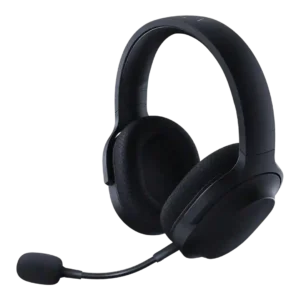
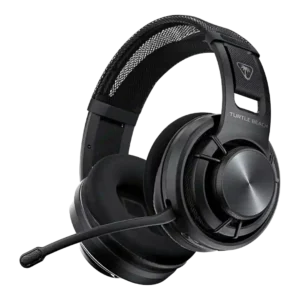
Average score
P1
Product 1: Razer Barracuda X
4.1
P2
Product 2: Turtle Beach Atlas Air Wireless...
3.8
Active noise cancellation
P1Product 1: Razer Barracuda X
No score yet
P2
Product 2: Turtle Beach Atlas Air Wireless...
1.0
There is no active noise cancellation. The open-back design prioritizes airflow and natural sound, so it can’t cancel distractions the way closed-back ANC headsets can.
Android compatibility
P1
Product 1: Razer Barracuda X
4.6
Android support is a clear plus, especially on models that lean on USB-C or Bluetooth for easy mobile pairing.
P2
Product 2: Turtle Beach Atlas Air Wireless...
4.1
Works on Android over Bluetooth and supports the Swarm II mobile app, but several advanced audio features are PC-centric and mobile options can feel limited.
App
P1
Product 1: Razer Barracuda X
4.0
The companion apps are useful for mode switching and tweaks, but reviewers disagree on convenience and feature completeness across mobile and PC.
P2
Product 2: Turtle Beach Atlas Air Wireless...
3.5
Swarm II provides firmware updates plus access to EQ, mic controls, spatial options, and game/chat features. Stability and feature parity vary by platform, and some users report connection or preset issues.
Audio-video sync accuracy
P1
Product 1: Razer Barracuda X
4.3
Latency is generally low enough for gaming, especially with the wireless dongle or game mode, though the advantage is smaller over Bluetooth.
P2
Product 2: Turtle Beach Atlas Air Wireless...
4.2
Audio latency is best over the 2.4GHz dongle and 3.5mm wired mode. Bluetooth is fine for casual listening but not ideal when timing is critical.
Bass performance
P1
Product 1: Razer Barracuda X
4.1
Bass is generally punchy and full, helping games feel lively, but some reviewers found it a bit too forward or aggressive and less controlled than pricier alternatives.
P2
Product 2: Turtle Beach Atlas Air Wireless...
3.6
Bass is generally controlled rather than thunderous. Some reviews find it punchy enough for games, but many note weaker sub-bass and less impact for explosions or bass-heavy music.
Battery
P1
Product 1: Razer Barracuda X
4.4
Battery life is a standout strength overall, ranging from good on the original model to excellent on newer versions and Chroma with lighting off.
P2
Product 2: Turtle Beach Atlas Air Wireless...
4.6
Battery life is repeatedly praised, usually meeting the advertised ~50 hours and sometimes exceeding it, so most users can go many sessions between charges.
Bluetooth
P1
Product 1: Razer Barracuda X
4.1
Bluetooth-enabled versions usually connect and switch reliably, but at least one long-term user reported frustrating handoff and reconnection problems. The reviewed Chroma material points to fast switching rather than true mixed dual-audio playback, so simultaneous wireless and Bluetooth listening remains a weakness.
P2
Product 2: Turtle Beach Atlas Air Wireless...
3.9
Bluetooth generally works reliably for calls and media, but it’s higher latency than the 2.4GHz dongle and switching between sources can take a couple seconds. True simultaneous game audio (2.4GHz) plus Bluetooth mixing isn’t supported. You can toggle/QuickSwitch between sources instead.
Build quality
P1
Product 1: Razer Barracuda X
4.4
Build quality is usually judged solid for the price, with plastic shells and reinforced bands feeling sturdier than expected.
P2
Product 2: Turtle Beach Atlas Air Wireless...
3.9
Build is mostly plastic to keep weight low and is generally described as solid and flexible. It doesn’t feel as premium as metal-framed competitors, and the unusual suspension design raises long-term questions for some.
Button control usability
P1
Product 1: Razer Barracuda X
4.5
Physical controls are generally easy to find and use, with the volume wheel and mute button earning especially positive feedback.
P2
Product 2: Turtle Beach Atlas Air Wireless...
3.9
Controls are mostly on one earcup with a prominent volume wheel. Some find them easy to locate, while others dislike similarly shaped buttons or coarse volume steps.
Cable quality
P1Product 1: Razer Barracuda X
No score yet
P2
Product 2: Turtle Beach Atlas Air Wireless...
4.6
Pack-in cables are commonly braided, longer than average, and better than typical bundled cables, drawing positive comments across multiple reviews.
Carry case quality
P1
Product 1: Razer Barracuda X
2.3
Storage is inconsistent across revisions: some reviews appreciate the included pouch, while others specifically complain that no case or bag is included.
P2
Product 2: Turtle Beach Atlas Air Wireless...
3.3
The included pouch/bag is useful for scratch protection but isn’t a structured case and offers limited impact protection.
Charging
P1
Product 1: Razer Barracuda X
4.8
Charging performance is acceptable to strong, with quick top-up praise in some Chroma coverage and otherwise unremarkable recharge times.
P2
Product 2: Turtle Beach Atlas Air Wireless...
4.3
USB-C charging is convenient, with multiple reviews citing fast charging (often roughly under a couple hours) and the ability to keep using the headset while it charges.
Clamping force comfort
P1
Product 1: Razer Barracuda X
4.2
Clamp is usually judged well-balanced, but impressions vary by head shape; some found it just right, while others thought it a touch too loose.
P2
Product 2: Turtle Beach Atlas Air Wireless...
4.2
Clamp is typically gentle and glasses-friendly, but the same light clamp can reduce stability for people who move around a lot.
Codec support
P1
Product 1: Razer Barracuda X
2.0
Bluetooth codec support is a weak point in the reviewed Bluetooth models, with SBC-only support called out as limiting.
P2Product 2: Turtle Beach Atlas Air Wireless...
No score yetComfort during long use
P1
Product 1: Razer Barracuda X
4.7
Comfort is one of the line's biggest strengths, with repeated praise for long-session wear, soft pads, and low fatigue.
P2
Product 2: Turtle Beach Atlas Air Wireless...
4.7
Comfort is a standout theme: lightweight build, breathable pads, and low clamp keep it easy to wear for hours, especially for glasses wearers.
Design and Aesthetics
P1
Product 1: Razer Barracuda X
4.6
Reviewers consistently like the understated look, calling it cleaner and less flashy than typical gaming headsets.
P2
Product 2: Turtle Beach Atlas Air Wireless...
4.1
A restrained, modern look with distinctive open-back grilles and floating cups. It reads more functional than flashy, which some prefer and others find plain.
Detachable microphone convenience
P1
Product 1: Razer Barracuda X
4.5
The detachable boom is widely appreciated for making the headset easier to travel with and less conspicuous off the desk.
P2
Product 2: Turtle Beach Atlas Air Wireless...
4.3
The detachable boom mic and flip-to-mute are convenient for switching between gaming and casual use. A few mention the boom length or ergonomics as minor annoyances.
Dongle
P1
Product 1: Razer Barracuda X
4.2
The USB-C dongle is a major part of the headset's appeal, delivering easy cross-platform use, though its size, port blocking, or occasional hiccups draw some complaints.
P2
Product 2: Turtle Beach Atlas Air Wireless...
4.3
The included 2.4GHz USB-A dongle is the preferred mode for low-latency gaming and tends to be stable, while also enabling the best PC-only audio options.
Ear cup padding quality
P1
Product 1: Razer Barracuda X
4.4
The fabric memory-foam pads are usually praised for breathability and softness, though a few reviewers wished for a little more depth.
P2
Product 2: Turtle Beach Atlas Air Wireless...
4.4
Earpads are described as plush, breathable, and comfortable, often using fabric rather than pleather to reduce heat. Many note they’re removable for cleaning or replacement.
Ear cup swivel/rotation range
P1
Product 1: Razer Barracuda X
3.4
Swivel is functional but divisive: some like the flexibility and flat-lay storage, while others dislike the unusual rotation direction.
P2
Product 2: Turtle Beach Atlas Air Wireless...
2.1
The earcups don’t swivel flat, which makes it less convenient to rest around the neck or pack neatly compared with headsets that fold or rotate.
Equalizer customization
P1
Product 1: Razer Barracuda X
4.2
Custom EQ support is appreciated where available, especially on mobile, and helps tune the sound away from bass-heavy defaults.
P2
Product 2: Turtle Beach Atlas Air Wireless...
3.9
A 10-band EQ with custom presets is a core strength (especially on PC). A few reviewers report EQ-related artifacts or odd behavior with non-default profiles.
Frequency response accuracy
P1Product 1: Razer Barracuda X
No score yet
P2
Product 2: Turtle Beach Atlas Air Wireless...
4.2
Tuning is broadly balanced with a mild upper-frequency emphasis that favors detail and competitive cues. Multiple notes point to less sub-bass than many closed-backs and occasional treble unevenness.
Game/Chat balance control
P1Product 1: Razer Barracuda X
No score yet
P2
Product 2: Turtle Beach Atlas Air Wireless...
3.0
Game/chat mix is typically handled in the companion software rather than with a dedicated hardware dial, which is workable on PC but less convenient mid-game.
Headband adjustability
P1Product 1: Razer Barracuda X
No score yet
P2
Product 2: Turtle Beach Atlas Air Wireless...
3.7
Adjustment relies on a suspension/velcro system rather than sliding yokes. It fits many heads well, but it’s less granular and some worry about long-term velcro tension.
Hinge durability
P1Product 1: Razer Barracuda X
No score yet
P2
Product 2: Turtle Beach Atlas Air Wireless...
4.0
The floating, band-suspended earcup design avoids traditional hinge stress points and feels robust in early use, but it’s unconventional enough that long-term wear remains an unknown.
Included accessories
P1
Product 1: Razer Barracuda X
4.5
Accessories are generally generous for the price, often including useful cables, adapters, and sometimes a travel pouch.
P2
Product 2: Turtle Beach Atlas Air Wireless...
4.6
The bundle typically includes the dongle, USB-C cable, 3.5mm cable, detachable mic (often with a windscreen), and a pouch. Braided cables and overall completeness get frequent praise.
Instrument separation
P1
Product 1: Razer Barracuda X
4.0
When the tuning clicks, reviewers report clear layering and good positional detail, though a few found the cheaper models less open and less revealing of subtle textures.
P2
Product 2: Turtle Beach Atlas Air Wireless...
4.4
Instrument and layer separation is strong, helping complex mixes and busy game scenes remain distinct rather than blending together.
Maximum volume clarity
P1
Product 1: Razer Barracuda X
4.7
Volume stays clean at high output in the stronger reviews, with little obvious distortion, though the loudest settings can become uncomfortable.
P2
Product 2: Turtle Beach Atlas Air Wireless...
4.1
Clarity at high volume is generally strong with little distortion, though a few reports suggest certain EQ modes can introduce artifacts, especially at lower listening levels.
Microphone noise reduction
P1
Product 1: Razer Barracuda X
4.6
Noise rejection is a consistent strength, with multiple reviews saying background hum and side noise stay controlled while speech remains intelligible.
P2
Product 2: Turtle Beach Atlas Air Wireless...
3.9
Noise handling is generally good with adjustable noise gates and processing, but some reviewers hear occasional dips or artifacts when noise reduction is too aggressive.
Microphone quality for calls
P1
Product 1: Razer Barracuda X
4.1
Mic performance ranges from usable to genuinely impressive depending on revision; the best takes call it clear and natural, while others note only decent chat quality.
P2
Product 2: Turtle Beach Atlas Air Wireless...
4.0
Mic clarity is above average for a gaming headset, especially over the dongle/high-bandwidth modes. Over Bluetooth it can sound more compressed and less full.
Midrange clarity
P1Product 1: Razer Barracuda X
No score yet
P2
Product 2: Turtle Beach Atlas Air Wireless...
4.3
Midrange is typically clear and present, keeping dialogue and key cues intelligible even in busy scenes.
Multi-platform compatibility
P1
Product 1: Razer Barracuda X
4.7
Cross-platform flexibility is one of the product family's defining strengths, with repeated praise for easy switching between PC, console, and mobile use.
P2
Product 2: Turtle Beach Atlas Air Wireless...
4.3
Connectivity is flexible via 2.4GHz dongle, Bluetooth, and 3.5mm analog, covering PC, PlayStation, Switch, and phones well. Xbox support is the main caveat because it isn’t wireless.
Noise isolation (passive)
P1
Product 1: Razer Barracuda X
3.6
Passive isolation is average to good: enough for home gaming and some travel, but not strong enough to hush louder low-frequency environments.
P2
Product 2: Turtle Beach Atlas Air Wireless...
1.3
Passive isolation is minimal by design. Sound leaks out and outside noise comes in, so it’s poorly suited to shared rooms, offices, or commuting.
Preset EQ profile quality
P1
Product 1: Razer Barracuda X
3.7
Preset sound modes are helpful but inconsistent, with some profiles sounding solid and others hurting fidelity more than helping.
P2
Product 2: Turtle Beach Atlas Air Wireless...
3.5
The default Signature Sound profile is widely considered the most balanced and reliable. Superhuman Hearing and other presets can sound artificial or overly bright, and some profiles behave inconsistently.
Replaceable earpads
P1Product 1: Razer Barracuda X
No score yet
P2
Product 2: Turtle Beach Atlas Air Wireless...
4.6
Earpads are removable and replacements/mod options are available or expected, which helps hygiene and long-term maintenance.
RGB lighting customization
P1
Product 1: Razer Barracuda X
4.4
Chroma lighting is customizable and better executed than expected, though not everyone sees it as worth the battery tradeoff.
P2Product 2: Turtle Beach Atlas Air Wireless...
No score yetSidetone adjustment quality
P1Product 1: Razer Barracuda X
No score yet
P2
Product 2: Turtle Beach Atlas Air Wireless...
3.1
Mic monitoring/sidetone is adjustable and often described as hiss-free, but several reviewers found it too quiet unless set very high or noted it doesn’t feel especially strong.
Software/setup simplicity
P1
Product 1: Razer Barracuda X
3.6
Setup is often simple plug-and-play, but some revisions lose points for scattered apps, account requirements, or occasional connection quirks.
P2
Product 2: Turtle Beach Atlas Air Wireless...
2.9
Setup is straightforward when everything behaves, but multiple reviews mention finicky detection, firmware/update hiccups, or settings that don’t persist, making the experience inconsistent.
Sound quality
P1
Product 1: Razer Barracuda X
4.4
Across the reviews, the Barracuda X line usually sounds good to excellent for gaming, with a warm, engaging presentation; criticism centers on some variants sounding less refined for pure music listening. Wired fallback is useful and generally sounds solid, making Xbox or low-battery use viable even if wireless is the main draw.
P2
Product 2: Turtle Beach Atlas Air Wireless...
4.5
Overall sound quality is a highlight: detailed, natural-leaning audio with strong positional clarity. The most common caveats are lighter low-end impact and occasional brightness depending on content and EQ.
Soundstage width
P1Product 1: Razer Barracuda X
No score yet
P2
Product 2: Turtle Beach Atlas Air Wireless...
4.5
Soundstage is notably wide and airy thanks to the open-back cups, creating a speaker-like sense of space that helps immersion and directional awareness in quiet rooms.
Spatial audio
P1
Product 1: Razer Barracuda X
4.0
Spatial and virtual surround features add directionality and immersion, but most reviews stop short of calling them class-leading or essential.
P2
Product 2: Turtle Beach Atlas Air Wireless...
4.2
PC-focused spatial features (often Waves 3D) can add useful directionality, though results vary by game and some listeners prefer it off for the cleanest, most natural presentation.
Stability
P1Product 1: Razer Barracuda X
No score yet
P2
Product 2: Turtle Beach Atlas Air Wireless...
3.1
Stability is mixed: it can sit comfortably when you’re stationary, but the light clamp and floating cups may shift with head turns or quick movement.
Treble clarity
P1Product 1: Razer Barracuda X
No score yet
P2
Product 2: Turtle Beach Atlas Air Wireless...
3.9
Treble tends to lean bright for detail and cue pickup, but several reviews mention occasional sharpness or sibilance, especially with certain presets or EQ changes.
USB-C
P1Product 1: Razer Barracuda X
No score yet
P2
Product 2: Turtle Beach Atlas Air Wireless...
4.2
Charges over USB-C; reviewers treat the USB-C connection as power/charging rather than a full-featured wired audio link.
Volume output
P1Product 1: Razer Barracuda X
No score yet
P2
Product 2: Turtle Beach Atlas Air Wireless...
3.3
Overall loudness is adequate for many, but multiple reviewers note an odd volume curve or that it needs higher percentage settings to reach their preferred listening level.
Weight comfort
P1
Product 1: Razer Barracuda X
4.8
Low weight is repeatedly highlighted as a major advantage, making the headset feel easy to wear for hours or while moving around.
P2
Product 2: Turtle Beach Atlas Air Wireless...
4.7
Weight is consistently noted as very low for a wireless headset (around 300g), helping it feel almost invisible during long sessions.
Xbox compatibility
P1
Product 1: Razer Barracuda X
2.7
Xbox support is the main compatibility compromise, with wired use typically working but native wireless support absent.
P2
Product 2: Turtle Beach Atlas Air Wireless...
3.0
Xbox use is described as wired-only through the controller via 3.5mm, with no native Xbox wireless support.