Average score
P1
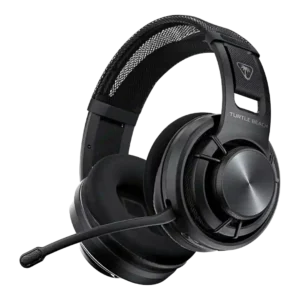
Product 1: Turtle Beach Atlas Air Wireless...
3.8
P2
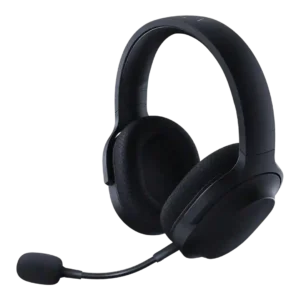
Product 2: Razer Barracuda X
3.8
Active noise cancellation
P1
Product 1: Turtle Beach Atlas Air Wireless...
1.0
There is no active noise cancellation. The open-back design prioritizes airflow and natural sound, so it can’t cancel distractions the way closed-back ANC headsets can.
P2
Product 2: Razer Barracuda X
1.7
The reviews do not describe built-in ANC on the Barracuda X itself; references frame ANC as absent or reserved for pricier alternatives.
Android compatibility
P1
Product 1: Turtle Beach Atlas Air Wireless...
4.1
Works on Android over Bluetooth and supports the Swarm II mobile app, but several advanced audio features are PC-centric and mobile options can feel limited.
P2
Product 2: Razer Barracuda X
4.5
Android compatibility is repeatedly supported through USB-C dongle use and mobile testing on Android phones.
App
P1
Product 1: Turtle Beach Atlas Air Wireless...
3.5
Swarm II provides firmware updates plus access to EQ, mic controls, spatial options, and game/chat features. Stability and feature parity vary by platform, and some users report connection or preset issues.
P2
Product 2: Razer Barracuda X
3.7
App support enables EQ, RGB, gaming mode, or surround features, but reviewers often found the split across Razer Audio, Synapse, Chroma, and 7.1 apps inconvenient.
aptX
P1Product 1: Turtle Beach Atlas Air Wireless...
No score yet
P2
Product 2: Razer Barracuda X
1.5
aptX support is specifically called out as missing, reducing the Bluetooth codec score.
Audio-video sync accuracy
P1
Product 1: Turtle Beach Atlas Air Wireless...
4.2
Audio latency is best over the 2.4GHz dongle and 3.5mm wired mode. Bluetooth is fine for casual listening but not ideal when timing is critical.
P2
Product 2: Razer Barracuda X
3.7
Latency is mostly positive for gaming, especially with dongle and gaming mode, but one cloud-gaming test reported added latency, popping, and dropout.
Bass performance
P1
Product 1: Turtle Beach Atlas Air Wireless...
3.6
Bass is generally controlled rather than thunderous. Some reviews find it punchy enough for games, but many note weaker sub-bass and less impact for explosions or bass-heavy music.
P2
Product 2: Razer Barracuda X
4.1
Bass is usually described as punchy, full, or satisfying, but some reviewers found the low end either lacking in rumble or a little compromised by preset tuning.
Battery
P1
Product 1: Turtle Beach Atlas Air Wireless...
4.6
Battery life is repeatedly praised, usually meeting the advertised ~50 hours and sometimes exceeding it, so most users can go many sessions between charges.
P2
Product 2: Razer Barracuda X
4.1
Battery life is a strength overall, ranging from roughly 20-24 hours on earlier models to about 50-70 hours on later 2022 and Chroma versions.
Bluetooth
P1
Product 1: Turtle Beach Atlas Air Wireless...
3.9
Bluetooth generally works reliably for calls and media, but it’s higher latency than the 2.4GHz dongle and switching between sources can take a couple seconds. True simultaneous game audio (2.4GHz) plus Bluetooth mixing isn’t supported. You can toggle/QuickSwitch between sources instead.
P2
Product 2: Razer Barracuda X
3.7
Bluetooth support depends on model year and variant, with 2022 and Chroma reviews praising it while older Barracuda X reviews note its absence.
Build quality
P1
Product 1: Turtle Beach Atlas Air Wireless...
3.9
Build is mostly plastic to keep weight low and is generally described as solid and flexible. It doesn’t feel as premium as metal-framed competitors, and the unusual suspension design raises long-term questions for some.
P2
Product 2: Razer Barracuda X
4.4
Build quality is generally solid for the price, with plastic construction offset by metal reinforcement, no creaking, and a sturdy feel.
Button control usability
P1
Product 1: Turtle Beach Atlas Air Wireless...
3.9
Controls are mostly on one earcup with a prominent volume wheel. Some find them easy to locate, while others dislike similarly shaped buttons or coarse volume steps.
P2
Product 2: Razer Barracuda X
4.2
Physical controls are generally easy to find and use, though the Chroma volume wheel can be too easy to move unintentionally.
Cable quality
P1
Product 1: Turtle Beach Atlas Air Wireless...
4.6
Pack-in cables are commonly braided, longer than average, and better than typical bundled cables, drawing positive comments across multiple reviews.
P2
Product 2: Razer Barracuda X
4.2
Cable feedback is positive where discussed, with reviewers appreciating decent length, useful included analog cables, and practical charging cables.
Carry case quality
P1
Product 1: Turtle Beach Atlas Air Wireless...
3.3
The included pouch/bag is useful for scratch protection but isn’t a structured case and offers limited impact protection.
P2
Product 2: Razer Barracuda X
2.7
Carry protection is inconsistent: Chroma reviews mention a pouch or bag, while several Barracuda X reviews complain that no case or pouch is included.
Charging
P1
Product 1: Turtle Beach Atlas Air Wireless...
4.3
USB-C charging is convenient, with multiple reviews citing fast charging (often roughly under a couple hours) and the ability to keep using the headset while it charges.
P2
Product 2: Razer Barracuda X
4.2
Charging evidence is positive for quick charge and use while charging, though one Chroma review found a half-to-full charge only middling.
Clamping force comfort
P1
Product 1: Turtle Beach Atlas Air Wireless...
4.2
Clamp is typically gentle and glasses-friendly, but the same light clamp can reduce stability for people who move around a lot.
P2
Product 2: Razer Barracuda X
4.2
Clamping comfort is mostly good, balancing grip and pressure, but one review found the clamping force weak enough to affect stability.
Codec support
P1Product 1: Turtle Beach Atlas Air Wireless...
No score yet
P2
Product 2: Razer Barracuda X
2.0
Codec support is limited in the reviews, with Bluetooth described as SBC-only and therefore weaker than headsets offering AAC or aptX.
Comfort during long use
P1
Product 1: Turtle Beach Atlas Air Wireless...
4.7
Comfort is a standout theme: lightweight build, breathable pads, and low clamp keep it easy to wear for hours, especially for glasses wearers.
P2
Product 2: Razer Barracuda X
4.5
Comfort over long sessions is a major strength, with repeated praise for light weight, breathable materials, and low fatigue across multi-hour gaming.
Connectivity versatility
P1Product 1: Turtle Beach Atlas Air Wireless...
No score yet
P2
Product 2: Razer Barracuda X
4.7
Connectivity versatility is one of the main strengths, with reviewers highlighting USB-C wireless, Bluetooth on newer models, 3.5mm on older models, and broad device support.
Console compatibility limitations
P1Product 1: Turtle Beach Atlas Air Wireless...
No score yet
P2
Product 2: Razer Barracuda X
2.7
The dominant console limitation is Xbox: reviewers repeatedly note the headset cannot connect wirelessly to Xbox and needs a cable or alternative.
Design and Aesthetics
P1
Product 1: Turtle Beach Atlas Air Wireless...
4.1
A restrained, modern look with distinctive open-back grilles and floating cups. It reads more functional than flashy, which some prefer and others find plain.
P2
Product 2: Razer Barracuda X
4.5
The design is consistently praised as subtle, understated, and less gamer-looking, with Chroma adding tasteful RGB for users who want lighting.
Detachable cable convenience
P1Product 1: Turtle Beach Atlas Air Wireless...
No score yet
P2
Product 2: Razer Barracuda X
3.8
Wired fallback is helpful on older Barracuda X models and for Xbox, but one Chroma review notes wired use is not possible on that variant.
Detachable microphone convenience
P1
Product 1: Turtle Beach Atlas Air Wireless...
4.3
The detachable boom mic and flip-to-mute are convenient for switching between gaming and casual use. A few mention the boom length or ergonomics as minor annoyances.
P2
Product 2: Razer Barracuda X
4.5
The detachable microphone is widely appreciated because it fits securely, improves everyday headphone use, and can be removed for travel.
Dongle
P1
Product 1: Turtle Beach Atlas Air Wireless...
4.3
The included 2.4GHz USB-A dongle is the preferred mode for low-latency gaming and tends to be stable, while also enabling the best PC-only audio options.
P2
Product 2: Razer Barracuda X
3.2
The USB-C dongle is central to the headset's versatility, but many reviewers warn it is wide, easy to lose, or able to block adjacent ports.
Ear cup padding quality
P1
Product 1: Turtle Beach Atlas Air Wireless...
4.4
Earpads are described as plush, breathable, and comfortable, often using fabric rather than pleather to reduce heat. Many note they’re removable for cleaning or replacement.
P2
Product 2: Razer Barracuda X
4.5
Ear cup padding is generally well-liked for memory foam and breathable fabric, though one review found the Chroma pads not especially plush.
Ear cup swivel/rotation range
P1
Product 1: Turtle Beach Atlas Air Wireless...
2.1
The earcups don’t swivel flat, which makes it less convenient to rest around the neck or pack neatly compared with headsets that fold or rotate.
P2
Product 2: Razer Barracuda X
3.1
Ear cup rotation is useful for storage, but several reviewers disliked the unusual direction in which the cups fold or swivel.
Earpad noise
P1Product 1: Turtle Beach Atlas Air Wireless...
No score yet
P2
Product 2: Razer Barracuda X
2.0
Earpad noise is a small weakness in one review, where fabric movement caused skin-contact noise.
Equalizer customization
P1
Product 1: Turtle Beach Atlas Air Wireless...
3.9
A 10-band EQ with custom presets is a core strength (especially on PC). A few reviewers report EQ-related artifacts or odd behavior with non-default profiles.
P2
Product 2: Razer Barracuda X
3.5
EQ customization is strong on models with Razer Audio or Synapse support, but older or non-Synapse experiences can leave users without EQ control.
Fit/seal reliability
P1Product 1: Turtle Beach Atlas Air Wireless...
No score yet
P2
Product 2: Razer Barracuda X
4.4
Fit and seal are generally good when clamping is right, but related stability evidence shows fit can vary by head shape.
Frequency response accuracy
P1
Product 1: Turtle Beach Atlas Air Wireless...
4.2
Tuning is broadly balanced with a mild upper-frequency emphasis that favors detail and competitive cues. Multiple notes point to less sub-bass than many closed-backs and occasional treble unevenness.
P2
Product 2: Razer Barracuda X
3.7
Measured frequency response was described as close to the consumer target in the mids, with more variation in lows and highs.
Game/Chat balance control
P1
Product 1: Turtle Beach Atlas Air Wireless...
3.0
Game/chat mix is typically handled in the companion software rather than with a dedicated hardware dial, which is workable on PC but less convenient mid-game.
P2Product 2: Razer Barracuda X
No score yetHeadband adjustability
P1
Product 1: Turtle Beach Atlas Air Wireless...
3.7
Adjustment relies on a suspension/velcro system rather than sliding yokes. It fits many heads well, but it’s less granular and some worry about long-term velcro tension.
P2
Product 2: Razer Barracuda X
4.5
Headband adjustment is supported by secure sizing and hard stops, with no major complaints in the reviews that mention it.
Hinge durability
P1
Product 1: Turtle Beach Atlas Air Wireless...
4.0
The floating, band-suspended earcup design avoids traditional hinge stress points and feels robust in early use, but it’s unconventional enough that long-term wear remains an unknown.
P2
Product 2: Razer Barracuda X
4.3
Durability around flexing and rotation is described positively, with reviewers noting no creaking and confidence when stretching the headset.
Included accessories
P1
Product 1: Turtle Beach Atlas Air Wireless...
4.6
The bundle typically includes the dongle, USB-C cable, 3.5mm cable, detachable mic (often with a windscreen), and a pouch. Braided cables and overall completeness get frequent praise.
P2
Product 2: Razer Barracuda X
4.6
Included accessories are usually generous, especially dongles, adapters, detachable mics, and cables, with stronger bundles on Chroma or later versions.
Instrument separation
P1
Product 1: Turtle Beach Atlas Air Wireless...
4.4
Instrument and layer separation is strong, helping complex mixes and busy game scenes remain distinct rather than blending together.
P2
Product 2: Razer Barracuda X
4.4
Layered audio and separation were a strength in several reviews, with reviewers noting balanced mixes, fine details, and reduced muddiness.
Integrated microphone
P1Product 1: Turtle Beach Atlas Air Wireless...
No score yet
P2
Product 2: Razer Barracuda X
4.0
Integrated microphone evidence applies to the non-X Barracuda review, which praised the cleaner look but criticized mic quality.
Maximum volume clarity
P1
Product 1: Turtle Beach Atlas Air Wireless...
4.1
Clarity at high volume is generally strong with little distortion, though a few reports suggest certain EQ modes can introduce artifacts, especially at lower listening levels.
P2
Product 2: Razer Barracuda X
4.3
Several reviewers pushed volume high without major distortion, making maximum-volume clarity one of the more consistently positive sound traits.
Microphone
P1Product 1: Turtle Beach Atlas Air Wireless...
No score yet
P2
Product 2: Razer Barracuda X
3.9
Microphone impressions range from excellent and natural to passable or weak, making it useful for chat but not consistently creator-grade.
Microphone noise reduction
P1
Product 1: Turtle Beach Atlas Air Wireless...
3.9
Noise handling is generally good with adjustable noise gates and processing, but some reviewers hear occasional dips or artifacts when noise reduction is too aggressive.
P2
Product 2: Razer Barracuda X
4.0
Microphone noise handling is mixed: some reviewers praised background rejection, while one noted the mic lacks active noise cancellation and can pick up room noise.
Microphone quality for calls
P1
Product 1: Turtle Beach Atlas Air Wireless...
4.0
Mic clarity is above average for a gaming headset, especially over the dongle/high-bandwidth modes. Over Bluetooth it can sound more compressed and less full.
P2
Product 2: Razer Barracuda X
4.1
Call and chat performance is mostly usable to very good, with reviewers praising clarity for Discord, Zoom, phone calls, and casual communication while noting position sensitivity.
Midrange clarity
P1
Product 1: Turtle Beach Atlas Air Wireless...
4.3
Midrange is typically clear and present, keeping dialogue and key cues intelligible even in busy scenes.
P2
Product 2: Razer Barracuda X
4.0
Midrange feedback is mostly positive for dialogue, vocals, and game cues, though one reviewer found the mids recessed in a more bass-heavy presentation.
Multi-platform compatibility
P1
Product 1: Turtle Beach Atlas Air Wireless...
4.3
Connectivity is flexible via 2.4GHz dongle, Bluetooth, and 3.5mm analog, covering PC, PlayStation, Switch, and phones well. Xbox support is the main caveat because it isn’t wireless.
P2
Product 2: Razer Barracuda X
4.7
Multi-platform compatibility is a major strength across PC, PlayStation, Switch, Android, Mac, iOS, and wired fallback depending on model.
Multipoint connectivity reliability
P1Product 1: Turtle Beach Atlas Air Wireless...
No score yet
P2
Product 2: Razer Barracuda X
3.9
SmartSwitch and dual wireless are praised when they work, but one long-term 2022 review reported Bluetooth interfering with 2.4GHz reconnection.
Noise isolation (passive)
P1
Product 1: Turtle Beach Atlas Air Wireless...
1.3
Passive isolation is minimal by design. Sound leaks out and outside noise comes in, so it’s poorly suited to shared rooms, offices, or commuting.
P2
Product 2: Razer Barracuda X
3.6
Passive isolation ranges from excellent in some user tests to only decent or weak against speech and low-frequency noise.
Packaging quality
P1Product 1: Turtle Beach Atlas Air Wireless...
No score yet
P2
Product 2: Razer Barracuda X
2.5
Packaging is only directly discussed in one review, which compared the box to Amazon Basics rather than premium Razer packaging.
Portability/foldability
P1Product 1: Turtle Beach Atlas Air Wireless...
No score yet
P2
Product 2: Razer Barracuda X
3.3
Portability is helped by low weight, but limited folding behavior and unusual cup rotation reduce convenience versus some travel headphones.
Positional audio accuracy
P1Product 1: Turtle Beach Atlas Air Wireless...
No score yet
P2
Product 2: Razer Barracuda X
4.3
Positional audio is often good for footsteps, shots, racing cues, and 360-degree movement, though one reviewer found surround harder to pinpoint.
Preset EQ profile quality
P1
Product 1: Turtle Beach Atlas Air Wireless...
3.5
The default Signature Sound profile is widely considered the most balanced and reliable. Superhuman Hearing and other presets can sound artificial or overly bright, and some profiles behave inconsistently.
P2
Product 2: Razer Barracuda X
3.1
Preset EQ feedback is mixed, with profiles described as hit-or-miss and sometimes too bass-heavy depending on the mode.
Replaceable earpads
P1
Product 1: Turtle Beach Atlas Air Wireless...
4.6
Earpads are removable and replacements/mod options are available or expected, which helps hygiene and long-term maintenance.
P2Product 2: Razer Barracuda X
No score yetRGB lighting customization
P1Product 1: Turtle Beach Atlas Air Wireless...
No score yet
P2
Product 2: Razer Barracuda X
3.7
RGB customization is strong on Chroma models, with six-zone lighting and app control, while non-Chroma Barracuda models have no RGB.
Sidetone adjustment quality
P1
Product 1: Turtle Beach Atlas Air Wireless...
3.1
Mic monitoring/sidetone is adjustable and often described as hiss-free, but several reviewers found it too quiet unless set very high or noted it doesn’t feel especially strong.
P2
Product 2: Razer Barracuda X
2.8
Sidetone is available in some software, but feedback is mixed because one reviewer disliked monitoring delay and older models lack sidetone control.
Smudge resistance
P1Product 1: Turtle Beach Atlas Air Wireless...
No score yet
P2
Product 2: Razer Barracuda X
3.8
Smudge resistance has limited but positive evidence, with one Chroma review noting fingerprint resistance while warning about scratches.
Software/setup simplicity
P1
Product 1: Turtle Beach Atlas Air Wireless...
2.9
Setup is straightforward when everything behaves, but multiple reviews mention finicky detection, firmware/update hiccups, or settings that don’t persist, making the experience inconsistent.
P2
Product 2: Razer Barracuda X
4.6
Setup is usually plug-and-play and simple, especially with the dongle, although app requirements for some features add friction.
Sound leakage
P1Product 1: Turtle Beach Atlas Air Wireless...
No score yet
P2
Product 2: Razer Barracuda X
4.5
Sound leakage is addressed positively in one review, where nearby listeners barely heard loud gameplay in a quiet room.
Sound quality
P1
Product 1: Turtle Beach Atlas Air Wireless...
4.5
Overall sound quality is a highlight: detailed, natural-leaning audio with strong positional clarity. The most common caveats are lighter low-end impact and occasional brightness depending on content and EQ.
P2
Product 2: Razer Barracuda X
4.3
Reviewers generally found the headset good to very good for gaming audio, with clear, balanced sound in most tests, though a few called it merely fine or not class-leading.
Soundstage width
P1
Product 1: Turtle Beach Atlas Air Wireless...
4.5
Soundstage is notably wide and airy thanks to the open-back cups, creating a speaker-like sense of space that helps immersion and directional awareness in quiet rooms.
P2
Product 2: Razer Barracuda X
3.4
Soundstage impressions are mixed: some reviewers heard impressive or full staging, while others found the presentation closed or narrower than rivals.
Spatial audio
P1
Product 1: Turtle Beach Atlas Air Wireless...
4.2
PC-focused spatial features (often Waves 3D) can add useful directionality, though results vary by game and some listeners prefer it off for the cleanest, most natural presentation.
P2
Product 2: Razer Barracuda X
4.0
Spatial audio is useful for directionality on supported platforms, but reviews also note it is app-dependent and less precise than higher-end THX implementations.
Stability
P1
Product 1: Turtle Beach Atlas Air Wireless...
3.1
Stability is mixed: it can sit comfortably when you’re stationary, but the light clamp and floating cups may shift with head turns or quick movement.
P2
Product 2: Razer Barracuda X
3.4
Stability is mixed: many reviewers report solid wireless range and no drops, but others report head fit movement, wireless drops, or 2022 reconnection problems.
Treble clarity
P1
Product 1: Turtle Beach Atlas Air Wireless...
3.9
Treble tends to lean bright for detail and cue pickup, but several reviews mention occasional sharpness or sibilance, especially with certain presets or EQ changes.
P2
Product 2: Razer Barracuda X
4.2
Treble is often described as crisp, clean, or non-harsh, but one Chroma review noted treble detail can suffer in the movie preset.
USB-C
P1
Product 1: Turtle Beach Atlas Air Wireless...
4.2
Charges over USB-C; reviewers treat the USB-C connection as power/charging rather than a full-featured wired audio link.
P2
Product 2: Razer Barracuda X
4.4
USB-C is a core advantage, appearing in charging, dongle, adapters, and cross-device support, though some ports are charging-only.
Value for money
P1Product 1: Turtle Beach Atlas Air Wireless...
No score yet
P2
Product 2: Razer Barracuda X
4.5
Value for money is one of the strongest themes, with many reviewers calling the headset a deal, bargain, winner, or excellent for the price.
Volume output
P1
Product 1: Turtle Beach Atlas Air Wireless...
3.3
Overall loudness is adequate for many, but multiple reviewers note an odd volume curve or that it needs higher percentage settings to reach their preferred listening level.
P2
Product 2: Razer Barracuda X
3.9
Volume output is generally strong, but one review found USB-C wireless quieter and another wanted a tighter volume dial.
Water/sweat resistance rating
P1Product 1: Turtle Beach Atlas Air Wireless...
No score yet
P2
Product 2: Razer Barracuda X
1.0
The available spec evidence says the headset is not waterproof, so water or sweat resistance should not be expected.
Weight comfort
P1
Product 1: Turtle Beach Atlas Air Wireless...
4.7
Weight is consistently noted as very low for a wireless headset (around 300g), helping it feel almost invisible during long sessions.
P2
Product 2: Razer Barracuda X
4.6
Low weight is one of the strongest points across the reviews, with 250g and 285g variants repeatedly described as light and easy to wear.
Wireless latency
P1Product 1: Turtle Beach Atlas Air Wireless...
No score yet
P2
Product 2: Razer Barracuda X
4.5
Wireless latency is usually praised as low or imperceptible over dongle and improved Bluetooth modes, with the main caveat coming from cloud-gaming latency.
Xbox compatibility
P1
Product 1: Turtle Beach Atlas Air Wireless...
3.0
Xbox use is described as wired-only through the controller via 3.5mm, with no native Xbox wireless support.
P2
Product 2: Razer Barracuda X
2.4
Xbox compatibility is limited to wired use in the evidence, with reviewers consistently saying native wireless Xbox support is absent.