Access logs
P1
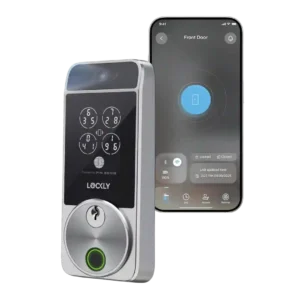
Product 1: Lockly Visage Zeno Series Smart...
4.5
Access-log evidence was limited but positive, with one reviewer valuing real-time lock-activity monitoring.
P2
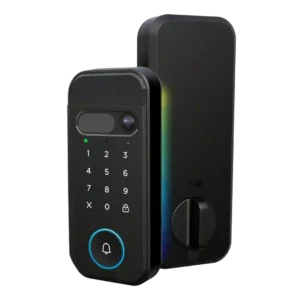
Product 2: myQ Secure View 3-in-1 Smart...
4.0
Access-log evidence was limited but positive, with one reviewer noting individual pins can show who opened the door.
App
P1
Product 1: Lockly Visage Zeno Series Smart...
3.6
The app drew mixed reactions: reviewers liked the newer interface or slick setup tools, but several found it undercooked, confusing, or only mostly reliable.
P2
Product 2: myQ Secure View 3-in-1 Smart...
4.5
The app setup experience was praised as simple, with phone control presented as easy to use.
Auto-lock
P1
Product 1: Lockly Visage Zeno Series Smart...
3.8
Auto-lock worked well in favorable installs, but one reviewer warned it becomes unreliable when the deadbolt does not slide smoothly.
P2
Product 2: myQ Secure View 3-in-1 Smart...
4.0
Auto-lock support was viewed as useful and configurable, though the evidence centers on one reviewer’s setup experience.
Battery
P1
Product 1: Lockly Visage Zeno Series Smart...
4.1
Battery impressions were split between praise for the two rechargeable packs and complaints about short life under always-on scanning or default settings.
P2
Product 2: myQ Secure View 3-in-1 Smart...
4.0
Battery impressions were mixed: reviewers liked the rechargeable pack, but one noted a long initial charge time.
Build quality and durability
P1
Product 1: Lockly Visage Zeno Series Smart...
4.5
Build quality was generally praised as sturdy, sleek, and more substantial than some alternatives.
P2
Product 2: myQ Secure View 3-in-1 Smart...
4.8
Reviewers praised the physical construction, describing the lock as a great quality product and super well built.
Camera and doorbell performance
P1
Product 1: Lockly Visage Zeno Series Smart...
2.3
Camera and doorbell feedback was mostly about absence: reviewers liked the lock but wished the price included video surveillance, package awareness, or doorbell-style features.
P2
Product 2: myQ Secure View 3-in-1 Smart...
4.7
Camera and doorbell evidence was positive, with praise for clear visitor video, a wide-angle view, and the integrated 2K camera-doorbell design.
Door-sense
P1
Product 1: Lockly Visage Zeno Series Smart...
2.6
Door-sense was the most consistent hardware complaint: it worked accurately for some reviewers, but many disliked the exposed wired sensor or complicated sensor alternatives.
P2
Product 2: myQ Secure View 3-in-1 Smart...
4.0
Door-sense worked in the reviewer’s test, with the app state updating once the door closed.
Door compatibility (deadbolt fit)
P1
Product 1: Lockly Visage Zeno Series Smart...
3.5
Deadbolt fit was mostly manageable as a direct swap, but reviewers warned that the door and bolt need to move smoothly or the lock may struggle to auto-lock.
P2
Product 2: myQ Secure View 3-in-1 Smart...
4.0
Door-fit evidence was limited but positive: one reviewer’s older steel door prep worked with the included jig and deadbolt drilling guidance.
Facial recognition
P1
Product 1: Lockly Visage Zeno Series Smart...
5.0
Facial recognition was the clearest consensus win, with reviewers repeatedly describing it as fast, accurate, reliable, and difficult to fool.
P2
Product 2: myQ Secure View 3-in-1 Smart...
5.0
Facial recognition drew some of the strongest praise, with reviewers calling it cool, incredible, and very fast.
Feature additions via updates
P1
Product 1: Lockly Visage Zeno Series Smart...
4.0
Feature-update evidence was limited to ZDNET, which said app updates improved user management and usability.
P2Product 2: myQ Secure View 3-in-1 Smart...
No score yetFingerprint
P1
Product 1: Lockly Visage Zeno Series Smart...
4.2
Fingerprint performance was mostly strong, but not universal: several reviewers found it fast and accurate, while others disliked placement or had hit-and-miss scans.
P2
Product 2: myQ Secure View 3-in-1 Smart...
5.0
Fingerprint access performed well in hands-on testing, with the reviewer saying the biometrics worked completely.
Guest Codes and Access
P1
Product 1: Lockly Visage Zeno Series Smart...
4.2
Guest access was useful for family or visitors, with reviewers praising custom codes, iCloud sharing, and easier guest entry.
P2
Product 2: myQ Secure View 3-in-1 Smart...
4.5
Guest access was praised for service or pet-care scenarios where the owner could let someone in without sharing a key.
Industrial design
P1
Product 1: Lockly Visage Zeno Series Smart...
3.0
Reviewers split on the design: one called it Lockly's least attractive smart lock, another saw the newer design as more attractive, and a video reviewer still found it not especially attractive.
P2
Product 2: myQ Secure View 3-in-1 Smart...
4.5
The lock’s integrated design was praised for reducing separate-device clutter and for looking slick and well designed.
Installation and Setup
P1
Product 1: Lockly Visage Zeno Series Smart...
4.0
Installation was usually described as easy, painless, or straightforward, but several reviewers noted setup pain from cabling, Bluetooth timing, or deadbolt alignment.
P2
Product 2: myQ Secure View 3-in-1 Smart...
4.5
Hands-on reviewers generally found installation approachable, praising complete hardware, easy installation, clear directions, and a smooth process, with one longer install still going fairly smoothly.
Key override reliability
P1
Product 1: Lockly Visage Zeno Series Smart...
4.3
The physical keys were a reliable backup in the reviews that discussed them, with one saying they were easy to use and another saying they turned smoothly.
P2
Product 2: myQ Secure View 3-in-1 Smart...
4.3
The hidden key backup was viewed positively, and another reviewer liked that the lock still had multiple fallback options.
Keypad
P1
Product 1: Lockly Visage Zeno Series Smart...
4.0
The keypad was viewed as secure thanks to PIN Genie, though reviewers also said it can slow entry or make code entry less convenient.
P2
Product 2: myQ Secure View 3-in-1 Smart...
4.3
Keypad evidence was mixed: one reviewer preferred physical buttons, while another confirmed the pin code worked.
Lock/unlock speed
P1
Product 1: Lockly Visage Zeno Series Smart...
4.7
Lock and unlock speed was a major strength, especially facial recognition, with reviewers repeatedly describing access as nearly instant, quick, or within seconds.
P2
Product 2: myQ Secure View 3-in-1 Smart...
5.0
Speed was a standout: one article cited two-second unlock latency, while a hands-on reviewer found face recognition extremely fast.
Locking motor
P1
Product 1: Lockly Visage Zeno Series Smart...
3.8
Motor feedback was mixed: one reviewer praised the quieter operation, while another said the deadbolt mechanism was not as smooth as a cheaper alternative.
P2
Product 2: myQ Secure View 3-in-1 Smart...
5.0
The interior locking action received strong praise from a reviewer who described it as super smooth.
Locking reliability
P1
Product 1: Lockly Visage Zeno Series Smart...
4.9
Overall locking reliability was one of the strongest themes, with reviewers saying the lock worked perfectly, performed well, or kept working every time.
P2
Product 2: myQ Secure View 3-in-1 Smart...
4.5
A hands-on reviewer tested multiple unlock methods and found them working successfully.
Notifications
P1
Product 1: Lockly Visage Zeno Series Smart...
3.3
Notifications worked, but reviewers could find them excessive when both lock and smart-home platforms sent alerts.
P2
Product 2: myQ Secure View 3-in-1 Smart...
3.8
Notification evidence was mixed: one review praised context-aware alerts, while another noted unsubscribed alerts lacked detection details.
Remote access
P1
Product 1: Lockly Visage Zeno Series Smart...
3.5
Remote access was divided, with quick on-demand actions in one review and Wi-Fi inaccessibility in another.
P2
Product 2: myQ Secure View 3-in-1 Smart...
4.5
Remote access was praised for letting someone enter without needing a physical key handoff.
Security features (encryption)
P1
Product 1: Lockly Visage Zeno Series Smart...
4.8
Security evidence was strong for anti-spoofing and privacy, with reviewers unable to fool face unlock using photos and one citing encryption as a strength.
P2
Product 2: myQ Secure View 3-in-1 Smart...
5.0
Security handling for face scans was praised because the reviewer said scans stay on the device rather than going to the cloud.
Smart-home integration (Alexa, Google, Siri, HomeKit, Matter, Thread)
P1
Product 1: Lockly Visage Zeno Series Smart...
4.4
Smart-home integration was broadly praised, especially Apple HomeKit/Home Key and Alexa routines, though one reviewer noted Matter and Thread were absent.
P2
Product 2: myQ Secure View 3-in-1 Smart...
2.7
Integration evidence was split: myQ ecosystem control was praised, but multiple reviews criticized or warned about limited popular smart-home platform support.
Touchscreen
P1
Product 1: Lockly Visage Zeno Series Smart...
5.0
Touchscreen evidence was limited but positive, with PCMag reporting touchpad entries were processed immediately.
P2
Product 2: myQ Secure View 3-in-1 Smart...
3.5
The touch-sensitive keypad divided preference, with one reviewer noting some people may prefer physical buttons instead.
User access management
P1
Product 1: Lockly Visage Zeno Series Smart...
4.0
User access management was generally strong after app updates, but initial user setup could be confusing.
P2
Product 2: myQ Secure View 3-in-1 Smart...
4.0
User access management was described as easy for users, PIN codes, and alerts.
Value and Price
P1
Product 1: Lockly Visage Zeno Series Smart...
3.8
Value opinions were context-dependent: reviewers saw strong feature value, but the high price, missing video, and battery caveats kept it from being an easy buy for everyone.
P2
Product 2: myQ Secure View 3-in-1 Smart...
3.3
Value depends heavily on use case: reviewers praised the feature bundle and recommendations, but flagged overkill, subscriptions, and fee concerns.
Wi-Fi
P1
Product 1: Lockly Visage Zeno Series Smart...
3.0
Wi-Fi was a recurring caveat, including failed syncing, 2.4GHz-only support, spotty remote access, and battery-drain tradeoffs.
P2Product 2: myQ Secure View 3-in-1 Smart...
No score yet