Access logs
P1
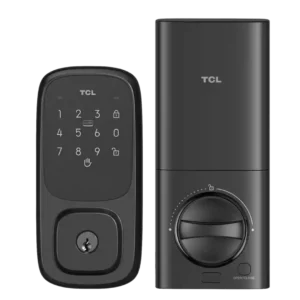
Product 1: TCL D1 Pro Smart Lock
3.4
Activity history exists in Smart Life, but reviewers disagree on completeness: some see detailed entries with time and user, while others report it may record unlocks only and omit locking and failed attempts. Reliability also depends on stable connectivity when the lock is managed remotely.
P2
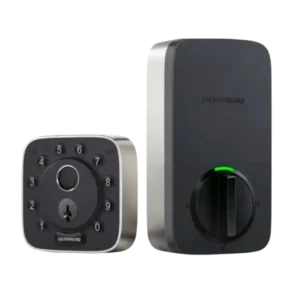
Product 2: ULTRALOQ Bolt Fingerprint Smart Lock
4.3
Logs are generally described as robust, showing an activity timeline that can identify lock events and, in many cases, which method or user was involved. One review notes that actions initiated through certain integrations can be labeled oddly in the timeline.
App
P1
Product 1: TCL D1 Pro Smart Lock
2.6
The lock is managed through the Tuya Smart Life app. Multiple reviewers call it outdated, confusing, and poorly organized (settings buried behind odd icons), though basic locking/unlocking and core settings typically work once onboarding is finished.
P2
Product 2: ULTRALOQ Bolt Fingerprint Smart Lock
4.2
The U home app is often described as easy to navigate for users, codes, and basic settings, but experiences are inconsistent. Multiple reviewers report setup quirks or occasional failures to connect/control the lock, while others report smooth day-to-day control.
Auto-lock
P1
Product 1: TCL D1 Pro Smart Lock
4.0
Auto-lock is widely reported as available and adjustable (commonly 5 to 900 seconds). Some users wish it supported scheduling, and others note the setting can be harder to find in the app than it should be.
P2
Product 2: ULTRALOQ Bolt Fingerprint Smart Lock
4.2
Auto-lock is widely praised when configured, especially when paired with the door sensor to confirm the door is closed, and timing controls are commonly cited. However, at least one reviewer reports software trouble enabling auto-lock reliably. Hands-free unlocking is available via phone location and short-range connectivity, and some reviewers like it as a Home Key alternative. Others report it can be slow or inconsistent and choose to leave it disabled.
Auto-relock after failed attempts
P1
Product 1: TCL D1 Pro Smart Lock
3.0
A lockout/timeout behavior after repeated failed authentication is described (for example, temporary lock suspension after several wrong attempts), but it is often not configurable and may be poorly documented.
P2Product 2: ULTRALOQ Bolt Fingerprint Smart Lock
No score yetBackset compatibility
P1
Product 1: TCL D1 Pro Smart Lock
4.5
Backset and deadbolt prep appear compatible with common door standards; at least one installer references using the included template and aligning to typical measurements during setup.
P2
Product 2: ULTRALOQ Bolt Fingerprint Smart Lock
4.8
Backset adjustment is described as supported via an adjustable bolt/latch, helping it fit common door configurations without special work.
Battery
P1
Product 1: TCL D1 Pro Smart Lock
4.0
Power comes from a rechargeable battery pack typically described as lasting several months, with low-battery alerts in the app. Reviews also highlight emergency USB-C power from the outside and note a practical downside: if only one pack is included, the lock can be unavailable while charging.
P2
Product 2: ULTRALOQ Bolt Fingerprint Smart Lock
4.1
The lock uses eight AA batteries, with reviewers commonly citing a target of roughly a year of life, and noting that heavy Wi-Fi usage can increase drain. Some reviewers prefer rechargeable systems, but most appreciate that AAs are easy to replace.
Bluetooth
P1
Product 1: TCL D1 Pro Smart Lock
2.5
Bluetooth is listed as present in at least one review for local connectivity, but other TCL-lock coverage warns there may be no practical Bluetooth fallback when Wi-Fi drops. Expect Wi-Fi to be the primary path for remote features.
P2
Product 2: ULTRALOQ Bolt Fingerprint Smart Lock
4.3
Bluetooth is commonly used for local control and platform pairing; it is generally responsive, but some reviewers note Bluetooth-based control in certain ecosystems can feel slower at times.
Build quality and durability
P1
Product 1: TCL D1 Pro Smart Lock
4.0
Build impressions are generally positive, often described as sturdy with a mix of metal and plastic. Some installation notes mention tight screw channels or plastic that can get marred if tools do not fit well.
P2
Product 2: ULTRALOQ Bolt Fingerprint Smart Lock
4.3
Build quality is frequently described as solid, with metal components and sturdy feel, though aesthetics are divisive. Some versions use more plastic on the face, which can look cheaper even if it does not feel flimsy.
Door-sense
P1
Product 1: TCL D1 Pro Smart Lock
1.0
Door-open/door-ajar sensing is reported as missing by at least one reviewer. Do not expect the lock to know whether the door itself is open or closed.
P2
Product 2: ULTRALOQ Bolt Fingerprint Smart Lock
4.3
The optional door sensor is repeatedly recommended because it enables door-open/ajar awareness, supports smarter auto-lock behavior, and can trigger alerts when a door is left open. Some note it is not always exposed to every smart-home platform the same way.
Door compatibility (deadbolt fit)
P1
Product 1: TCL D1 Pro Smart Lock
4.5
Most reviewers treat it as a standard full deadbolt replacement and report it fits typical doors without modifications when replacing an existing deadbolt. Included templates and multiple bolt sizes help accommodate different door thicknesses.
P2
Product 2: ULTRALOQ Bolt Fingerprint Smart Lock
4.5
Multiple reviewers describe the lock as fitting most standard U.S. doors as a full deadbolt replacement. Compatibility is generally not a blocker when replacing an existing deadbolt.
Existing hardware reuse
P1Product 1: TCL D1 Pro Smart Lock
No score yet
P2
Product 2: ULTRALOQ Bolt Fingerprint Smart Lock
3.8
Some installers successfully reuse existing hardware like a strike plate, but at least one reviewer found that trying to reuse parts slowed installation. Using the included hardware is often suggested for the smoothest setup.
Fingerprint
P1
Product 1: TCL D1 Pro Smart Lock
4.0
The D1 Pro model is reviewed primarily for palm-vein unlocking rather than fingerprint scanning. One related TCL lock review (the non-Pro D1) praises a fingerprint reader, but that feature should not be assumed on the D1 Pro unless the specific variant includes it.
P2
Product 2: ULTRALOQ Bolt Fingerprint Smart Lock
4.6
Fingerprint performance is one of the strongest themes: reviewers repeatedly describe it as fast, accurate, and reliable, often unlocking in under a second. A few note occasional misses can be improved by enrolling the same finger more than once.
Finish durability
P1Product 1: TCL D1 Pro Smart Lock
No score yet
P2
Product 2: ULTRALOQ Bolt Fingerprint Smart Lock
4.4
Several reviewers highlight that the printed/illuminated keypad markings and button materials are designed to resist obvious wear, reducing the chance that frequently used digits become visibly obvious over time. Long-term finish wear is not broadly tested.
Geofencing
P1
Product 1: TCL D1 Pro Smart Lock
1.0
Native geofencing is repeatedly called out as absent. Users wanting proximity-based unlocking generally need to rely on external automation via Alexa or Google Assistant rather than the lock app.
P2
Product 2: ULTRALOQ Bolt Fingerprint Smart Lock
4.0
Geofencing-based behavior is available and can work well, but reviewers disagree on reliability and speed. Some appreciate the convenience, while others find it slow or prefer not to share location continuously.
Guest Codes and Access
P1
Product 1: TCL D1 Pro Smart Lock
4.0
Guest access is a strong point on paper: multiple PINs, temporary codes, and other credential types (such as NFC fobs) are supported. Execution can feel clunky in Smart Life, and some temporary access rules are described as unintuitive.
P2
Product 2: ULTRALOQ Bolt Fingerprint Smart Lock
4.7
Guest access is described as flexible, with support for one-time, scheduled, recurring, and time-bounded PIN codes. Reviewers frequently cite this as a practical advantage for visitors, neighbors, cleaners, and deliveries.
Hub requirement
P1
Product 1: TCL D1 Pro Smart Lock
5.0
Built-in Wi-Fi is repeatedly highlighted as enabling remote control without a separate hub. Pairing is typically done to a 2.4GHz network.
P2
Product 2: ULTRALOQ Bolt Fingerprint Smart Lock
4.0
Hub needs depend on ecosystem and model. Some versions are described as not needing a dedicated hub for standard smart features, while Apple Home/Matter remote control can depend on a compatible hub or adapter depending on configuration.
Installation and Setup
P1
Product 1: TCL D1 Pro Smart Lock
3.8
Physical installation is often described as straightforward, but multiple reviews mention quirks like selecting the correct bolt set, juggling screw sizes, or needing a smaller screwdriver. App onboarding/pairing is a frequent pain point and is sometimes the hardest part of setup.
P2
Product 2: ULTRALOQ Bolt Fingerprint Smart Lock
4.3
Physical installation is commonly described as quick and straightforward for a full deadbolt replacement, often taking only a few minutes for experienced installers. Software setup and platform pairing are more variable, with some reviewers reporting repeated connection or onboarding friction.
Key override reliability
P1
Product 1: TCL D1 Pro Smart Lock
4.4
A traditional key backup is consistently included and generally works as expected, providing a dependable fallback alongside electronic methods. Emergency power via USB-C is also commonly mentioned for worst-case scenarios.
P2
Product 2: ULTRALOQ Bolt Fingerprint Smart Lock
4.5
Key override is consistently presented as a usable backup method, and reviewers treat it as a standard fail-safe alongside digital access. Detailed long-term reliability testing is not common in the reviews.
Keypad
P1
Product 1: TCL D1 Pro Smart Lock
3.6
Keypad usability is mixed: some reviewers find it responsive and well-lit, while others complain the keypad is small and makes mistypes easier. Physical-button versions in the TCL lineup are described as clicky and reasonably quiet.
P2
Product 2: ULTRALOQ Bolt Fingerprint Smart Lock
4.5
The keypad is widely liked for being tactile and easy for guests, with an anti-peep approach that allows extra digits before or after the real PIN. It is generally described as responsive and useful when fingerprints are not ideal.
Lock/unlock speed
P1
Product 1: TCL D1 Pro Smart Lock
4.5
Unlock speed is a highlight, with palm recognition frequently described as near-instant when positioned correctly. PIN, NFC, and app commands are also typically reported as quick.
P2
Product 2: ULTRALOQ Bolt Fingerprint Smart Lock
4.4
Lock/unlock actions are often described as quick, including near-instant response to app commands in some tests. Others note slower response in some integration paths or platforms, particularly when relying on certain network/control routes.
Locking motor
P1
Product 1: TCL D1 Pro Smart Lock
4.4
Motor strength is praised in multiple reviews, including notes that it does not struggle to throw the deadbolt where other locks have. Day-to-day actuation is often described as smooth and reasonably quiet.
P2
Product 2: ULTRALOQ Bolt Fingerprint Smart Lock
3.2
Motor behavior is polarizing: some reviewers do not call out noise at all, while others describe the motor as grinding, whining, or too loud for regular home use. This appears to vary by version and subjective tolerance.
Locking reliability
P1
Product 1: TCL D1 Pro Smart Lock
4.1
Core locking/unlocking reliability is generally rated high, especially for palm recognition once learned and for NFC access in some testing. Reliability concerns show up more around connectivity and the Smart Life software experience than the mechanical deadbolt action.
P2
Product 2: ULTRALOQ Bolt Fingerprint Smart Lock
4.5
Core locking reliability is generally reported as strong, with consistent success across fingerprint and keypad entry. When reliability issues appear, they are more often tied to connectivity, app control, or ecosystem integration rather than the physical bolt failing to actuate.
Notifications
P1
Product 1: TCL D1 Pro Smart Lock
3.6
Notifications and alerts are available, including special/duress-type alerts in some coverage. However, the phrasing can be noisy or confusing, and notification usefulness depends on stable Wi-Fi and consistent event logging behavior.
P2
Product 2: ULTRALOQ Bolt Fingerprint Smart Lock
4.2
Notifications are frequently highlighted as useful, including alerts for lock/unlock events, specific user activity, and door-left-open states when the door sensor is used. Some reviewers appreciate fine-grained control over which alerts to receive.
Physical attack resistance
P1Product 1: TCL D1 Pro Smart Lock
No score yet
P2
Product 2: ULTRALOQ Bolt Fingerprint Smart Lock
4.4
Security-focused commentary includes claims of strong overall security ratings on some variants and at least one discussion of strong bump resistance in the mechanical cylinder. However, in-depth, standardized attack testing is not consistently provided across reviews.
Pick/drill resistance (if rated)
P1Product 1: TCL D1 Pro Smart Lock
No score yet
P2
Product 2: ULTRALOQ Bolt Fingerprint Smart Lock
2.8
One lockpicking-focused review suggests the mechanical cylinder does not showcase especially impressive anti-pick measures, even while noting strong bump resistance. Drilling resistance is not meaningfully assessed in these reviews.
Remote access
P1
Product 1: TCL D1 Pro Smart Lock
3.8
Remote locking/unlocking is supported over Wi-Fi through Smart Life. Some reviewers report occasional Wi-Fi disconnect issues (especially in other TCL lock coverage), which can temporarily degrade remote management.
P2
Product 2: ULTRALOQ Bolt Fingerprint Smart Lock
3.4
Remote access depends heavily on model and setup: some Wi-Fi versions are intended to provide remote control directly, while Matter/HomeKit remote control can require a compatible hub or additional adapter. Several reviewers report inconsistent remote reachability when the lock drops offline.
Smart-home integration (Alexa, Google, Siri, HomeKit, Matter, Thread)
P1
Product 1: TCL D1 Pro Smart Lock
2.4
Integration is limited compared with top competitors: Alexa and Google Assistant support is common, while Apple HomeKit and Matter are repeatedly reported as unsupported, and IFTTT/Home Assistant support is also commonly cited as missing.
P2
Product 2: ULTRALOQ Bolt Fingerprint Smart Lock
4.6
Smart-home compatibility is repeatedly cited as a major strength, spanning popular ecosystems (including Apple Home/HomeKit, Alexa, Google, and, on some variants, Matter). A recurring caveat is that certain advanced features may still require the manufacturer app, and responsiveness can vary by platform.
User access management
P1
Product 1: TCL D1 Pro Smart Lock
3.3
No summary yet.
P2
Product 2: ULTRALOQ Bolt Fingerprint Smart Lock
4.6
User management is described as flexible, supporting multiple user roles, schedules, and access methods per user (PIN, fingerprint, app). Reviewers routinely point to this as a standout for families and service-provider access.
Value and Price
P1
Product 1: TCL D1 Pro Smart Lock
4.0
Value is commonly described as strong for a palm-recognition lock, especially when discounted below MSRP. Some reviewers still feel it competes in a crowded price tier where better ecosystems exist, so the app and integration limits factor heavily into perceived value.
P2
Product 2: ULTRALOQ Bolt Fingerprint Smart Lock
3.6
Pricing is commonly described as on the expensive side for a smart lock, but some reviewers feel the access flexibility and ecosystem support justify it. Value perception drops when reviewers encounter connectivity problems, missing built-in Wi-Fi on certain variants, or loud motor noise.
Voice control
P1
Product 1: TCL D1 Pro Smart Lock
3.6
Voice control via Alexa and Google Assistant is widely reported as supported and generally functional. Broader voice ecosystem features depend on Smart Life linkage and do not extend to Siri/HomeKit.
P2
Product 2: ULTRALOQ Bolt Fingerprint Smart Lock
4.3
Voice control is generally described as working well once paired to an assistant ecosystem, including voice-triggered locking/unlocking flows. A few reports mention occasional assistant-side command failures when the lock is not responding reliably.
Warranty and support
P1Product 1: TCL D1 Pro Smart Lock
No score yet
P2
Product 2: ULTRALOQ Bolt Fingerprint Smart Lock
3.8
Support experiences are not deeply covered, but at least one reviewer reports contacting the company about Wi-Fi/app issues and receiving acknowledgment and escalation. Clear resolution timelines or outcomes are not broadly documented.
Weather resistance
P1
Product 1: TCL D1 Pro Smart Lock
4.1
Weather sealing is generally positioned as good, including explicit IP54 mention in some coverage and gasketed hardware in others. A few reviews note that official certification details can be unclear depending on source.
P2
Product 2: ULTRALOQ Bolt Fingerprint Smart Lock
4.5
Weather resistance is repeatedly associated with an IP65-style rating and suitability for outdoor exposure like rain and dust. Long-term durability in harsh conditions is not extensively tested in the reviews.
Wi-Fi
P1
Product 1: TCL D1 Pro Smart Lock
3.8
Wi-Fi is core to the lock experience and is typically limited to 2.4GHz networks. Connectivity is usually fine once paired, but a notable concern raised in TCL lock coverage is occasional dropouts that can interrupt app-based control.
P2
Product 2: ULTRALOQ Bolt Fingerprint Smart Lock
3.8
Wi-Fi behavior varies by model and experience: some versions are described as having built-in Wi-Fi, while at least one Matter-focused review states Wi-Fi is not integrated and may require an extra adapter. Some users also report Wi-Fi dropouts that make remote access unreliable.