Access logs
P1
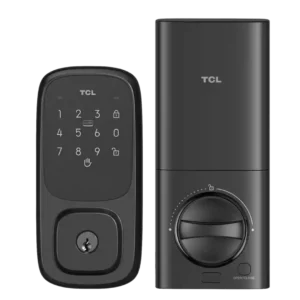
Product 1: TCL D1 Pro Smart Lock
3.4
Activity history exists in Smart Life, but reviewers disagree on completeness: some see detailed entries with time and user, while others report it may record unlocks only and omit locking and failed attempts. Reliability also depends on stable connectivity when the lock is managed remotely.
P2
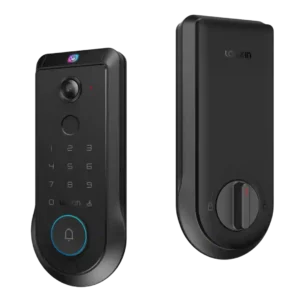
Product 2: Lockin Veno Pro Smart Deadbolt...
4.3
Event/activity logs are repeatedly mentioned, with reviewers noting access to doorbell and lock/unlock histories and the ability to review event records inside the app.
Alarm/siren loudness (if included)
P1Product 1: TCL D1 Pro Smart Lock
No score yet
P2
Product 2: Lockin Veno Pro Smart Deadbolt...
4.1
Audio/alarm volume is adjustable in the app and reviewers note it can be loud by default during setup; the ability to tune or mute sounds is a plus, but audio quality for doorbell recordings was criticized by at least one reviewer.
App
P1
Product 1: TCL D1 Pro Smart Lock
2.6
The lock is managed through the Tuya Smart Life app. Multiple reviewers call it outdated, confusing, and poorly organized (settings buried behind odd icons), though basic locking/unlocking and core settings typically work once onboarding is finished.
P2
Product 2: Lockin Veno Pro Smart Deadbolt...
4.0
The Lockin app is widely described as feature-packed and customizable (modes, power management, access controls, event viewing), but multiple reviewers also flagged rough edges such as hidden controls, missing/immature video history features at launch, slow clip loading, and occasional troubleshooting or resets.
Auto-lock
P1
Product 1: TCL D1 Pro Smart Lock
4.0
Auto-lock is widely reported as available and adjustable (commonly 5 to 900 seconds). Some users wish it supported scheduling, and others note the setting can be harder to find in the app than it should be.
P2
Product 2: Lockin Veno Pro Smart Deadbolt...
4.5
Auto-lock is widely praised and highly configurable (immediate to timed delays). The built-in door-closed sensing helps prevent locking before the door is shut, improving real-world reliability.
Auto-relock after failed attempts
P1
Product 1: TCL D1 Pro Smart Lock
3.0
A lockout/timeout behavior after repeated failed authentication is described (for example, temporary lock suspension after several wrong attempts), but it is often not configurable and may be poorly documented.
P2
Product 2: Lockin Veno Pro Smart Deadbolt...
4.4
Wrong-try protection and lockout behavior are described as available and configurable, adding a practical layer of protection against repeated code attempts.
Battery
P1
Product 1: TCL D1 Pro Smart Lock
4.0
Power comes from a rechargeable battery pack typically described as lasting several months, with low-battery alerts in the app. Reviews also highlight emergency USB-C power from the outside and note a practical downside: if only one pack is included, the lock can be unavailable while charging.
P2
Product 2: Lockin Veno Pro Smart Deadbolt...
4.3
Battery life is commonly framed as roughly three months for the Pro, with USB-C charging and emergency power options. Several reviews highlight an optional solar panel that can meaningfully top up the battery, although placement and looks are a frequent complaint.
Bluetooth
P1
Product 1: TCL D1 Pro Smart Lock
2.5
Bluetooth is listed as present in at least one review for local connectivity, but other TCL-lock coverage warns there may be no practical Bluetooth fallback when Wi-Fi drops. Expect Wi-Fi to be the primary path for remote features.
P2
Product 2: Lockin Veno Pro Smart Deadbolt...
4.2
Bluetooth is used in setup/bridging to Wi-Fi in several reviews and is generally portrayed as convenient during onboarding.
Build quality and durability
P1
Product 1: TCL D1 Pro Smart Lock
4.0
Build impressions are generally positive, often described as sturdy with a mix of metal and plastic. Some installation notes mention tight screw channels or plastic that can get marred if tools do not fit well.
P2
Product 2: Lockin Veno Pro Smart Deadbolt...
4.3
Build quality impressions are mostly positive: reviewers call the lock hefty, solid, and less plastic-heavy, though the exterior assembly is bulky and at least one reviewer criticized hardware tolerances (bolts/threads) as a quality-control pain point.
Door-sense
P1
Product 1: TCL D1 Pro Smart Lock
1.0
Door-open/door-ajar sensing is reported as missing by at least one reviewer. Do not expect the lock to know whether the door itself is open or closed.
P2
Product 2: Lockin Veno Pro Smart Deadbolt...
4.5
The integrated door-open/closed sensing via the strike plate and smart deadbolt is repeatedly called out as a smart, cleaner alternative to external sensors and is tied to better auto-lock behavior and door-status awareness.
Door compatibility (deadbolt fit)
P1
Product 1: TCL D1 Pro Smart Lock
4.5
Most reviewers treat it as a standard full deadbolt replacement and report it fits typical doors without modifications when replacing an existing deadbolt. Included templates and multiple bolt sizes help accommodate different door thicknesses.
P2
Product 2: Lockin Veno Pro Smart Deadbolt...
4.3
One review provides specific door thickness and bore-fit guidance and generally treats the lock as compatible with standard deadbolt installs; the main fit concern raised is bulk rather than incompatibility.
Fingerprint
P1
Product 1: TCL D1 Pro Smart Lock
4.0
The D1 Pro model is reviewed primarily for palm-vein unlocking rather than fingerprint scanning. One related TCL lock review (the non-Pro D1) praises a fingerprint reader, but that feature should not be assumed on the D1 Pro unless the specific variant includes it.
P2
Product 2: Lockin Veno Pro Smart Deadbolt...
4.0
Fingerprint access is usually described as quick and usable, but experiences vary: some found it reliable, others needed multiple tries or noted setup is slower than palm enrollment and can be harder for some users (including kids).
Geofencing
P1
Product 1: TCL D1 Pro Smart Lock
1.0
Native geofencing is repeatedly called out as absent. Users wanting proximity-based unlocking generally need to rely on external automation via Alexa or Google Assistant rather than the lock app.
P2
Product 2: Lockin Veno Pro Smart Deadbolt...
3.2
Geofencing is mentioned as present in some materials and apps, but reviewers say it is limited, often used for changing modes/settings rather than true automatic lock/unlock behavior.
Guest Codes and Access
P1
Product 1: TCL D1 Pro Smart Lock
4.0
Guest access is a strong point on paper: multiple PINs, temporary codes, and other credential types (such as NFC fobs) are supported. Execution can feel clunky in Smart Life, and some temporary access rules are described as unintuitive.
P2
Product 2: Lockin Veno Pro Smart Deadbolt...
4.1
Guest access features are a highlight: reviewers cite one-time, temporary, and scheduled PIN codes and easy sharing, though some note restrictions (temporary access may be PIN-only, and permission tiers/time restrictions for full users can be limited).
Hub requirement
P1
Product 1: TCL D1 Pro Smart Lock
5.0
Built-in Wi-Fi is repeatedly highlighted as enabling remote control without a separate hub. Pairing is typically done to a 2.4GHz network.
P2
Product 2: Lockin Veno Pro Smart Deadbolt...
4.0
For ecosystem control, reviewers note you may need a Matter controller hub (or similar hub) to add the lock to platforms like Apple Home, Google Home, Alexa, or SmartThings; hub use often comes with reduced feature depth versus the Lockin app.
Installation and Setup
P1
Product 1: TCL D1 Pro Smart Lock
3.8
Physical installation is often described as straightforward, but multiple reviews mention quirks like selecting the correct bolt set, juggling screw sizes, or needing a smaller screwdriver. App onboarding/pairing is a frequent pain point and is sometimes the hardest part of setup.
P2
Product 2: Lockin Veno Pro Smart Deadbolt...
4.2
Installation is often reported as a straightforward 10–15 minute swap for a standard deadbolt, with guided in-app setup, but one critical review cited poorly machined/jamming long bolts and lots of cable routing that can make assembly more frustrating than typical.
Key override reliability
P1
Product 1: TCL D1 Pro Smart Lock
4.4
A traditional key backup is consistently included and generally works as expected, providing a dependable fallback alongside electronic methods. Emergency power via USB-C is also commonly mentioned for worst-case scenarios.
P2
Product 2: Lockin Veno Pro Smart Deadbolt...
4.5
A physical key is included and used as a backup method; no review reported key override failures, and several call out the presence of emergency power as an additional fallback.
Keypad
P1
Product 1: TCL D1 Pro Smart Lock
3.6
Keypad usability is mixed: some reviewers find it responsive and well-lit, while others complain the keypad is small and makes mistypes easier. Physical-button versions in the TCL lineup are described as clicky and reasonably quiet.
P2
Product 2: Lockin Veno Pro Smart Deadbolt...
4.0
The keypad is generally seen as useful for kids/guests and as a backup method, but at least one reviewer criticized poor outside usability (a non-illuminated lock button and unclear manual locking cues).
Lock/unlock speed
P1
Product 1: TCL D1 Pro Smart Lock
4.5
Unlock speed is a highlight, with palm recognition frequently described as near-instant when positioned correctly. PIN, NFC, and app commands are also typically reported as quick.
P2
Product 2: Lockin Veno Pro Smart Deadbolt...
4.4
Lock/unlock responsiveness is frequently described as very fast (both biometrics and app control), though overall perceived speed can be undercut when video clips or app functions lag.
Locking reliability
P1
Product 1: TCL D1 Pro Smart Lock
4.1
Core locking/unlocking reliability is generally rated high, especially for palm recognition once learned and for NFC access in some testing. Reliability concerns show up more around connectivity and the Smart Life software experience than the mechanical deadbolt action.
P2
Product 2: Lockin Veno Pro Smart Deadbolt...
4.2
Locking reliability is rated highly in several hands-on tests, but one critical review characterized the product as still beta-like, requiring reboots/force-quits and not yet fully trustworthy without more firmware refinement.
Notifications
P1
Product 1: TCL D1 Pro Smart Lock
3.6
Notifications and alerts are available, including special/duress-type alerts in some coverage. However, the phrasing can be noisy or confusing, and notification usefulness depends on stable Wi-Fi and consistent event logging behavior.
P2
Product 2: Lockin Veno Pro Smart Deadbolt...
4.1
Notifications are often described as fast and informative (motion/doorbell/lock events), but at least one reviewer reported major notification failures that required support and factory resets, and another noted limited per-alert toggles in the app.
Physical attack resistance
P1Product 1: TCL D1 Pro Smart Lock
No score yet
P2
Product 2: Lockin Veno Pro Smart Deadbolt...
4.3
At least two reviews cite BHMA/ANSI Grade 2 level certification for the lock, suggesting solid baseline physical security for residential use, though most testing focused on convenience and software rather than attack trials.
Remote access
P1
Product 1: TCL D1 Pro Smart Lock
3.8
Remote locking/unlocking is supported over Wi-Fi through Smart Life. Some reviewers report occasional Wi-Fi disconnect issues (especially in other TCL lock coverage), which can temporarily degrade remote management.
P2
Product 2: Lockin Veno Pro Smart Deadbolt...
4.2
Remote control via the Lockin app is positioned as a core strength (live view, lock/unlock, codes, alerts), though performance varies by reviewer, with some praising responsiveness and others reporting lag or slow video clip loading.
Security features (encryption)
P1Product 1: TCL D1 Pro Smart Lock
No score yet
P2
Product 2: Lockin Veno Pro Smart Deadbolt...
4.3
Some reviewers highlight on-device processing, local storage, and direct device-to-phone style connections (often described as more private), but concrete third-party verification details are limited; advanced security claims should be weighed against real-world software stability.
Smart-home integration (Alexa, Google, Siri, HomeKit, Matter, Thread)
P1
Product 1: TCL D1 Pro Smart Lock
2.4
Integration is limited compared with top competitors: Alexa and Google Assistant support is common, while Apple HomeKit and Matter are repeatedly reported as unsupported, and IFTTT/Home Assistant support is also commonly cited as missing.
P2
Product 2: Lockin Veno Pro Smart Deadbolt...
3.9
Smart-home compatibility is frequently advertised as broad (Matter/Thread plus major platforms), and pairing generally works, but reviewers repeatedly note that third-party apps expose only basic lock functions and omit many advanced features (especially doorbell/camera and granular access controls).
Tamper detection sensitivity
P1Product 1: TCL D1 Pro Smart Lock
No score yet
P2
Product 2: Lockin Veno Pro Smart Deadbolt...
4.2
Anti-tamper and unusual-activity detection are referenced (including tamper events surfaced in some ecosystem apps), but few reviewers deeply tested sensitivity or false-alarm behavior.
Touchscreen
P1
Product 1: TCL D1 Pro Smart Lock
3.8
Touchscreen input (where present) is generally responsive, but size constraints can make number entry fiddly for some users. Menu navigation on-device can also be confusing during pairing steps.
P2
Product 2: Lockin Veno Pro Smart Deadbolt...
4.2
The touch interface is often described as responsive and modern, with some praise for smudge resistance; however, visibility/UX issues (fish-eye video framing noted elsewhere, and unlit button behavior) can reduce ease of use at night.
User access management
P1
Product 1: TCL D1 Pro Smart Lock
3.3
No summary yet.
P2
Product 2: Lockin Veno Pro Smart Deadbolt...
4.0
User management is generally organized (multiple palms/fingerprints/PINs per user), but at least one reviewer criticized limited permission granularity, with full users effectively receiving always-on access.
Value and Price
P1
Product 1: TCL D1 Pro Smart Lock
4.0
Value is commonly described as strong for a palm-recognition lock, especially when discounted below MSRP. Some reviewers still feel it competes in a crowded price tier where better ecosystems exist, so the app and integration limits factor heavily into perceived value.
P2
Product 2: Lockin Veno Pro Smart Deadbolt...
3.8
Value depends heavily on price: reviewers see the all-in-one concept and no-subscription local storage as compelling, but MSRP is considered expensive, and early-bird pricing is viewed as much more competitive given software maturity concerns.
Voice control
P1
Product 1: TCL D1 Pro Smart Lock
3.6
Voice control via Alexa and Google Assistant is widely reported as supported and generally functional. Broader voice ecosystem features depend on Smart Life linkage and do not extend to Siri/HomeKit.
P2
Product 2: Lockin Veno Pro Smart Deadbolt...
4.5
Voice control via assistants (Siri/Alexa/Google) is described as working for basic lock/unlock commands; richer smart-home routines are possible, but broader feature access still tends to live in the Lockin app.
Weather resistance
P1
Product 1: TCL D1 Pro Smart Lock
4.1
Weather sealing is generally positioned as good, including explicit IP54 mention in some coverage and gasketed hardware in others. A few reviews note that official certification details can be unclear depending on source.
P2
Product 2: Lockin Veno Pro Smart Deadbolt...
4.5
Multiple reviews cite IP65 weatherproofing and describe the lock holding up to rain/dust and outdoor conditions; long-term durability claims exist, but most evidence is short-to-medium term testing.
Wi-Fi
P1
Product 1: TCL D1 Pro Smart Lock
3.8
Wi-Fi is core to the lock experience and is typically limited to 2.4GHz networks. Connectivity is usually fine once paired, but a notable concern raised in TCL lock coverage is occasional dropouts that can interrupt app-based control.
P2
Product 2: Lockin Veno Pro Smart Deadbolt...
4.3
Built-in 2.4GHz Wi-Fi is a recurring positive, enabling direct app control and remote features without a separate bridge for basic operation.