Access logs
P1
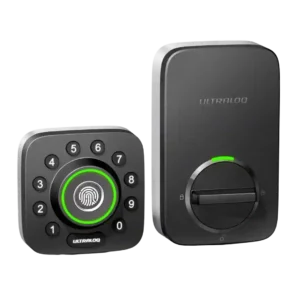
Product 1: ULTRALOQ U-Bolt Pro Smart Lock
4.2
Reviewers who discussed logs found them useful for seeing who entered, when access happened, and how the lock was used; notification-style detail was praised more often than criticized.
P2
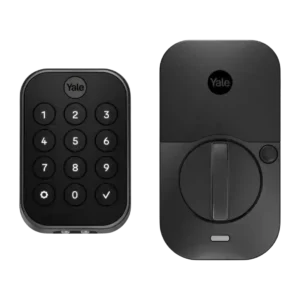
Product 2: Yale Assure Lock 2 Smart...
4.4
Access logs were consistently useful, letting reviewers track who locked, unlocked, or entered and helping families or hosts monitor activity.
App
P1
Product 1: ULTRALOQ U-Bolt Pro Smart Lock
3.7
The app drew mixed reactions: several reviewers found it intuitive or easy, while others reported connection hiccups, slow loading, or an unpolished interface.
P2
Product 2: Yale Assure Lock 2 Smart...
3.5
The app was often described as simple or easy to follow, but reviewers also reported slow loading, antiquated design, connectivity frustrations, and setup hiccups.
Auto-lock
P1
Product 1: ULTRALOQ U-Bolt Pro Smart Lock
3.8
Auto-lock was valued for peace of mind, especially with door sensing, but multiple reviewers disliked that it could lock too quickly or surprise them by being enabled by default.
P2
Product 2: Yale Assure Lock 2 Smart...
3.9
Auto-lock and auto-unlock were useful conveniences for many reviewers, but reliability depended on DoorSense behavior, proximity logic, and reviewer preference for location tracking.
Backset compatibility
P1
Product 1: ULTRALOQ U-Bolt Pro Smart Lock
2.8
Backset setup had one notable quirk: one reviewer found the embossed sizing guidance backward, which made this otherwise standard compatibility step confusing.
P2
Product 2: Yale Assure Lock 2 Smart...
1.5
Backset flexibility was a clear limitation in one review, which said the lock was not an option for a longer-than-average backset.
Battery
P1
Product 1: ULTRALOQ U-Bolt Pro Smart Lock
3.7
Battery impressions were mixed: some reviewers expected months of use and liked low-battery warnings, while others worried about fast drain and vague battery reporting.
P2
Product 2: Yale Assure Lock 2 Smart...
2.4
Battery life was one of the weakest areas, especially with Wi-Fi models, with complaints about short life, limited battery visibility, and frequent replacement concerns.
Bluetooth
P1
Product 1: ULTRALOQ U-Bolt Pro Smart Lock
4.0
Bluetooth pairing was generally smooth, with reviewers appreciating quick pairing and local control, though it was less central than Wi-Fi in the overall experience.
P2
Product 2: Yale Assure Lock 2 Smart...
3.7
Bluetooth performance was positive when direct and local, but one reviewer found waiting for Bluetooth/Wi-Fi switching frustrating in real use.
Build quality and durability
P1
Product 1: ULTRALOQ U-Bolt Pro Smart Lock
4.7
Build quality was a clear strength, with reviewers repeatedly describing the lock as solid, durable, heavy-duty, or tank-like.
P2
Product 2: Yale Assure Lock 2 Smart...
4.2
Build and design earned broad praise for a sleek, premium, sturdy feel, though a few reviewers found the interior bulk or thumb-turn construction less appealing.
Door-sense
P1
Product 1: ULTRALOQ U-Bolt Pro Smart Lock
4.4
Door-sense feedback was positive where tested; reviewers liked the added sensor and remote reporting of open/closed and lock/unlock state.
P2
Product 2: Yale Assure Lock 2 Smart...
3.7
DoorSense was useful for knowing door status and enabling safer auto-lock behavior, but installation, appearance, and occasional calibration behavior were recurring caveats.
Door compatibility (deadbolt fit)
P1Product 1: ULTRALOQ U-Bolt Pro Smart Lock
No score yet
P2
Product 2: Yale Assure Lock 2 Smart...
3.4
Door fit was mostly workable on standard doors, though reviewers stressed measuring carefully and one reviewer found their dimensions did not match at a first install location.
Feature additions via updates
P1
Product 1: ULTRALOQ U-Bolt Pro Smart Lock
4.5
Reviewers viewed the Wi-Fi model’s added capabilities as meaningful improvements over earlier versions, especially built-in Wi-Fi, door sensing, and Smart Auto Lock.
P2Product 2: Yale Assure Lock 2 Smart...
No score yetFingerprint
P1
Product 1: ULTRALOQ U-Bolt Pro Smart Lock
4.6
Fingerprint access was one of the strongest areas, with most reviewers calling it fast, reliable, accurate, or flawless; the main caveat was angle sensitivity in one review.
P2
Product 2: Yale Assure Lock 2 Smart...
3.8
Fingerprint performance split sharply: several reviewers praised quick, accurate recognition, while one long-term reviewer reported persistent failures that undermined the feature.
Geofencing
P1
Product 1: ULTRALOQ U-Bolt Pro Smart Lock
3.8
Geofencing divided reviewers: some found auto-unlock slick or improved, while one older review said it never activated and others noted setup behavior mattered.
P2
Product 2: Yale Assure Lock 2 Smart...
3.4
Geofencing and auto-unlock were convenient when they worked, but reviewers disliked fixed radius limits, constant location access, or privacy/battery implications.
Guest Codes and Access
P1
Product 1: ULTRALOQ U-Bolt Pro Smart Lock
4.7
Guest and temporary access were repeatedly praised, especially scheduled codes for cleaners, dog walkers, renters, family, and one-time visitors.
P2
Product 2: Yale Assure Lock 2 Smart...
4.6
Guest codes were one of the most consistently praised features, especially temporary, scheduled, unlimited, or child-friendly access options.
Hub requirement
P1
Product 1: ULTRALOQ U-Bolt Pro Smart Lock
3.3
Hub feedback depended on version and setup: built-in Wi-Fi was praised for removing a bridge, while bridge-based versions drew complaints about range and pairing friction.
P2
Product 2: Yale Assure Lock 2 Smart...
4.0
Module-based connectivity and reduced bridge requirements were viewed as flexible strengths, though some features still required a paid module or the right protocol.
Industrial design
P1
Product 1: ULTRALOQ U-Bolt Pro Smart Lock
3.8
Design opinions varied sharply: some liked the compact or satin finish, while others found the look industrial, unattractive, or lacking curb appeal.
P2Product 2: Yale Assure Lock 2 Smart...
No score yetInstallation and Setup
P1
Product 1: ULTRALOQ U-Bolt Pro Smart Lock
4.3
Installation was usually described as easy, quick, or straightforward on the newer Wi-Fi version, but older and bridge-based experiences included serious setup frustrations.
P2
Product 2: Yale Assure Lock 2 Smart...
3.9
Most reviewers found installation manageable or easy, helped by app guidance and templates, but several called out door measurements, DoorSense drilling, cable routing, or calibration as potential friction.
Key override reliability
P1
Product 1: ULTRALOQ U-Bolt Pro Smart Lock
4.3
Physical key backup was treated as a reassuring safety feature, especially for dead batteries, forgotten phones, or other electronic access failures.
P2
Product 2: Yale Assure Lock 2 Smart...
3.9
Backup entry options were valued, including physical keys on keyed models and 9V battery contacts on key-free models, especially as protection against dead batteries.
Keypad
P1
Product 1: ULTRALOQ U-Bolt Pro Smart Lock
4.3
The physical keypad was mostly praised for tactile, accurate buttons and anti-peep use, though one reviewer said the circular layout slowed code entry.
P2
Product 2: Yale Assure Lock 2 Smart...
3.9
Keypad impressions were mixed: reviewers liked responsive, readable, and kid-friendly entry, but disliked sunlight readability problems and extra taps to wake the screen.
Lock/unlock speed
P1
Product 1: ULTRALOQ U-Bolt Pro Smart Lock
4.5
Locking and unlocking were typically fast, with several reviewers praising instant response; Magic Shake was the notable speed-related exception.
P2
Product 2: Yale Assure Lock 2 Smart...
4.7
Lock/unlock speed was generally strong, with reviewers describing quick keypad response, fast auto-unlock behavior, and instant fingerprint unlocking.
Locking motor
P1
Product 1: ULTRALOQ U-Bolt Pro Smart Lock
4.3
The motor generally felt smooth and quick, but some reviewers found the locking action louder or shakier than competing locks.
P2
Product 2: Yale Assure Lock 2 Smart...
4.4
The locking mechanism was viewed positively, with smooth, quiet, solid operation and audible confirmation highlighted across reviews.
Locking reliability
P1
Product 1: ULTRALOQ U-Bolt Pro Smart Lock
4.7
Core locking reliability was very strong overall, with most reviewers reporting no failures, smooth operation, or dependable keyless entry.
P2
Product 2: Yale Assure Lock 2 Smart...
4.2
Core lock reliability was mostly strong, with many reviewers reporting smooth or problem-free operation, though some long-term and connectivity-related issues softened the consensus.
Notifications
P1
Product 1: ULTRALOQ U-Bolt Pro Smart Lock
3.8
Notifications were useful for low battery, remote status, and entry alerts, but one reviewer criticized the lack of blanket notifications across users.
P2
Product 2: Yale Assure Lock 2 Smart...
3.6
Notifications were useful for access, auto-lock, and ajar alerts, but some reviewers wanted earlier low-battery warnings or reported missing/annoying alerts.
Physical attack resistance
P1
Product 1: ULTRALOQ U-Bolt Pro Smart Lock
4.2
Physical security impressions were positive where discussed, with reviewers valuing stronger screws, reinforced security, and ANSI-related strength claims.
P2
Product 2: Yale Assure Lock 2 Smart...
4.0
Physical attack resistance impressions were positive where discussed, especially for the key-free model and reviewers’ sense that the lock felt tough.
Remote access
P1
Product 1: ULTRALOQ U-Bolt Pro Smart Lock
4.5
Remote access was a major strength when Wi-Fi or a bridge was working, letting reviewers lock, unlock, and check status away from home; Wi-Fi/cloud latency was the main caveat.
P2
Product 2: Yale Assure Lock 2 Smart...
4.1
Remote access was a major strength: reviewers valued checking status, controlling the lock away from home, and getting peace of mind from anywhere.
Security features (encryption)
P1
Product 1: ULTRALOQ U-Bolt Pro Smart Lock
4.6
Encryption and account/security features were generally reassuring, but security confidence came mostly from reviewer judgments rather than deep technical testing.
P2
Product 2: Yale Assure Lock 2 Smart...
3.8
Security features drew mixed-to-positive reactions, including two-factor setup, encryption, keypad lockout, and backup-key tradeoffs.
Smart-home integration (Alexa, Google, Siri, HomeKit, Matter, Thread)
P1
Product 1: ULTRALOQ U-Bolt Pro Smart Lock
4.2
Smart-home integration was broad and useful across Alexa, Google, IFTTT, SmartThings, and routines, but HomeKit, Amazon Key, and 2.4 GHz setup limits created tradeoffs.
P2
Product 2: Yale Assure Lock 2 Smart...
4.0
Smart-home integration was broad and often praised across HomeKit, Alexa, Google, Matter/module plans, and other ecosystems, though Home Key and Android/Wear OS gaps created caveats.
Two-factor authentication availability
P1
Product 1: ULTRALOQ U-Bolt Pro Smart Lock
2.0
Two-factor authentication was a clear weakness in the Reviewed review, which criticized the app for lacking this extra account-protection layer.
P2
Product 2: Yale Assure Lock 2 Smart...
4.5
Two-factor authentication was explicitly praised as part of the app’s account security requirements.
User access management
P1
Product 1: ULTRALOQ U-Bolt Pro Smart Lock
4.7
User access management was a standout for families and rentals, with reviewers praising individual profiles, schedules, temporary users, and revocable access.
P2
Product 2: Yale Assure Lock 2 Smart...
4.2
User management was strong overall, with app users, entry codes, schedules, and guest controls praised for families, visitors, and rental scenarios.
Value and Price
P1
Product 1: ULTRALOQ U-Bolt Pro Smart Lock
4.4
Value was viewed favorably overall: even when called expensive, reviewers often concluded the lock was worth it because of its feature set and access flexibility.
P2
Product 2: Yale Assure Lock 2 Smart...
3.4
Value was mixed: reviewers liked the feature range and some found it affordable or worth it on sale, while others considered it pricey or questioned add-on costs.
Voice control
P1
Product 1: ULTRALOQ U-Bolt Pro Smart Lock
4.3
Voice control worked well in the reviews that tested it, especially Alexa setup and commands, though some reviewers saw it as useful only in limited scenarios.
P2
Product 2: Yale Assure Lock 2 Smart...
3.8
Voice control generally worked and added convenience, but security restrictions and PIN requirements limited how seamless it felt.
Warranty and support
P1
Product 1: ULTRALOQ U-Bolt Pro Smart Lock
4.0
Support evidence was limited but positive, with one review summarizing users as generally satisfied with responsiveness and replacement help.
P2
Product 2: Yale Assure Lock 2 Smart...
1.5
Support was a weak point in one long-term review, where Yale helped resolve some issues but did not solve or replace the fingerprint problem.
Weather resistance
P1
Product 1: ULTRALOQ U-Bolt Pro Smart Lock
4.0
Weather resistance was supported by limited real-world evidence and positive expectations, with reviewers noting temperature performance and IP65 confidence.
P2
Product 2: Yale Assure Lock 2 Smart...
4.3
Weather-related impressions were positive where tested or judged, including cold-climate touchscreen use and confidence that the lock could withstand the elements.
Wi-Fi
P1
Product 1: ULTRALOQ U-Bolt Pro Smart Lock
3.7
Wi-Fi was the biggest technical split: built-in Wi-Fi and remote access were praised, but 2.4 GHz requirements, pairing trouble, and slower cloud response drew criticism.
P2
Product 2: Yale Assure Lock 2 Smart...
2.9
Wi-Fi added valuable remote control and ecosystem support, but reviewers repeatedly connected it with battery drain, slow or spotty connectivity, and setup annoyances.