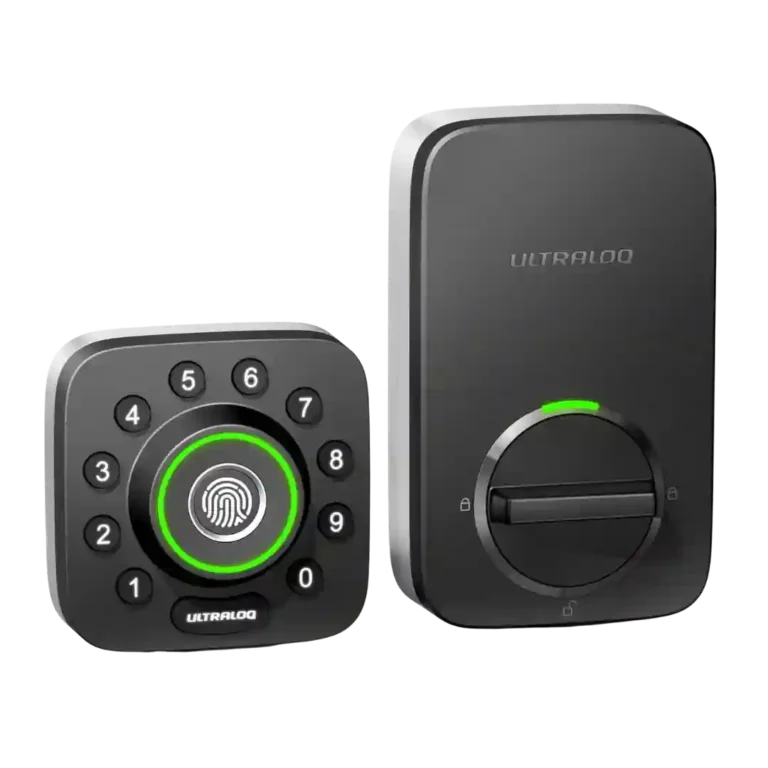
ULTRALOQ U-Bolt Pro Smart Lock

ULTRALOQ U-Bolt Pro Smart Lock Review

Brand: ULTRALOQ
Updated: 3 days ago
4.3
Consolidated expert score
336
Review insights
34
Scored features
19
Expert reviews

Bottom Line

Choose the ULTRALOQ U-Bolt Pro if you want fast fingerprint entry, flexible codes, logs, and remote control. Skip it if you need HomeKit, Amazon Key, true 2FA, or dislike 2.4GHz/app setup quirks.

Best for

Best for households, rentals, Airbnb hosts, caregivers, and small offices that need multiple entry methods, access logs, temporary users, and remote control. It especially suits buyers who prioritize fingerprint entry and Alexa/Google-style smart-home routines.

Not for

Not for users who require Apple HomeKit, Amazon Key, or two-factor authentication in the companion app. It is also a poor fit for anyone who cannot work around 2.4GHz Wi-Fi, bridge placement, or app setup quirks.

Verdict

The ULTRALOQ U-Bolt Pro stands out for access flexibility: reviewers repeatedly praised fingerprint entry, keypad backup, physical keys, logs, remote control, and user scheduling. The strongest version is the built-in Wi-Fi model, which avoids the bridge pain that appeared in older reviews. Its biggest tradeoff is that convenience varies by setup: fingerprint and keypad performance are consistently strong, while Wi-Fi pairing, geofencing, battery life, and app polish are more mixed. Smart-home support is broad for Alexa, Google, IFTTT, and SmartThings, but Apple HomeKit and Amazon Key gaps matter for those ecosystems. Overall, the evidence supports a versatile, feature-rich smart lock with some configuration-dependent rough edges.

Reviewer Consensus

Strong agreement: Reviewers most consistently agree that fingerprint entry is fast, convenient, and one of the lock’s strongest features.

Mixed opinions: Opinions are split on Wi-Fi setup, geofencing, app polish, battery life, and whether a bridge is needed because different versions behave differently.

Common concern: The most repeated caveat is setup friction around Wi-Fi, bridge placement, app behavior, or default auto-lock behavior.

Evidence coverage
  • 19 expert reviews
  • 25 of 34 scored features show reviewer agreement
  • 9 scored features have limited or less conclusive evidence
  • no scored features show reviewer disagreement or mixed evidence
  1. Limited review data
  2. Mixed evidence
  3. Moderate consensus
  4. Strong consensus

Compared in Reviews

Products reviewers directly compared with this model, grouped into quick takeaways.

August Wi-Fi Smart Lock

  • Alternative: HomeKit support PCMag says August Wi-Fi Smart Lock is the HomeKit-friendly alternative, while the Ultraloq remains its Editors’ Choice.
  • More expensive: price and built-in Wi-Fi The review positions the Ultraloq as cheaper than the August Wi-Fi Smart Lock while still offering built-in Wi-Fi and more entry methods.

Schlage Encode

  • Alternative: Amazon Key support Reviewed points to Schlage Encode as an alternative when Amazon Key support matters.
  • More expensive: price and keypad/Wi-Fi features The review compares the Ultraloq favorably on price against Schlage Encode while noting comparable keypad and Wi-Fi capability.

Eufy Security Smart Lock Touch

  • More expensive: price and feature set The review frames the Ultraloq as less expensive than Eufy Security Smart Lock Touch with similar fingerprint, keypad, Wi-Fi, and app features.

Feature Scorecards

Pros

  • 4.8
    based on 7 reviews
    Lock/unlock speed: 4.8, based on 7 reviews
    Unlocking was repeatedly described as instant or quick, especially fingerprint entry, with several reviewers calling it one of the faster locks they tested.
  • 4.7
    based on 19 reviews
    Fingerprint: 4.7, based on 19 reviews
    Fingerprint entry was the strongest consensus feature, with nearly every reviewer reporting fast, reliable, or flawless scans, except for angle sensitivity in one review.
  • 4.6
    based on 10 reviews
    Guest Codes and Access: 4.6, based on 10 reviews
    Guest and temporary access was a clear strength for cleaners, dog sitters, rentals, Airbnb, and visitors, often with time/date limits or eKeys.
  • 4.6
    based on 14 reviews
    User access management: 4.6, based on 14 reviews
    User management was broad and flexible, covering admins, normal users, temporary users, fingerprints, passcodes, app access, and schedules.
  • 4.6
    based on 13 reviews
    Locking reliability: 4.6, based on 13 reviews
    Reliability was a major strength in most hands-on tests, especially fingerprint/keyless operation, though older setup bugs and alignment-related concerns appeared in a minority of reviews.
  • 4.6
    based on 7 reviews
    Door-sense: 4.6, based on 7 reviews
    Door-sense evidence was strong for the Wi-Fi version, with reviewers using the included sensor for open/closed status and to prevent locking while ajar.
  • 4.5
    based on 5 reviews
    Weather resistance: 4.5, based on 5 reviews
    Weather resistance was supported by IP65 or dust/water claims across reviews, with some reviewers expecting it to handle outdoor exposure and temperature swings.
  • 4.5
    based on 14 reviews
    Access logs: 4.5, based on 14 reviews
    Access logs were consistently available and useful, showing who entered, when, and by what method across app, fingerprint, code, manual, and auto events.
  • 4.5
    based on 8 reviews
    Security features (encryption): 4.5, based on 8 reviews
    Security features included AES/dynamic-key encryption, lockout mode, and anti-peep/randomized keypad entry, with one review highlighting dual-layer encryption.
  • 4.5
    based on 17 reviews
    Keypad: 4.5, based on 17 reviews
    The keypad was generally praised for anti-peep entry and tactile/physical buttons, although one reviewer found the circular layout slower than a normal keypad.
  • 4.5
    based on 4 reviews
    Existing hardware reuse: 4.5, based on 4 reviews
    Reviewers were able to use existing deadbolt prep or old lock locations, with no wiring or drilling required in the cleanest installs.
  • 4.5
    based on 14 reviews
    Remote access: 4.5, based on 14 reviews
    Remote access was widely valued for locking, unlocking, monitoring, and guest entry from away, but one review noted Bluetooth-only use loses smartphone control.
  • 4.5
    based on 17 reviews
    Key override reliability: 4.5, based on 17 reviews
    Nearly every reviewer valued the physical key backup, especially for dead batteries, lockout mode, or emergency entry.
  • 4.5
    based on 5 reviews
    Voice control: 4.5, based on 5 reviews
    Voice control worked through Alexa or Google in several reviews, usually with a voice code for unlocking, but HomeKit/Siri support was absent.
  • 4.4
    based on 7 reviews
    Build quality and durability: 4.4, based on 7 reviews
    Build impressions were mostly strong, with metal/heavy-duty comments and solid feel, but one reviewer described the unit as light plastic with a loud shaky action.
  • 4.4
    based on 12 reviews
    Value and Price: 4.4, based on 12 reviews
    Value was usually favorable because reviewers saw strong feature density for the price, although some noted it was expensive or dependent on sale/bridge configuration.
  • 4.4
    based on 9 reviews
    Door compatibility (deadbolt fit): 4.4, based on 9 reviews
    The lock generally fit standard deadbolt doors and common left/right orientations, with reviewers citing standard door thickness or existing deadbolt prep as the main compatibility path.
  • 4.4
    based on 6 reviews
    Keyway quality: 4.4, based on 6 reviews
    The hidden keyway was appreciated as a concealed backup, and one locksmith-style review specifically identified the conventional keyway as Schlage-style.
  • 4.4
    based on 17 reviews
    Installation and Setup: 4.4, based on 17 reviews
    Most reviewers found installation straightforward, often under 30 minutes, but the older bridge-era review reported a difficult tailpiece/screw-tightness process and one review had hub pairing restarts.
  • 4.4
    based on 14 reviews
    Auto-lock: 4.4, based on 14 reviews
    Auto-lock was widely supported and configurable, but several reviewers warned that the default behavior can surprise or briefly lock users out during setup.
  • 4.4
    based on 10 reviews
    Notifications: 4.4, based on 10 reviews
    Notifications were useful for low battery, remote events, and entry alerts, though one reviewer disliked needing per-user notification rules.
  • 4.3
    based on 7 reviews
    Bluetooth: 4.3, based on 7 reviews
    Bluetooth was consistently useful for pairing, local control, and bridge operation, with reviewers noting app pairing or onboard Bluetooth support.
  • 4.2
    based on 13 reviews
    Smart-home integration (Alexa, Google, Siri, HomeKit, Matter, Thread): 4.2, based on 13 reviews
    Smart-home support was broad for Alexa, Google Assistant, IFTTT, SmartThings, and routines, but lack of HomeKit and Amazon Key limited some ecosystems.
  • 4.2
    based on 16 reviews
    Battery: 4.2, based on 16 reviews
    Battery feedback was mostly positive thanks to AA cells, low-battery alerts, and emergency USB power, but several reviewers noted variable real-world life.
  • App
    4.2
    based on 15 reviews
    App: 4.2, based on 15 reviews
    The app enabled setup, locking, users, logs, notifications, and settings; reviews were mostly positive, but some criticized the UI, hiccups, or lost connections.
  • 4.2
    based on 5 reviews
    Physical attack resistance: 4.2, based on 5 reviews
    Physical security evidence was mixed by version/source: some cited ANSI Grade 1 strength, while other reviews called it unrated or Grade 2/3-like.
  • 4.2
    based on 4 reviews
    Backset compatibility: 4.2, based on 4 reviews
    Backset support was documented for 2-3/8-inch and 2-3/4-inch setups, though one reviewer hit confusing stamped markings during adjustment.
  • 4.2
    based on 1 review
    Warranty and support: 4.2, based on 1 review
    Support evidence was limited to one review that summarized user feedback as generally responsive with replacement parts when needed.
  • 4.2
    based on 12 reviews
    Wi-Fi: 4.2, based on 12 reviews
    Wi-Fi was a major convenience when built in or paired through a bridge, but 2.4GHz-only setup and mesh/dual-band issues were the clearest repeated drawback.
  • 4.1
    based on 14 reviews
    Geofencing: 4.1, based on 14 reviews
    Geofencing and auto-unlock were split: several reviewers found it useful or improved, while others said it required distance thresholds, setup nuance, or failed outright.
  • 4.0
    based on 13 reviews
    Hub requirement: 4.0, based on 13 reviews
    Hub requirements varied by version: built-in Wi-Fi models avoided an extra bridge, while older or bridge-bundle versions needed a nearby adapter.
  • 3.6
    based on 5 reviews
    Locking motor: 3.6, based on 5 reviews
    Motor feedback was mixed: PCMag and Brian Unbox found smooth or quiet operation, while others called the action loud, shaky, or sensitive to installation strain.

Cons

  • 3.4
    based on 1 review
    Jam detection: 3.4, based on 1 review
    Only one review gave direct jam-related evidence, noting an error message that can indicate a jam when the lock orientation is wrong.
  • 2.0
    based on 1 review
    Two-factor authentication availability: 2.0, based on 1 review
    Two-factor authentication was a weakness because the Reviewed transcript explicitly says the Ultraloq app lacks two-factor authentication.

Compared With Category Average

Compared with other Smart Locks, this product is above average in Door-sense, Fingerprint, Geofencing, below average in Two-factor authentication availability.

Attribute This product Category average Difference
Two-factor authentication availability 2.0 3.8 -1.8
Door-sense 4.6 3.0 +1.6
Fingerprint 4.7 3.5 +1.2
Geofencing 4.1 3.2 +0.9
Existing hardware reuse 4.5 3.5 +1.0
Keyway quality 4.4 3.4 +0.9
Key override reliability 4.5 3.9 +0.6
Keypad 4.5 4.0 +0.5

FAQ

Does the ULTRALOQ U-Bolt Pro work well for fingerprint unlocking?

Yes. Across the reviews, fingerprint unlocking is the clearest strength, with many reviewers calling it fast, flawless, instant, or very reliable.

Does it need a Wi-Fi bridge?

It depends on the version. Built-in Wi-Fi models do not need an extra bridge, while older or bridge-bundle versions use a nearby adapter for remote access and integrations.

Can I give temporary access to guests or workers?

Yes. Reviewers repeatedly describe temporary users, scheduled codes, eKeys, and time-limited access for cleaners, dog walkers, renters, or visitors.

Is the app good?

The app is useful for setup, users, logs, settings, remote control, and notifications, but reviewer opinion is mixed because some found it intuitive while others reported hiccups, rough UI, or connection issues.

Does it work with Alexa, Google, or HomeKit?

It works with Alexa and Google Assistant, and some reviews mention IFTTT or SmartThings. The evidence repeatedly notes that it does not support Apple HomeKit.

How reliable is auto-unlock or geofencing?

Geofencing is the most context-dependent feature. Some reviewers found it useful, while others said it required leaving a defined radius first, was slower than expected, or failed in testing.

What happens if the batteries die?

Reviewers noted two backups: a physical key behind the front face and emergency USB or micro-USB power, depending on the version, to wake the lock long enough to enter.

Consider This Instead

If you want better Two-factor authentication availability

Choose Yale August Smart Lock. It scores 5.0 vs 2.0 for Two-factor authentication availability, with a 4.2 overall score.

Compare

If you want better Smart-home integration (Alexa, Google, Siri, HomeKit, Matter, Thread)

Choose Aqara UWB Smart Lock U400. It scores 4.8 vs 4.2 for Smart-home integration (Alexa, Google, Siri, HomeKit, Matter, Thread), with a 4.2 overall score.

Compare

Overall Top Smart Locks Alternatives

#1 Tapo Smart Door Lock DL110
4.3
12 reviews

Choose the Tapo DL110 for fast fingerprint access, strong battery life, guest codes, and app control under premium-lock prices. Skip it if your door alignment is tricky or you need...

Pros: Keyway quality, Battery

Cons: Existing hardware reuse

#2 Current product ULTRALOQ U-Bolt Pro Smart Lock
ULTRALOQ U-Bolt Pro Smart Lock
4.3
19 reviews

Choose the ULTRALOQ U-Bolt Pro if you want fast fingerprint entry, flexible codes, logs, and remote control. Skip it if you need HomeKit, Amazon Key, true 2FA, or dislike 2.4GHz/app...

Pros: Lock/unlock speed, Fingerprint

Cons: Two-factor authentication availability, Jam detection

#3 Aqara UWB Smart Lock U400
4.2
13 reviews

Choose the U400 if you want hands-free Apple Home unlocking with strong fallback access methods. Skip it if you need a compact lock, higher BHMA rating, no hub requirements, or...

Pros: Lock/unlock speed, Smart-home integration (Alexa

Cons: Physical attack resistance, Hub requirement

#4 eufy FamiLock S3 Max Smart Lock
4.2
18 reviews

Best for an all-in-one lock, video doorbell, and palm unlock setup. Skip it if you need cheaper hardware, full Matter camera features, or better low-light video.

Pros: Lock/unlock speed, Locking reliability

Cons: Fingerprint, Jam detection