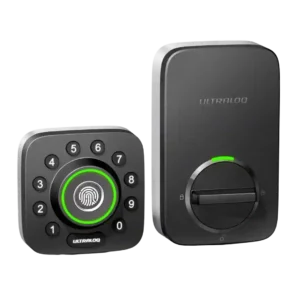
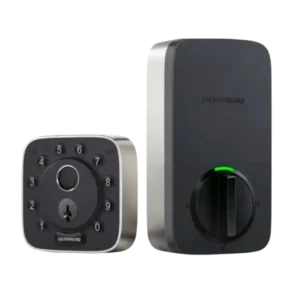
Access logs are consistently highlighted as useful and fairly detailed, showing who unlocked the door and by what method (PIN, fingerprint, app/remote, manual). A few experiences note the log view can be limited initially but loads more history as you scroll, making it practical for monitoring kids, guests, or service providers.
Logs are generally described as robust, showing an activity timeline that can identify lock events and, in many cases, which method or user was involved. One review notes that actions initiated through certain integrations can be labeled oddly in the timeline.
The app is generally described as easy to set up and feature-rich (users, logs, settings, firmware), but polish varies. Several reviews mention occasional sluggishness or connection hiccups, and Wi-Fi setup can be frustrating on certain networks; standalone/manual programming is also reported as unreliable by at least one reviewer.
The U home app is often described as easy to navigate for users, codes, and basic settings, but experiences are inconsistent. Multiple reviewers report setup quirks or occasional failures to connect/control the lock, while others report smooth day-to-day control.
Auto-lock is a major strength: it is configurable (seconds to minutes), and in Wi-Fi/door-sensor setups it can avoid locking when the door is open/ajar. A recurring minor complaint is that auto-lock being enabled by default can surprise new users, though it is easy to adjust or disable.
Auto-lock is widely praised when configured, especially when paired with the door sensor to confirm the door is closed, and timing controls are commonly cited. However, at least one reviewer reports software trouble enabling auto-lock reliably. Hands-free unlocking is available via phone location and short-range connectivity, and some reviewers like it as a Home Key alternative. Others report it can be slow or inconsistent and choose to leave it disabled.
Backset compatibility is repeatedly described as standard (commonly 2-3/8 or 2-3/4). A couple of hands-on installs mention minor confusion/quirks during adjustment, but overall fit is framed as typical for U.S. doors.
Backset adjustment is described as supported via an adjustable bolt/latch, helping it fit common door configurations without special work.
Battery life varies by usage and connectivity: manufacturer claims range from months to longer, but reviewers report anything from about a month during heavy testing to multiple months in normal use. Strong low-battery warnings are commonly noted, and emergency USB power plus a hidden key reduce lockout risk.
The lock uses eight AA batteries, with reviewers commonly citing a target of roughly a year of life, and noting that heavy Wi-Fi usage can increase drain. Some reviewers prefer rechargeable systems, but most appreciate that AAs are easy to replace.
Bluetooth pairing is generally described as straightforward and reliable for local control. Bridge-based setups rely on Bluetooth to link the lock to the bridge, and most reviewers report good day-to-day operation once paired.
Bluetooth is commonly used for local control and platform pairing; it is generally responsive, but some reviewers note Bluetooth-based control in certain ecosystems can feel slower at times.
Build quality is frequently praised as solid, heavy, and secure-feeling. Several reviews reference commercial-grade claims (especially on the Wi-Fi model), while a few note the industrial look or plastic feel on some exterior elements; overall durability impressions skew strongly positive.
Build quality is frequently described as solid, with metal components and sturdy feel, though aesthetics are divisive. Some versions use more plastic on the face, which can look cheaper even if it does not feel flimsy.
The door sensor is widely viewed as a meaningful upgrade, enabling open/closed status, open-door alerts, and smarter auto-lock behavior that helps prevent locking when the door is ajar. Reviewers consistently frame it as useful for peace of mind and better automation.
The optional door sensor is repeatedly recommended because it enables door-open/ajar awareness, supports smarter auto-lock behavior, and can trigger alerts when a door is left open. Some note it is not always exposed to every smart-home platform the same way.
Door compatibility is generally presented as standard deadbolt fit for typical U.S. doors, with common door thickness and bore/backset ranges. Most installs are described as straightforward when replacing an existing deadbolt, with extra work mainly if drilling new holes or correcting alignment.
Multiple reviewers describe the lock as fitting most standard U.S. doors as a full deadbolt replacement. Compatibility is generally not a blocker when replacing an existing deadbolt.
Some installers successfully reuse existing hardware like a strike plate, but at least one reviewer found that trying to reuse parts slowed installation. Using the included hardware is often suggested for the smoothest setup.
Firmware updates and software-driven features are commonly mentioned (adding or refining behaviors like Magic Shake, sensor-based auto-lock, and general stability). A caution appears in some user-feedback sections that updates or configuration changes can occasionally introduce issues, so keeping alignment and settings correct matters.
Fingerprint performance is a standout: most reviewers describe it as fast and accurate with quick setup. A few note that finger positioning/angle can matter and some users (especially older users in anecdotal feedback) may see inconsistent scans, but overall sentiment is strongly positive.
Fingerprint performance is one of the strongest themes: reviewers repeatedly describe it as fast, accurate, and reliable, often unlocking in under a second. A few note occasional misses can be improved by enrolling the same finger more than once.
Several reviewers highlight that the printed/illuminated keypad markings and button materials are designed to resist obvious wear, reducing the chance that frequently used digits become visibly obvious over time. Long-term finish wear is not broadly tested.
Geofencing behavior is mixed: some reviewers report a better experience than prior generations, while others call it unreliable or dependent on leaving a set radius before it will trigger properly. It can be helpful when tuned, but it is not the most universally dependable feature.
Geofencing-based behavior is available and can work well, but reviewers disagree on reliability and speed. Some appreciate the convenience, while others find it slow or prefer not to share location continuously.
Guest access is repeatedly described as strong: temporary PINs, scheduled access windows, one-time codes, and shareable eKeys are highlighted as ideal for cleaners, dog walkers, and rentals. Logs tied to user identity improve accountability for shared access.
Guest access is described as flexible, with support for one-time, scheduled, recurring, and time-bounded PIN codes. Reviewers frequently cite this as a practical advantage for visitors, neighbors, cleaners, and deliveries.
Hub/bridge needs depend on the version: built-in Wi-Fi models remove the bridge requirement, while older bundles require a bridge placed close to the door (often described as within about 10 feet). Bridge requirement is a common source of complexity for voice assistants and remote features on non-Wi-Fi versions.
Hub needs depend on ecosystem and model. Some versions are described as not needing a dedicated hub for standard smart features, while Apple Home/Matter remote control can depend on a compatible hub or adapter depending on configuration.
Installation varies sharply by generation: Wi-Fi revisions are often described as much easier and faster than early versions, with some installs completing in under 10–30 minutes. Older versions are described as finicky, sometimes requiring tailpiece trimming and very careful screw tightness and alignment to avoid binding.
Physical installation is commonly described as quick and straightforward for a full deadbolt replacement, often taking only a few minutes for experienced installers. Software setup and platform pairing are more variable, with some reviewers reporting repeated connection or onboarding friction.
There is no clear mention of an automatic jam-detection feature, but jamming/binding scenarios come up: misalignment, overtightened screws, and door fit can cause resistance. Newer hardware revisions are described as reducing prior jamming issues, but proper alignment remains important.
The hidden physical key is broadly viewed as a reliable backup, and emergency external power via a USB port adds another recovery option when batteries die. This layered fallback approach is frequently cited as a major practical advantage versus app-only smart locks.
Key override is consistently presented as a usable backup method, and reviewers treat it as a standard fail-safe alongside digital access. Detailed long-term reliability testing is not common in the reviews.
The keypad earns praise for tactile buttons, backlighting, and the anti-peep feature that allows extra digits around the real code. A recurring usability nit is the circular layout, which some find slower than a traditional keypad, but most still consider it dependable and secure.
The keypad is widely liked for being tactile and easy for guests, with an anti-peep approach that allows extra digits before or after the real PIN. It is generally described as responsive and useful when fingerprints are not ideal.
Keyway quality is not heavily evaluated, but one review explicitly notes a standard-style keyway (Schlage mentioned) and most emphasize that the keyhole is hidden behind a flip-down faceplate. As a backup entry method, it is generally framed as dependable and well-integrated.
One security-focused review points out an unusual mechanical cylinder/keyway presentation that may be confusing from a traditional lock perspective. This is not raised as an issue by typical user reviews focused on daily usability.
Lock/unlock speed is commonly described as quick, especially via fingerprint and keypad, with near-instant responses frequently noted in tests. Geofence-based behaviors can be slower or more conditional, but direct methods are consistently fast.
Lock/unlock actions are often described as quick, including near-instant response to app commands in some tests. Others note slower response in some integration paths or platforms, particularly when relying on certain network/control routes.
The motor is often described as smooth and fast, but a couple of reviewers note it can be louder than some competing locks. Most still consider the sound level acceptable, and the faster action is often seen as a worthwhile tradeoff.
Motor behavior is polarizing: some reviewers do not call out noise at all, while others describe the motor as grinding, whining, or too loud for regular home use. This appears to vary by version and subjective tolerance.
Once installed correctly and aligned, locking reliability is usually described as excellent with consistent fingerprint/PIN/app operation. Reported reliability issues tend to cluster around connectivity (Wi-Fi pairing or app connection loss) and installation-related binding rather than everyday mechanical failures.
Core locking reliability is generally reported as strong, with consistent success across fingerprint and keypad entry. When reliability issues appear, they are more often tied to connectivity, app control, or ecosystem integration rather than the physical bolt failing to actuate.
Notifications are generally appreciated for remote awareness (lock/unlock events and battery alerts). Some app workflows are criticized for requiring per-user notification rules rather than a simple global option, but overall alerting is seen as helpful for security and household monitoring.
Notifications are frequently highlighted as useful, including alerts for lock/unlock events, specific user activity, and door-left-open states when the door sensor is used. Some reviewers appreciate fine-grained control over which alerts to receive.
Physical attack resistance is framed as strong on Wi-Fi/door-sensor variants that reference commercial-grade/Grade 1 claims, while at least one older evaluation notes the model was not officially certified and was described as closer to Grade 2 in spirit. Overall, reviewers still describe it as robust for typical residential use.
Security-focused commentary includes claims of strong overall security ratings on some variants and at least one discussion of strong bump resistance in the mechanical cylinder. However, in-depth, standardized attack testing is not consistently provided across reviews.
One lockpicking-focused review suggests the mechanical cylinder does not showcase especially impressive anti-pick measures, even while noting strong bump resistance. Drilling resistance is not meaningfully assessed in these reviews.
Remote access is a key benefit when Wi-Fi is built in or when a bridge is used: reviewers frequently highlight being able to lock/unlock from anywhere and manage users remotely. Some note remote actions can be slower over Wi-Fi than Bluetooth and that Wi-Fi stability depends on signal quality and network constraints.
Remote access depends heavily on model and setup: some Wi-Fi versions are intended to provide remote control directly, while Matter/HomeKit remote control can require a compatible hub or additional adapter. Several reviewers report inconsistent remote reachability when the lock drops offline.
Security features commonly mentioned include dual-layer encryption claims, the anti-peep keypad, activity logs, and a lockout mode that disables electronic access. These are generally seen as meaningful safeguards, though account-level protections are not universally praised.
Smart-home integrations are broad (Alexa, Google, IFTTT, and sometimes SmartThings), enabling routines and automations. The most consistent limitation is the lack of Apple HomeKit support; setup can also be a bit quirky depending on how platforms label the integration and which connectivity version you own.
Smart-home compatibility is repeatedly cited as a major strength, spanning popular ecosystems (including Apple Home/HomeKit, Alexa, Google, and, on some variants, Matter). A recurring caveat is that certain advanced features may still require the manufacturer app, and responsiveness can vary by platform.
At least one review explicitly criticizes the companion app for lacking two-factor authentication, even while other reviews mention phone-number verification during account creation. If account security is a top priority, this is a notable weakness compared with platforms that offer robust 2FA.
User access management is repeatedly praised: multiple roles (admin/normal/temporary), schedules, usage limits, and support for many users with PINs and fingerprints. This flexibility is a primary reason reviewers recommend it for families, offices, and rental properties.
User management is described as flexible, supporting multiple user roles, schedules, and access methods per user (PIN, fingerprint, app). Reviewers routinely point to this as a standout for families and service-provider access.
Value is generally rated positively relative to competitors because it bundles many entry methods (fingerprint + keypad + app + key) and strong guest-management features. Some reviewers still call MSRP expensive, but discounts and the feature set often shift the judgment toward good value.
Pricing is commonly described as on the expensive side for a smart lock, but some reviewers feel the access flexibility and ecosystem support justify it. Value perception drops when reviewers encounter connectivity problems, missing built-in Wi-Fi on certain variants, or loud motor noise.
Voice control (Alexa/Google) is commonly supported, typically requiring a voice PIN for unlocking. Experience depends on version: Wi-Fi models simplify setup, while bridge-based versions add placement constraints but still work well once configured.
Voice control is generally described as working well once paired to an assistant ecosystem, including voice-triggered locking/unlocking flows. A few reports mention occasional assistant-side command failures when the lock is not responding reliably.
Warranty and support are not deeply reviewed across sources, but one review’s user-feedback roundup notes generally responsive customer support and replacement parts when needed. Most other coverage focuses more on features and setup than long-term service outcomes.
Support experiences are not deeply covered, but at least one reviewer reports contacting the company about Wi-Fi/app issues and receiving acknowledgment and escalation. Clear resolution timelines or outcomes are not broadly documented.
Weather resistance is frequently cited through IP65 and wide operating temperature claims, with reviewers expecting it to hold up in typical outdoor conditions. Real-world endurance commentary is limited, but the overall framing is that it is designed for exterior exposure.
Weather resistance is repeatedly associated with an IP65-style rating and suitability for outdoor exposure like rain and dust. Long-term durability in harsh conditions is not extensively tested in the reviews.
Wi-Fi is a major convenience upgrade on built-in models, enabling remote access without extra hardware, but 2.4GHz-only requirements are a recurring pain point—especially for certain mesh setups. Strong signal and correct band selection are repeatedly emphasized for stable operation.
Wi-Fi behavior varies by model and experience: some versions are described as having built-in Wi-Fi, while at least one Matter-focused review states Wi-Fi is not integrated and may require an extra adapter. Some users also report Wi-Fi dropouts that make remote access unreliable.