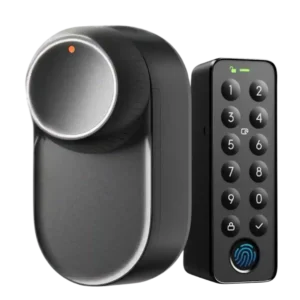
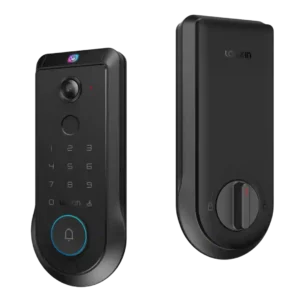
Access logs are frequently mentioned, including local history tracking and identifying who unlocked when credentials are tied to users. Several sources indicate logs can be retained for months, which is useful for monitoring and troubleshooting.
Event/activity logs are repeatedly mentioned, with reviewers noting access to doorbell and lock/unlock histories and the ability to review event records inside the app.
Alerts are typically configurable beeps/chirps for states like door left open/unlocked and can often be muted or toned down. Reviewers generally find them useful for awareness, but they’re not framed as a full-volume siren replacement.
Audio/alarm volume is adjustable in the app and reviewers note it can be loud by default during setup; the ability to tune or mute sounds is a plus, but audio quality for doorbell recordings was criticized by at least one reviewer.
The SwitchBot app is repeatedly praised for an intuitive setup flow, strong configurability (speed, alerts, night modes, scenes), and smoother calibration than earlier models. A recurring nuisance is that some settings are harder to adjust unless the phone is currently connected to the lock.
The Lockin app is widely described as feature-packed and customizable (modes, power management, access controls, event viewing), but multiple reviewers also flagged rough edges such as hidden controls, missing/immature video history features at launch, slow clip loading, and occasional troubleshooting or resets.
Auto-lock is flexible (timers, door-closed conditions) and often works well when the door sensor is accurate and the door’s mechanics are straightforward. On certain doors (lift-to-lock or sensor misreads), auto-lock can fail or require delays and user training to avoid jams or unwanted lockouts.
Auto-lock is widely praised and highly configurable (immediate to timed delays). The built-in door-closed sensing helps prevent locking before the door is shut, improving real-world reliability.
Lockouts after repeated failed attempts are described as a practical safeguard on keypad-based entry, with escalating disable timers in at least one review. This helps slow brute-force attempts while keeping other entry methods available.
Wrong-try protection and lockout behavior are described as available and configurable, adding a practical layer of protection against repeated code attempts.
Battery design is a highlight: reviewers frequently cite long life on the rechargeable pack plus multiple layers of backup power (backup battery/capacitor/emergency unlock) to reduce lockout risk. A common gripe is that charging typically requires removing the battery pack, though backup power helps bridge that downtime.
Battery life is commonly framed as roughly three months for the Pro, with USB-C charging and emergency power options. Several reviews highlight an optional solar panel that can meaningfully top up the battery, although placement and looks are a frequent complaint.
Bluetooth-first operation is consistent across reviews: local control works, and keypad-to-lock Bluetooth can feel very fast thanks to an always-on link. However, phone-to-lock Bluetooth connection time can add noticeable delay in some situations.
Bluetooth is used in setup/bridging to Wi-Fi in several reviews and is generally portrayed as convenient during onboarding.
Build quality is widely described as sturdy and premium-feeling, with multiple sources calling out a robust body and confident feel on the knob and mounting system. Overall, it’s positioned as a more refined, durable step up from prior SwitchBot retrofit locks.
Build quality impressions are mostly positive: reviewers call the lock hefty, solid, and less plastic-heavy, though the exterior assembly is bulky and at least one reviewer criticized hardware tolerances (bolts/threads) as a quality-control pain point.
The door sensor/magnet enables door-ajar awareness and smarter auto-lock behavior, but it’s also one of the most common weak points. Multiple reviewers note misreads or finicky behavior on certain installations, which can undermine automation reliability.
The integrated door-open/closed sensing via the strike plate and smart deadbolt is repeatedly called out as a smart, cleaner alternative to external sensors and is tied to better auto-lock behavior and door-status awareness.
Compatibility is a selling point, with multiple reviews emphasizing broad support for different lock types and door styles, including some tricky setups. Still, outliers exist where adapters don’t fit without modification, and some door mechanics (like lift-to-lock handles) require user habits or delays to work smoothly.
One review provides specific door thickness and bore-fit guidance and generally treats the lock as compatible with standard deadbolt installs; the main fit concern raised is bulk rather than incompatibility.
A core strength is keeping the existing exterior cylinder and keys, which reviewers call ideal for renters or anyone preserving curb appeal. Because it’s interior-only, reliable outside entry typically improves most when paired with a keypad (or other SwitchBot accessories).
Firmware and app updates are referenced as meaningful, with some reported fixes and ongoing feature improvements. Several reviewers still caution against buying purely on promised future integrations, even though SwitchBot appears active in updates.
Fingerprint unlocking is usually fast and convenient, especially when the keypad maintains an active connection to the lock. A few reports mention missed reads (or smaller fingers struggling) and occasional scanner flakiness, which makes a PIN/NFC fallback valuable.
Fingerprint access is usually described as quick and usable, but experiences vary: some found it reliable, others needed multiple tries or noted setup is slower than palm enrollment and can be harder for some users (including kids).
Aesthetic add-ons (like stick-on veneers/wood-grain overlays) are polarizing: some appreciate the option, while others think they look cheap or don’t add much. The core enclosure is generally liked for its cleaner, slimmer design.
Geofencing is commonly described as beta/inconsistent: some testers report sporadic triggers, missed arrivals, or reliability that depends heavily on location conditions. When it works, it’s convenient, but most sources recommend keeping a stronger backup entry method.
Geofencing is mentioned as present in some materials and apps, but reviewers say it is limited, often used for changing modes/settings rather than true automatic lock/unlock behavior.
Guest access is strong in most accounts, with permanent, temporary, and one-time codes commonly supported, plus emergency/duress-style options in some setups. Some reviewers want more granular scheduling rules (like day-of-week windows) for shared access.
Guest access features are a highlight: reviewers cite one-time, temporary, and scheduled PIN codes and easy sharing, though some note restrictions (temporary access may be PIN-only, and permission tiers/time restrictions for full users can be limited).
The hub is optional for basic local use but commonly required for the “full” experience (remote access, Matter, voice assistants, and broader smart-home integration). Multiple reviews frame this as the primary tradeoff of the product’s Bluetooth-first design.
For ecosystem control, reviewers note you may need a Matter controller hub (or similar hub) to add the lock to platforms like Apple Home, Google Home, Alexa, or SmartThings; hub use often comes with reduced feature depth versus the Lockin app.
Most reviewers describe installation and calibration as quick and greatly improved over older SwitchBot locks, often taking just minutes with clear in-app guidance. Edge cases exist: some doors needed drilling, adapter kits, or fiddly latch/bracket alignment.
Installation is often reported as a straightforward 10–15 minute swap for a standard deadbolt, with guided in-app setup, but one critical review cited poorly machined/jamming long bolts and lots of cable routing that can make assembly more frustrating than typical.
When resistance is encountered, the lock may report being stuck or require recalibration, and emergency/boost unlock features can help recover. Still, door mechanics (lift handles, sticky cylinders, low-power quiet modes) can create jam-like scenarios that users must tune around.
Key override is a reliable fallback because the exterior hardware stays unchanged, and several reviewers like that a locksmith can still service the cylinder without destroying the smart module. However, certain installs that require an interior key left inserted can limit outside key insertion on some doors.
A physical key is included and used as a backup method; no review reported key override failures, and several call out the presence of emergency power as an additional fallback.
Keypads are repeatedly positioned as essential for the best everyday experience, adding PIN/fingerprint/NFC and, with Vision, face unlock plus extra functions like doorbell/scene triggers. Downsides include added cost, larger outdoor footprint, and occasional biometric finickiness depending on user and conditions.
The keypad is generally seen as useful for kids/guests and as a backup method, but at least one reviewer criticized poor outside usability (a non-illuminated lock button and unclear manual locking cues).
The keyway is typically hidden behind the doorbell button and presented as a practical backup; reviewers do not report pick/drill testing, but also do not flag obvious keyway quality problems in normal use.
Speed is often called a major upgrade versus earlier SwitchBot models, especially when unlocking via keypad (typically very fast). Phone-based Bluetooth control ranges from quick to sluggish depending on connection state, and some third-party/Matter paths are slower than direct control.
Lock/unlock responsiveness is frequently described as very fast (both biometrics and app control), though overall perceived speed can be undercut when video clips or app functions lag.
Motor strength is generally praised for handling stiff deadbolts and certain complex door systems, with a smoother/quieter action than prior models. Some reviewers warn that quieter/slow modes can reduce available torque on sticky locks, potentially affecting reliability in edge cases.
Overall locking reliability is rated highly, with improved mounting and auto-calibration reducing out-of-sync issues versus older versions. Reliability is best on standard, well-aligned doors; unusual mechanics and door-sense inaccuracies can still reduce automation consistency.
Locking reliability is rated highly in several hands-on tests, but one critical review characterized the product as still beta-like, requiring reboots/force-quits and not yet fully trustworthy without more firmware refinement.
Notifications for lock activity, door-ajar state, and battery status are generally reported as accurate when connectivity is set up properly. Some users note that ecosystem/bridge paths can introduce delays compared with direct app or keypad operation.
Notifications are often described as fast and informative (motion/doorbell/lock events), but at least one reviewer reported major notification failures that required support and factory resets, and another noted limited per-alert toggles in the app.
At least two reviews cite BHMA/ANSI Grade 2 level certification for the lock, suggesting solid baseline physical security for residential use, though most testing focused on convenience and software rather than attack trials.
Remote access works when bridged via a hub or compatible SwitchBot device, and several reviewers find it genuinely useful for visitors and monitoring. That said, a few sources report slower response or unreliable behavior when controlling through certain third-party platforms.
Remote control via the Lockin app is positioned as a core strength (live view, lock/unlock, codes, alerts), though performance varies by reviewer, with some praising responsiveness and others reporting lag or slow video clip loading.
Digital security notes include AES-128 encrypted communication and local storage of biometric data (faces/fingerprints) rather than cloud dependence in several reviews. On the physical side, overall security still depends on the strength of your existing cylinder and door hardware.
Some reviewers highlight on-device processing, local storage, and direct device-to-phone style connections (often described as more private), but concrete third-party verification details are limited; advanced security claims should be weighed against real-world software stability.
Matter/smart-home integration typically requires a hub or SwitchBot bridge device and often exposes a basic lock/unlock experience in platforms like Apple Home or Home Assistant. Results range from smooth to slow/unreliable depending on ecosystem and setup, so local keypad entry is often the fastest path.
Smart-home compatibility is frequently advertised as broad (Matter/Thread plus major platforms), and pairing generally works, but reviewers repeatedly note that third-party apps expose only basic lock functions and omit many advanced features (especially doorbell/camera and granular access controls).
Tamper/anti-theft features are commonly associated with the keypad ecosystem and can be enabled/managed in the app. Reviews mention the availability of tamper alerts, but most do not deeply stress-test sensitivity against real-world attacks.
Anti-tamper and unusual-activity detection are referenced (including tamper events surfaced in some ecosystem apps), but few reviewers deeply tested sensitivity or false-alarm behavior.
The touch interface is often described as responsive and modern, with some praise for smudge resistance; however, visibility/UX issues (fish-eye video framing noted elsewhere, and unlit button behavior) can reduce ease of use at night.
User access management is generally well-regarded, allowing multiple user profiles and the ability to add/revoke faces, fingerprints, NFC cards, and codes. Capability and convenience improve significantly with keypad pairing and a properly configured hub ecosystem.
User management is generally organized (multiple palms/fingerprints/PINs per user), but at least one reviewer criticized limited permission granularity, with full users effectively receiving always-on access.
Value is often viewed as strong for a modern retrofit lock, particularly for users already in the SwitchBot ecosystem. Total cost can rise quickly if you add a hub and the Vision keypad, at which point some reviewers compare it to full smart-lock alternatives.
Value depends heavily on price: reviewers see the all-in-one concept and no-subscription local storage as compelling, but MSRP is considered expensive, and early-bird pricing is viewed as much more competitive given software maturity concerns.
Voice control is available via hub integrations and generally works, often with added PIN/voice-code protections for unlocking. It’s useful for hands-free control but usually not as quick or consistent as keypad-based entry at the door.
Voice control via assistants (Siri/Alexa/Google) is described as working for basic lock/unlock commands; richer smart-home routines are possible, but broader feature access still tends to live in the Lockin app.
Because the lock mounts indoors, weather concerns mostly apply to outdoor accessories like keypads, which are often rated for rain and temperature extremes. Reports indicate good real-world performance in wind/rain and cold, but face recognition can degrade in harsh lighting or extreme cold.
Multiple reviews cite IP65 weatherproofing and describe the lock holding up to rain/dust and outdoor conditions; long-term durability claims exist, but most evidence is short-to-medium term testing.
Wi-Fi connectivity isn’t native to the lock and is usually provided via a SwitchBot hub/bridge. Reviewers generally like having the option, but experience can depend on hub placement and network quality, and some ecosystems can feel slower than local keypad use.
Built-in 2.4GHz Wi-Fi is a recurring positive, enabling direct app control and remote features without a separate bridge for basic operation.