Access logs
P1
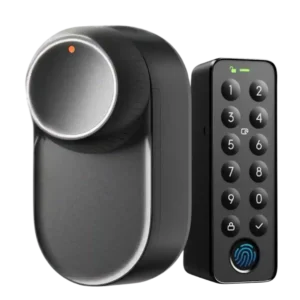
Product 1: SwitchBot Lock Ultra
4.3
Reviewers who discussed logs valued being able to see activity history, with one noting accurate logs and another saying they help check who came and went.
P2
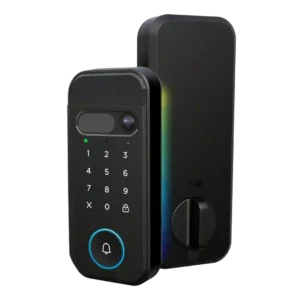
Product 2: myQ Secure View 3-in-1 Smart...
4.0
Access-log evidence was limited but positive, with one reviewer noting individual pins can show who opened the door.
Alarm/siren loudness (if included)
P1
Product 1: SwitchBot Lock Ultra
3.0
The keypad speaker is clearly audible, but one reviewer found the voice prompts annoying enough to lower the score.
P2Product 2: myQ Secure View 3-in-1 Smart...
No score yetApp
P1
Product 1: SwitchBot Lock Ultra
4.8
The SwitchBot app was widely praised for easy pairing, clear calibration, smooth menus, and stable operation, with a few feature-description caveats.
P2
Product 2: myQ Secure View 3-in-1 Smart...
4.5
The app setup experience was praised as simple, with phone control presented as easy to use.
Auto-lock
P1
Product 1: SwitchBot Lock Ultra
3.2
Auto-lock drew mixed evidence: some reviewers liked the extra security or found it reliable, while lift-to-lock doors and a bad door sensor broke the experience for others.
P2
Product 2: myQ Secure View 3-in-1 Smart...
4.0
Auto-lock support was viewed as useful and configurable, though the evidence centers on one reviewer’s setup experience.
Battery
P1
Product 1: SwitchBot Lock Ultra
4.7
Battery evidence was strongly positive overall, especially for the rechargeable pack and backup/emergency power, though one reviewer wondered about Keypad Vision drain.
P2
Product 2: myQ Secure View 3-in-1 Smart...
4.0
Battery impressions were mixed: reviewers liked the rechargeable pack, but one noted a long initial charge time.
Build quality and durability
P1
Product 1: SwitchBot Lock Ultra
4.7
Build quality was consistently described as tough, robust, solid, or premium, with only a mild plastic-build caveat from one reviewer.
P2
Product 2: myQ Secure View 3-in-1 Smart...
4.8
Reviewers praised the physical construction, describing the lock as a great quality product and super well built.
Camera and doorbell performance
P1
Product 1: SwitchBot Lock Ultra
4.0
Doorbell-related evidence was limited but positive, with the keypad button described as a useful doorbell-style feature.
P2
Product 2: myQ Secure View 3-in-1 Smart...
4.7
Camera and doorbell evidence was positive, with praise for clear visitor video, a wide-angle view, and the integrated 2K camera-doorbell design.
Door-sense
P1
Product 1: SwitchBot Lock Ultra
2.8
Door-sense was split: one reviewer found the sensor useful for auto-lock, while another said the magnet still reported the door state unreliably.
P2
Product 2: myQ Secure View 3-in-1 Smart...
4.0
Door-sense worked in the reviewer’s test, with the app state updating once the door closed.
Door compatibility (deadbolt fit)
P1
Product 1: SwitchBot Lock Ultra
4.3
Door compatibility was a major strength for unusual doors, deadbolts, jimmy-proof locks, and mortise locks, though one reviewer needed custom adapters.
P2
Product 2: myQ Secure View 3-in-1 Smart...
4.0
Door-fit evidence was limited but positive: one reviewer’s older steel door prep worked with the included jig and deadbolt drilling guidance.
Existing hardware reuse
P1
Product 1: SwitchBot Lock Ultra
4.5
Reviewers liked that the retrofit design keeps existing exterior hardware, keys, and deadbolts, making it renter-friendly and low-modification.
P2Product 2: myQ Secure View 3-in-1 Smart...
No score yetFacial recognition
P1
Product 1: SwitchBot Lock Ultra
4.3
Facial recognition was often praised as hands-free and reliable, but some reviewers had issues with lighting, positioning, or early firmware.
P2
Product 2: myQ Secure View 3-in-1 Smart...
5.0
Facial recognition drew some of the strongest praise, with reviewers calling it cool, incredible, and very fast.
Feature additions via updates
P1
Product 1: SwitchBot Lock Ultra
4.5
Firmware and update evidence was positive where mentioned, including a fixed face-registration issue and praise for SwitchBot’s update pace.
P2Product 2: myQ Secure View 3-in-1 Smart...
No score yetFingerprint
P1
Product 1: SwitchBot Lock Ultra
4.1
Fingerprint access was mostly fast and convenient, although one reviewer reported the scanner sometimes failed to respond.
P2
Product 2: myQ Secure View 3-in-1 Smart...
5.0
Fingerprint access performed well in hands-on testing, with the reviewer saying the biometrics worked completely.
Guest Codes and Access
P1
Product 1: SwitchBot Lock Ultra
4.2
Guest and temporary access options were praised for codes, emergency options, Airbnbs, and vacation rentals, but one reviewer wanted more scheduling flexibility.
P2
Product 2: myQ Secure View 3-in-1 Smart...
4.5
Guest access was praised for service or pet-care scenarios where the owner could let someone in without sharing a key.
Hub requirement
P1
Product 1: SwitchBot Lock Ultra
3.1
Hub requirement was a common tradeoff: hubs unlock Matter, remote access, and integrations, but several reviewers treated that dependency as a limitation.
P2Product 2: myQ Secure View 3-in-1 Smart...
No score yetIndustrial design
P1
Product 1: SwitchBot Lock Ultra
4.4
Design was generally praised as smaller, modern, neater, and more premium, though wood veneers and side latches drew minor criticism.
P2
Product 2: myQ Secure View 3-in-1 Smart...
4.5
The lock’s integrated design was praised for reducing separate-device clutter and for looking slick and well designed.
Installation and Setup
P1
Product 1: SwitchBot Lock Ultra
4.7
Installation and setup were consistently praised as quick, simple, or beginner-friendly, though odd doors or adapters could complicate the process.
P2
Product 2: myQ Secure View 3-in-1 Smart...
4.5
Hands-on reviewers generally found installation approachable, praising complete hardware, easy installation, clear directions, and a smooth process, with one longer install still going fairly smoothly.
Key override reliability
P1
Product 1: SwitchBot Lock Ultra
3.7
Key override reliability depended on door hardware: some reviewers valued keeping a manual key path, while another lost outside-key access on their setup.
P2
Product 2: myQ Secure View 3-in-1 Smart...
4.3
The hidden key backup was viewed positively, and another reviewer liked that the lock still had multiple fallback options.
Keypad
P1
Product 1: SwitchBot Lock Ultra
4.4
The keypad was repeatedly described as essential, convenient, flexible, and fast, especially when paired with face, fingerprint, NFC, and PIN methods.
P2
Product 2: myQ Secure View 3-in-1 Smart...
4.3
Keypad evidence was mixed: one reviewer preferred physical buttons, while another confirmed the pin code worked.
Lock/unlock speed
P1
Product 1: SwitchBot Lock Ultra
4.4
Lock/unlock speed was mostly praised as fast or quicker than prior models, though Bluetooth phone unlocking could take several seconds in one review.
P2
Product 2: myQ Secure View 3-in-1 Smart...
5.0
Speed was a standout: one article cited two-second unlock latency, while a hands-on reviewer found face recognition extremely fast.
Locking motor
P1
Product 1: SwitchBot Lock Ultra
4.5
Motor evidence was strong overall, with reviewers praising torque, quietness, and strength, aside from a weak night-mode/sticky-lock caveat.
P2
Product 2: myQ Secure View 3-in-1 Smart...
5.0
The interior locking action received strong praise from a reviewer who described it as super smooth.
Locking reliability
P1
Product 1: SwitchBot Lock Ultra
4.6
Locking reliability was strong overall, with several reviewers reporting solid operation, reliable locking, and no failed unlocks, except in special night-mode or sensor cases.
P2
Product 2: myQ Secure View 3-in-1 Smart...
4.5
A hands-on reviewer tested multiple unlock methods and found them working successfully.
Notifications
P1
Product 1: SwitchBot Lock Ultra
4.5
Notification evidence was positive where tested, including accurate lock-open notifications, Apple Home notifications, and helpful battery alerts.
P2
Product 2: myQ Secure View 3-in-1 Smart...
3.8
Notification evidence was mixed: one review praised context-aware alerts, while another noted unsubscribed alerts lacked detection details.
Remote access
P1
Product 1: SwitchBot Lock Ultra
3.8
Remote access was useful for visitors and temporary access, but reviewers repeatedly noted that it depends on a hub.
P2
Product 2: myQ Secure View 3-in-1 Smart...
4.5
Remote access was praised for letting someone enter without needing a physical key handoff.
Security features (encryption)
P1
Product 1: SwitchBot Lock Ultra
4.5
Security feature evidence was positive for local biometric handling, anti-peek passcodes, and face-recognition resistance to photos or videos.
P2
Product 2: myQ Secure View 3-in-1 Smart...
5.0
Security handling for face scans was praised because the reviewer said scans stay on the device rather than going to the cloud.
Smart-home integration (Alexa, Google, Siri, HomeKit, Matter, Thread)
P1
Product 1: SwitchBot Lock Ultra
3.6
Smart-home integration was powerful but mixed: Matter, Apple Home, Home Assistant, and automations worked well for some, while others had unreliable or basic Matter behavior.
P2
Product 2: myQ Secure View 3-in-1 Smart...
2.7
Integration evidence was split: myQ ecosystem control was praised, but multiple reviews criticized or warned about limited popular smart-home platform support.
User access management
P1
Product 1: SwitchBot Lock Ultra
4.4
User access management was praised for detailed controls, temporary access, and adjustable authorizations, with one reviewer wanting finer scheduling.
P2
Product 2: myQ Secure View 3-in-1 Smart...
4.0
User access management was described as easy for users, PIN codes, and alerts.
Value and Price
P1
Product 1: SwitchBot Lock Ultra
4.3
Value was generally positive thanks to fair pricing and strong bundles, though one reviewer felt the appeal fell when keypad cost pushed it near full smart locks.
P2
Product 2: myQ Secure View 3-in-1 Smart...
3.3
Value depends heavily on use case: reviewers praised the feature bundle and recommendations, but flagged overkill, subscriptions, and fee concerns.
Weather resistance
P1
Product 1: SwitchBot Lock Ultra
4.3
Weather evidence was positive for the keypad and lock surviving rain, wind, and cold testing, with one cold-weather facial-recognition caveat.
P2
Product 2: myQ Secure View 3-in-1 Smart...
4.5
Weather protection was praised through the exterior gasket, which a reviewer said sealed well to keep moisture out.