Access history is available in some setups (and was highlighted in early coverage), but in practice it can depend on the hub and platform, and not every controller app exposes detailed logs.
Access logs are consistently praised, offering a clear timeline of lock/unlock events by method and user, and become more informative when DoorSense is installed to add door-open/closed events.
Reviews note no built-in alarm/siren, so there is no siren loudness benefit to rely on.
App support is inconsistent: some versions rely on a smart-home hub app rather than a dedicated Kwikset app, which can limit advanced controls like remote code creation on certain platforms.
The Yale Access app is generally easy to navigate for locking/unlocking, viewing activity, and managing guests, but many reviewers call it dated or slow to load, with some settings only available after a Bluetooth connection and occasional connection hiccups.
Auto-relock/auto-lock features are commonly praised for convenience and worked consistently in testing, but toggling settings may require opening the interior panel and using small switches.
Auto-lock is flexible (timer-based and, with DoorSense, door-closed-based) and usually reliable, but a few users report edge cases where it attempted to lock when the door was open or wish the door-closed requirement were stricter by default. Auto-unlock is convenient when it works, using Bluetooth proximity plus location-aware modes, but experiences vary: some report near-perfect reliability while others see misses (especially with Wi-Fi setups) or dislike always-on location permissions.
Keypad security tools like wrong-code limits and temporary lockouts are available and can reduce PIN-guessing risk, though real-world testing depth varies across reviewers.
Standard backsets appear fine, but at least one review warns that longer-than-average backsets may not be supported, so nonstandard doors should be double-checked before purchase.
Powered by four AA batteries with low-battery warnings and external 9V jump terminals for emergencies; battery life reports vary (some cite roughly 5 to 6 months), and battery access can require partial disassembly.
Battery life is a recurring pain point on Wi-Fi setups, often quoted around three months and sometimes closer to 5–7 weeks in heavy use, and the app commonly lacks a clear battery percentage until late in the cycle, making low-battery lockouts more plausible.
Multiple reviews explicitly note there is no Bluetooth, so there is no phone-proximity unlock or key fob option.
Bluetooth control is typically quick and responsive, and several reviewers note it can feel faster than hub-based control; it also underpins proximity features like Auto-Unlock on many configurations.
The exterior build is described as sturdy and the mechanism proved reliable in use, but at least one reviewer reported sloppy bolt machining that made installation harder.
Build quality is generally regarded as solid and premium-looking, often paired with BHMA/Grade 2 positioning and a smaller interior footprint, though a few reviewers note the interior feels lighter or that finishes can scuff during a fussy install.
Reviews note no full door-open/closed alerting, but some describe auto-lock behavior that only triggers when the door is closed and may beep when it is not fully shut.
DoorSense adds meaningful context (open, closed, ajar) and can prevent the bolt from extending when the door is open, but it may require drilling for a clean install and some users report calibration hassles or occasional misbehavior.
The lock generally fits standard doors and deadbolt cutouts, but many setup flows emphasize careful measuring and some owners report that small door/hardware variances can create mounting challenges.
If you are replacing another Kwikset deadbolt, the footprint and standard door prep can make swaps easier, with minimal changes to the door.
Assure Lock 2 usually replaces the full deadbolt rather than reusing existing hardware, but Yale’s Smart Modules can be moved between compatible locks, which reviewers see as a long-term flexibility win.
Z-Wave Plus versions cite over-the-air firmware update capability, but overall functionality remains intentionally minimalist and still depends on the hub ecosystem.
Updates and modular add-ons are central to the product strategy: reviewers cite bug fixes via firmware and the ability to swap Wi-Fi/Z-Wave/Zigbee modules with Matter support discussed as a future upgrade path.
Fingerprint unlocking (on Touch models) is often described as extremely fast and accurate, yet at least one long-term owner reports recurring failures that require re-enrollment, suggesting this feature’s reliability can vary by unit and environment.
Matte finishes are frequently praised for resisting fingerprints and looking upscale; long-term finish wear is less documented, but at least one review mentions cosmetic scuffs from handling or a tight install.
Geofencing-based behaviors usually rely on a fixed or coarse radius (often described as about 200 meters), which works for typical comings-and-goings but can fail for short trips or multi-entry homes and may feel inflexible to tune.
Obsidian stores up to 16 codes on the standalone model and up to 30 codes on connected versions, with 4 to 8 digits per code; code limits and scheduling features vary by model and ecosystem.
Guest codes are a standout: reviewers highlight easy sharing plus temporary and recurring schedules; capacity is sometimes cited as 250 codes while other reviews describe effectively unlimited code creation depending on setup.
Most smart features require a compatible Z-Wave hub; without it, Obsidian behaves like a standalone keypad deadbolt.
The modular design reduces hard hub dependence, but you still need the right path for your ecosystem: Wi-Fi for broad third-party integrations, or an Apple home hub for Bluetooth-only HomeKit remote access; reviewers also appreciate that Wi-Fi no longer requires a separate bridge.
Many reviewers found setup straightforward with good hardware options, but others ran into alignment issues, confusing instructions, or a tricky handing/calibration step that required rework.
Installation is frequently described as DIY-friendly with templates and app walkthroughs, yet several reviewers still ran into alignment/fit issues, module seating mistakes, or DoorSense drilling that turned setup into a longer project.
Obsidian is keywayless, so there is no physical key override if electronics fail; the emergency fallback is the external 9V jump terminals plus your PIN.
Keyed versions provide a dependable physical fallback, while key-free versions lean on 9V emergency power terminals; both approaches work, but key-free owners need to be mindful of battery state to avoid inconvenience.
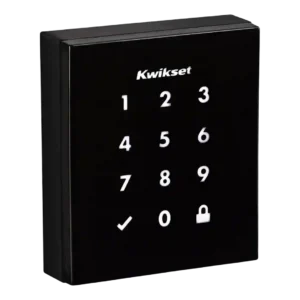
The illuminated touchscreen keypad is central to the design and is generally responsive and easy to use, though a few reviewers note it can take multiple touches to wake.
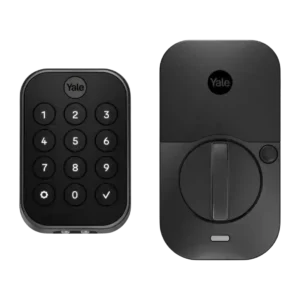
The keypad is easy to use in low light thanks to backlighting, but multiple reviews complain it can be hard to read in direct sunlight and that needing to tap the Yale logo first is not always obvious or convenient.
Keyway details are limited in the reviews, but keyed models can be rekeyed and accept standard backup keys; key-free variants remove the key cylinder entirely as a potential failure or attack point.
Unlocking is generally quick once the keypad wakes, but some reviewers reported slower wake behavior and slightly slower operation in hot, sunny conditions.
Lock/unlock speed is generally snappy via code and Bluetooth, while app actions over Wi-Fi can add a few seconds; fingerprint models (when functioning well) are near-instant and feel fastest day-to-day.
Motor noise is noticeable to some reviewers, who describe the mechanism as loud during operation.
The motor action is typically described as smooth and sometimes quiet, with configurable sounds/volume; a few users like the audible confirmation, while others prefer quieter operation.
Across reviews, the lock generally operated consistently without jamming, and the auto-relock feature performed reliably when enabled.
Core locking is mostly dependable, but some reviewers experienced intermittent app connectivity, Wi-Fi reconnect notices, calibration problems, or automation quirks that can undermine confidence if you expect set-and-forget behavior.
The lock provides audio/LED indicators (including low-battery alerts) and hub apps can show lock state, but native, lock-specific push notifications are limited and platform-dependent.
Notifications and smart alerts cover events like manual lock/unlock, specific-user activity, auto-lock, and door-ajar warnings, but some reviewers report missed or delayed alerts and others get noisy Wi-Fi reconnect notifications.
Removing the keyway reduces exposure to key-based attacks, but otherwise Obsidian is a standard deadbolt without advanced intrusion sensing or active defense features.
Reviewers generally feel confident in the physical security thanks to a sturdy deadbolt and Grade 2 positioning; key-free models are also seen as reducing attack surface by removing the keyway, though no one provides lab-grade break-in testing.
Keywayless entry reduces the risk of traditional picking and bump-key attacks; reviews do not provide an explicit drill-resistance rating.
Formal pick/drill ratings are rarely discussed; the most concrete claims focus on key-free designs being harder to pick because there is no key cylinder, while keyed models rely on conventional mechanical security.
When paired to a Z-Wave hub, reviewers were able to lock/unlock and check status remotely, but code management and other functions can be restricted by the chosen platform.
Remote access depends on configuration: Wi-Fi models/modules enable control from anywhere, while Bluetooth-only owners often rely on a HomeKit hub for remote operation; otherwise control is limited to short-range Bluetooth.
SecureScreen (decoy/random digits) helps prevent fingerprint-based code guessing, and Z-Wave versions mention encryption; the keywayless design also removes common key-based attack vectors like bump keys.
Security notes include locally stored fingerprints protected with AES encryption, multi-layer encryption for app/account data, and restrictions that require local Bluetooth for certain sensitive setting changes.
Integration centers on Z-Wave hubs (such as SmartThings, Wink, and Control4) with Alexa/Google voice control typically routed through that hub; multiple reviews call out missing native HomeKit support.
Ecosystem support is a strength when paired with the appropriate module, spanning HomeKit and (with Wi-Fi) Alexa/Google and other platforms; however, many variants lack Apple Home Key, and some users report platform-specific limitations like Google routines gaps or PIN-required voice unlocking.
The glossy, minimalist touch surface looks premium on modern doors but can smudge; SecureScreen and anti-fingerprint coatings help reduce obvious fingerprint trails.
Touchscreen designs look sleek and respond well once awake, but glare and sunlight readability remain recurring complaints, and some users want it to wake more reliably with a single touch anywhere on the pad.
Two-factor authentication and account verification (email/phone codes) are highlighted as strong protections in several reviews, helping reduce the risk of unauthorized remote control.
You can add/remove PINs and use an optional master code, but advanced guest access controls (expiring or scheduled codes) are limited or unavailable on some models and hubs.
User access management is straightforward, typically distinguishing owners from guests and allowing either full app access or limited entry methods, making it practical for families and shared homes.
Pricing is mid-to-premium for a touchscreen deadbolt; value is better if you already own a Z-Wave hub, but paying extra for a hub and living with limited code controls can reduce perceived value.
Value depends heavily on configuration: the base lock can feel reasonably priced for the design and access features, but Wi-Fi and future modules add cost, making it less appealing if long battery life or flawless connectivity are your top priorities.
Voice control generally works for locking and status checks through Alexa/Google when paired with a hub, but unlocking by voice is often restricted for security.
Voice control works well for locking and status checks through Siri/HomeKit and through Alexa/Google when the lock is internet-connected, but unlocking is typically gated behind extra authentication steps and the experience can be less seamless than top competitors.
Support experiences are mixed: some issues are resolved through resets or firmware, but at least one owner describes an unresolved fingerprint problem and dissatisfaction with the resolution path.
The black exterior can absorb heat in direct sun; at least one reviewer noted it can get hot to the touch and may slow slightly under high heat.
Weather tolerance is presented as strong, with reviewers citing operation in very cold conditions and wide stated temperature ranges; the exterior touchscreen/keypad generally holds up in real use, though environment-specific readability (sun glare) can be an issue.
There is no built-in Wi-Fi; remote access typically depends on Z-Wave plus a hub rather than direct Wi-Fi connectivity.
Wi-Fi (via the Smart Module or bundled models) unlocks true remote control and broader ecosystem support, but it can add setup complexity, occasional disconnect messages, and noticeably worse battery life compared with Bluetooth-only operation.