App
P1
Product 1: Kwikset Obsidian Smart Lock
3.5
Reviewers liked app-based control when a compatible platform supported it, but the lock lost points because it lacks its own app and some hub apps could not manage codes.
P2
Product 2: ULTRALOQ Bolt Fingerprint Smart Lock
4.1
App feedback ranged from excellent and simple to inconsistent; some reviewers found the app easy or seamless, while one had repeated connection problems.
Auto-lock
P1
Product 1: Kwikset Obsidian Smart Lock
4.3
Auto-lock was reliable and easy to set up in stronger reviews, though one transcript noted that changing related customization switches required a screwdriver.
P2
Product 2: ULTRALOQ Bolt Fingerprint Smart Lock
4.1
Auto-lock was highly valued when it worked, with multiple reviewers praising its usefulness, but one reviewer could not enable it reliably.
Battery
P1
Product 1: Kwikset Obsidian Smart Lock
2.8
Battery feedback was mixed: one preview praised warning before batteries died, while later user-oriented evidence reported six-month or five-month battery life concerns.
P2
Product 2: ULTRALOQ Bolt Fingerprint Smart Lock
3.7
Battery impressions were mixed: reviewers liked the long-life claims or early battery status, but disliked replaceable AAs, limited battery detail, or the number of cells.
Bluetooth
P1
Product 1: Kwikset Obsidian Smart Lock
3.0
Bluetooth was a mild drawback rather than a dealbreaker: one reviewer did not mind its absence, but warned it could deter buyers who want phone proximity unlocking.
P2
Product 2: ULTRALOQ Bolt Fingerprint Smart Lock
3.2
Bluetooth drew a limited but important caveat: one Apple Home-focused reviewer found Bluetooth-based control a little slow at times.
Build quality and durability
P1
Product 1: Kwikset Obsidian Smart Lock
4.5
Build quality was praised in the clearest durability evidence, with the lock described as sturdy and jam-free during testing.
P2
Product 2: ULTRALOQ Bolt Fingerprint Smart Lock
4.0
Build impressions were mostly positive, with reviewers praising solidity and materials, though one Matter review raised longevity concerns because of the motor noise.
Door compatibility (deadbolt fit)
P1
Product 1: Kwikset Obsidian Smart Lock
4.0
Door fit looked favorable for standard replacements, with the reviewer saying it should be almost as easy to install in most standard lock enclosures.
P2Product 2: ULTRALOQ Bolt Fingerprint Smart Lock
No score yetExisting hardware reuse
P1
Product 1: Kwikset Obsidian Smart Lock
4.5
Existing hardware reuse was a strength in the replacement scenario, where the reviewer installed it easily after removing a prior Kwikset lock.
P2
Product 2: ULTRALOQ Bolt Fingerprint Smart Lock
3.0
Existing hardware reuse was mixed: one reviewer thought reusing the old strike would save time, but that choice made installation take longer.
Fingerprint
P1
Product 1: Kwikset Obsidian Smart Lock
4.4
Fingerprint-related security earned consistent praise because SecureScreen and coating features reduced the risk of visible touch patterns revealing codes.
P2
Product 2: ULTRALOQ Bolt Fingerprint Smart Lock
4.8
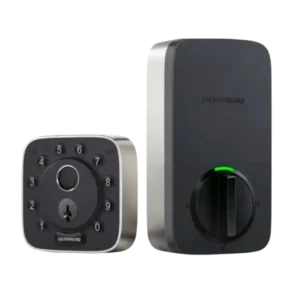
Fingerprint access was the strongest consensus feature: nearly every reviewer found it fast, accurate, reliable, or instantly responsive, with only occasional issues noted.
Guest Codes and Access
P1
Product 1: Kwikset Obsidian Smart Lock
3.8
Guest access was one of the most mixed areas: reviewers liked multiple codes and temporary scheduling in some versions, but criticized limited code counts and remote-code gaps in others.
P2
Product 2: ULTRALOQ Bolt Fingerprint Smart Lock
4.8
Guest and temporary access was a clear strength, with reviewers appreciating scheduled access, single-use or limited codes, and easy access for neighbors or service visitors.
Hub requirement
P1
Product 1: Kwikset Obsidian Smart Lock
3.0
Hub requirements split reviewers: Z-Wave was welcomed by smart-home users, while others treated the required hub as an added burden.
P2
Product 2: ULTRALOQ Bolt Fingerprint Smart Lock
3.3
Hub requirements depended on the version and workflow: built-in Wi-Fi avoided a separate bridge for one reviewer, while the Matter model drew criticism for bridge needs.
Industrial design
P1
Product 1: Kwikset Obsidian Smart Lock
4.5
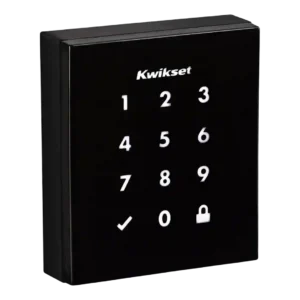
Design was the strongest consensus attribute, with repeated praise for the sleek, minimalist, modern, key-free look.
P2
Product 2: ULTRALOQ Bolt Fingerprint Smart Lock
3.8
Industrial design split reviewers: some liked the size, solidity, or simple look, while others found it cheap-looking or unattractive.
Installation and Setup
P1
Product 1: Kwikset Obsidian Smart Lock
3.5
Installation ranged from simple and thoughtfully guided to frustrating, with one reviewer blaming unclear instructions and bolt machining while others completed setup easily.
P2
Product 2: ULTRALOQ Bolt Fingerprint Smart Lock
4.7
Installation was one of the clearest strengths: reviewers repeatedly called setup easy, quick, straightforward, or manageable with only a few screws.
Keypad
P1
Product 1: Kwikset Obsidian Smart Lock
4.5
The keypad was praised for intuitive everyday locking and unlocking.
P2
Product 2: ULTRALOQ Bolt Fingerprint Smart Lock
4.7
The physical keypad was a recurring positive because reviewers liked the tactile feel, responsiveness, and guest-friendly button design.
Lock/unlock speed
P1
Product 1: Kwikset Obsidian Smart Lock
3.8
Locking speed was mixed, with one review praising prompt Alexa locking while another noticed the lock ran a bit slower than normal.
P2
Product 2: ULTRALOQ Bolt Fingerprint Smart Lock
4.7
Unlock speed was praised across most reviews, especially through fingerprint and app commands, though one Matter review found Matter actions slightly slower.
Locking motor
P1
Product 1: Kwikset Obsidian Smart Lock
2.5
The locking motor drew a clear complaint for being quite loud, even though the same review did not report jams.
P2
Product 2: ULTRALOQ Bolt Fingerprint Smart Lock
1.0
The Matter model’s motor was the sharpest hardware complaint, described as grinding, whining, and unpleasant.
Locking reliability
P1
Product 1: Kwikset Obsidian Smart Lock
4.5
Locking reliability was positive overall, with reviewers reporting that auto-relock worked every time, the bolt worked fine after setup, and the mechanism did not jam.
P2
Product 2: ULTRALOQ Bolt Fingerprint Smart Lock
4.3
Core lock operation was usually reliable in testing, but app-based locking and unlocking was inconsistent for one reviewer and the Matter model had a loud motor caveat.
Notifications
P1Product 1: Kwikset Obsidian Smart Lock
No score yet
P2
Product 2: ULTRALOQ Bolt Fingerprint Smart Lock
4.7
Notifications were consistently praised as helpful, especially for open-door alerts, user-specific activity, and keeping track of household or guest access.
Physical attack resistance
P1
Product 1: Kwikset Obsidian Smart Lock
4.5
Physical attack resistance was praised because the keywayless design removes common keyed-entry attack paths.
P2
Product 2: ULTRALOQ Bolt Fingerprint Smart Lock
4.8
Physical attack resistance had strong evidence from ANSI-grade commentary and especially from an expert’s praise for bump resistance.
Pick/drill resistance (if rated)
P1
Product 1: Kwikset Obsidian Smart Lock
4.5
Pick and bump-key resistance was praised because ditching the keyway removed the risk of picking or forced entry with a bump key.
P2
Product 2: ULTRALOQ Bolt Fingerprint Smart Lock
2.0
Pick resistance was criticized by the lock-picking review, which was not impressed with the anti-pick features.
Remote access
P1
Product 1: Kwikset Obsidian Smart Lock
3.3
Remote access depended heavily on the platform: it worked well through Wink in one review, but other evidence tied remote control to a more expensive hub-enabled setup.
P2
Product 2: ULTRALOQ Bolt Fingerprint Smart Lock
1.0
Remote access was a major failure point for one reviewer because unstable Wi-Fi made remote control impossible.
Security features (encryption)
P1
Product 1: Kwikset Obsidian Smart Lock
4.3
Security features were praised across reviews, especially SecureScreen, which reviewers said worked well and helped prevent code guessing from fingerprints.
P2
Product 2: ULTRALOQ Bolt Fingerprint Smart Lock
4.6
Security features beyond the core lock were praised, especially anti-peep PIN entry and the usefulness of random digits when someone may be watching.
Smart-home integration (Alexa, Google, Siri, HomeKit, Matter, Thread)
P1
Product 1: Kwikset Obsidian Smart Lock
3.7
Smart-home integration was useful but ecosystem-dependent: Z-Wave, SmartThings, Wink, Alexa, and other platforms worked well in some cases, while HomeKit and Google limitations hurt compatibility.
P2
Product 2: ULTRALOQ Bolt Fingerprint Smart Lock
4.3
Smart-home integration was a major selling point across reviews, but enthusiasm was tempered by missing Home Key, Home Assistant issues, and model-specific platform limits.
User access management
P1
Product 1: Kwikset Obsidian Smart Lock
3.4
User access management varied sharply by version and platform, from strong scheduled and one-time code support to complaints about no expiring codes or no app-based code changes.
P2
Product 2: ULTRALOQ Bolt Fingerprint Smart Lock
4.8
User access management was praised for scheduled codes, admin/normal/temporary roles, and flexible control over who can enter and when.
Value and Price
P1
Product 1: Kwikset Obsidian Smart Lock
3.0
Value was divided: some reviewers considered it expensive once hubs or non-connected limitations were included, while one YouTube reviewer called the price good for a keyless Z-Wave lock.
P2
Product 2: ULTRALOQ Bolt Fingerprint Smart Lock
3.8
Value was mixed: reviewers said it offered a lot or a reasonable price, but several still called it expensive or undercut by software flaws.
Voice control
P1
Product 1: Kwikset Obsidian Smart Lock
3.7
Voice control worked well when supported, especially Alexa locking and status checks, but other reviews emphasized that Alexa or Google control required a Z-Wave hub.
P2
Product 2: ULTRALOQ Bolt Fingerprint Smart Lock
3.4
Voice control was positive in one professional review with Alexa and Siri working well, but another review captured a Siri non-response.
Weather resistance
P1
Product 1: Kwikset Obsidian Smart Lock
2.5
Sun and heat exposure was a concern in one user review because the black exterior became uncomfortable for children to touch.
P2
Product 2: ULTRALOQ Bolt Fingerprint Smart Lock
4.8
Weather resistance received positive support from the reviewer who connected the IP65 rating with durability for rain and dust exposure.