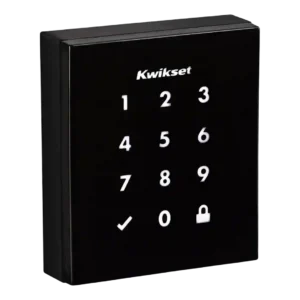
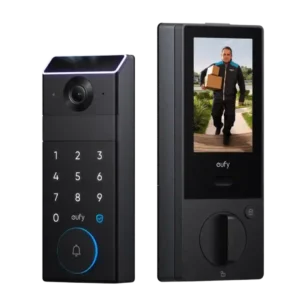
Access history is available in some setups (and was highlighted in early coverage), but in practice it can depend on the hub and platform, and not every controller app exposes detailed logs.
Reviewers consistently highlight the in-app Events timeline as a strong audit trail: it shows lock/unlock actions plus motion and doorbell events with thumbnails, making it easy to see what happened and when.
Reviews note no built-in alarm/siren, so there is no siren loudness benefit to rely on.
The built-in speaker is generally described as clear and loud enough for doorbell sounds and two-way talk, with adjustable volume. However, it does not tie into a traditional wired chime; most setups rely on Alexa/Echo devices or a HomeBase for indoor chimes.
App support is inconsistent: some versions rely on a smart-home hub app rather than a dedicated Kwikset app, which can limit advanced controls like remote code creation on certain platforms.
The Eufy app offers deep control (live view, event playback, access rules, power modes, and camera settings) and works reliably, but multiple reviews call it sprawling and time-consuming to learn because it manages many Eufy device categories.
Auto-relock/auto-lock features are commonly praised for convenience and worked consistently in testing, but toggling settings may require opening the interior panel and using small switches.
Auto-lock is widely praised for flexibility: you can set short delays and schedules, and it generally waits for the door to be closed before engaging. A few notes suggest edge cases if the door is only slightly ajar, so tuning is worthwhile.
Wrong-try protection is repeatedly mentioned as a useful safeguard, with configurable lockouts after a set number of failed palm scans or PIN attempts.
Powered by four AA batteries with low-battery warnings and external 9V jump terminals for emergencies; battery life reports vary (some cite roughly 5 to 6 months), and battery access can require partial disassembly.
The dual-power design is a standout: a large rechargeable 15,000mAh pack plus AAA backup batteries. Reviews like the concept for avoiding lockouts during charging, but real-world endurance varies with video settings, and heavy surveillance use can drain the main battery much faster.
Multiple reviews explicitly note there is no Bluetooth, so there is no phone-proximity unlock or key fob option.
Bluetooth is present for connectivity and setup, but reviews focus more on Wi-Fi behavior than Bluetooth range or stability.
The exterior build is described as sturdy and the mechanism proved reliable in use, but at least one reviewer reported sloppy bolt machining that made installation harder.
Build quality is frequently described as robust and premium, backed by Grade 1 durability/security claims. Multiple reviewers note the lock is physically large and heavy, reflecting the added camera and screen hardware.
Reviews note no full door-open/closed alerting, but some describe auto-lock behavior that only triggers when the door is closed and may beep when it is not fully shut.
The lock’s door-sense behavior is commonly tied to its auto-lock feature, helping it avoid locking when the door is open. Some hands-on reviewers mention it can misinterpret a nearly closed door, so placement and calibration matter.
Fit is generally standard for a deadbolt replacement, but the bulky exterior/interior escutcheons can be a visual and physical presence. Several reviews warn the interior screen is less useful on doors with glass, and screen or storm doors can obstruct the camera view or visitor interaction.
If you are replacing another Kwikset deadbolt, the footprint and standard door prep can make swaps easier, with minimal changes to the door.
Z-Wave Plus versions cite over-the-air firmware update capability, but overall functionality remains intentionally minimalist and still depends on the hub ecosystem.
Biometric access is a core strength, implemented here as palm-vein recognition. Reviews generally find it fast and accurate once you learn the hand position, though a few note it can be sensitive to angle or may need a wake-up touch in some conditions to save battery.
A few reviewers note the exterior materials do a decent job resisting obvious smudges and fingerprints, helping the keypad area stay cleaner looking over time.
Obsidian stores up to 16 codes on the standalone model and up to 30 codes on connected versions, with 4 to 8 digits per code; code limits and scheduling features vary by model and ecosystem.
Guest access is strong on paper and in testing, with support for many PINs, scheduled codes, and multiple palm enrollments, making it suitable for families and frequent visitors.
Most smart features require a compatible Z-Wave hub; without it, Obsidian behaves like a standalone keypad deadbolt.
A hub is not required for basic operation and remote control over Wi-Fi, but a HomeBase is repeatedly positioned as the path to expanded storage and smarter alerts (such as facial recognition) and can also act as an indoor chime. There are also reports that certain smart-home pairing flows work best when the lock is on Wi-Fi rather than routed through a hub.
Many reviewers found setup straightforward with good hardware options, but others ran into alignment issues, confusing instructions, or a tricky handing/calibration step that required rework.
Installation is usually described as straightforward (often around 15–20 minutes) with app-based video guidance, though it involves extra wiring compared to simpler locks. A few reviewers experienced early firmware/setup hiccups or needed recalibration after install.
A few reviewers mention calibration and initial false jam/stuck behavior during setup; once calibrated, operation is typically stable.
Obsidian is keywayless, so there is no physical key override if electronics fail; the emergency fallback is the external 9V jump terminals plus your PIN.
The hidden keyway under the doorbell button and the availability of an emergency USB-C power option are valued for backup entry. One reviewer noted the doorbell-button cover can be fiddly to reseat, but overall the mechanical override is seen as an important safety net.
The illuminated touchscreen keypad is central to the design and is generally responsive and easy to use, though a few reviewers note it can take multiple touches to wake.
The keypad is widely viewed as responsive and easy to use, supporting many PINs and guest access patterns. Features like one-touch locking and optional scramble passcodes show up repeatedly as practical day-to-day conveniences.
The keyway is cleverly concealed for aesthetics, though at least one review suggests the cover mechanism can be a bit finicky.
Unlocking is generally quick once the keypad wakes, but some reviewers reported slower wake behavior and slightly slower operation in hot, sunny conditions.
Unlocking speed is a recurring strength, especially with palm access and remote commands, with many reviewers describing near-instant actuation once the lock is properly calibrated.
Motor noise is noticeable to some reviewers, who describe the mechanism as loud during operation.
Multiple reviews call out the interior controls that can drive the deadbolt motor (in addition to a manual thumbturn), which can be helpful for users who prefer a push-button action.
Across reviews, the lock generally operated consistently without jamming, and the auto-relock feature performed reliably when enabled.
Locking and unlocking are generally reported as reliable, with stable connectivity and consistent response to palm scans, PINs, and app commands once the device is installed and calibrated.
The lock provides audio/LED indicators (including low-battery alerts) and hub apps can show lock state, but native, lock-specific push notifications are limited and platform-dependent.
Notifications are typically fast and useful, with human-focused motion alerts and quick access to live view or buffered clips. Some advanced alert types are described as dependent on adding a HomeBase.
Removing the keyway reduces exposure to key-based attacks, but otherwise Obsidian is a standard deadbolt without advanced intrusion sensing or active defense features.
Physical security is positioned as a major selling point, with repeated references to Grade 1 certification and a solid, heavy build intended to withstand force and long-term use.
Keywayless entry reduces the risk of traditional picking and bump-key attacks; reviews do not provide an explicit drill-resistance rating.
Several reviewers reference anti-pick or encrypted-cylinder claims, but detailed independent pick/drill ratings are not commonly provided in the reviews; expectations are high given the Grade 1 positioning, but specifics are limited.
When paired to a Z-Wave hub, reviewers were able to lock/unlock and check status remotely, but code management and other functions can be restricted by the chosen platform.
Remote access is a strength thanks to built-in Wi-Fi and the Eufy app, typically without needing a separate bridge. Some apps require a press-and-hold action for lock/unlock to prevent accidental triggers.
SecureScreen (decoy/random digits) helps prevent fingerprint-based code guessing, and Z-Wave versions mention encryption; the keywayless design also removes common key-based attack vectors like bump keys.
Security features mentioned across reviews include local video storage, scramble passcodes, configurable lockout after failed attempts, and encrypted communications. Privacy and local data storage are frequently framed as benefits versus subscription-first competitors.
Integration centers on Z-Wave hubs (such as SmartThings, Wink, and Control4) with Alexa/Google voice control typically routed through that hub; multiple reviews call out missing native HomeKit support.
Matter support and voice assistant compatibility are consistently described as real but limited: third-party platforms generally expose basic lock controls, while camera, doorbell, and palm features remain primarily inside the Eufy ecosystem.
Tamper and suspicious-activity protections show up via mentions of tamper alarms, loitering alerts, and wrong-try lockouts. Sensitivity and alert volume can usually be tuned in the app.
The glossy, minimalist touch surface looks premium on modern doors but can smudge; SecureScreen and anti-fingerprint coatings help reduce obvious fingerprint trails.
The touch interface and capacitive keypad lighting are repeatedly praised for responsiveness and visibility, making PIN entry and one-touch actions easy at the door.
You can add/remove PINs and use an optional master code, but advanced guest access controls (expiring or scheduled codes) are limited or unavailable on some models and hubs.
User management is a highlight: per-person profiles, scheduled or one-time access, and tying palm scans to users are repeatedly described as well implemented.
Pricing is mid-to-premium for a touchscreen deadbolt; value is better if you already own a Z-Wave hub, but paying extra for a hub and living with limited code controls can reduce perceived value.
Price is the biggest recurring downside: most reviews call it expensive, though many also concede it can replace a separate smart lock and doorbell. Value improves most for users who genuinely want the integrated screen and consolidated hardware.
Voice control generally works for locking and status checks through Alexa/Google when paired with a hub, but unlocking by voice is often restricted for security.
Voice control is generally reported as responsive for basic locking and unlocking through Alexa, Google, and Siri, and some reviewers mention the ability to view the camera feed on compatible smart displays.
Warranty details are mentioned as longer on the mechanical side than electronics, though hands-on support experiences are not deeply covered in the reviews.
The black exterior can absorb heat in direct sun; at least one reviewer noted it can get hot to the touch and may slow slightly under high heat.
Weather resistance is reinforced by repeated references to an IP65 rating and outdoor placement suitability, though extreme conditions and long-term finish wear are not heavily tested across reviews.
There is no built-in Wi-Fi; remote access typically depends on Z-Wave plus a hub rather than direct Wi-Fi connectivity.
Wi-Fi connectivity is typically stable, but multiple sources note the lock operates on 2.4GHz networks. Some marketing and reviewer notes cite Wi-Fi 6, yet practical guidance still centers on 2.4GHz setup and the lack of 5GHz support.