Access history is available in some setups (and was highlighted in early coverage), but in practice it can depend on the hub and platform, and not every controller app exposes detailed logs.
Access history is available in the Schlage app and is frequently cited as useful. More than one review notes the log window may be limited (for example, roughly four weeks).
Reviews note no built-in alarm/siren, so there is no siren loudness benefit to rely on.
The built-in alarm is widely described as present but not very loud. It functions more as a local deterrent than a house-wide siren.
App support is inconsistent: some versions rely on a smart-home hub app rather than a dedicated Kwikset app, which can limit advanced controls like remote code creation on certain platforms.
The Schlage app is frequently required for full functionality (alarms, logs, some code management, and settings). A recurring tradeoff is app fragmentation between Apple Home and Schlage, plus occasional code-sync quirks.
Auto-relock/auto-lock features are commonly praised for convenience and worked consistently in testing, but toggling settings may require opening the interior panel and using small switches.
Auto-lock is supported and commonly used, but multiple reviewers note it is configured in the Schlage app (or handled via Apple Home automations) rather than being fully exposed inside Apple Home.
Several reviews describe lockout behavior after repeated wrong code entries, sometimes paired with an alarm and temporary keypad disablement. This is framed as a useful protection against brute-force guessing.
Powered by four AA batteries with low-battery warnings and external 9V jump terminals for emergencies; battery life reports vary (some cite roughly 5 to 6 months), and battery access can require partial disassembly.
Battery life is the most inconsistent theme: some reviewers report around six months, while at least one long-term user reports closer to two months even on Thread. Several imply that door alignment, resistance, and usage patterns strongly affect longevity.
Multiple reviews explicitly note there is no Bluetooth, so there is no phone-proximity unlock or key fob option.
Bluetooth is mentioned mainly as a pairing or fallback connection path; most reviewers prefer Wi-Fi or Thread for day-to-day responsiveness.
The exterior build is described as sturdy and the mechanism proved reliable in use, but at least one reviewer reported sloppy bolt machining that made installation harder.
Hardware is repeatedly described as solid and premium, and one review highlights top BHMA/ANSI certifications. Size/bulk is noted by some, but durability and fit-and-finish are generally praised.
Reviews note no full door-open/closed alerting, but some describe auto-lock behavior that only triggers when the door is closed and may beep when it is not fully shut.
Multiple reviews explicitly call out the lack of a built-in door open/close sensor. Some users add a separate contact sensor to approximate door-sense behavior.
If you are replacing another Kwikset deadbolt, the footprint and standard door prep can make swaps easier, with minimal changes to the door.
Z-Wave Plus versions cite over-the-air firmware update capability, but overall functionality remains intentionally minimalist and still depends on the hub ecosystem.
Firmware and software updates are mentioned as part of ownership, with reviewers recommending keeping the Schlage app available for updates and settings. Some hope updates improve behavior such as battery longevity and code syncing.
Most reviews state there is no fingerprint reader, and some frame this as a missed feature at the price. One overview-style video appears to describe biometrics, but this conflicts with the rest of the review set.
Finish options and certification callouts are described positively, with at least one review referencing high finish ratings. No consistent complaints about premature wear appear in the transcripts.
Geofencing is commonly called out as missing. Reviewers who want proximity-based automation rely on Apple Home automations or other platforms, but treat the lack of built-in geofencing as a gap.
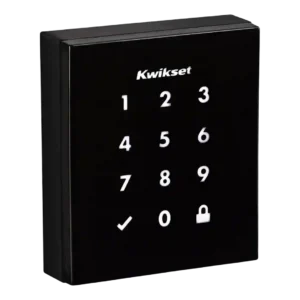
Obsidian stores up to 16 codes on the standalone model and up to 30 codes on connected versions, with 4 to 8 digits per code; code limits and scheduling features vary by model and ecosystem.
Code-based guest access is a major strength, with up to 100 codes mentioned and options for temporary or scheduled access in the Schlage app. Several reviews note occasional quirks in how codes appear or sync in Apple Home.
Most smart features require a compatible Z-Wave hub; without it, Obsidian behaves like a standalone keypad deadbolt.
No third-party bridge is required for Wi-Fi, but Apple Home remote control typically needs a Home hub (Apple TV or HomePod). Thread performance also depends on having a Thread border router in the home.
Many reviewers found setup straightforward with good hardware options, but others ran into alignment issues, confusing instructions, or a tricky handing/calibration step that required rework.
Most reviewers describe installation as a standard deadbolt swap that takes about 10 minutes, with clear steps and included hardware. A few note minor setup hiccups (pairing, network, or HomeKit add flow), but overall onboarding is straightforward.
Obsidian is keywayless, so there is no physical key override if electronics fail; the emergency fallback is the external 9V jump terminals plus your PIN.
Physical key access is consistently positioned as the dependable backup, especially because emergency external power is not emphasized across reviews. A few reviewers note only one key is included.
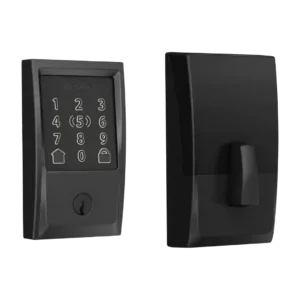
The illuminated touchscreen keypad is central to the design and is generally responsive and easy to use, though a few reviewers note it can take multiple touches to wake.
Keypad responsiveness is often rated well, but visibility and backlighting are recurring criticisms: faint numbers or uneven/jagged lighting make it harder to use in bright conditions for some users. Others report it is bright and easy to read.
One reviewer specifically calls out that the cylinder can be re-keyed, and mentions compatibility with common five-pin Schlage-style cylinders. This is framed as a practical benefit for matching existing keys.
Unlocking is generally quick once the keypad wakes, but some reviewers reported slower wake behavior and slightly slower operation in hot, sunny conditions.
Speed is often praised, especially when using Home Key or Thread, with near-instant responses reported in several videos. One reviewer notes NFC can require close positioning and may feel less convenient than the keypad in certain door/frame situations.
Motor noise is noticeable to some reviewers, who describe the mechanism as loud during operation.
Motor operation is usually described as smooth and quiet. A slight whir is mentioned in one review, and several point out that door friction or resistance can increase strain and noise.
Across reviews, the lock generally operated consistently without jamming, and the auto-relock feature performed reliably when enabled.
Reliability is generally strong once configured, but there are scattered reports of HomeKit responsiveness issues or access-code quirks that are resolved by network resets, re-pairing, or using the Schlage app for certain settings.
The lock provides audio/LED indicators (including low-battery alerts) and hub apps can show lock state, but native, lock-specific push notifications are limited and platform-dependent.
Notifications are praised in Apple Home, including alerts that can identify who unlocked via Home Key or specific access codes in some setups. Users value this for household tracking and automation triggers.
Removing the keyway reduces exposure to key-based attacks, but otherwise Obsidian is a standard deadbolt without advanced intrusion sensing or active defense features.
One review highlights high BHMA and ANSI grade certifications, and others emphasize Schlage's reputation for security hardware. Overall, physical security is presented as strong for a residential smart deadbolt, though detailed pick/drill testing is not common in the transcripts.
Keywayless entry reduces the risk of traditional picking and bump-key attacks; reviews do not provide an explicit drill-resistance rating.
When paired to a Z-Wave hub, reviewers were able to lock/unlock and check status remotely, but code management and other functions can be restricted by the chosen platform.
Remote access is supported via Wi-Fi, but multiple reviews emphasize that Apple Home users need a hub for away-from-home control and status updates. In practice, remote features work well once the ecosystem requirements are met.
SecureScreen (decoy/random digits) helps prevent fingerprint-based code guessing, and Z-Wave versions mention encryption; the keywayless design also removes common key-based attack vectors like bump keys.
One review explicitly cites 128-bit AES encryption as part of the lock's security approach. Most other reviews focus more on ecosystem security and account practices than on cryptography details.
Integration centers on Z-Wave hubs (such as SmartThings, Wink, and Control4) with Alexa/Google voice control typically routed through that hub; multiple reviews call out missing native HomeKit support.
Smart-home integration is a headline win: HomeKit with Home Key, plus Alexa and Google Assistant support are repeatedly cited. Thread support is highlighted as improving responsiveness and stability in Apple Home environments.
Tamper and forced-entry detection settings are described as configurable, including sensitivity adjustments. Reviewers appreciate the deterrent behavior even if the alarm volume is not described as extreme.
The glossy, minimalist touch surface looks premium on modern doors but can smudge; SecureScreen and anti-fingerprint coatings help reduce obvious fingerprint trails.
The touch interface is convenient and modern, but a few reviewers want stronger feedback (physical buttons or clearer confirmation). Backlight quality is a common tweak request.
At least one review criticizes the Schlage app for lacking two-factor authentication. Security-conscious users may see this as a weak spot for an account-connected device.
You can add/remove PINs and use an optional master code, but advanced guest access controls (expiring or scheduled codes) are limited or unavailable on some models and hubs.
Access management is described as strong, with residents/guests and easy enable/disable of codes. Some reviewers note labeling and syncing differences between Apple Home and the Schlage app.
Pricing is mid-to-premium for a touchscreen deadbolt; value is better if you already own a Z-Wave hub, but paying extra for a hub and living with limited code controls can reduce perceived value.
Price is repeatedly described as premium, and value is framed as strongest for Apple households who will use Home Key daily. Outside that use case, reviewers suggest the cost and feature omissions (like fingerprint or geofencing) may be harder to justify.
Voice control generally works for locking and status checks through Alexa/Google when paired with a hub, but unlocking by voice is often restricted for security.
Voice control support via Siri, Alexa, and Google Assistant is referenced as convenient for locking and status checks. Some sources imply security confirmations for unlocking via voice in certain assistants.
Warranty coverage is praised in at least one review, citing lifetime mechanical coverage and multi-year electronics coverage. Support is not a major complaint area across the set.
The black exterior can absorb heat in direct sun; at least one reviewer noted it can get hot to the touch and may slow slightly under high heat.
Weather protection is not a headline strength in the reviews; one source notes there is no IP rating, though temperature specs are cited. Most feedback treats it as typical residential hardware rather than a lock built for harsh exposure.
There is no built-in Wi-Fi; remote access typically depends on Z-Wave plus a hub rather than direct Wi-Fi connectivity.
Built-in 2.4GHz Wi-Fi is consistently highlighted as a convenience because it avoids a separate bridge. Reviews generally describe stable remote-capable connectivity, with platform-specific hub requirements for Apple Home.