Access logs
P1
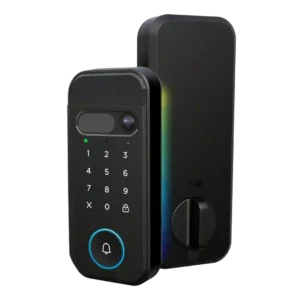
Product 1: myQ Secure View 3-in-1 Smart...
4.1
The app can associate access with individual PINs or users, giving at least basic visibility into who opened the door.
P2
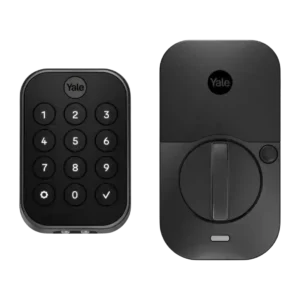
Product 2: Yale Assure Lock 2 Smart...
4.5
Activity logging is one of the clearest strengths, tracking lock, unlock, manual, code, app, and DoorSense activity so owners can see who came and went.
App
P1
Product 1: myQ Secure View 3-in-1 Smart...
4.4
Reviewers consistently describe the myQ app as central to setup, settings, unlocking, device management, and camera/lock control.
P2
Product 2: Yale Assure Lock 2 Smart...
3.8
The Yale app is usually described as organized or easy enough for lock control and codes, but reviewers also reported slow loading, old design, and connection glitches.
Auto-lock
P1
Product 1: myQ Secure View 3-in-1 Smart...
4.6
Auto-lock evidence is strong, including unknown-person locking, face-based lock/unlock automation, and a configurable 90-second autolock delay.
P2
Product 2: Yale Assure Lock 2 Smart...
4.2
Auto-lock is widely supported and often useful with DoorSense or timers, but a few reviewers saw inconsistent behavior when the door was not detected correctly.
Auto-relock after failed attempts
P1Product 1: myQ Secure View 3-in-1 Smart...
No score yet
P2
Product 2: Yale Assure Lock 2 Smart...
4.4
Wrong-code protection appears in the keypad settings, with reviewers noting shutdown times, wrong-code limits, and temporary keypad lockout behavior.
Backset compatibility
P1
Product 1: myQ Secure View 3-in-1 Smart...
4.5
The hands-on install shows adjustable backset handling, including the common 2-3/8 and 2-3/4 inch style positions.
P2
Product 2: Yale Assure Lock 2 Smart...
3.6
Backset support is standard for common 2-3/8-inch and 2-3/4-inch setups, but one Touch reviewer warned that longer-than-average backsets are unsupported.
Battery
P1
Product 1: myQ Secure View 3-in-1 Smart...
4.2
Battery feedback is mostly positive around six-month claims and rechargeable design, with one caveat that the initial charge took several hours.
P2
Product 2: Yale Assure Lock 2 Smart...
3.0
Battery life is the most repeated weakness, especially with Wi-Fi, with reviewers citing short life, limited battery visibility, and late low-battery warnings.
Bluetooth
P1
Product 1: myQ Secure View 3-in-1 Smart...
3.8
Bluetooth appears during setup or internal hardware discussion, but the review evidence is limited and not performance-focused.
P2
Product 2: Yale Assure Lock 2 Smart...
4.3
Bluetooth is consistently supported and often useful for local setup and control, with some reviewers noting Bluetooth-only models trade remote features for longer battery life.
Build quality and durability
P1
Product 1: myQ Secure View 3-in-1 Smart...
4.5
Hands-on reviewers describe the exterior as dense, secure, and well built, with general quality impressions that are strongly positive.
P2
Product 2: Yale Assure Lock 2 Smart...
4.2
Build feedback was mostly positive, with reviewers praising the compact, sturdy, premium-feeling hardware, though a few noted hollow-feeling construction or a scuffed finish after a fall.
Camera and doorbell performance
P1
Product 1: myQ Secure View 3-in-1 Smart...
4.4
Camera and doorbell evidence is broad: reviewers cite 2K HDR video, wide-angle viewing, color night vision, two-way audio, and doorbell/camera consolidation.
P2Product 2: Yale Assure Lock 2 Smart...
No score yetDoor-sense
P1
Product 1: myQ Secure View 3-in-1 Smart...
4.5
Door-sense is supported by the included magnetic open/closed sensor and app feedback that distinguishes a door being ajar from closed.
P2
Product 2: Yale Assure Lock 2 Smart...
4.1
DoorSense is valuable for open, closed, and ajar awareness, though installation can require drilling and a few reviewers reported calibration or matching-design complaints.
Door compatibility (deadbolt fit)
P1
Product 1: myQ Secure View 3-in-1 Smart...
3.8
Door fit is workable for deadbolt-style installs, though one reviewer needed to drill and prep a door that did not already have a deadbolt.
P2
Product 2: Yale Assure Lock 2 Smart...
4.1
Door fit is generally broad for standard deadbolt doors, though reviewers repeatedly noted the need to measure thickness, bore holes, and hardware before installation.
Existing hardware reuse
P1
Product 1: myQ Secure View 3-in-1 Smart...
2.5
Existing hardware reuse is limited because the lock replaces the deadbolt and may require new drilling if the door is not already prepared.
P2
Product 2: Yale Assure Lock 2 Smart...
2.0
The lock replaces rather than reuses the existing deadbolt hardware, which is a drawback for shoppers who want to keep their current lock body.
Feature additions via updates
P1Product 1: myQ Secure View 3-in-1 Smart...
No score yet
P2
Product 2: Yale Assure Lock 2 Smart...
4.2
Upgradeability is a strong theme: reviewers noted bug fixes, firmware updates, interchangeable wireless modules, and future Matter or Z-Wave paths.
Fingerprint
P1
Product 1: myQ Secure View 3-in-1 Smart...
4.4
Fingerprint support is repeatedly mentioned and tested, with reviewers treating it as one of the main everyday unlock methods.
P2
Product 2: Yale Assure Lock 2 Smart...
3.9
Fingerprint performance is the most split attribute: several Touch reviewers found it very fast and accurate, while one long-term reviewer reported persistent failures.
Geofencing
P1Product 1: myQ Secure View 3-in-1 Smart...
No score yet
P2
Product 2: Yale Assure Lock 2 Smart...
3.9
Geofenced auto-unlock is convenient when it works, but reviewers were split because it requires location permission, can fail, and has radius or multi-door limitations.
Guest Codes and Access
P1
Product 1: myQ Secure View 3-in-1 Smart...
4.4
Guest and temporary access are supported through PIN codes, user-specific pins, and quick passes for short-term access.
P2
Product 2: Yale Assure Lock 2 Smart...
4.5
Guest-code support is a standout, with temporary, recurring, scheduled, and high-capacity PIN options repeatedly praised for families, dog walkers, cleaners, and rentals.
Hub requirement
P1
Product 1: myQ Secure View 3-in-1 Smart...
4.2
Review evidence points to direct Wi-Fi setup and optional accessories rather than a clearly required hub, though no review gives a formal no-hub statement.
P2
Product 2: Yale Assure Lock 2 Smart...
4.0
Hub and module needs vary by configuration; some Wi-Fi setups avoid a separate bridge, while Alexa, Google, Matter, Z-Wave, or remote access can require the right module or hub.
Installation and Setup
P1
Product 1: myQ Secure View 3-in-1 Smart...
4.4
Setup is usually described as clear or easy, but the most detailed install shows extra work for drilling, strike prep, calibration, and alignment.
P2
Product 2: Yale Assure Lock 2 Smart...
4.1
Most reviewers found installation manageable on standard doors, with several calling it quick or app-guided, but others hit fit, DoorSense, calibration, or careful-alignment issues.
Key override reliability
P1
Product 1: myQ Secure View 3-in-1 Smart...
4.2
A physical key remains available as a backup, with reviewers noting included keys and a concealed keyhole under the doorbell cover.
P2
Product 2: Yale Assure Lock 2 Smart...
4.0
Backup entry depends on the model: keyed versions provide a physical key, while keyless versions rely on a 9V battery contact as the fallback.
Keypad
P1
Product 1: myQ Secure View 3-in-1 Smart...
4.2
The keypad supports PIN entry and is described as visible during setup, with one reviewer noting the touch-sensitive design instead of physical buttons.
P2
Product 2: Yale Assure Lock 2 Smart...
3.9
Keypad feedback is mostly positive for visibility at night and easy code entry, but several reviewers disliked needing to tap the Yale logo and one reported keypad failure.
Lock/unlock speed
P1
Product 1: myQ Secure View 3-in-1 Smart...
4.8
Speed evidence is strong, including two-second unlock claims and hands-on praise for fast facial recognition.
P2
Product 2: Yale Assure Lock 2 Smart...
4.3
Locking and unlocking speed was usually praised, with reviewers describing responsive Bluetooth operation, quick keypad opening, and automatic unlocking at close range.
Locking motor
P1
Product 1: myQ Secure View 3-in-1 Smart...
4.3
Motor operation is described positively overall, with smooth inside locking and working app lock/unlock, though one install needed strike cleanup.
P2
Product 2: Yale Assure Lock 2 Smart...
4.4
The motor and deadbolt action drew positive comments for smooth, solid movement and audible lock/unlock feedback.
Locking reliability
P1
Product 1: myQ Secure View 3-in-1 Smart...
4.4
Hands-on testing found the unlock methods working after setup, with reliability depending partly on correct strike alignment.
P2
Product 2: Yale Assure Lock 2 Smart...
4.0
Reliability is generally good for basic locking and unlocking, but app connection delays, Bluetooth setup hiccups, and one long-term fingerprint issue keep it from being flawless.
Notifications
P1
Product 1: myQ Secure View 3-in-1 Smart...
3.9
Notifications include context-aware alerts, motion alerts, access alerts, and paid detection labels that identify what triggered an alert.
P2
Product 2: Yale Assure Lock 2 Smart...
3.9
Notifications are useful for lock events, ajar warnings, and user activity, but reviewers also reported late low-battery warnings, missing alerts, and noisy Wi-Fi disconnect notifications.
Physical attack resistance
P1
Product 1: myQ Secure View 3-in-1 Smart...
3.0
Physical resistance evidence is limited: one review says no BHMA/ANSI grade is disclosed, while another notes a stronger strike component.
P2
Product 2: Yale Assure Lock 2 Smart...
4.4
Physical security evidence is positive but mostly specification-based, with reviewers citing Grade 2 certification, sturdy construction, and key-free resistance to forced picking.
Pick/drill resistance (if rated)
P1
Product 1: myQ Secure View 3-in-1 Smart...
2.3
Pick or drill resistance is not independently tested; the only related evidence is the lack of a disclosed BHMA/ANSI grade.
P2
Product 2: Yale Assure Lock 2 Smart...
4.2
Pick resistance is only directly supported for key-free versions, where one review says the absence of a keyway prevents picking or forced opening through that route.
Remote access
P1
Product 1: myQ Secure View 3-in-1 Smart...
4.5
Remote access is well supported, with app-based lock/unlock control described for letting someone in when the owner is away.
P2
Product 2: Yale Assure Lock 2 Smart...
4.2
Remote access is a strong feature on Wi-Fi-enabled setups, letting owners lock, unlock, monitor, or share access away from home, though connectivity issues appeared in some tests.
Security features (encryption)
P1
Product 1: myQ Secure View 3-in-1 Smart...
4.5
Security evidence is strongest for biometric privacy because one reviewer says face scans stay on the device rather than the cloud.
P2
Product 2: Yale Assure Lock 2 Smart...
4.5
Security features include local fingerprint storage, AES encryption, code-hiding or PIN-lockout options, and account protections, but evidence focuses more on features than testing attacks.
Smart-home integration (Alexa, Google, Siri, HomeKit, Matter, Thread)
P1
Product 1: myQ Secure View 3-in-1 Smart...
2.7
Integration is mixed: myQ ecosystem integration is presented as a strength, but popular third-party platforms are described as unsupported or previously restricted.
P2
Product 2: Yale Assure Lock 2 Smart...
4.4
Smart-home support is broad across HomeKit, Alexa, Google, SmartThings, Z-Wave, Zigbee, Wi-Fi, and future Matter paths, though exact support depends on the model or module.
Touchscreen
P1
Product 1: myQ Secure View 3-in-1 Smart...
3.7
The front keypad is touch-sensitive, though one reviewer notes physical buttons may be a personal preference for some users.
P2
Product 2: Yale Assure Lock 2 Smart...
3.6
Touchscreen models look sleek and work well indoors or at night, but multiple reviewers found the screen or numeric keypad hard to read in direct sunlight.
Two-factor authentication availability
P1Product 1: myQ Secure View 3-in-1 Smart...
No score yet
P2
Product 2: Yale Assure Lock 2 Smart...
4.7
Two-factor authentication is directly supported in one review, which says the app requires a strong password plus two-factor verification.
User access management
P1
Product 1: myQ Secure View 3-in-1 Smart...
4.5
User management is strong, with evidence for managing users, assigning PINs, adding fingerprints, adding another user, and short-term access.
P2
Product 2: Yale Assure Lock 2 Smart...
4.3
User access management is strong, with owner/guest roles, app access, entry-code access, fingerprint access, and scheduled permissions appearing across reviews.
Value and Price
P1
Product 1: myQ Secure View 3-in-1 Smart...
3.3
Value is mixed: reviewers like the all-in-one design, but price, overkill for simple needs, and subscription-gated features create clear caveats.
P2
Product 2: Yale Assure Lock 2 Smart...
3.9
Value is context-dependent: reviewers liked the feature set and midrange pricing, but several called higher Wi-Fi or Touch configurations expensive or harder to justify.
Voice control
P1
Product 1: myQ Secure View 3-in-1 Smart...
1.5
Voice-control evidence is negative because reviewers cite removed Google Assistant support and lack of Amazon Alexa or Google Home integration.
P2
Product 2: Yale Assure Lock 2 Smart...
4.1
Voice control works through supported ecosystems such as Siri, Alexa, and Google Assistant, but security PIN prompts and module requirements can make it less seamless.
Warranty and support
P1
Product 1: myQ Secure View 3-in-1 Smart...
2.0
Support evidence is a concern because one review highlights disabled third-party support and broader consumer skepticism about Chamberlain’s practices.
P2
Product 2: Yale Assure Lock 2 Smart...
2.0
Support evidence is negative and limited to one long-term reviewer whose persistent fingerprint problem was not resolved or exchanged by Yale support.
Weather resistance
P1
Product 1: myQ Secure View 3-in-1 Smart...
4.5
Weather evidence is positive, including the stated -4°F to 140°F range and hands-on praise for a moisture-sealing rubber gasket.
P2
Product 2: Yale Assure Lock 2 Smart...
4.3
Weather and temperature evidence is favorable, including operating-temperature claims, IPX5 coverage, and real use in very cold conditions.
Wi-Fi
P1
Product 1: myQ Secure View 3-in-1 Smart...
4.2
Wi-Fi support is directly shown in review evidence, including connection to a 2.4 GHz Wi-Fi network during setup.
P2
Product 2: Yale Assure Lock 2 Smart...
3.7
Wi-Fi enables remote access and broader integrations, but it also drives the main complaints: battery drain, setup issues, disconnections, and occasional app connection trouble.