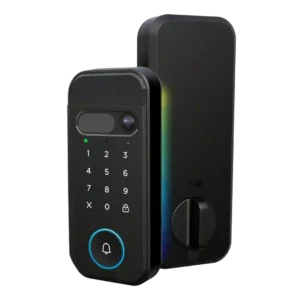
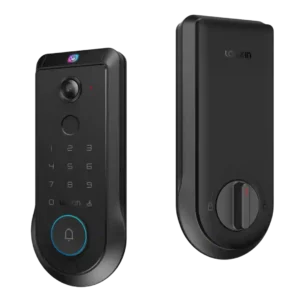
Average score
P1
Product 1: myQ Secure View 3-in-1 Smart...
3.9
P2
Product 2: Lockin Veno Pro Smart Deadbolt...
4.0
Access logs
P1
Product 1: myQ Secure View 3-in-1 Smart...
4.1
The app can associate access with individual PINs or users, giving at least basic visibility into who opened the door.
P2
Product 2: Lockin Veno Pro Smart Deadbolt...
4.2
Reviewers found useful activity history in the app, including doorbell, lock/unlock, camera, and security logs.
Alarm/siren loudness (if included)
P1Product 1: myQ Secure View 3-in-1 Smart...
No score yet
P2
Product 2: Lockin Veno Pro Smart Deadbolt...
3.9
Audio and alarm volume can be adjusted, but evidence focuses more on controls than measured siren strength.
App
P1
Product 1: myQ Secure View 3-in-1 Smart...
4.4
Reviewers consistently describe the myQ app as central to setup, settings, unlocking, device management, and camera/lock control.
P2
Product 2: Lockin Veno Pro Smart Deadbolt...
4.0
The native app is generally rich and easy to use, though one reviewer hit rough behavior requiring reboots and force-quits.
Auto-lock
P1
Product 1: myQ Secure View 3-in-1 Smart...
4.6
Auto-lock evidence is strong, including unknown-person locking, face-based lock/unlock automation, and a configurable 90-second autolock delay.
P2
Product 2: Lockin Veno Pro Smart Deadbolt...
4.6
Auto-lock is widely supported and praised, especially because door-sense can wait until the door is actually closed.
Auto-relock after failed attempts
P1Product 1: myQ Secure View 3-in-1 Smart...
No score yet
P2
Product 2: Lockin Veno Pro Smart Deadbolt...
4.1
Wrong-try protection is present and configurable, with reviewers noting lockout behavior after repeated code attempts.
Backset compatibility
P1
Product 1: myQ Secure View 3-in-1 Smart...
4.5
The hands-on install shows adjustable backset handling, including the common 2-3/8 and 2-3/4 inch style positions.
P2Product 2: Lockin Veno Pro Smart Deadbolt...
No score yetBattery
P1
Product 1: myQ Secure View 3-in-1 Smart...
4.2
Battery feedback is mostly positive around six-month claims and rechargeable design, with one caveat that the initial charge took several hours.
P2
Product 2: Lockin Veno Pro Smart Deadbolt...
4.3
Battery life is viewed positively, with three-month estimates, rechargeable USB-C power, and optional solar charging drawing praise.
Bluetooth
P1
Product 1: myQ Secure View 3-in-1 Smart...
3.8
Bluetooth appears during setup or internal hardware discussion, but the review evidence is limited and not performance-focused.
P2
Product 2: Lockin Veno Pro Smart Deadbolt...
4.2
Bluetooth is used for setup and the lock also includes Wi-Fi and Thread radios, giving it flexible connectivity.
Build quality and durability
P1
Product 1: myQ Secure View 3-in-1 Smart...
4.5
Hands-on reviewers describe the exterior as dense, secure, and well built, with general quality impressions that are strongly positive.
P2
Product 2: Lockin Veno Pro Smart Deadbolt...
4.5
Build quality is mostly praised for solid materials and zinc-alloy construction, although one review criticized installation bolt machining.
Camera and doorbell performance
P1
Product 1: myQ Secure View 3-in-1 Smart...
4.4
Camera and doorbell evidence is broad: reviewers cite 2K HDR video, wide-angle viewing, color night vision, two-way audio, and doorbell/camera consolidation.
P2
Product 2: Lockin Veno Pro Smart Deadbolt...
4.1
Camera performance is the most divided area: several praised sharp 2K video, while others criticized night vision, audio, fisheye distortion, and clip loading.
Door-sense
P1
Product 1: myQ Secure View 3-in-1 Smart...
4.5
Door-sense is supported by the included magnetic open/closed sensor and app feedback that distinguishes a door being ajar from closed.
P2
Product 2: Lockin Veno Pro Smart Deadbolt...
4.6
Door-sense is a standout hardware feature, using a built-in or magnetic deadbolt sensor to detect open and closed states cleanly.
Door compatibility (deadbolt fit)
P1
Product 1: myQ Secure View 3-in-1 Smart...
3.8
Door fit is workable for deadbolt-style installs, though one reviewer needed to drill and prep a door that did not already have a deadbolt.
P2
Product 2: Lockin Veno Pro Smart Deadbolt...
4.2
Door fit evidence is positive for standard deadbolt dimensions, with the lock specified for common door thicknesses and crossbore sizing.
Existing hardware reuse
P1
Product 1: myQ Secure View 3-in-1 Smart...
2.5
Existing hardware reuse is limited because the lock replaces the deadbolt and may require new drilling if the door is not already prepared.
P2
Product 2: Lockin Veno Pro Smart Deadbolt...
2.8
The lock is a full replacement assembly, so reviewers generally removed the old deadbolt and installed Lockin's deadbolt and strike plate.
Feature additions via updates
P1Product 1: myQ Secure View 3-in-1 Smart...
No score yet
P2
Product 2: Lockin Veno Pro Smart Deadbolt...
2.9
Firmware and update evidence is mixed: updates completed or were promised, but one reviewer felt the product still needed more firmware polish.
Fingerprint
P1
Product 1: myQ Secure View 3-in-1 Smart...
4.4
Fingerprint support is repeatedly mentioned and tested, with reviewers treating it as one of the main everyday unlock methods.
P2
Product 2: Lockin Veno Pro Smart Deadbolt...
4.1
Fingerprint access works well in several reviews, but it is less effortless than palm unlock and was harder for some users or placements.
Finish durability
P1Product 1: myQ Secure View 3-in-1 Smart...
No score yet
P2
Product 2: Lockin Veno Pro Smart Deadbolt...
4.2
Finish evidence is positive, with reviewers noting a matte zinc-alloy surface and fingerprint-resistant exterior.
Geofencing
P1Product 1: myQ Secure View 3-in-1 Smart...
No score yet
P2
Product 2: Lockin Veno Pro Smart Deadbolt...
2.7
Geofencing is weak or inconsistent: some app modes exist, but reviewers said it may only change modes rather than lock or unlock automatically.
Guest Codes and Access
P1
Product 1: myQ Secure View 3-in-1 Smart...
4.4
Guest and temporary access are supported through PIN codes, user-specific pins, and quick passes for short-term access.
P2
Product 2: Lockin Veno Pro Smart Deadbolt...
4.1
Guest access is strong through single-use, temporary, periodic, and time-based PIN options, though biometrics are less flexible for temporary users.
Hub requirement
P1
Product 1: myQ Secure View 3-in-1 Smart...
4.2
Review evidence points to direct Wi-Fi setup and optional accessories rather than a clearly required hub, though no review gives a formal no-hub statement.
P2
Product 2: Lockin Veno Pro Smart Deadbolt...
4.0
Core operation does not require a subscription hub, but Matter integrations require a controller and are more limited than the native app.
Installation and Setup
P1
Product 1: myQ Secure View 3-in-1 Smart...
4.4
Setup is usually described as clear or easy, but the most detailed install shows extra work for drilling, strike prep, calibration, and alignment.
P2
Product 2: Lockin Veno Pro Smart Deadbolt...
4.2
Installation is usually described as quick and simple, but one review had a notably difficult physical assembly due to poorly milled bolts.
Key override reliability
P1
Product 1: myQ Secure View 3-in-1 Smart...
4.2
A physical key remains available as a backup, with reviewers noting included keys and a concealed keyhole under the doorbell cover.
P2
Product 2: Lockin Veno Pro Smart Deadbolt...
3.7
Backup key access is present behind the doorbell cover, giving a physical override alongside emergency power options.
Keypad
P1
Product 1: myQ Secure View 3-in-1 Smart...
4.2
The keypad supports PIN entry and is described as visible during setup, with one reviewer noting the touch-sensitive design instead of physical buttons.
P2
Product 2: Lockin Veno Pro Smart Deadbolt...
3.9
The keypad is responsive and backlit in positive reviews, but one reviewer found the exterior lock button hard to see.
Keyway quality
P1Product 1: myQ Secure View 3-in-1 Smart...
No score yet
P2
Product 2: Lockin Veno Pro Smart Deadbolt...
3.8
Keyway evidence is limited but positive for accessibility, with the physical keyhole hidden behind a removable or sliding doorbell cover.
Lock/unlock speed
P1
Product 1: myQ Secure View 3-in-1 Smart...
4.8
Speed evidence is strong, including two-second unlock claims and hands-on praise for fast facial recognition.
P2
Product 2: Lockin Veno Pro Smart Deadbolt...
4.3
Unlock speed is a clear strength, especially for palm recognition and app or Matter lock/unlock commands.
Locking motor
P1
Product 1: myQ Secure View 3-in-1 Smart...
4.3
Motor operation is described positively overall, with smooth inside locking and working app lock/unlock, though one install needed strike cleanup.
P2
Product 2: Lockin Veno Pro Smart Deadbolt...
4.4
Motor performance is inferred from fast app, Matter, biometric, and voice-controlled lock/unlock operation, with no major motor failure reported.
Locking reliability
P1
Product 1: myQ Secure View 3-in-1 Smart...
4.4
Hands-on testing found the unlock methods working after setup, with reliability depending partly on correct strike alignment.
P2
Product 2: Lockin Veno Pro Smart Deadbolt...
4.1
Locking reliability is mostly strong in positive long-term and lab testing, though one reviewer did not yet trust the product fully.
Notifications
P1
Product 1: myQ Secure View 3-in-1 Smart...
3.9
Notifications include context-aware alerts, motion alerts, access alerts, and paid detection labels that identify what triggered an alert.
P2
Product 2: Lockin Veno Pro Smart Deadbolt...
4.2
Notifications are useful and often quick, but controls and reliability are mixed, including one severe troubleshooting experience in the supplied reviews.
Palm vein recognition
P1Product 1: myQ Secure View 3-in-1 Smart...
No score yet
P2
Product 2: Lockin Veno Pro Smart Deadbolt...
4.6
Palm vein recognition is the product's strongest attribute, praised for speed, touchless convenience, and accuracy, with one review reporting erratic wake behavior.
Physical attack resistance
P1
Product 1: myQ Secure View 3-in-1 Smart...
3.0
Physical resistance evidence is limited: one review says no BHMA/ANSI grade is disclosed, while another notes a stronger strike component.
P2
Product 2: Lockin Veno Pro Smart Deadbolt...
4.2
Physical resistance evidence is favorable, based on zinc-alloy construction, BHMA or ANSI Grade 2 certification, and rugged build comments.
Pick/drill resistance (if rated)
P1
Product 1: myQ Secure View 3-in-1 Smart...
2.3
Pick or drill resistance is not independently tested; the only related evidence is the lack of a disclosed BHMA/ANSI grade.
P2Product 2: Lockin Veno Pro Smart Deadbolt...
No score yetRemote access
P1
Product 1: myQ Secure View 3-in-1 Smart...
4.5
Remote access is well supported, with app-based lock/unlock control described for letting someone in when the owner is away.
P2
Product 2: Lockin Veno Pro Smart Deadbolt...
4.2
Remote access through the app is well supported, including remote locking, unlocking, visitor calls, and access-code management.
Security features (encryption)
P1
Product 1: myQ Secure View 3-in-1 Smart...
4.5
Security evidence is strongest for biometric privacy because one reviewer says face scans stay on the device rather than the cloud.
P2
Product 2: Lockin Veno Pro Smart Deadbolt...
4.4
Security and privacy evidence is strong around local storage, on-device processing, P2P transmission, and reduced cloud dependence.
Smart-home integration (Alexa, Google, Siri, HomeKit, Matter, Thread)
P1
Product 1: myQ Secure View 3-in-1 Smart...
2.7
Integration is mixed: myQ ecosystem integration is presented as a strength, but popular third-party platforms are described as unsupported or previously restricted.
P2
Product 2: Lockin Veno Pro Smart Deadbolt...
3.9
Smart-home integration is broad on paper and works for basic controls, but reviewers repeatedly note Matter's limited feature depth.
Tamper detection sensitivity
P1Product 1: myQ Secure View 3-in-1 Smart...
No score yet
P2
Product 2: Lockin Veno Pro Smart Deadbolt...
4.0
Tamper and unusual-activity features are present, but reviewers gave little detail on sensitivity or tuning.
Touchscreen
P1
Product 1: myQ Secure View 3-in-1 Smart...
3.7
The front keypad is touch-sensitive, though one reviewer notes physical buttons may be a personal preference for some users.
P2
Product 2: Lockin Veno Pro Smart Deadbolt...
4.5
Touchscreen evidence is positive for responsiveness and reinforced or smudge-free glass, though detailed durability testing is limited.
User access management
P1
Product 1: myQ Secure View 3-in-1 Smart...
4.5
User management is strong, with evidence for managing users, assigning PINs, adding fingerprints, adding another user, and short-term access.
P2
Product 2: Lockin Veno Pro Smart Deadbolt...
3.9
User management is robust for household users and multiple credentials, but one review criticized the lack of partial access rules for regular users.
Value and Price
P1
Product 1: myQ Secure View 3-in-1 Smart...
3.3
Value is mixed: reviewers like the all-in-one design, but price, overkill for simple needs, and subscription-gated features create clear caveats.
P2
Product 2: Lockin Veno Pro Smart Deadbolt...
3.9
Value is mixed: early pricing and all-in-one functionality look attractive, while retail pricing is repeatedly described as high.
Voice control
P1
Product 1: myQ Secure View 3-in-1 Smart...
1.5
Voice-control evidence is negative because reviewers cite removed Google Assistant support and lack of Amazon Alexa or Google Home integration.
P2
Product 2: Lockin Veno Pro Smart Deadbolt...
4.6
Voice control works well in the evidence, with Siri, Alexa, and Google commands used for lock and unlock actions.
Warranty and support
P1
Product 1: myQ Secure View 3-in-1 Smart...
2.0
Support evidence is a concern because one review highlights disabled third-party support and broader consumer skepticism about Chamberlain’s practices.
P2
Product 2: Lockin Veno Pro Smart Deadbolt...
2.4
Support evidence is limited and somewhat negative, with sparse in-app support information and a troubleshooting process that took multiple days in one included review.
Weather resistance
P1
Product 1: myQ Secure View 3-in-1 Smart...
4.5
Weather evidence is positive, including the stated -4°F to 140°F range and hands-on praise for a moisture-sealing rubber gasket.
P2
Product 2: Lockin Veno Pro Smart Deadbolt...
4.5
Weather resistance is a strength, with IP65 protection and reports of continued operation through rain, dust, and varied conditions.
Wi-Fi
P1
Product 1: myQ Secure View 3-in-1 Smart...
4.2
Wi-Fi support is directly shown in review evidence, including connection to a 2.4 GHz Wi-Fi network during setup.
P2
Product 2: Lockin Veno Pro Smart Deadbolt...
4.3
Wi-Fi support is solid, with built-in 2.4GHz connectivity and reviewers reporting straightforward app setup and connection.