Average score
P1
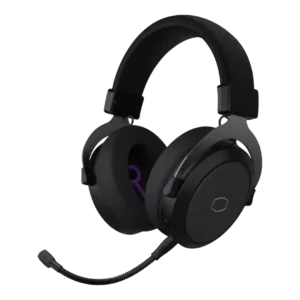
Product 1: Cooler Master CH351 Gaming Headset
3.4
P2
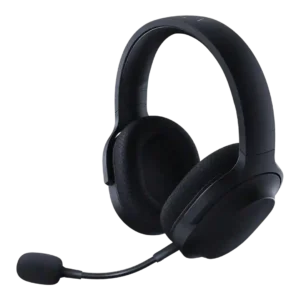
Product 2: Razer Barracuda X
3.8
Active noise cancellation
P1
Product 1: Cooler Master CH351 Gaming Headset
1.0
There is no strong case for active noise canceling here; one included review flatly says the headset is not noise-canceling.
P2
Product 2: Razer Barracuda X
1.7
The reviews do not describe built-in ANC on the Barracuda X itself; references frame ANC as absent or reserved for pricier alternatives.
Android compatibility
P1
Product 1: Cooler Master CH351 Gaming Headset
4.1
Android support is explicitly listed for the CH351, making mobile pairing part of its intended use case.
P2
Product 2: Razer Barracuda X
4.5
Android compatibility is repeatedly supported through USB-C dongle use and mobile testing on Android phones.
App
P1
Product 1: Cooler Master CH351 Gaming Headset
2.2
Software support is inconsistent in the included reviews, ranging from no companion app at all to optional PC software on another Cooler Master unit.
P2
Product 2: Razer Barracuda X
3.7
App support enables EQ, RGB, gaming mode, or surround features, but reviewers often found the split across Razer Audio, Synapse, Chroma, and 7.1 apps inconvenient.
aptX
P1Product 1: Cooler Master CH351 Gaming Headset
No score yet
P2
Product 2: Razer Barracuda X
1.5
aptX support is specifically called out as missing, reducing the Bluetooth codec score.
Audio-video sync accuracy
P1Product 1: Cooler Master CH351 Gaming Headset
No score yet
P2
Product 2: Razer Barracuda X
3.7
Latency is mostly positive for gaming, especially with dongle and gaming mode, but one cloud-gaming test reported added latency, popping, and dropout.
Bass performance
P1
Product 1: Cooler Master CH351 Gaming Headset
4.4
Bass is a recurring strength, delivering weighty explosions and energetic low end without fully burying other cues.
P2
Product 2: Razer Barracuda X
4.1
Bass is usually described as punchy, full, or satisfying, but some reviewers found the low end either lacking in rumble or a little compromised by preset tuning.
Battery
P1Product 1: Cooler Master CH351 Gaming Headset
No score yet
P2
Product 2: Razer Barracuda X
4.1
Battery life is a strength overall, ranging from roughly 20-24 hours on earlier models to about 50-70 hours on later 2022 and Chroma versions.
Bluetooth
P1
Product 1: Cooler Master CH351 Gaming Headset
1.5
Wireless stability is the CH351's biggest weakness, with persistent static and buzzing reported even during active use.
P2
Product 2: Razer Barracuda X
3.7
Bluetooth support depends on model year and variant, with 2022 and Chroma reviews praising it while older Barracuda X reviews note its absence.
Build quality
P1
Product 1: Cooler Master CH351 Gaming Headset
4.0
Material quality looks decent for the money, though not every component feels equally premium.
P2
Product 2: Razer Barracuda X
4.4
Build quality is generally solid for the price, with plastic construction offset by metal reinforcement, no creaking, and a sturdy feel.
Button control usability
P1
Product 1: Cooler Master CH351 Gaming Headset
2.9
Control usability varies sharply, from simple inline buttons on one review unit to a crowded, error-prone earcup layout on the other.
P2
Product 2: Razer Barracuda X
4.2
Physical controls are generally easy to find and use, though the Chroma volume wheel can be too easy to move unintentionally.
Cable quality
P1
Product 1: Cooler Master CH351 Gaming Headset
4.2
The CH331's permanently attached fabric-wrapped cable is long, practical for desk use and presented as a solid part of the package.
P2
Product 2: Razer Barracuda X
4.2
Cable feedback is positive where discussed, with reviewers appreciating decent length, useful included analog cables, and practical charging cables.
Carry case quality
P1Product 1: Cooler Master CH351 Gaming Headset
No score yet
P2
Product 2: Razer Barracuda X
2.7
Carry protection is inconsistent: Chroma reviews mention a pouch or bag, while several Barracuda X reviews complain that no case or pouch is included.
Charging
P1Product 1: Cooler Master CH351 Gaming Headset
No score yet
P2
Product 2: Razer Barracuda X
4.2
Charging evidence is positive for quick charge and use while charging, though one Chroma review found a half-to-full charge only middling.
Clamping force comfort
P1Product 1: Cooler Master CH351 Gaming Headset
No score yet
P2
Product 2: Razer Barracuda X
4.2
Clamping comfort is mostly good, balancing grip and pressure, but one review found the clamping force weak enough to affect stability.
Codec support
P1Product 1: Cooler Master CH351 Gaming Headset
No score yet
P2
Product 2: Razer Barracuda X
2.0
Codec support is limited in the reviews, with Bluetooth described as SBC-only and therefore weaker than headsets offering AAC or aptX.
Comfort during long use
P1
Product 1: Cooler Master CH351 Gaming Headset
3.1
Long-session comfort is mixed: soft pads help, but weight and head pressure are recurring complaints.
P2
Product 2: Razer Barracuda X
4.5
Comfort over long sessions is a major strength, with repeated praise for light weight, breathable materials, and low fatigue across multi-hour gaming.
Connectivity versatility
P1Product 1: Cooler Master CH351 Gaming Headset
No score yet
P2
Product 2: Razer Barracuda X
4.7
Connectivity versatility is one of the main strengths, with reviewers highlighting USB-C wireless, Bluetooth on newer models, 3.5mm on older models, and broad device support.
Console compatibility limitations
P1Product 1: Cooler Master CH351 Gaming Headset
No score yet
P2
Product 2: Razer Barracuda X
2.7
The dominant console limitation is Xbox: reviewers repeatedly note the headset cannot connect wirelessly to Xbox and needs a cable or alternative.
Design and Aesthetics
P1
Product 1: Cooler Master CH351 Gaming Headset
4.2
Styling lands well in both reviews, whether you prefer playful colorways or a more subdued black-on-black look.
P2
Product 2: Razer Barracuda X
4.5
The design is consistently praised as subtle, understated, and less gamer-looking, with Chroma adding tasteful RGB for users who want lighting.
Detachable cable convenience
P1
Product 1: Cooler Master CH351 Gaming Headset
2.7
Cable convenience is mixed across the included reviews, with one headset using a removable aux cable and the other a fixed cord.
P2
Product 2: Razer Barracuda X
3.8
Wired fallback is helpful on older Barracuda X models and for Xbox, but one Chroma review notes wired use is not possible on that variant.
Detachable microphone convenience
P1
Product 1: Cooler Master CH351 Gaming Headset
4.3
A detachable boom mic adds welcome flexibility for switching between gaming use and a cleaner everyday setup.
P2
Product 2: Razer Barracuda X
4.5
The detachable microphone is widely appreciated because it fits securely, improves everyday headphone use, and can be removed for travel.
Dongle
P1
Product 1: Cooler Master CH351 Gaming Headset
2.0
The CH351 includes a 2.4GHz USB-C dongle, but the wireless experience is undermined by static noise.
P2
Product 2: Razer Barracuda X
3.2
The USB-C dongle is central to the headset's versatility, but many reviewers warn it is wide, easy to lose, or able to block adjacent ports.
Ear cup padding quality
P1
Product 1: Cooler Master CH351 Gaming Headset
4.1
The ear pads are a consistent positive, described as soft faux/protein leather and generally comfortable on the ears.
P2
Product 2: Razer Barracuda X
4.5
Ear cup padding is generally well-liked for memory foam and breathable fabric, though one review found the Chroma pads not especially plush.
Ear cup swivel/rotation range
P1
Product 1: Cooler Master CH351 Gaming Headset
3.0
Cup movement is limited overall; the CH331 cups pivot outward but do not offer especially generous articulation.
P2
Product 2: Razer Barracuda X
3.1
Ear cup rotation is useful for storage, but several reviewers disliked the unusual direction in which the cups fold or swivel.
Earpad noise
P1Product 1: Cooler Master CH351 Gaming Headset
No score yet
P2
Product 2: Razer Barracuda X
2.0
Earpad noise is a small weakness in one review, where fabric movement caused skin-contact noise.
Equalizer customization
P1
Product 1: Cooler Master CH351 Gaming Headset
1.8
EQ customization is weak overall, either missing entirely or present but not especially effective.
P2
Product 2: Razer Barracuda X
3.5
EQ customization is strong on models with Razer Audio or Synapse support, but older or non-Synapse experiences can leave users without EQ control.
Fit/seal reliability
P1Product 1: Cooler Master CH351 Gaming Headset
No score yet
P2
Product 2: Razer Barracuda X
4.4
Fit and seal are generally good when clamping is right, but related stability evidence shows fit can vary by head shape.
Frequency response accuracy
P1
Product 1: Cooler Master CH351 Gaming Headset
4.3
The drivers reproduce both heavy bass and finer ambient details well enough to sound convincing, even if the signature is not neutral.
P2
Product 2: Razer Barracuda X
3.7
Measured frequency response was described as close to the consumer target in the mids, with more variation in lows and highs.
Headband adjustability
P1
Product 1: Cooler Master CH351 Gaming Headset
4.0
The CH331 offers useful headband extension, giving it enough adjustment range for fit tuning.
P2
Product 2: Razer Barracuda X
4.5
Headband adjustment is supported by secure sizing and hard stops, with no major complaints in the reviews that mention it.
Hinge durability
P1Product 1: Cooler Master CH351 Gaming Headset
No score yet
P2
Product 2: Razer Barracuda X
4.3
Durability around flexing and rotation is described positively, with reviewers noting no creaking and confidence when stretching the headset.
Included accessories
P1
Product 1: Cooler Master CH351 Gaming Headset
4.3
The CH351 package is well equipped with a dongle, aux cable and detachable microphone.
P2
Product 2: Razer Barracuda X
4.6
Included accessories are usually generous, especially dongles, adapters, detachable mics, and cables, with stronger bundles on Chroma or later versions.
Instrument separation
P1
Product 1: Cooler Master CH351 Gaming Headset
4.4
The reviews point to good layer separation, making footsteps, ambience and soundtrack elements easier to distinguish.
P2
Product 2: Razer Barracuda X
4.4
Layered audio and separation were a strength in several reviews, with reviewers noting balanced mixes, fine details, and reduced muddiness.
Integrated microphone
P1
Product 1: Cooler Master CH351 Gaming Headset
4.1
Microphone functionality is a core feature across the included reviews, even though the exact implementation differs.
P2
Product 2: Razer Barracuda X
4.0
Integrated microphone evidence applies to the non-X Barracuda review, which praised the cleaner look but criticized mic quality.
Maximum volume clarity
P1Product 1: Cooler Master CH351 Gaming Headset
No score yet
P2
Product 2: Razer Barracuda X
4.3
Several reviewers pushed volume high without major distortion, making maximum-volume clarity one of the more consistently positive sound traits.
Microphone
P1Product 1: Cooler Master CH351 Gaming Headset
No score yet
P2
Product 2: Razer Barracuda X
3.9
Microphone impressions range from excellent and natural to passable or weak, making it useful for chat but not consistently creator-grade.
Microphone noise reduction
P1
Product 1: Cooler Master CH351 Gaming Headset
4.7
The CH351 mic does a notably good job suppressing nearby household noise in the included test.
P2
Product 2: Razer Barracuda X
4.0
Microphone noise handling is mixed: some reviewers praised background rejection, while one noted the mic lacks active noise cancellation and can pick up room noise.
Microphone quality for calls
P1
Product 1: Cooler Master CH351 Gaming Headset
4.6
On the CH351, the detachable mic is clear and loud enough for chat or streaming without sounding thin.
P2
Product 2: Razer Barracuda X
4.1
Call and chat performance is mostly usable to very good, with reviewers praising clarity for Discord, Zoom, phone calls, and casual communication while noting position sensitivity.
Midrange clarity
P1
Product 1: Cooler Master CH351 Gaming Headset
4.2
Midrange detail is solid for the class, with dialogue and vocal texture coming through better than a typical one-note budget tuning.
P2
Product 2: Razer Barracuda X
4.0
Midrange feedback is mostly positive for dialogue, vocals, and game cues, though one reviewer found the mids recessed in a more bass-heavy presentation.
Multi-platform compatibility
P1
Product 1: Cooler Master CH351 Gaming Headset
4.5
The CH351 stands out for broad platform support across consoles, computers and mobile devices.
P2
Product 2: Razer Barracuda X
4.7
Multi-platform compatibility is a major strength across PC, PlayStation, Switch, Android, Mac, iOS, and wired fallback depending on model.
Multipoint connectivity reliability
P1Product 1: Cooler Master CH351 Gaming Headset
No score yet
P2
Product 2: Razer Barracuda X
3.9
SmartSwitch and dual wireless are praised when they work, but one long-term 2022 review reported Bluetooth interfering with 2.4GHz reconnection.
Noise isolation (passive)
P1
Product 1: Cooler Master CH351 Gaming Headset
2.5
Passive isolation is limited, with one review explicitly noting that room sounds still bleed through.
P2
Product 2: Razer Barracuda X
3.6
Passive isolation ranges from excellent in some user tests to only decent or weak against speech and low-frequency noise.
Packaging quality
P1Product 1: Cooler Master CH351 Gaming Headset
No score yet
P2
Product 2: Razer Barracuda X
2.5
Packaging is only directly discussed in one review, which compared the box to Amazon Basics rather than premium Razer packaging.
Portability/foldability
P1
Product 1: Cooler Master CH351 Gaming Headset
1.8
Portability is not a strength, as the included evidence points to a desk-first design rather than a travel-friendly one.
P2
Product 2: Razer Barracuda X
3.3
Portability is helped by low weight, but limited folding behavior and unusual cup rotation reduce convenience versus some travel headphones.
Positional audio accuracy
P1Product 1: Cooler Master CH351 Gaming Headset
No score yet
P2
Product 2: Razer Barracuda X
4.3
Positional audio is often good for footsteps, shots, racing cues, and 360-degree movement, though one reviewer found surround harder to pinpoint.
Preset EQ profile quality
P1
Product 1: Cooler Master CH351 Gaming Headset
1.6
Preset tuning is not a standout, with profiles either absent or too similar and bass-skewed to feel useful.
P2
Product 2: Razer Barracuda X
3.1
Preset EQ feedback is mixed, with profiles described as hit-or-miss and sometimes too bass-heavy depending on the mode.
RGB lighting customization
P1
Product 1: Cooler Master CH351 Gaming Headset
2.0
RGB lighting exists on the CH331, but control is minimal and limited to basic on or off behavior rather than real customization.
P2
Product 2: Razer Barracuda X
3.7
RGB customization is strong on Chroma models, with six-zone lighting and app control, while non-Chroma Barracuda models have no RGB.
Sidetone adjustment quality
P1Product 1: Cooler Master CH351 Gaming Headset
No score yet
P2
Product 2: Razer Barracuda X
2.8
Sidetone is available in some software, but feedback is mixed because one reviewer disliked monitoring delay and older models lack sidetone control.
Smudge resistance
P1Product 1: Cooler Master CH351 Gaming Headset
No score yet
P2
Product 2: Razer Barracuda X
3.8
Smudge resistance has limited but positive evidence, with one Chroma review noting fingerprint resistance while warning about scratches.
Software/setup simplicity
P1
Product 1: Cooler Master CH351 Gaming Headset
3.2
Basic setup is easy enough, but the overall experience is weakened by limited customization and, on the CH351, awkward controls.
P2
Product 2: Razer Barracuda X
4.6
Setup is usually plug-and-play and simple, especially with the dongle, although app requirements for some features add friction.
Sound leakage
P1Product 1: Cooler Master CH351 Gaming Headset
No score yet
P2
Product 2: Razer Barracuda X
4.5
Sound leakage is addressed positively in one review, where nearby listeners barely heard loud gameplay in a quiet room.
Sound quality
P1
Product 1: Cooler Master CH351 Gaming Headset
4.1
The included reviews consistently praise big, immersive gaming sound, although the CH351's wireless buzzing drags down the overall experience. Both reviews paint wired operation as a strong scenario, with seamless connection and better overall sound performance.
P2
Product 2: Razer Barracuda X
4.3
Reviewers generally found the headset good to very good for gaming audio, with clear, balanced sound in most tests, though a few called it merely fine or not class-leading.
Soundstage width
P1
Product 1: Cooler Master CH351 Gaming Headset
4.5
Wide staging is one of the clearest strengths, helping worlds feel larger and positional cues easier to place.
P2
Product 2: Razer Barracuda X
3.4
Soundstage impressions are mixed: some reviewers heard impressive or full staging, while others found the presentation closed or narrower than rivals.
Spatial audio
P1
Product 1: Cooler Master CH351 Gaming Headset
4.6
Spatial or virtual surround performance is a real highlight, adding convincing depth and directionality in games.
P2
Product 2: Razer Barracuda X
4.0
Spatial audio is useful for directionality on supported platforms, but reviews also note it is app-dependent and less precise than higher-end THX implementations.
Stability
P1
Product 1: Cooler Master CH351 Gaming Headset
2.8
On-head stability is only average, with one review noting that the headset can slide around during movement.
P2
Product 2: Razer Barracuda X
3.4
Stability is mixed: many reviewers report solid wireless range and no drops, but others report head fit movement, wireless drops, or 2022 reconnection problems.
Treble clarity
P1
Product 1: Cooler Master CH351 Gaming Headset
4.1
Treble detail is good enough to keep smaller environmental sounds audible, including birds, crackling fire and distant effects.
P2
Product 2: Razer Barracuda X
4.2
Treble is often described as crisp, clean, or non-harsh, but one Chroma review noted treble detail can suffer in the movie preset.
USB-C
P1
Product 1: Cooler Master CH351 Gaming Headset
4.0
USB-C is part of the CH351 setup, appearing in its dongle and port layout.
P2
Product 2: Razer Barracuda X
4.4
USB-C is a core advantage, appearing in charging, dongle, adapters, and cross-device support, though some ports are charging-only.
Value for money
P1Product 1: Cooler Master CH351 Gaming Headset
No score yet
P2
Product 2: Razer Barracuda X
4.5
Value for money is one of the strongest themes, with many reviewers calling the headset a deal, bargain, winner, or excellent for the price.
Volume output
P1
Product 1: Cooler Master CH351 Gaming Headset
4.3
Volume output is described as lively and forceful, with enough punch to make games and music sound exciting.
P2
Product 2: Razer Barracuda X
3.9
Volume output is generally strong, but one review found USB-C wireless quieter and another wanted a tighter volume dial.
Water/sweat resistance rating
P1Product 1: Cooler Master CH351 Gaming Headset
No score yet
P2
Product 2: Razer Barracuda X
1.0
The available spec evidence says the headset is not waterproof, so water or sweat resistance should not be expected.
Weight comfort
P1
Product 1: Cooler Master CH351 Gaming Headset
2.6
Both reviews call the headset noticeably heavy, which becomes more obvious the longer you wear it.
P2
Product 2: Razer Barracuda X
4.6
Low weight is one of the strongest points across the reviews, with 250g and 285g variants repeatedly described as light and easy to wear.
Wireless latency
P1Product 1: Cooler Master CH351 Gaming Headset
No score yet
P2
Product 2: Razer Barracuda X
4.5
Wireless latency is usually praised as low or imperceptible over dongle and improved Bluetooth modes, with the main caveat coming from cloud-gaming latency.
Xbox compatibility
P1
Product 1: Cooler Master CH351 Gaming Headset
1.5
Xbox support is not a strength in the included evidence, and one review specifically steers Xbox shoppers toward other models.
P2
Product 2: Razer Barracuda X
2.4
Xbox compatibility is limited to wired use in the evidence, with reviewers consistently saying native wireless Xbox support is absent.