cross-platform compatibility
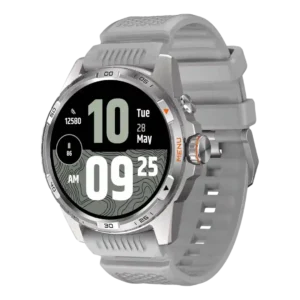
Ticwatch Atlas
2.0
Cross-platform support is limited because reviewers note Android-only use and no iPhone compatibility.
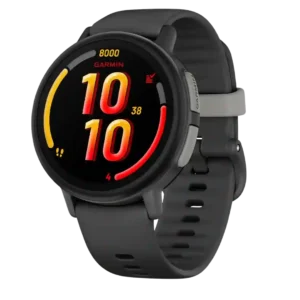
Garmin Bounce 2
5.0
Garmin Jr. works on both iOS and Android, so mixed-phone households can manage the watch without changing platforms.
coaching features
Ticwatch Atlas
2.0
Coaching is underdeveloped, with one reviewer wanting a more complete fitness feature suite instead of relying on outside apps.
Garmin Bounce 2
4.9
Step challenges, activity goals, games, and family competitions can genuinely motivate children to move. Chore rewards also appeal to some families, though not every child stays interested.
third-party app support
Ticwatch Atlas
4.2
Third-party app support is solid through Wear OS and the Play Store, with Strava, Spotify, and other apps working well.
Garmin Bounce 2
1.8
Third-party support is limited, especially for music. Amazon Music is the only offline service, and the lack of Spotify or broader app options frustrates many families.
mapping and navigation
Ticwatch Atlas
3.0
Mapping and navigation are mixed: Google Maps and heat maps help, but reviewers want stronger native offline mapping and training tools.
Garmin Bounce 2
5.0
LiveTrack can show both a child’s current position and route in real time, which is extremely helpful once the connection activates.
operating system experience
Ticwatch Atlas
3.0
Operating system experience is the most repeated tradeoff: Wear OS works, but update uncertainty and older software hurt confidence.
Garmin Bounce 2
5.0
The overall watch experience feels smooth and enjoyable in normal use. Basic navigation is quick even for young first-time smartwatch users.
voice assistant quality
Ticwatch Atlas
1.6
Voice assistant support is the clearest smart-feature drawback because reviewers repeatedly complain that Google Assistant is missing.
Garmin Bounce 2
3.5
Voice commands can start calls, set alarms, and check information, but they require rigid wording. It is useful once children learn the accepted phrases.
user interface
Ticwatch Atlas
2.8
The user interface is mixed to weak, with reviewers criticizing drab visuals, too many Mobvoi apps, or boring animations.
Garmin Bounce 2
4.7
The basic interface is easy for children to learn and use. Simple menus and clear controls are praised even by some owners who dislike the connected services.
reliability
Ticwatch Atlas
3.9
Reliability is mostly good, with stable performance and few freezes, but phantom vibrations and one watch-face glitch appear as caveats.
Garmin Bounce 2
2.0
Reliability ranges from excellent to deeply frustrating. Some families report dependable daily use, while others face pairing failures, delayed communication, charging problems, and services that work only intermittently.
customization options
Ticwatch Atlas
4.4
Customization is praised across watch faces, tiles, complications, and low-power display settings.
Garmin Bounce 2
2.7
Glances, contacts, schedules, and appearance can be adjusted, but hardware customization is weak. Fixed band choices and limited protective accessories frustrate some families.
battery life
Ticwatch Atlas
4.6
Battery life is the strongest consensus point, usually delivering multi-day endurance and repeatedly beating typical Wear OS expectations.
Garmin Bounce 2
3.0
Typical endurance lands around one and a half to two days, with some families getting slightly more. LTE, GPS, calls, and aging batteries can reduce it to a day or even several hours, making frequent charging the most consistent complaint.
value for money
Ticwatch Atlas
4.0
Value is context-dependent: discounts make it attractive, but several reviewers prefer cheaper or more polished alternatives.
Garmin Bounce 2
2.4
The $299 hardware price plus an LTE subscription is difficult to justify when tracking or calling is unreliable. Families who prioritize waterproofing, parental control, and phone-free independence are more willing to accept the premium.
app ecosystem
Ticwatch Atlas
3.8
Google app integration and Mobvoi's improving app layer are viewed as useful, though not as polished as leading ecosystems.
Garmin Bounce 2
2.2
Garmin families benefit from shared challenges and centralized management, but communication remains heavily locked to Garmin Jr. Requiring approved contacts to install the app is one of the most repeated frustrations.
call handling
Ticwatch Atlas
4.4
Call handling is well regarded, with good clarity and useful wrist calling in practical situations.
Garmin Bounce 2
3.0
Two-way calls and app-based messaging are convenient for younger children and work very well for some families. Many others report failed calls, delayed messages, poor indoor service, or frustration that every contact must use Garmin Jr.
GPS accuracy
Ticwatch Atlas
3.9
GPS accuracy divides reviewers: some found routes solid or Apple Watch-like, while others saw sluggish lock-on and overreported distance.
Garmin Bounce 2
2.6
Location tracking is the most polarizing part of the watch. Some families find it accurate and reassuring, while many report lag, incorrect positions, weak rural or indoor performance, and tracking that fails when it matters.
brightness
Ticwatch Atlas
3.8
Brightness is usually acceptable or strong outdoors, but some reviewers found the screen less vibrant or dimmer than premium rivals.
Garmin Bounce 2
5.0
The AMOLED panel is bright and colorful, making the interface lively and easy to see. It is a substantial visual improvement over the older screen.
sleep tracking accuracy
Ticwatch Atlas
3.8
Sleep tracking is mixed: some reviewers found it accurate or aligned with other devices, while others saw wake time counted as sleep.
Garmin Bounce 2
2.8
Movement-only sleep tracking provides a rough estimate rather than dependable health data. It is better treated as a basic habit indicator than a diagnostic tool.
button controls
Ticwatch Atlas
4.0
Button controls are mostly liked for the crown and haptics, though one reviewer found rotation missing and another found sensitivity uneven.
Garmin Bounce 2
5.0
Physical side buttons make the watch easier to operate with wet, dirty, or gloved hands. They provide a dependable alternative to touch input.
charging convenience
Ticwatch Atlas
2.6
Charging convenience is a recurring weak spot because reviewers dislike the proprietary pogo-pin setup, loose connection risk, or USB-A cable.
Garmin Bounce 2
1.8
The proprietary charging cable is a recurring annoyance and cannot be replaced by a common USB-C cable. One owner also experienced a complete charging failure.
LTE connectivity
Ticwatch Atlas
1.5
LTE is a clear limitation because one reviewer calls it the only glaring omission.
Garmin Bounce 2
2.4
Standalone LTE is essential to the watch’s phone-free appeal, but coverage quality varies dramatically. Indoor dead zones, country restrictions, and delayed service are common concerns.
materials quality
Ticwatch Atlas
4.2
Materials feel sturdy and high-end for the price, though one reviewer notes the Atlas still lacks true top-end premium feel.
Garmin Bounce 2
5.0
Fiber-reinforced polymer keeps the watch light while resisting rough handling. The soft silicone strap complements the durable body.
companion app quality
Ticwatch Atlas
3.4
The companion app is functional and sometimes informative, but several reviewers find it barebones, sluggish, or visually unimpressive.
Garmin Bounce 2
4.2
Garmin Jr. is usually considered clean, intuitive, and easy to set up, with strong contact and location controls. A minority of owners report poor syncing, missing family members, or unreliable notifications.
style and design
Ticwatch Atlas
3.9
Design draws mixed-to-positive reactions: many like the rugged look, while others find it bland, bulky, or too familiar.
Garmin Bounce 2
4.7
The round, colorful design looks more like a real watch than a toy, and children generally liked wearing it. One buyer found it bulky, but appearance is otherwise a clear strength.
band quality
Ticwatch Atlas
4.1
The band is mostly comfortable, grippy, breathable, and secure, though reviewers note limited 24mm options and some less-premium feel.
Garmin Bounce 2
3.4
The soft silicone strap is easy to clean and comfortable for many children. Several families disliked the limited band choices, while one owner confirmed it can be replaced with a small watch tool.
menu navigation
Ticwatch Atlas
4.3
Menu navigation is mostly easy and clearly defined, with the crown and gestures making everyday use straightforward.
Garmin Bounce 2
5.0
Children tend to learn the menus quickly, and the glance-based layout keeps essential information easy to reach.
pairing reliability
Ticwatch Atlas
3.0
Pairing reliability is mixed because setup is easy once started, but app handoff between Mobvoi and Wear OS can be confusing.
Garmin Bounce 2
3.7
Setup can take only minutes when everything works, but a failed or unstable app pairing disables most of the watch’s important connected features.
display quality
Ticwatch Atlas
4.2
Display quality is generally strong thanks to the dual-layer setup, though a few reviewers note washed-out colors or less premium vibrancy.
Garmin Bounce 2
4.9
The AMOLED screen is consistently described as sharp, vivid, and a major upgrade over the original model. Colors pop and graphics look unusually polished for a kids’ watch.
build quality
Ticwatch Atlas
4.4
Build quality is consistently strong, with reviewers praising the premium feel, metal construction, and sturdy rugged case.
Garmin Bounce 2
5.0
The watch body feels premium and meets Garmin’s usual construction standards. Even highly critical owners often separate the solid hardware from unreliable connected services.
charging speed
Ticwatch Atlas
4.5
Charging speed is mostly praised for fast top-ups, despite one reviewer calling it unimpressive.
Garmin Bounce 2
5.0
A full charge takes about two hours and was considered quick by one family, though other sources view that duration as inconvenient for such short battery life.
comfort
Ticwatch Atlas
4.4
Comfort is widely positive despite the large case, helped by soft straps and manageable weight.
Garmin Bounce 2
3.9
Its light weight works well on small wrists, but the fixed silicone band can be a deal-breaker for children with sensory sensitivities.
water resistance
Ticwatch Atlas
4.5
Water resistance performs well in reviewer use, including swim and submersion experiences.
Garmin Bounce 2
5.0
The 5 ATM protection is one of the most dependable strengths, with successful use in pools, showers, rain, snow, and even the ocean.
music controls
Ticwatch Atlas
2.5
Music control integration is limited because one reviewer wanted playback control inside TicExercise instead of leaving the workout app.
Garmin Bounce 2
3.0
Music can be controlled from the watch, but the tiny speaker is not ideal. Bluetooth headphones provide the more practical listening experience.
onboard music storage
Ticwatch Atlas
4.3
Onboard music support is useful, with storage and Spotify offline playback helping phone-free workouts.
Garmin Bounce 2
3.8
Offline music is a welcome feature and can be easy to set up, but it is restricted to Amazon Music. Families already using other services may need another subscription or skip music entirely.
fit
Ticwatch Atlas
3.3
Fit is context-dependent: some reviewers find it comfortable, while others warn that the large body can be awkward or too big.
Garmin Bounce 2
3.7
The smaller, lighter case suits many young wrists better than the original Bounce. Even so, at least one eight-year-old found it too bulky.
outdoor visibility
Ticwatch Atlas
4.6
Outdoor visibility is a standout, with multiple reviewers saying the display or low-power layer remains readable in daylight.
Garmin Bounce 2
5.0
The bright AMOLED screen remains clear outside and in direct sunlight. Children can read it easily during outdoor activities.
activity auto-detection
Ticwatch Atlas
4.4
Auto-detection is generally praised for quickly recognizing walks or exertion, with only minor limits around passive workout context.
Garmin Bounce 2
4.0
The watch can classify completed activities automatically, adding convenience for children who forget to start a sport profile.
safety features
Ticwatch Atlas
3.5
Safety features are appreciated in principle, but fall detection produced multiple accidental triggers for some reviewers.
Garmin Bounce 2
3.9
Geofencing, live location, check-ins, and emergency assistance can provide excellent peace of mind when they work. Customer experiences are sharply divided because unreliable tracking and communication can undermine the watch’s core safety purpose.
workout tracking variety
Ticwatch Atlas
4.4
Workout variety is strong, with reviewers consistently citing broad sports coverage and more than 100 modes.
Garmin Bounce 2
4.7
The watch covers a broad mix of running, cycling, swimming, team sports, and other activities. It offers more sport variety than most child-focused wearables.
touchscreen responsiveness
Ticwatch Atlas
4.8
Touchscreen responsiveness is strong in the few reviews that tested it directly.
Garmin Bounce 2
5.0
Swipes and taps feel quick, accurate, and natural for younger users. The responsive touchscreen helps the watch feel modern rather than toy-like.
smartphone notifications
Ticwatch Atlas
3.8
Notifications are useful and customizable overall, though one reviewer experienced unexplained vibrations.
Garmin Bounce 2
4.0
Boundary alerts automatically notify parents when a child enters or leaves a set area. They reduce the need to repeatedly open the app and check location.
software smoothness
Ticwatch Atlas
4.7
Software smoothness is a major strength, with reviewers repeatedly reporting snappy, fluid performance and little lag.
Garmin Bounce 2
4.5
Day-to-day operation is generally responsive and enjoyable, with menus reacting quickly. Live connected features can still introduce delays.
smartwatch features
Ticwatch Atlas
4.1
Smartwatch features are broad and useful, but the experience is weakened by missing Assistant support and ecosystem tradeoffs.
Garmin Bounce 2
4.2
The focused mix of communication, safety, games, activities, music, and chores suits younger children who are not ready for a phone. Older children may find it restrictive or quickly want more apps and entertainment.
durability
Ticwatch Atlas
4.6
Durability is one of the Atlas' clearest strengths, with scratch resistance, rugged construction, and water tests holding up well.
Garmin Bounce 2
4.7
The reinforced case and glass usually handle bumps, scrapes, swimming, and months of child use well. Long-term durability is less certain because some earlier Bounce concerns remain unresolved.
watch face quality
Ticwatch Atlas
3.1
Watch face quality is split, with some reviewers loving the selection while others call Mobvoi's faces uninspiring or terrible.
Garmin Bounce 2
3.0
Watch faces offer some child-friendly personalization, but choices are limited and third-party designs are unavailable.
step counting accuracy
Ticwatch Atlas
4.5
Step counting gets limited but positive support, with one reviewer finding it surprisingly consistent.
Garmin Bounce 2
4.5
Step counts are generally useful and can record individual steps more precisely than some alternatives. One owner still relied on steps only because pairing failures disabled the connected features.
blood oxygen tracking
Ticwatch Atlas
3.5
Blood oxygen results are mixed: some readings matched reference devices, while others produced erratic or dodgy spot readings.
Garmin Bounce 2No score yet
calorie tracking usefulness
Ticwatch Atlas
4.3
Calorie tracking is considered useful and close enough to comparison devices for everyday fitness understanding.
Garmin Bounce 2No score yet
chore and reward features
Ticwatch AtlasNo score yet
Garmin Bounce 2
4.0
Chores, virtual coins, and real-world rewards can turn routines into a motivating system. Some families use it enthusiastically, while others find children do not care enough to keep checking tasks.
data privacy
Ticwatch AtlasNo score yet
Garmin Bounce 2
4.2
The closed contact system limits strangers, apps, and social media, which gives parents more control than a smartphone. Continuous child-location data still requires trust in Garmin’s handling of sensitive information.
ECG functionality
Ticwatch Atlas
1.5
ECG support is a weakness because one reviewer specifically notes that the Atlas lacks an ECG sensor found on rival Wear OS watches.
Garmin Bounce 2No score yet
fitness tracking accuracy
Ticwatch Atlas
3.6
Fitness tracking accuracy is mixed, ranging from strong everyday results to concerns about GPS and heart-rate accuracy for serious training.
Garmin Bounce 2No score yet
games quality
Ticwatch AtlasNo score yet
Garmin Bounce 2
3.8
The educational games are fun and age-appropriate at first, but the small selection may lose appeal quickly. Some parents would rather remove games altogether.
health tracking accuracy
Ticwatch Atlas
4.0
Overall health tracking is generally useful and often accurate, but heart-rate reliability and insight depth remain uneven.
Garmin Bounce 2No score yet
heart rate accuracy
Ticwatch Atlas
4.1
Heart-rate accuracy is mostly positive in controlled or everyday use, but a few workout tests showed meaningful under- or over-reporting.
Garmin Bounce 2No score yet
parental controls
Ticwatch AtlasNo score yet
Garmin Bounce 2
4.0
School mode, approved contacts, and feature restrictions give parents meaningful control. The controls are effective but still need more granular options for individual apps and family permissions.
recovery insights
Ticwatch Atlas
2.0
Recovery insights are weak, with reviewers saying suggestions felt off or required third-party apps.
Garmin Bounce 2No score yet
score tracking
Ticwatch AtlasNo score yet
Garmin Bounce 2
2.0
The digital golf scorecard exists, but its usefulness for the typical child was questioned.
size options
Ticwatch Atlas
2.3
Size options are poor because the Atlas comes in one large size and several reviewers warn it is not for small wrists.
Garmin Bounce 2No score yet
voice note usefulness
Ticwatch AtlasNo score yet
Garmin Bounce 2
4.0
Voice notes and automatic voice-to-text are easier for children than typing on a tiny screen, and several families enjoyed them. Poor audio or service failures can make the feature unreliable.
wellness insights
Ticwatch Atlas
2.5
Wellness insights are basic, with reviewers saying the data exists but requires too much digging and offers limited interpretation.
Garmin Bounce 2No score yet
Wi-Fi connectivity
Ticwatch AtlasNo score yet
Garmin Bounce 2
5.0
Wi-Fi setup is straightforward and can keep messaging working where cellular service or roaming is unavailable. Performance still depends on having a known, strong network.