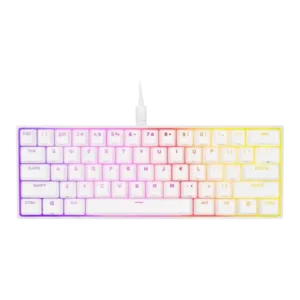
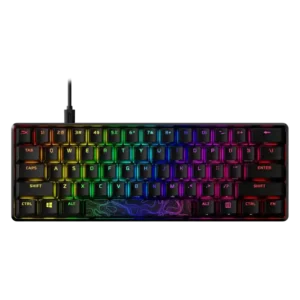
Compare Corsair K65 RGB MINI vs HyperX Alloy Origins

P1 Corsair K65 RGB MINI
P2 HyperX Alloy Origins

Comparison Takeaways

Corsair K65 RGB MINI

Where It Has the Edge

  • key spacing is 4.4 vs 2.3. Key spacing was positive in the limited evidence, with reviewers saying the layout did not feel compressed and...
  • volume control is 4.4 vs 2.7. Volume control appeared as a useful secondary function, with reviewers calling audio adjustment accessible or part of the...
  • media controls is 4.3 vs 2.8. Media controls were available as secondary functions and generally appreciated, especially because they helped replace full-size keyboard functionality.
  • software quality is 4.3 vs 2.9. Software quality was generally strong, with iCUE praised for profiles, remapping, lighting, polling controls, and a more modern...

HyperX Alloy Origins

Where It Has the Edge

  • materials quality is 4.7 vs 2.8. Materials quality was led by the aluminum case and, on some variants, PBT keycaps, though ABS keycaps held...
  • value for money is 4.1 vs 2.9. Value for money is generally strong, with reviewers repeatedly calling the keyboard competitive, fair, or excellent for around...
  • latency is 4.5 vs 3.3. Measured and perceived latency was strong, with reviewers reporting very low or undetectable latency suitable for fast-paced gaming.
  • acoustics is 3.3 vs 2.2. Acoustics were mixed: some liked the solid or pleasant sound, while others criticized spacebar reverb, rattling, loudness, or...
Average score
Product 1: Corsair K65 RGB MINI
3.7
Product 2: HyperX Alloy Origins
3.6
acoustics
Product 1: Corsair K65 RGB MINI
2.2

Acoustics were a major weakness, with repeated mentions of ping, hollowness, reverberation, scratchiness, and tonal issues across multiple reviews.

Product 2: HyperX Alloy Origins
3.3

Acoustics were mixed: some liked the solid or pleasant sound, while others criticized spacebar reverb, rattling, loudness, or clacky tone.

actuation consistency
Product 1: Corsair K65 RGB MINI
3.8

Evidence on consistency was mostly positive in gaming and chatter testing, though the short actuation travel also made mispresses possible for some reviewers.

Product 2: HyperX Alloy Origins
3.9

Actuation was usually described as fast, smooth, and consistent, though several reviewers said the shorter travel was only subtly noticeable.

backlight brightness
Product 1: Corsair K65 RGB MINI
4.6

Backlight brightness was praised wherever discussed, with reviewers calling the lighting vibrant, bright, and easy to show off through the keycaps.

Product 2: HyperX Alloy Origins
4.6

Backlight brightness was repeatedly praised as very bright, with several reviews noting multiple brightness levels.

build quality
Product 1: Corsair K65 RGB MINI
4.1

Build quality was generally solid or sturdy despite the all-plastic construction, with most criticism aimed at materials and design choices rather than flex.

Product 2: HyperX Alloy Origins
4.7

Build quality was the strongest consensus point, with reviewers repeatedly praising the heavy aluminum construction and premium feel.

cable quality
Product 1: Corsair K65 RGB MINI
3.9

Cable quality was mixed: reviewers liked that it was detachable USB-C and travel-friendly, but several criticized the braid as stiff or prone to kinking.

Product 2: HyperX Alloy Origins
3.6

Cable quality is mixed: detachable and braided cables are praised, but some reviewers found the cable rigid or only decent.

compatibility
Product 1: Corsair K65 RGB MINI
4.4

Compatibility was good in the limited evidence, with Windows, macOS, and Xbox mentioned, though console use lacks iCUE support.

Product 2: HyperX Alloy Origins
4.0

Compatibility is generally good for Windows and consoles, with mixed notes on macOS/Linux or software availability.

connectivity
Product 1: Corsair K65 RGB MINI
4.2

Connectivity centered on wired detachable USB-C, which reviewers generally liked for travel and customization; wireless was not part of the design.

Product 2: HyperX Alloy Origins
3.8

Connectivity is solid for wired USB-C use, helped by detachable cables, but there is no wireless connectivity.

customization options
Product 1: Corsair K65 RGB MINI
4.3

Customization options were robust overall, including remaps, RGB layers, macros, profiles, hardware controls, and software-driven assignments.

Product 2: HyperX Alloy Origins
4.3

Customization options are broad for lighting, remapping, macros, and game mode, but depth and ease vary by software experience.

desk space efficiency
Product 1: Corsair K65 RGB MINI
4.7

Desk space efficiency was one of the most consistent positives, with reviewers repeatedly saying the compact layout freed room for mouse movement and other desk items.

Product 2: HyperX Alloy Origins
4.5

Desk space efficiency was repeatedly praised, especially on compact variants that leave more room for mouse movement.

durability
Product 1: Corsair K65 RGB MINI
4.2

Durability was helped by PBT keycaps, thick caps, and rated Cherry switches, though some reviewers questioned the long-term feel of the plastic exterior.

Product 2: HyperX Alloy Origins
4.5

Durability evidence is positive where discussed, especially 80-million-keystroke switches, solid aluminum, and long-term use.

ease of switch replacement
Product 1: Corsair K65 RGB MINI
1.8

Ease of switch replacement was poor because reviewers described the switches as soldered or not hot-swappable, making aftermarket changes difficult.

Product 2: HyperX Alloy Origins
1.0

Ease of switch replacement is poor on non-hotswap models because reviewers discussed desoldering or wishing for hotswap functionality.

ergonomics
Product 1: Corsair K65 RGB MINI
2.8

Ergonomics were mixed to negative because of no adjustable feet, fixed typing angle, awkward shortcut reach, and some uncomfortable casing edges.

Product 2: HyperX Alloy Origins
3.8

Ergonomics are mixed: adjustable feet and multiple angles help, but the lack of a wrist rest and high profile hurt comfort for some users.

extra gaming features
Product 1: Corsair K65 RGB MINI
4.4

Extra gaming features included NKRO, anti-ghosting, Windows lock, mouse controls, and shortcut layers, adding useful gaming-oriented functionality.

Product 2: HyperX Alloy Origins
4.6

Extra gaming features are strong for the price, including game mode, anti-ghosting, N-key rollover, and shortcut-based controls.

frame rigidity
Product 1: Corsair K65 RGB MINI
4.2

Frame rigidity was positive in the few reviews that tested it, with reviewers finding no flex or describing the board as solidly built.

Product 2: HyperX Alloy Origins
4.8

Frame rigidity was excellent across reviews, with minimal or no flex and a stable, heavy chassis.

gaming performance
Product 1: Corsair K65 RGB MINI
4.2

Gaming performance was generally good, especially for FPS play and mouse space, though reviewers often said it felt like a normal responsive keyboard rather than a transformative one.

Product 2: HyperX Alloy Origins
4.6

Gaming performance was a major strength, supported by responsive switches, low latency, rollover, anti-ghosting, and compact layouts for mouse movement.

hot-swappable switches
Product 1: Corsair K65 RGB MINI
1.5

Hot-swappable switches were consistently absent where discussed, limiting enthusiast appeal and switch experimentation.

Product 2: HyperX Alloy Origins
1.0

Hot-swappable switch support is a weakness because reviewers specifically noted non-hotswap PCBs or the need for desoldering.

keycap quality
Product 1: Corsair K65 RGB MINI
4.4

The double-shot PBT keycaps were one of the strongest physical positives, with reviewers praising texture, shine-through quality, thickness, and durability, while noting some ABS extras.

Product 2: HyperX Alloy Origins
3.6

Keycap quality is mixed: 60/65 variants with PBT were praised, while full-size/Core ABS keycaps were repeatedly called average, shiny, or subpar.

key responsiveness
Product 1: Corsair K65 RGB MINI
4.2

Responsiveness was generally strong for gaming, with fast actuation, precise inputs, and quick registration, although the sensitive switches could also cause accidental keypresses.

Product 2: HyperX Alloy Origins
4.4

Reviewers consistently described the keys as fast, responsive, and easy to press, with several linking that responsiveness to gaming performance.

key spacing
Product 1: Corsair K65 RGB MINI
4.4

Key spacing was positive in the limited evidence, with reviewers saying the layout did not feel compressed and the distance between keys felt right.

Product 2: HyperX Alloy Origins
2.3

Key spacing was mixed, with some users adapting quickly while others noticed tight spacing, accidental caps lock hits, or slippery keycaps.

key stability
Product 1: Corsair K65 RGB MINI
No score yet
Product 2: HyperX Alloy Origins
4.5

Key stability was positively noted where discussed, especially the lack of key wobble and stable key movement.

latency
Product 1: Corsair K65 RGB MINI
3.3

The 8,000Hz mode offers a theoretical latency advantage, but most reviewers said the difference was hard or impossible to notice and sometimes brought performance caveats.

Product 2: HyperX Alloy Origins
4.5

Measured and perceived latency was strong, with reviewers reporting very low or undetectable latency suitable for fast-paced gaming.

layout options
Product 1: Corsair K65 RGB MINI
3.7

The 60% layout retained many secondary functions, but opinions were split because the shortcuts were powerful yet could be awkward, cluttered, or steep to learn.

Product 2: HyperX Alloy Origins
4.5

Layout options are a strength because the lineup spans full-size, tenkeyless, 65 percent, and 60 percent models.

legend visibility
Product 1: Corsair K65 RGB MINI
3.8

Legend visibility was mixed: several reviewers liked the shine-through and clean legends, while others criticized cluttered sublegends or unclear/messy keycap markings.

Product 2: HyperX Alloy Origins
4.3

Legend visibility was helped by bright shine-through lighting and side/front secondary legends, though some hotkey legends were not illuminated.

macro customization
Product 1: Corsair K65 RGB MINI
4.4

Macro customization was a major strength, appearing in both iCUE and hardware controls with onboard macro recording, remapping, and profile-based assignments.

Product 2: HyperX Alloy Origins
3.9

Macro customization is available and broadly useful, but some software flows make macro setup less intuitive than competitors.

materials quality
Product 1: Corsair K65 RGB MINI
2.8

Materials quality was mixed: reviewers liked some sturdy construction, but the plastic body, sharp edges, and scratch-prone casing repeatedly lowered impressions.

Product 2: HyperX Alloy Origins
4.7

Materials quality was led by the aluminum case and, on some variants, PBT keycaps, though ABS keycaps held some versions back.

media controls
Product 1: Corsair K65 RGB MINI
4.3

Media controls were available as secondary functions and generally appreciated, especially because they helped replace full-size keyboard functionality.

Product 2: HyperX Alloy Origins
2.8

Media controls are serviceable through function shortcuts, but reviewers repeatedly missed dedicated media keys or a volume wheel.

noise level
Product 1: Corsair K65 RGB MINI
2.3

Noise level was a repeated concern, especially with louder-than-expected switches, pinging, hollow resonance, scratchiness, and intrusive typing sounds.

Product 2: HyperX Alloy Origins
3.3

Noise level depends heavily on switch and variant; some found it quiet enough, while others called it loud or annoying for typing.

onboard memory
Product 1: Corsair K65 RGB MINI
4.5

Onboard memory was a clear strength, with repeated mentions of 8MB storage, saved lighting, remaps, macros, and travel-friendly profile storage.

Product 2: HyperX Alloy Origins
3.6

Onboard memory supports three profiles on many models, which reviewers liked, though some found the limit or syncing imperfect.

passthrough features
Product 1: Corsair K65 RGB MINI
No score yet
Product 2: HyperX Alloy Origins
1.0

Passthrough features are a clear limitation because reviewers noted the absence or removal of USB pass-through/charging.

per-key lighting control
Product 1: Corsair K65 RGB MINI
4.5

Per-key lighting and layered effects were well supported, including hardware effects, up to 20 lighting layers, and individually customizable keys in iCUE.

Product 2: HyperX Alloy Origins
4.3

Per-key lighting control is supported and generally praised, although setup sometimes requires software work and can be unintuitive.

polling rate
Product 1: Corsair K65 RGB MINI
4.6

The 8,000Hz polling rate and AXON processing were widely noted as headline specs, but reviewers repeatedly questioned whether the spec mattered in real play.

Product 2: HyperX Alloy Origins
4.5

The available measurements and specs point to standard 1000 Hz polling performance, which reviewers considered suitable for gaming.

portability
Product 1: Corsair K65 RGB MINI
4.5

Portability was strong because of the small footprint, light body, and detachable cable, making the board easy to travel with.

Product 2: HyperX Alloy Origins
4.5

Portability is strong on compact variants and helped by detachable cables, though full-size models are heavier.

profile management
Product 1: Corsair K65 RGB MINI
4.3

Profile management was strong thanks to onboard profiles and hardware profile switching, though the number and process could feel complex.

Product 2: HyperX Alloy Origins
2.9

Profile management is useful through three onboard profiles, but some reviewers had sync failures or wanted more than three saved profiles.

reliability
Product 1: Corsair K65 RGB MINI
2.5

Reliability evidence was limited and mixed: one TechPowerUp sample had a failed Q key, but the replacement units reportedly worked out of the box.

Product 2: HyperX Alloy Origins
2.7

Reliability is mixed: long-term use and sturdy hardware are positives, but reviews mention squeaky spacebars, software glitches, and restart issues.

RGB customization
Product 1: Corsair K65 RGB MINI
4.4

RGB customization was strong through iCUE and onboard shortcuts, with lighting presets, layers, profile control, and hardware playback appearing repeatedly in the reviews.

Product 2: HyperX Alloy Origins
3.7

RGB customization is capable through NGENUITY, including effects and layers, but some reviewers found the effect library or per-key setup limiting.

RGB lighting quality
Product 1: Corsair K65 RGB MINI
4.4

RGB lighting quality was a clear strength, with reviewers praising brightness, vibrancy, clean animations, the white plate effect, and the decorative spacebar illumination.

Product 2: HyperX Alloy Origins
4.5

RGB lighting quality was one of the strongest points, with reviewers praising brightness, saturation, vividness, and overall visual impact despite some white color tint issues.

size and form factor
Product 1: Corsair K65 RGB MINI
4.5

The small 60% form factor was widely recognized as compact and useful for minimal setups, travel, and gaming desks.

Product 2: HyperX Alloy Origins
4.4

Size and form factor were praised for compact, clean layouts, especially TKL, 65 percent, and 60 percent variants.

software quality
Product 1: Corsair K65 RGB MINI
4.3

Software quality was generally strong, with iCUE praised for profiles, remapping, lighting, polling controls, and a more modern interface, despite some complexity.

Product 2: HyperX Alloy Origins
2.9

Software quality is the most consistent weakness, with reviewers citing bugs, Windows Store friction, unintuitive controls, and limited depth, though a few found it usable.

sound dampening
Product 1: Corsair K65 RGB MINI
2.1

Sound dampening was limited; reviewers pointed to hollow case space, missing dampening material, and possible foam or O-ring fixes as ways to improve the sound.

Product 2: HyperX Alloy Origins
2.5

Sound dampening is limited, with reviewers noting no foam, under-lubed stabilizers, or little focus on sound and feel beyond the core gaming design.

stabilizer quality
Product 1: Corsair K65 RGB MINI
3.9

Stabilizer quality was better than prior Corsair efforts and often described as decent or good, but some reviewers still noticed spacebar or acoustic issues.

Product 2: HyperX Alloy Origins
3.0

Stabilizer quality was mixed, ranging from acceptable or good to rattly, under-lubed, or problematic on larger keys.

switch feel
Product 1: Corsair K65 RGB MINI
3.6

Cherry linear switches were often described as smooth, fast, or comfortable, but several reviewers found the MX Speed or Red feel scratchy, loud, or less smooth than expected.

Product 2: HyperX Alloy Origins
4.4

Reviewers generally liked HyperX Red and Aqua switch feel, describing the switches as smooth, familiar, quick, and pleasant, though preference depends on switch type.

switch options
Product 1: Corsair K65 RGB MINI
4.0

Reviewers consistently identified Cherry MX Red, Speed/Silver, and Silent linear options; the choice is useful, but tactile, clicky, optical, and Corsair OPX-style options were missed.

Product 2: HyperX Alloy Origins
4.0

Switch options are a strength on larger models with Red, Aqua, and Blue choices, but smaller variants were sometimes limited to a single switch option.

typing comfort
Product 1: Corsair K65 RGB MINI
3.6

Typing comfort was polarized: some reviewers typed quickly and comfortably, while others reported typos, fatigue, or discomfort from short travel and the 60% layout.

Product 2: HyperX Alloy Origins
3.4

Typing comfort ranges from comfortable and familiar to sensitive or fatiguing depending on layout, switch sensitivity, and wrist support.

typing feel
Product 1: Corsair K65 RGB MINI
4.4

Typing feel drew some high praise for smooth, precise, and satisfying travel, but it depended heavily on reviewer preference and tolerance for the compact layout.

Product 2: HyperX Alloy Origins
4.2

Typing feel was generally satisfying and smooth, but some reviewers found the light switches or compact layouts less ideal for everyday typing.

value for money
Product 1: Corsair K65 RGB MINI
2.9

Value for money was split, with some reviewers liking the price against Ducky or Razer and others calling it overpriced versus budget or fuller-featured alternatives.

Product 2: HyperX Alloy Origins
4.1

Value for money is generally strong, with reviewers repeatedly calling the keyboard competitive, fair, or excellent for around $90-$110.

volume control
Product 1: Corsair K65 RGB MINI
4.4

Volume control appeared as a useful secondary function, with reviewers calling audio adjustment accessible or part of the onboard control set.

Product 2: HyperX Alloy Origins
2.7

Volume control is mixed, with some convenient shortcut praise but repeated criticism that there is no dedicated volume dial or wheel.

wireless performance
Product 1: Corsair K65 RGB MINI
1.5

Wireless performance was only discussed as an absent feature, with one reviewer saying wireless capability would have improved the board.

Product 2: HyperX Alloy Origins
0.5

Wireless performance scores poorly because the reviewed models are wired and reviewers noted no Wi-Fi or Bluetooth support.

wrist rest quality
Product 1: Corsair K65 RGB MINI
1.0

The only direct wrist-rest evidence was negative, with one reviewer noting that the keyboard includes no wrist rest.

Product 2: HyperX Alloy Origins
1.2

Wrist-rest support is weak because reviewed variants generally do not include one, and multiple reviewers said a palm or wrist rest would help.