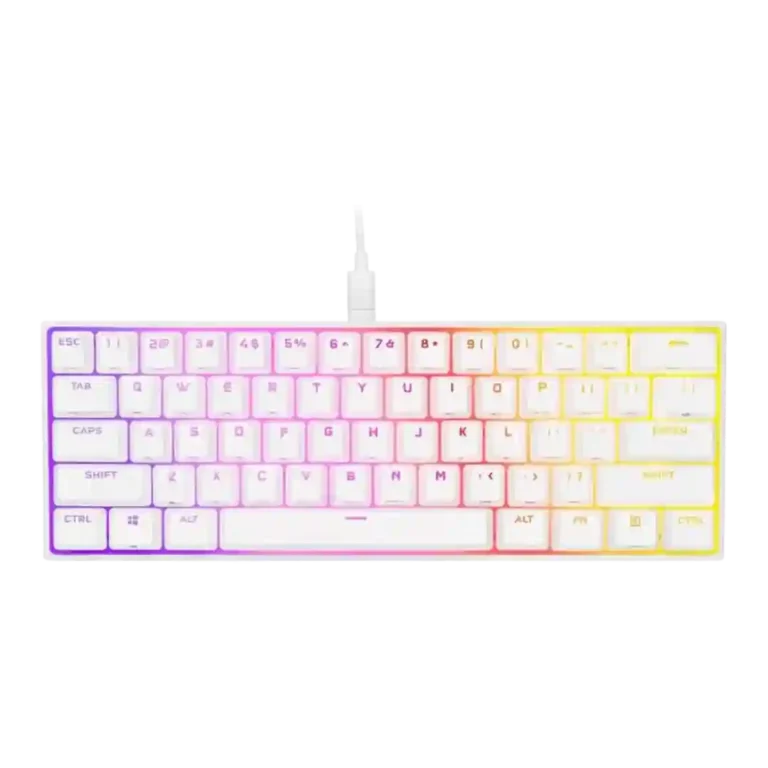
- Better: default key layout Tom’s Guide finds the HyperX Alloy Origins 60 more straightforward with a better default layout.
- Cheaper: value and refinement PCMag says the HyperX Alloy Origins 60 delivers a refined 60% experience for less money.
Corsair K65 RGB MINI Review
Bottom Line
Choose the Corsair K65 RGB Mini for a compact, travel-friendly 60% board with vivid RGB, strong iCUE profiles, and responsive gaming feel. Skip it if you need quiet acoustics, hot-swap switches, wireless, adjustable feet, or a productivity-friendly layout.
Best for gamers who want a compact wired 60% keyboard with vivid RGB, strong iCUE customization, onboard profiles, and extra desk space for mouse movement. It especially fits Corsair ecosystem users who value lighting and profiles more than hot-swap or wireless features.
Not for users who rely on dedicated arrows, function keys, quiet typing, adjustable feet, wireless, or hot-swappable switches. It is also a weaker fit for productivity-heavy setups where shortcuts and the fixed 60% layout slow work down.
The Corsair K65 RGB Mini earns its strongest praise as a compact 60% gaming board with bright RGB, deep iCUE control, onboard profiles, and generally responsive Cherry linear switches. Reviewers repeatedly liked the desk-space savings, detachable USB-C setup, PBT keycaps, and profile or macro flexibility. The tradeoff is that Corsair’s headline 8,000Hz polling rarely felt useful in practice, while the 60% layout, missing adjustable feet, and shortcut placement made typing or productivity less comfortable for several reviewers. Acoustics were the clearest weakness: many heard ping, hollowness, scratchiness, or excess loudness, and hot-swap, wireless, and passthrough features were absent.
Compared in Reviews
Products reviewers directly compared with this model, grouped into quick takeaways.
Ducky One 2 Mini
- Worse: software and firmware Switch and Click says the K65 Mini’s software is where it starts to surpass Ducky’s One 2 Mini.
- Similar: price and 60% market positioning The reviewer says Corsair prices the K65 Mini in line with Ducky’s One 2 Mini while offering wider mainstream availability.
Corsair K60 RGB Pro
- Better: value and layout Laptop Mag says shoppers not specifically seeking a mini keyboard get better value from the K60 RGB Pro.
Feature Scorecards
Pros
-
Desk space efficiency was one of the most consistent positives, with reviewers repeatedly saying the compact layout freed room for mouse movement and other desk items.
-
The 8,000Hz polling rate and AXON processing were widely noted as headline specs, but reviewers repeatedly questioned whether the spec mattered in real play.
-
Backlight brightness was praised wherever discussed, with reviewers calling the lighting vibrant, bright, and easy to show off through the keycaps.
-
Onboard memory was a clear strength, with repeated mentions of 8MB storage, saved lighting, remaps, macros, and travel-friendly profile storage.
-
Per-key lighting and layered effects were well supported, including hardware effects, up to 20 lighting layers, and individually customizable keys in iCUE.
-
The small 60% form factor was widely recognized as compact and useful for minimal setups, travel, and gaming desks.
-
Portability was strong because of the small footprint, light body, and detachable cable, making the board easy to travel with.
-
The double-shot PBT keycaps were one of the strongest physical positives, with reviewers praising texture, shine-through quality, thickness, and durability, while noting some ABS extras.
-
Macro customization was a major strength, appearing in both iCUE and hardware controls with onboard macro recording, remapping, and profile-based assignments.
-
Typing feel drew some high praise for smooth, precise, and satisfying travel, but it depended heavily on reviewer preference and tolerance for the compact layout.
-
RGB lighting quality was a clear strength, with reviewers praising brightness, vibrancy, clean animations, the white plate effect, and the decorative spacebar illumination.
-
RGB customization was strong through iCUE and onboard shortcuts, with lighting presets, layers, profile control, and hardware playback appearing repeatedly in the reviews.
-
Extra gaming features included NKRO, anti-ghosting, Windows lock, mouse controls, and shortcut layers, adding useful gaming-oriented functionality.
-
Compatibility was good in the limited evidence, with Windows, macOS, and Xbox mentioned, though console use lacks iCUE support.
-
Key spacing was positive in the limited evidence, with reviewers saying the layout did not feel compressed and the distance between keys felt right.
-
Volume control appeared as a useful secondary function, with reviewers calling audio adjustment accessible or part of the onboard control set.
-
Customization options were robust overall, including remaps, RGB layers, macros, profiles, hardware controls, and software-driven assignments.
-
Profile management was strong thanks to onboard profiles and hardware profile switching, though the number and process could feel complex.
-
Media controls were available as secondary functions and generally appreciated, especially because they helped replace full-size keyboard functionality.
-
Software quality was generally strong, with iCUE praised for profiles, remapping, lighting, polling controls, and a more modern interface, despite some complexity.
-
Durability was helped by PBT keycaps, thick caps, and rated Cherry switches, though some reviewers questioned the long-term feel of the plastic exterior.
-
Connectivity centered on wired detachable USB-C, which reviewers generally liked for travel and customization; wireless was not part of the design.
-
Frame rigidity was positive in the few reviews that tested it, with reviewers finding no flex or describing the board as solidly built.
-
Gaming performance was generally good, especially for FPS play and mouse space, though reviewers often said it felt like a normal responsive keyboard rather than a transformative one.
-
Responsiveness was generally strong for gaming, with fast actuation, precise inputs, and quick registration, although the sensitive switches could also cause accidental keypresses.
-
Build quality was generally solid or sturdy despite the all-plastic construction, with most criticism aimed at materials and design choices rather than flex.
-
Reviewers consistently identified Cherry MX Red, Speed/Silver, and Silent linear options; the choice is useful, but tactile, clicky, optical, and Corsair OPX-style options were missed.
-
Cable quality was mixed: reviewers liked that it was detachable USB-C and travel-friendly, but several criticized the braid as stiff or prone to kinking.
-
Stabilizer quality was better than prior Corsair efforts and often described as decent or good, but some reviewers still noticed spacebar or acoustic issues.
-
Legend visibility was mixed: several reviewers liked the shine-through and clean legends, while others criticized cluttered sublegends or unclear/messy keycap markings.
-
Evidence on consistency was mostly positive in gaming and chatter testing, though the short actuation travel also made mispresses possible for some reviewers.
-
The 60% layout retained many secondary functions, but opinions were split because the shortcuts were powerful yet could be awkward, cluttered, or steep to learn.
-
Cherry linear switches were often described as smooth, fast, or comfortable, but several reviewers found the MX Speed or Red feel scratchy, loud, or less smooth than expected.
-
Typing comfort was polarized: some reviewers typed quickly and comfortably, while others reported typos, fatigue, or discomfort from short travel and the 60% layout.
Cons
-
The 8,000Hz mode offers a theoretical latency advantage, but most reviewers said the difference was hard or impossible to notice and sometimes brought performance caveats.
-
Value for money was split, with some reviewers liking the price against Ducky or Razer and others calling it overpriced versus budget or fuller-featured alternatives.
-
Ergonomics were mixed to negative because of no adjustable feet, fixed typing angle, awkward shortcut reach, and some uncomfortable casing edges.
-
Materials quality was mixed: reviewers liked some sturdy construction, but the plastic body, sharp edges, and scratch-prone casing repeatedly lowered impressions.
-
Reliability evidence was limited and mixed: one TechPowerUp sample had a failed Q key, but the replacement units reportedly worked out of the box.
-
Noise level was a repeated concern, especially with louder-than-expected switches, pinging, hollow resonance, scratchiness, and intrusive typing sounds.
-
Acoustics were a major weakness, with repeated mentions of ping, hollowness, reverberation, scratchiness, and tonal issues across multiple reviews.
-
Sound dampening was limited; reviewers pointed to hollow case space, missing dampening material, and possible foam or O-ring fixes as ways to improve the sound.
-
Ease of switch replacement was poor because reviewers described the switches as soldered or not hot-swappable, making aftermarket changes difficult.
-
Hot-swappable switches were consistently absent where discussed, limiting enthusiast appeal and switch experimentation.
-
Wireless performance was only discussed as an absent feature, with one reviewer saying wireless capability would have improved the board.
-
The only direct wrist-rest evidence was negative, with one reviewer noting that the keyboard includes no wrist rest.
Compared With Category Average
Compared with other Gaming Keyboard, this product is below average in sound dampening, acoustics, hot-swappable switches.
| Attribute | This product | Category average | Difference |
|---|---|---|---|
| sound dampening | 2.1 | 4.1 | -2.1 |
| acoustics | 2.2 | 4.0 | -1.9 |
| hot-swappable switches | 1.5 | 3.3 | -1.8 |
| wireless performance | 1.5 | 3.3 | -1.8 |
| wrist rest quality | 1.0 | 2.8 | -1.8 |
| noise level | 2.3 | 3.9 | -1.6 |
| ease of switch replacement | 1.8 | 3.4 | -1.6 |
| materials quality | 2.8 | 4.3 | -1.5 |
FAQ
Is the Corsair K65 RGB Mini good for gaming?
Yes, reviewers generally found it responsive and well suited to gaming, especially FPS play where the 60% size leaves more mouse room. The benefit is less clear for games that need many keys or frequent shortcuts.
Does the 8,000Hz polling rate make a noticeable difference?
Most reviewers said the 8,000Hz polling rate sounded impressive but was hard to notice in real use. Some framed it as a possible competitive advantage, while others saw it as a paper spec with limited practical value.
Is it comfortable for typing and office work?
Typing comfort was mixed. Some reviewers typed quickly and comfortably, but others reported accidental presses, awkward arrow-key shortcuts, or productivity friction from the 60% layout.
How good is the RGB lighting?
RGB lighting was one of the strongest points. Reviewers praised the brightness, vivid color, per-key control, layered effects, onboard lighting shortcuts, and the illuminated decorative spacebar.
Are the switches hot-swappable?
No. Reviewers who discussed it said the switches are not hot-swappable or are soldered, so it is not a strong choice for users who want easy switch replacement.
Do you need iCUE to customize it?
iCUE gives the deepest control over lighting, remaps, macros, profiles, and polling rate. Several reviewers also noted useful onboard controls and hardware profiles for use without the software running.
Is the K65 RGB Mini quiet?
No, not according to many reviewers. Pinging, hollowness, scratchiness, and loud switch noise were among the most repeated criticisms.
Consider This Instead
If you want better hot-swappable switches
Choose Corsair K65 Plus. It scores 5.0 vs 1.5 for hot-swappable switches, with a 4.1 overall score.
If you want better wrist rest quality
Choose Razer Huntsman V2 Analog. It scores 4.6 vs 1.0 for wrist rest quality, with a 3.7 overall score.
If you want better wireless performance
Choose ASUS ROG Azoth Extreme. It scores 4.8 vs 1.5 for wireless performance, with a 4.1 overall score.
If you want better acoustics
Choose be quiet! Dark Mount. It scores 5.0 vs 2.2 for acoustics, with a 3.9 overall score.
Overall Top Gaming Keyboard Alternatives
Best for 8K polling, magnetic-switch gaming control, premium build, and deep web customization. Skip it if you need broad switch compatibility, USB passthrough, a wrist rest, or a portable keyboard.
Pros: latency, polling rate
Cons: portability, switch options
Good if you want a premium full-size Hall Effect keyboard with smooth switches, strong gaming controls, and quiet acoustics. Skip it if you need a portable, budget, or broadly switch-compatible...
Pros: key stability, frame rigidity
Cons: portability, switch options

Best for a premium, quiet Hall Effect TKL with strong wireless, software, and gaming features. Skip it if price, switch flexibility, USB passthrough, or an included wrist rest matter most.
Pros: rapid trigger support, typing feel
Cons: switch options, portability
Best for a premium 96% metal keyboard with Hall Effect tuning, strong wireless, and excellent typing feel. Skip it for travel, bargain pricing, or maximum esports specs.
Pros: build quality, frame rigidity
Cons: portability, switch options