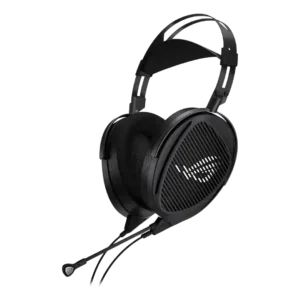
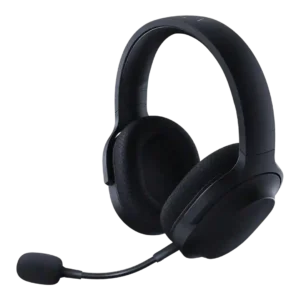
Average score
P1
Product 1: ASUS ROG Kithara
3.7
P2
Product 2: Razer Barracuda X
3.8
Active noise cancellation
P1Product 1: ASUS ROG Kithara
No score yet
P2
Product 2: Razer Barracuda X
2.0
Active noise cancellation was treated as an absent premium feature, with one reviewer saying buyers who need ANC should consider another model.
Android compatibility
P1Product 1: ASUS ROG Kithara
No score yet
P2
Product 2: Razer Barracuda X
4.6
Android compatibility was consistently positive when mentioned, with reviewers appreciating USB-C or wireless use on Android phones.
App
P1Product 1: ASUS ROG Kithara
No score yet
P2
Product 2: Razer Barracuda X
3.4
App support was useful for EQ, gaming mode, lighting, or battery status, but multiple reviewers disliked separate apps, limited Synapse control, or app dependence.
aptX
P1Product 1: ASUS ROG Kithara
No score yet
P2
Product 2: Razer Barracuda X
1.5
aptX support was explicitly criticized as absent, with one review calling the lack of AAC or aptX a letdown.
Audio-video sync accuracy
P1Product 1: ASUS ROG Kithara
No score yet
P2
Product 2: Razer Barracuda X
4.1
Audio-video sync and response were mostly strong, with app gaming modes, low-latency wireless, and quick response praised across several reviews.
Bass performance
P1
Product 1: ASUS ROG Kithara
3.5
Bass is controlled, textured, and sometimes impactful, but several reviewers say it is restrained compared with closed-back or bass-heavy gaming headsets.
P2
Product 2: Razer Barracuda X
3.8
Bass was often described as punchy, warm, or strong, but several reviewers noted limits such as less sub-bass depth, less rumble, or occasional overemphasis.
Battery
P1Product 1: ASUS ROG Kithara
No score yet
P2
Product 2: Razer Barracuda X
4.2
Battery life was mostly praised as long or excellent, especially 50-70 hour models, though RGB use and older models reduced that advantage.
Bluetooth
P1Product 1: ASUS ROG Kithara
No score yet
P2
Product 2: Razer Barracuda X
3.7
Bluetooth was praised on newer/Chroma models for convenience, but older-model reviews missed it and one long-term 2022 review found Bluetooth switching disruptive.
Build quality
P1
Product 1: ASUS ROG Kithara
4.6
Build quality is one of the strongest themes, with reviewers praising the metal frame, solid construction, and premium materials despite some control/headband caveats.
P2
Product 2: Razer Barracuda X
4.4
Build quality was generally solid for the price, with many reviewers praising sturdy plastic, metal reinforcement, or strong construction despite budget materials.
Button control usability
P1
Product 1: ASUS ROG Kithara
2.6
Inline control usability is mixed to negative: controls are convenient in theory, but the wheel or mute/control housing can feel cheap, sensitive, or touchy.
P2
Product 2: Razer Barracuda X
3.8
Controls were usually easy to reach and precise, but reviewers disliked loose volume wheels, unclear mute state, or awkward volume positioning.
Cable quality
P1
Product 1: ASUS ROG Kithara
3.9
Cable impressions are mixed: the premium braided cable is praised, while the mic cable can feel merely okay, short, or somewhat plain.
P2
Product 2: Razer Barracuda X
5.0
Cable quality was praised where evaluated, especially the included long, high-quality charging and adapter cables.
Carry case quality
P1
Product 1: ASUS ROG Kithara
1.5
One reviewer specifically faults the lack of a bag or hard case given the number of included cables and adapters.
P2
Product 2: Razer Barracuda X
2.9
Carry case support was inconsistent, with praise when a pouch or bag was included and criticism when the headset shipped without even a basic pouch.
Charging
P1Product 1: ASUS ROG Kithara
No score yet
P2
Product 2: Razer Barracuda X
4.0
Charging evidence was positive but mixed: quick charge and use-while-charging were praised, while one Chroma review called charging speed middling.
Clamping force comfort
P1
Product 1: ASUS ROG Kithara
4.4
Clamp is usually described as moderate, relaxed, or well balanced, helping comfort without creating excessive jaw or temple pressure.
P2
Product 2: Razer Barracuda X
4.2
Clamping comfort was usually well balanced and secure without too much pressure, but one review found the clamp too weak and prone to sliding.
Codec support
P1Product 1: ASUS ROG Kithara
No score yet
P2
Product 2: Razer Barracuda X
2.0
Codec support was a weak point in reviews that discussed it, because Bluetooth was limited to SBC rather than higher-quality codecs.
Comfort during long use
P1
Product 1: ASUS ROG Kithara
4.3
Most reviewers find long-session comfort strong despite the size, though weight, clamp, or headband fit can create issues for some users.
P2
Product 2: Razer Barracuda X
4.6
Comfort over long sessions was one of the strongest areas, with repeated praise for multi-hour or all-day use and very few serious comfort complaints.
Connectivity versatility
P1
Product 1: ASUS ROG Kithara
4.9
Connectivity versatility is a major strength thanks to the cable bundle, swappable plugs, balanced option, USB-C adapter, and broad desk-device support.
P2
Product 2: Razer Barracuda X
4.7
Connectivity versatility was one of the clearest strengths, with reviewers praising the ability to use the headset across many devices and connection types.
Console compatibility limitations
P1
Product 1: ASUS ROG Kithara
2.0
Console compatibility has important caveats, especially around Xbox and controller/USB-C behavior, with some reviewers discouraging console-first use.
P2
Product 2: Razer Barracuda X
2.6
Console limitations centered on Xbox, where reviewers repeatedly noted that wireless support was unavailable and a cable was required.
Design and Aesthetics
P1
Product 1: ASUS ROG Kithara
3.9
Design reactions range from stylish, premium, and restrained to comically oversized or odd-looking on smaller heads.
P2
Product 2: Razer Barracuda X
4.5
Design was a major strength: reviewers repeatedly liked the subtle, understated, non-gamery look, with Chroma lighting adding style for RGB fans.
Detachable cable convenience
P1Product 1: ASUS ROG Kithara
No score yet
P2
Product 2: Razer Barracuda X
4.5
The detachable analog cable was useful for broad compatibility, especially for wired fallback on devices without wireless support.
Detachable microphone convenience
P1Product 1: ASUS ROG Kithara
No score yet
P2
Product 2: Razer Barracuda X
4.3
The detachable microphone was usually praised for convenience, easy removal, stable positioning, or making the headset work better as everyday headphones.
Dongle
P1
Product 1: ASUS ROG Kithara
3.4
The USB-C dongle is useful for compatibility and sometimes volume, but reviewers disagree on whether it improves sound or behaves consistently.
P2
Product 2: Razer Barracuda X
3.2
The dongle enabled broad USB-C wireless use, but reviewers frequently criticized its width, port blocking, storage issues, or occasional reconnection problems.
Ear cup padding quality
P1
Product 1: ASUS ROG Kithara
4.5
The large pads are widely praised for plushness, breathability, and comfort, with a few caveats about scratchiness, warmth, or fit behavior.
P2
Product 2: Razer Barracuda X
4.2
Ear cup padding was mostly praised for memory foam, fabric, breathability, and softness, though a few reviewers found it thin, shallow, or slightly harsh.
Ear cup swivel/rotation range
P1
Product 1: ASUS ROG Kithara
4.3
Swivel and rotation receive positive notes for helping the headset sit naturally, lay flat, or adapt to different heads.
P2
Product 2: Razer Barracuda X
2.5
Ear cup swivel and rotation were a recurring annoyance because several reviewers felt the cups folded or rotated the wrong way.
Earpad noise
P1Product 1: ASUS ROG Kithara
No score yet
P2
Product 2: Razer Barracuda X
2.5
Earpad noise was a limited but negative finding, with one reviewer noting audible skin-versus-material contact noise.
Earpad replacement ease
P1
Product 1: ASUS ROG Kithara
3.3
Earpad replacement is generally possible and sometimes easy, but proprietary or clip-based mounting can feel limiting or fiddly.
P2Product 2: Razer Barracuda X
No score yetEqualizer customization
P1
Product 1: ASUS ROG Kithara
3.8
EQ potential is mixed: the drivers respond well to EQ, but the headset has no built-in software EQ and may need extra gear or PC tools.
P2
Product 2: Razer Barracuda X
3.3
Equalizer customization was mixed: mobile or Synapse EQ could be useful, but some models lacked PC EQ or any meaningful equalizer support.
Fit/seal reliability
P1
Product 1: ASUS ROG Kithara
3.8
Fit and seal are mixed: one review praises a solid seal, while another reports the earcups sliding during movement.
P2
Product 2: Razer Barracuda X
3.5
Fit and seal reliability was mixed, ranging from good self-adjusting fit to weak clamp that slid forward when leaning over.
Footstep sound level scaling feature
P1
Product 1: ASUS ROG Kithara
4.9
Footstep and cue clarity is repeatedly praised, especially for shooters, where reviewers hear footsteps, reloads, and distant movement clearly.
P2Product 2: Razer Barracuda X
No score yetFrequency response accuracy
P1
Product 1: ASUS ROG Kithara
4.6
Measurements and reviewer impressions point to strong response consistency, clean presentation, and studio-leaning tuning, though the target is not bass-heavy.
P2
Product 2: Razer Barracuda X
3.5
Frequency response evidence was limited to one measured-style review, which found it acceptable for gaming with some bass and treble deviations.
Game/Chat balance control
P1
Product 1: ASUS ROG Kithara
1.5
The gaming-control feature set is limited, with one review specifically calling out the lack of chat mix adjustment.
P2Product 2: Razer Barracuda X
No score yetHeadband adjustability
P1
Product 1: ASUS ROG Kithara
2.0
Several reviewers criticize the headband or sliders for looseness or weak adjustment, making this one of the more repeated build-control complaints.
P2
Product 2: Razer Barracuda X
3.9
Headband adjustability and padding were generally solid and secure, though a few reviewers wanted plusher or thicker padding.
Hinge durability
P1
Product 1: ASUS ROG Kithara
4.8
Hinge durability is praised in the reviews that mention it, with the hinges and headband described as robust or able to take abuse.
P2
Product 2: Razer Barracuda X
5.0
Hinge and structural durability were praised in the limited evidence, with reviewers noting no rattles, weak feeling, or cracking concerns.
Included accessories
P1
Product 1: ASUS ROG Kithara
4.5
The accessory bundle is repeatedly praised as generous and complete, though one reviewer thinks the many pieces may feel fiddly to gamers.
P2
Product 2: Razer Barracuda X
4.4
Included accessories were usually well received, especially the generous cables, adapters, setup guide, and complete-feeling package.
Instrument separation
P1
Product 1: ASUS ROG Kithara
4.7
Reviewers often highlight strong separation, detail retrieval, and the ability to distinguish instruments or game sounds without smearing.
P2
Product 2: Razer Barracuda X
3.9
Instrument and sound separation was mostly positive, especially in busy game and music mixes, with only one review saying small details were hard to hear.
Integrated microphone
P1Product 1: ASUS ROG Kithara
No score yet
P2
Product 2: Razer Barracuda X
2.5
The integrated microphone evidence was limited to the non-X Barracuda-style review and was negative compared with the rest of the headset.
Maximum volume clarity
P1
Product 1: ASUS ROG Kithara
5.0
One review credits the low distortion and driver control with giving the headset headroom when pushing volume or applying EQ.
P2
Product 2: Razer Barracuda X
4.3
At high volume, reviewers usually reported clean playback with little or no distortion, supporting good maximum-volume clarity.
Microphone
P1
Product 1: ASUS ROG Kithara
3.5
Overall microphone impressions are mixed: clear and practical for chat, but sensitive, plosive-prone, nasal, or not standout in several reviews.
P2
Product 2: Razer Barracuda X
3.8
Microphone performance varied by model and reviewer: Chroma and several X reviews were positive, while some older or integrated mic reviews were merely passable or poor.
Microphone noise reduction
P1
Product 1: ASUS ROG Kithara
4.2
Microphone noise handling is better than many headset mics, with several reviewers noting low background pickup despite limited or no digital processing.
P2
Product 2: Razer Barracuda X
3.7
Microphone noise handling was mixed-positive: several reviewers praised voice focus or rejected background noise, while others heard background noise or quality drops with processing.
Microphone quality for calls
P1
Product 1: ASUS ROG Kithara
3.7
The microphone is usually good enough for calls, gaming chat, Discord, and meetings, but it is not treated as a replacement for a dedicated mic.
P2
Product 2: Razer Barracuda X
4.0
Call and chat microphone quality was often clear enough for Discord, Zoom, voice calls, or streaming in a pinch, but a few reviews found it merely serviceable.
Midrange clarity
P1
Product 1: ASUS ROG Kithara
4.2
Midrange earns praise for clarity and balance in some reviews, while one reviewer hears voices and instruments sitting slightly farther back.
P2
Product 2: Razer Barracuda X
3.9
Midrange clarity was usually strong for voices, melodies, and game detail, with isolated criticism that bass could bleed into the mids or leave them recessed.
Multi-platform compatibility
P1
Product 1: ASUS ROG Kithara
4.5
Multi-platform compatibility is broad across PC, PlayStation, Switch, mobile, and some Xbox audio use, though functionality varies by connector.
P2
Product 2: Razer Barracuda X
4.8
Multi-platform compatibility was one of the strongest consensus positives, with repeated praise for PC, PlayStation, Switch, Android, Mac, iOS, and wired fallback.
Multipoint connectivity reliability
P1Product 1: ASUS ROG Kithara
No score yet
P2
Product 2: Razer Barracuda X
4.0
SmartSwitch and dual-wireless behavior were praised when they worked quickly, but one long-term reviewer reported unreliable reconnection and tiresome dongle reseating.
Noise isolation (passive)
P1
Product 1: ASUS ROG Kithara
1.6
Because the Kithara is open-back, reviewers consistently warn that it offers little passive isolation and works best in quiet rooms.
P2
Product 2: Razer Barracuda X
3.4
Passive isolation was useful in quiet rooms and some home settings, but reviewers repeatedly warned that voices, traffic, or travel noise still came through.
Packaging quality
P1
Product 1: ASUS ROG Kithara
4.3
Packaging receives positive notes for a premium presentation and the included ROG-style unboxing experience.
P2
Product 2: Razer Barracuda X
3.7
Packaging impressions ranged from simple and easy to nicely presented, with one reviewer comparing the budget box to Amazon Basics.
Portability/foldability
P1
Product 1: ASUS ROG Kithara
3.0
Portability is limited by the large wired open-back design, even though the earcups can lay flat for packing.
P2
Product 2: Razer Barracuda X
3.6
Portability was mixed: light weight, flat cups, and removable mic helped, but odd swivel behavior, no case, and dongle storage issues hurt travel convenience.
Positional audio accuracy
P1
Product 1: ASUS ROG Kithara
4.4
Positional accuracy is mostly strong for shooters, but a few reviewers say it is good rather than class-leading or report cue-location issues.
P2
Product 2: Razer Barracuda X
4.3
Positional audio was frequently praised for footsteps, shots, direction, and game awareness, with only a few caveats about imperfect precision.
Preset EQ profile quality
P1Product 1: ASUS ROG Kithara
No score yet
P2
Product 2: Razer Barracuda X
3.3
Preset EQ profiles were mixed, with useful game/music options offset by hit-or-miss tuning and some presets pushing bass or highs too far.
Replaceable earpads
P1
Product 1: ASUS ROG Kithara
4.5
One review praises the included alternate earpads as high-quality, though the replacement ecosystem is limited by the proprietary mount.
P2Product 2: Razer Barracuda X
No score yetRGB lighting customization
P1Product 1: ASUS ROG Kithara
No score yet
P2
Product 2: Razer Barracuda X
4.3
RGB customization was a Chroma strength, with reviewers liking the look and options, though some disliked app dependence or limited interactivity.
Sidetone adjustment quality
P1Product 1: ASUS ROG Kithara
No score yet
P2
Product 2: Razer Barracuda X
2.5
Sidetone and mic monitoring were weak overall: one review valued sidetone, but others criticized delay or lack of adjustment.
Smudge resistance
P1Product 1: ASUS ROG Kithara
No score yet
P2
Product 2: Razer Barracuda X
3.3
Smudge resistance was mixed, with one Chroma review praising fingerprint resistance while another Barracuda review found the finish fingerprint-prone.
Software/setup simplicity
P1
Product 1: ASUS ROG Kithara
4.1
Setup is praised for being simple and plug-and-play, but that simplicity also means no app-driven feature suite or software customization.
P2
Product 2: Razer Barracuda X
3.8
Setup simplicity was often praised as plug-and-play, but app requirements, missing controls, and a long-term reconnection problem kept it from being universally simple.
Sound leakage
P1
Product 1: ASUS ROG Kithara
2.1
Sound leakage is an unavoidable open-back tradeoff, with most reviewers warning that nearby people can hear audio and outside sound comes in.
P2
Product 2: Razer Barracuda X
4.5
Sound leakage evidence was limited but positive, with one reviewer finding leakage barely audible even at high volume.
Sound quality
P1
Product 1: ASUS ROG Kithara
4.7
Reviewers consistently describe the Kithara as an exceptional-sounding wired headset, with only a few noting that its sound-first approach is niche.
P2
Product 2: Razer Barracuda X
4.2
Reviewers generally found the headset's sound good to excellent for gaming and everyday listening, though a few budget-model reviews called it merely fine or not class-leading.
Soundstage width
P1
Product 1: ASUS ROG Kithara
4.7
The open-back planar design is repeatedly praised for a wide, airy soundstage that helps games, music, and spatial presentation feel larger.
P2
Product 2: Razer Barracuda X
3.6
Soundstage and spatial width were mixed: some reviewers praised immersion and spaciousness, while others found it closed or less wide than pricier headsets.
Spatial audio
P1Product 1: ASUS ROG Kithara
No score yet
P2
Product 2: Razer Barracuda X
3.8
Spatial audio was useful for directionality and immersion in supported setups, though some reviewers found it less precise, app-dependent, or not worth the hassle.
Stability
P1
Product 1: ASUS ROG Kithara
2.1
Stability is a recurring weakness when reviewers experience sliding earcups, loose sliders, or tension-band movement during play.
P2
Product 2: Razer Barracuda X
3.5
Stability was mixed: several reviewers praised solid wireless or secure wear, but others reported drops, sliding, or 2022 connection problems.
Treble clarity
P1
Product 1: ASUS ROG Kithara
3.9
Treble is generally detailed and helpful for cues, though reviewers split on whether it is bright, restrained, or potentially fatiguing.
P2
Product 2: Razer Barracuda X
3.8
Treble was commonly called crisp or clean without harshness, though some presets or use cases made upper frequencies airy, thin, or less detailed.
USB-C
P1
Product 1: ASUS ROG Kithara
3.3
USB-C support is useful and can boost volume in some setups, but it is not always an audio upgrade and can still leave low output on some devices.
P2
Product 2: Razer Barracuda X
4.2
USB-C was praised for broad dongle and charging convenience, but a few reviews noted limitations such as port blocking or no USB-C audio data mode.
Value for money
P1
Product 1: ASUS ROG Kithara
3.8
Value is divisive: some see a standout planar bargain, while others think the price is hard to justify without wireless convenience or easier driveability.
P2
Product 2: Razer Barracuda X
4.6
Value for money was strongly positive, with many reviewers calling it a bargain, no-brainer, winner, or strong performer at its price.
Volume output
P1
Product 1: ASUS ROG Kithara
2.9
Volume output is highly device-dependent: some sources get very loud, while controllers, onboard audio, or certain USB-C setups can feel limited.
P2
Product 2: Razer Barracuda X
4.1
Volume output was generally strong, with several reviewers saying it got loud or had enough power, although one review found USB-C wireless quieter.
Weight comfort
P1
Product 1: ASUS ROG Kithara
3.6
Reviewers agree the headset is heavy, but opinions split between excellent weight distribution and fatigue or pressure from the 420 g frame.
P2
Product 2: Razer Barracuda X
4.6
Weight comfort was strongly praised; reviewers repeatedly described the headset as light, weightless, or easy to wear for long sessions.
Wireless latency
P1Product 1: ASUS ROG Kithara
No score yet
P2
Product 2: Razer Barracuda X
4.2
Wireless latency was usually low enough for gaming, with several reviews calling it lag-free or well synced, though one cloud-gaming case and one range test were weaker.
Xbox compatibility
P1
Product 1: ASUS ROG Kithara
1.5
Xbox support is the weakest platform story, with reviewers noting limited compatibility or no microphone input in key setups.
P2
Product 2: Razer Barracuda X
2.6
Xbox compatibility was consistently limited: reviewers said Xbox required a 3.5mm cable or lacked native wireless support.