Compare Keychron K2 HE vs ASUS ROG Falchion Ace 75 HE

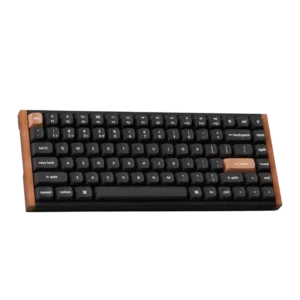
Keychron K2 HE
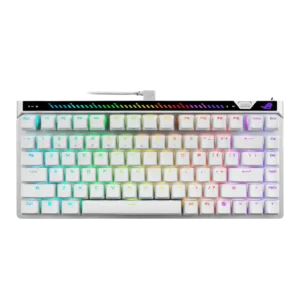
ASUS ROG Falchion Ace 75 HE

Quick verdict

What each product is best for

Choose Keychron K2 HE for wrist rest quality and analog input support.

Choose ASUS ROG Falchion Ace 75 HE for backlight brightness and portability.

Comparison Takeaways

Keychron K2 HE

Where It Has the Edge

  • wrist rest quality is 5.0 vs 1.5. Wrist rest quality was praised when reviewers tried Keychron's optional palm rest, though the need for one also...
  • analog input support is 4.2 vs 1.0. Analog-style depth input was viewed as a useful advanced feature, especially for gamepad-like controls, though one reviewer saw...
  • wireless performance is 3.9 vs 1.9. Wireless performance was mixed: many reviewers had flawless Bluetooth/2.4GHz use, while others saw wake delay or 2.4GHz bugginess.
  • value for money is 4.6 vs 2.9. Value for money was broadly positive because reviewers saw premium Hall effect features and design at a reasonable...

ASUS ROG Falchion Ace 75 HE

Where It Has the Edge

  • backlight brightness is 4.4 vs 2.7. Backlight brightness was positively described as bright and vibrant.
  • portability is 4.4 vs 3.0. Portability was positive due to the included carrying case and on-the-go readiness.
  • reliability is 4.6 vs 3.3. Reliability was positive, with reviewers saying features worked as expected, inputs kept up, and response stayed predictable.
  • media controls is 4.1 vs 2.9. Media controls were useful and clever for some reviewers, but the rear touchbar placement was awkward for another.
Average score
Keychron K2 HE
4.4
ASUS ROG Falchion Ace 75 HE
4.2
wrist rest quality
Keychron K2 HE
5.0

Wrist rest quality was praised when reviewers tried Keychron's optional palm rest, though the need for one also reflected keyboard height.

ASUS ROG Falchion Ace 75 HE
1.5

Wrist-rest sentiment was negative because a reviewer felt the lack of an included wrist rest was stingy at this price.

analog input support
Keychron K2 HE
4.2

Analog-style depth input was viewed as a useful advanced feature, especially for gamepad-like controls, though one reviewer saw it as more novel than essential.

ASUS ROG Falchion Ace 75 HE
1.0

Analog support was a clear weakness because one reviewer specifically noted the lack of analog mode.

wireless performance
Keychron K2 HE
3.9

Wireless performance was mixed: many reviewers had flawless Bluetooth/2.4GHz use, while others saw wake delay or 2.4GHz bugginess.

ASUS ROG Falchion Ace 75 HE
1.9

Wireless performance was a major weakness because the keyboard lacks wireless operation despite premium pricing.

value for money
Keychron K2 HE
4.6

Value for money was broadly positive because reviewers saw premium Hall effect features and design at a reasonable price, even if not cheap.

ASUS ROG Falchion Ace 75 HE
2.9

Value was the main recurring compromise: reviewers liked the keyboard but questioned the premium price and cheaper competition.

ease of switch replacement
Keychron K2 HE
3.8

Switch replacement was possible, but the practical experience was constrained by limited compatible magnetic switch choices.

ASUS ROG Falchion Ace 75 HE
2.2

Ease of switch replacement was weak because third-party replacement is not freely supported.

backlight brightness
Keychron K2 HE
2.7

Backlight brightness split reviewers: some found it dim or redundant on opaque caps, while others praised brighter implementations.

ASUS ROG Falchion Ace 75 HE
4.4

Backlight brightness was positively described as bright and vibrant.

connectivity
Keychron K2 HE
4.5

Connectivity was generally strong across Bluetooth, 2.4GHz, and wired use, though side-port design and occasional wake behavior created caveats.

ASUS ROG Falchion Ace 75 HE
2.9

Connectivity was mixed: wired operation is fast and latency-free, but multiple reviewers missed wireless/battery support.

portability
Keychron K2 HE
3.0

Portability was a weak-to-mixed area because weight and size made the board less travel-friendly despite compact dimensions.

ASUS ROG Falchion Ace 75 HE
4.4

Portability was positive due to the included carrying case and on-the-go readiness.

cable quality
Keychron K2 HE
3.3

Cable impressions were mixed: the braided cable was praised, but several reviewers disliked the short length or side-port constraints.

ASUS ROG Falchion Ace 75 HE
2.0

Cable quality was criticized where evaluated because the L-shaped cable looked awkward in a normal desk orientation.

reliability
Keychron K2 HE
3.3

Reliability was mixed: some reviewers reported no issues or a reliable experience, while others noted wake or 2.4GHz input issues.

ASUS ROG Falchion Ace 75 HE
4.6

Reliability was positive, with reviewers saying features worked as expected, inputs kept up, and response stayed predictable.

media controls
Keychron K2 HE
2.9

Media controls were a recurring weakness because reviewers wanted a knob or dedicated controls, despite remapping and function-row workarounds.

ASUS ROG Falchion Ace 75 HE
4.1

Media controls were useful and clever for some reviewers, but the rear touchbar placement was awkward for another.

layout options
Keychron K2 HE
3.2

Layout options were mixed: the 75% layout kept useful keys, but missing numpad, print screen, or full-size spacing bothered some users.

ASUS ROG Falchion Ace 75 HE
4.4

The 75% layout was broadly liked for keeping function keys, arrows, and productivity-friendly controls while staying compact.

volume control
Keychron K2 HE
2.7

Volume control was criticized mainly through the missing knob and reliance on remapping or function-row controls.

ASUS ROG Falchion Ace 75 HE
3.8

Volume control was useful but mixed because reviewers liked direct control while one wished the roller handled volume more naturally.

latency
Keychron K2 HE
4.0

Latency evidence was mixed: several reviewers saw no noticeable lag, while one measured/characterized performance as not top-tier gaming latency.

ASUS ROG Falchion Ace 75 HE
5.0

Latency feedback was excellent, with reviewers praising the wired connection and minimal signal delay.

ergonomics
Keychron K2 HE
3.3

Ergonomics were mixed: adjustable angles helped some reviewers, but keyboard height caused wrist strain for others.

ASUS ROG Falchion Ace 75 HE
4.0

Ergonomics were mostly praised, but the rear touchbar placement was criticized as awkward by one reviewer.

noise level
Keychron K2 HE
4.2

Noise level was generally acceptable to good, with reviewers describing it as quiet enough or not overly clicky, though not silent.

ASUS ROG Falchion Ace 75 HE
3.5

Noise-level evidence was split: one reviewer praised the lack of rattle and ping, while another called the sound clacky and annoying.

legend visibility
Keychron K2 HE
3.5

Legend visibility depended on version: opaque Special Edition caps drew criticism, while font clarity and shine-through options were praised elsewhere.

ASUS ROG Falchion Ace 75 HE
2.9

Legend and font styling was divisive; reviewers found the futuristic/gamey look a matter of taste.

stabilizer quality
Keychron K2 HE
4.2

Stabilizer quality was mostly good, with several reviewers noting limited rattle or firm larger keys, but some still heard inconsistency.

ASUS ROG Falchion Ace 75 HE
4.8

Stabilizers received a strong score where evaluated, with minimal rattle and a solid feel on larger keys.

acoustics
Keychron K2 HE
4.7

Reviewers frequently liked the K2 HE's deeper, thocky, or satisfying sound, though one called it unadventurous rather than exciting.

ASUS ROG Falchion Ace 75 HE
4.1

Acoustic impressions were mostly positive for controlled, smooth, and better-than-expected sound, though one reviewer found the sound clacky and annoying.

RGB lighting quality
Keychron K2 HE
3.9

RGB lighting quality ranged from bright and attractive to partially blocked by opaque caps, making it version-dependent.

ASUS ROG Falchion Ace 75 HE
4.5

RGB lighting quality was positive, with comments on integration, brightness, evenness, and vibrant presentation.

materials quality
Keychron K2 HE
4.7

Materials quality came through in praise for aluminum, wood, concrete, PBT, and overall premium-feeling construction.

ASUS ROG Falchion Ace 75 HE
4.2

Materials were mostly praised, especially metal plates and premium feel, but one reviewer wanted a fuller metal build at the price.

typing feel
Keychron K2 HE
4.8

Typing feel was overwhelmingly praised, often described as cloud-like, fluid, smooth, or among the best experiences reviewers had used.

ASUS ROG Falchion Ace 75 HE
4.3

Typing feel was generally positive, ranging from controlled and premium to good for a gaming-focused keyboard, though one reviewer found it less premium than expected.

hot-swappable switches
Keychron K2 HE
2.6

Hot-swap support was consistently treated as limited because the board only accepts compatible Hall effect double-rail switches.

ASUS ROG Falchion Ace 75 HE
3.0

Hot-swap sentiment was mixed because the board supports swapping but practical compatibility is limited.

macro customization
Keychron K2 HE
4.7

Macro customization was praised where discussed, especially because macros could be created in Launcher and retained across devices.

ASUS ROG Falchion Ace 75 HE
4.4

Macro customization was supported by Gear Link's settings coverage, including macros and reliable browser-based configuration.

switch feel
Keychron K2 HE
4.9

Switch feel was the standout attribute: reviewers repeatedly described the magnetic switches as smooth, stable, satisfying, and highly responsive.

ASUS ROG Falchion Ace 75 HE
4.6

Reviewers consistently liked the HFX V2/V2X switch feel, calling it smooth, pleasing, light, and well suited to both gaming and typing, with only minor preference differences.

extra gaming features
Keychron K2 HE
4.8

Advanced gaming features were praised as serious tools for competitive players, especially actuation tuning and rapid-trigger behaviors.

ASUS ROG Falchion Ace 75 HE
4.5

Extra gaming features were strongly praised overall, including rapid trigger, 8K polling, physical toggles, and on-board adjustment tools.

key responsiveness
Keychron K2 HE
4.7

Key responsiveness was a major strength, with reviewers repeatedly calling the board fast, highly responsive, or effortless to trigger.

ASUS ROG Falchion Ace 75 HE
5.0

Responsiveness was a major strength, with reviewers describing immediate inputs and especially fast movement behavior.

polling rate
Keychron K2 HE
4.3

Polling rate was considered adequate to good for most users at 1,000Hz, but not class-leading for top competitive gaming.

ASUS ROG Falchion Ace 75 HE
4.6

The high polling rate was treated as a competitive advantage, though one reviewer framed its benefit as most relevant to pros.

compatibility
Keychron K2 HE
4.8

Compatibility was praised for Mac/Windows switching, Linux mentions, and cross-device use, with no major platform problem in scored evidence.

ASUS ROG Falchion Ace 75 HE
4.5

Compatibility was praised in the software context for platform independence across computers.

software quality
Keychron K2 HE
4.4

Software quality was mostly praised for a web-based Launcher that avoids bulky apps, though some reviewers found it less polished than competitors or dependent on USB/web access.

ASUS ROG Falchion Ace 75 HE
4.7

Software was a major upgrade over Armoury Crate, with Gear Link described as reliable, lighter, responsive, and easy to use.

key stability
Keychron K2 HE
4.9

Key stability was repeatedly praised, with reviewers noting little or no wobble from double-rail switches and stabilized larger keys.

ASUS ROG Falchion Ace 75 HE
4.6

Key stability was strong, with reviewers reporting little wobble and a firm, stable board feel.

build quality
Keychron K2 HE
4.9

Build quality was a consistent strength, with reviewers calling it solid, premium, rigid, and well made across editions.

ASUS ROG Falchion Ace 75 HE
4.6

Build quality was a consistent strength, with reviewers calling the board premium, solid, well assembled, and excellent in fit and finish.

rapid trigger support
Keychron K2 HE
4.9

Rapid trigger support was one of the clearest strengths, repeatedly praised for instant reset, gaming movement, and fast repeat inputs.

ASUS ROG Falchion Ace 75 HE
4.7

Rapid Trigger was a core strength across reviews, valued for fast reset behavior and competitive tuning.

switch options
Keychron K2 HE
2.5

Switch options were the most consistent limitation because compatibility is restricted to a small set of linear Gateron double-rail magnetic switches.

ASUS ROG Falchion Ace 75 HE
2.3

Switch option sentiment was weak because reviewers repeatedly noted proprietary or limited magnetic-switch compatibility, which restricts experimentation.

frame rigidity
Keychron K2 HE
4.8

Frame rigidity was praised in the reviews that discussed it, including no deck flex, rigid construction, and ultra-stable typing.

ASUS ROG Falchion Ace 75 HE
5.0

Frame rigidity was excellent, with no flex or looseness reported and a torsion-resistant feel.

typing comfort
Keychron K2 HE
4.3

Typing comfort was usually positive thanks to smooth switches and low fatigue, but height caused discomfort for some reviewers.

ASUS ROG Falchion Ace 75 HE
4.5

Typing comfort was positive, with reviewers mentioning low fatigue and comfortable long-session use.

size and form factor
Keychron K2 HE
4.7

The size and form factor were generally viewed as a good 75% balance, but the compact layout and weight were not ideal for every user.

ASUS ROG Falchion Ace 75 HE
4.6

The form factor was widely praised as a sweet spot between compactness, familiarity, and daily usability.

keycap quality
Keychron K2 HE
4.3

Keycap quality was mostly praised for PBT, OSA shape, and comfort, though a few reviews noted plain styling or material-saving concerns.

ASUS ROG Falchion Ace 75 HE
4.4

Keycaps were mostly praised for PBT durability, texture, feel, and premium impression.

profile management
Keychron K2 HE
4.6

Profile management was positive, with reviewers valuing locally stored profiles and separate typing/gaming setups.

ASUS ROG Falchion Ace 75 HE
4.5

Profile management was praised for cloud saving and usefulness across multiple systems.

actuation consistency
Keychron K2 HE
4.7

The Hall effect switches were repeatedly described as smooth and consistent, with only mild stiffness noted in one review.

ASUS ROG Falchion Ace 75 HE
4.8

Actuation consistency was praised through even resistance, precise inputs, and consistent key behavior.

RGB customization
Keychron K2 HE
4.6

RGB customization was praised for plentiful modes and settings, even when lighting visibility itself was not always ideal.

ASUS ROG Falchion Ace 75 HE
4.5

RGB customization was praised through customizable lighting and software control.

sound dampening
Keychron K2 HE
4.8

Sound dampening was praised for muted, premium, thocky sound from internal foam, silicone, and dampening layers.

ASUS ROG Falchion Ace 75 HE
4.7

Sound dampening was praised for reducing ping, rattle, and resonance across several reviews.

durability
Keychron K2 HE
4.8

Durability was inferred positively from sturdy construction, Hall effect longevity, and even an accidental drop test, with no major durability complaint.

ASUS ROG Falchion Ace 75 HE
4.7

Durability evidence centered on PBT keycaps resisting gloss and holding up after prolonged use.

desk space efficiency
Keychron K2 HE
4.6

The 75% layout was praised for saving desk space while retaining essentials, though some users missed larger layouts.

ASUS ROG Falchion Ace 75 HE
4.5

Desk space efficiency was positive where discussed, with the smaller profile taking up less space.

design aesthetics
Keychron K2 HE
4.8

Design aesthetics earned broad praise for wood accents, a premium office-friendly look, and a less-gamer visual identity.

ASUS ROG Falchion Ace 75 HE
4.8

Design aesthetics were strongly positive, especially for the clean, modern, futuristic look.

gaming performance
Keychron K2 HE
4.7

Gaming performance was broadly positive, especially for responsiveness, rapid trigger, strafing, and clean repeated inputs, though pure esports comparisons were more guarded.

ASUS ROG Falchion Ace 75 HE
4.7

Gaming performance was strongly praised for speed, fluidity, precision, and competitive FPS usefulness.

customization options
Keychron K2 HE
4.8

Customization was one of the strongest themes, with reviewers praising per-key actuation, remapping, lighting, macros, and Hall effect controls.

ASUS ROG Falchion Ace 75 HE
4.8

Customization was a strong point, with actuation, rapid trigger, RGB, key assignments, and browser-based tuning repeatedly praised.

battery life
Keychron K2 HE
4.4

Battery life was generally positive, ranging from several days to multiple weeks depending on RGB and wireless settings, with a few average assessments.

ASUS ROG Falchion Ace 75 HENo score yet
key spacing
Keychron K2 HE
3.4

Key spacing was mixed, with smaller or tightly packed keys bothering some reviewers before they adjusted.

ASUS ROG Falchion Ace 75 HENo score yet
onboard memory
Keychron K2 HE
5.0

Onboard memory was praised because mappings or settings stayed on the keyboard and transferred across devices.

ASUS ROG Falchion Ace 75 HENo score yet
per-key lighting control
Keychron K2 HE
2.0

Per-key lighting control was specifically criticized in one review for not supporting individual key color selection.

ASUS ROG Falchion Ace 75 HENo score yet