- Worse: feel and sound The reviewer preferred the K2 HE's feel and sound over a modified Corsair K65 Plus Wireless.
Keychron K2 HE Review
Bottom Line
Choose the Keychron K2 HE if you want a stylish 75% Hall effect keyboard with smooth typing, rapid-trigger gaming, and deep web customization. Skip it if you need tactile switch variety, a numpad, brighter shine-through legends, or top-tier esports latency.
Best for users who want one keyboard for serious typing and responsive gaming, especially if they value Hall effect actuation tuning, a compact 75% layout, and a premium office-friendly look.
Not ideal for users who need a numpad, broad tactile/clicky switch swapping, dedicated media hardware, the brightest shine-through legends, or the absolute lowest competitive latency.
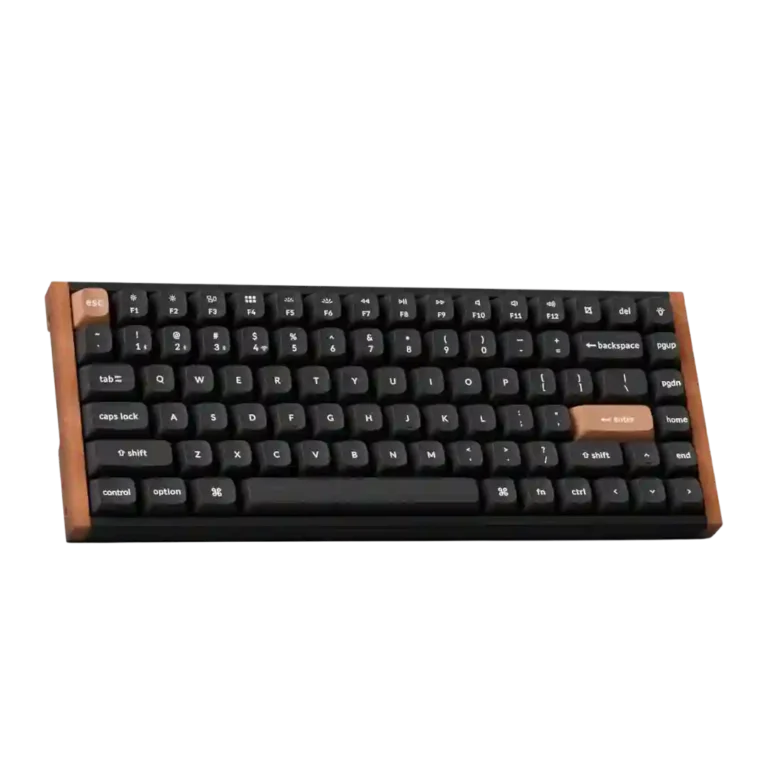
The Keychron K2 HE lands as a polished middle ground between gaming keyboard speed and workday-friendly refinement. Across the reviews, its biggest wins are smooth Hall effect switches, a premium wood-accented design, strong build quality, and unusually deep browser-based customization. The main tradeoff is specialization: the board feels advanced and flexible, but its switch ecosystem is narrow, the tall 75% body can strain some wrists, and lighting or media controls depend heavily on version and remapping. Wireless use is broadly useful, yet a few reviewers noticed wake or 2.4GHz quirks, so the best experience depends on whether typing feel, aesthetics, and actuation tuning matter more than maximal esports latency or full-size convenience.
Compared in Reviews
Products reviewers directly compared with this model, grouped into quick takeaways.
- Worse: multiple actuation zones The reviewer said the K2 HE goes beyond the Corsair K70 Max's dual-actuation approach.
- Alternative: layout size The Keychron Q1 HE was presented as a roomier alternative for users with big hands.
Feature Scorecards
Summary
51 reviewed features- Very positive 4.5-5.0 51% 26 features
- Positive 3.5-4.4 25% 13 features
- Neutral 2.5-3.4 22% 11 features
- Negative 1.5-2.4 2% 1 feature
- Very negative below 1.5 0% 0 features
Pros
-
Onboard memory was praised because mappings or settings stayed on the keyboard and transferred across devices.
-
Wrist rest quality was praised when reviewers tried Keychron's optional palm rest, though the need for one also reflected keyboard height.
-
Rapid trigger support was one of the clearest strengths, repeatedly praised for instant reset, gaming movement, and fast repeat inputs.
-
Key stability was repeatedly praised, with reviewers noting little or no wobble from double-rail switches and stabilized larger keys.
-
Build quality was a consistent strength, with reviewers calling it solid, premium, rigid, and well made across editions.
-
Switch feel was the standout attribute: reviewers repeatedly described the magnetic switches as smooth, stable, satisfying, and highly responsive.
-
Design aesthetics earned broad praise for wood accents, a premium office-friendly look, and a less-gamer visual identity.
-
Typing feel was overwhelmingly praised, often described as cloud-like, fluid, smooth, or among the best experiences reviewers had used.
-
Frame rigidity was praised in the reviews that discussed it, including no deck flex, rigid construction, and ultra-stable typing.
-
Durability was inferred positively from sturdy construction, Hall effect longevity, and even an accidental drop test, with no major durability complaint.
-
Compatibility was praised for Mac/Windows switching, Linux mentions, and cross-device use, with no major platform problem in scored evidence.
-
Advanced gaming features were praised as serious tools for competitive players, especially actuation tuning and rapid-trigger behaviors.
-
Customization was one of the strongest themes, with reviewers praising per-key actuation, remapping, lighting, macros, and Hall effect controls.
-
Sound dampening was praised for muted, premium, thocky sound from internal foam, silicone, and dampening layers.
-
Macro customization was praised where discussed, especially because macros could be created in Launcher and retained across devices.
-
The size and form factor were generally viewed as a good 75% balance, but the compact layout and weight were not ideal for every user.
-
Key responsiveness was a major strength, with reviewers repeatedly calling the board fast, highly responsive, or effortless to trigger.
-
Materials quality came through in praise for aluminum, wood, concrete, PBT, and overall premium-feeling construction.
-
Gaming performance was broadly positive, especially for responsiveness, rapid trigger, strafing, and clean repeated inputs, though pure esports comparisons were more guarded.
-
The Hall effect switches were repeatedly described as smooth and consistent, with only mild stiffness noted in one review.
-
Reviewers frequently liked the K2 HE's deeper, thocky, or satisfying sound, though one called it unadventurous rather than exciting.
-
Value for money was broadly positive because reviewers saw premium Hall effect features and design at a reasonable price, even if not cheap.
-
Profile management was positive, with reviewers valuing locally stored profiles and separate typing/gaming setups.
-
RGB customization was praised for plentiful modes and settings, even when lighting visibility itself was not always ideal.
-
The 75% layout was praised for saving desk space while retaining essentials, though some users missed larger layouts.
-
Connectivity was generally strong across Bluetooth, 2.4GHz, and wired use, though side-port design and occasional wake behavior created caveats.
-
Battery life was generally positive, ranging from several days to multiple weeks depending on RGB and wireless settings, with a few average assessments.
-
Software quality was mostly praised for a web-based Launcher that avoids bulky apps, though some reviewers found it less polished than competitors or dependent on USB/web access.
-
Typing comfort was usually positive thanks to smooth switches and low fatigue, but height caused discomfort for some reviewers.
-
Polling rate was considered adequate to good for most users at 1,000Hz, but not class-leading for top competitive gaming.
-
Keycap quality was mostly praised for PBT, OSA shape, and comfort, though a few reviews noted plain styling or material-saving concerns.
-
Analog-style depth input was viewed as a useful advanced feature, especially for gamepad-like controls, though one reviewer saw it as more novel than essential.
-
Stabilizer quality was mostly good, with several reviewers noting limited rattle or firm larger keys, but some still heard inconsistency.
-
Noise level was generally acceptable to good, with reviewers describing it as quiet enough or not overly clicky, though not silent.
-
Latency evidence was mixed: several reviewers saw no noticeable lag, while one measured/characterized performance as not top-tier gaming latency.
-
RGB lighting quality ranged from bright and attractive to partially blocked by opaque caps, making it version-dependent.
-
Wireless performance was mixed: many reviewers had flawless Bluetooth/2.4GHz use, while others saw wake delay or 2.4GHz bugginess.
-
Switch replacement was possible, but the practical experience was constrained by limited compatible magnetic switch choices.
-
Legend visibility depended on version: opaque Special Edition caps drew criticism, while font clarity and shine-through options were praised elsewhere.
Cons
-
Key spacing was mixed, with smaller or tightly packed keys bothering some reviewers before they adjusted.
-
Cable impressions were mixed: the braided cable was praised, but several reviewers disliked the short length or side-port constraints.
-
Ergonomics were mixed: adjustable angles helped some reviewers, but keyboard height caused wrist strain for others.
-
Reliability was mixed: some reviewers reported no issues or a reliable experience, while others noted wake or 2.4GHz input issues.
-
Layout options were mixed: the 75% layout kept useful keys, but missing numpad, print screen, or full-size spacing bothered some users.
-
Portability was a weak-to-mixed area because weight and size made the board less travel-friendly despite compact dimensions.
-
Media controls were a recurring weakness because reviewers wanted a knob or dedicated controls, despite remapping and function-row workarounds.
-
Backlight brightness split reviewers: some found it dim or redundant on opaque caps, while others praised brighter implementations.
-
Volume control was criticized mainly through the missing knob and reliance on remapping or function-row controls.
-
Hot-swap support was consistently treated as limited because the board only accepts compatible Hall effect double-rail switches.
-
Switch options were the most consistent limitation because compatibility is restricted to a small set of linear Gateron double-rail magnetic switches.
-
Per-key lighting control was specifically criticized in one review for not supporting individual key color selection.
Compared With Category Average
Compared with other Gaming Keyboards, this product is above average in wrist rest quality, rapid trigger support, value for money, below average in per-key lighting control, backlight brightness, volume control.
Summary
8 compared features- Above average 0.4+ pts higher 63% 5 features
- Same as average within 0.3 pts 0% 0 features
- Below average 0.4+ pts lower 38% 3 features
| Attribute | This product | Category average | Difference |
|---|---|---|---|
| per-key lighting control | 2.0 | 4.1 | -2.1 |
| wrist rest quality | 5.0 | 3.3 | +1.7 |
| rapid trigger support | 4.9 | 3.7 | +1.3 |
| value for money | 4.6 | 3.7 | +1.0 |
| backlight brightness | 2.7 | 4.0 | -1.3 |
| volume control | 2.7 | 3.8 | -1.1 |
| analog input support | 4.2 | 3.3 | +1.0 |
| compatibility | 4.8 | 3.8 | +1.0 |
FAQ
Is the Keychron K2 HE good for typing?
Yes. Reviewers repeatedly praised its smooth magnetic switches, fluid typing feel, and low fatigue, though a few found the tall body uncomfortable without a wrist rest.
Is it good for gaming?
Yes for most gamers. Rapid trigger, adjustable actuation, and responsive keys were praised, but reviewers who focused on esports noted it is not the absolute latency leader.
How is the software?
The Keychron Launcher web app was mostly praised for avoiding bulky downloads and making actuation, remaps, lighting, profiles, and macros accessible. Some reviewers still found it less polished than Wooting-style software or disliked needing USB for changes.
Are the switches easy to swap?
They are hot-swappable, but only within a narrow set of compatible Gateron Double-Rail magnetic switches. Reviewers treated this as a real limitation for enthusiasts who want tactile or clicky options.
How is the battery life?
Most reviews were positive, describing days to weeks of use depending on RGB and connection mode. A few called it average rather than exceptional among wireless keyboards.
What are the main drawbacks?
The most common drawbacks were limited switch options, tall ergonomics for some wrists, missing dedicated knob/media controls, version-dependent RGB usefulness, and occasional wireless wake quirks.
Sample Expert Reviews We Analyzed
These are a few of the reviews included in our analysis.
Video Reviews
- Review score
- 5.0/5
- Review score
- 4.7/5
- Review score
- 4.3/5
Article Reviews
- Review score
- 4.3/5
Consider This Instead
If you want better per-key lighting control
Choose Logitech G915 Lightspeed. It scores 5.0 vs 2.0 for per-key lighting control, with a 4.2 overall score.
If you want better hot-swappable switches
Choose be quiet! Dark Mount. It scores 5.0 vs 2.6 for hot-swappable switches, with a 4.0 overall score.
If you want better switch options
Choose MonsGeek M1 V5 HE. It scores 4.8 vs 2.5 for switch options, with a 4.3 overall score.
If you want better volume control
Choose Keychron Q6 HE. It scores 5.0 vs 2.7 for volume control, with a 4.4 overall score.
Overall Top Gaming Keyboards Alternatives
Good if you want a premium 96% Hall Effect keyboard for work and gaming with excellent build, sound, and customization. Skip it if you need cheaper esports-first speed, 8,000Hz polling,...
Pros: cable quality, typing comfort
Cons: portability, switch options

Good if you want a premium full-size Hall Effect keyboard with smooth switches, quiet sound, and deep customization. Skip it if you need a portable, budget-friendly board or broad switch...
Pros: key stability, frame rigidity
Cons: portability, switch options

Good if you want a compact Hall Effect keyboard with smooth typing, strong gaming response, bright RGB, and good value. Skip it if you need polished software, quiet heavy presses,...
Pros: desk space efficiency, layout options
Cons: compatibility
Good if you want a premium, quiet TKL Hall Effect keyboard for typing and gaming. Skip it if price, portability, 8,000Hz polling, or broad switch choice matters most.
Pros: build quality, extra gaming features
Cons: switch options, hot-swappable switches