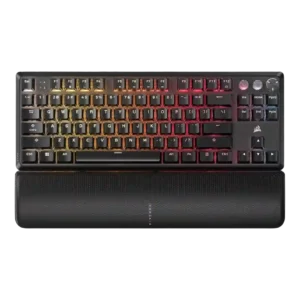
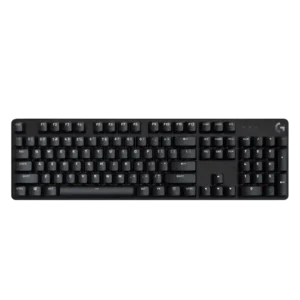
Compare Corsair K70 PRO vs Logitech G413 SE

P1 Corsair K70 PRO
P2 Logitech G413 SE

Comparison Takeaways

Corsair K70 PRO

Where It Has the Edge

  • onboard memory is 4.9 vs 1.0. Onboard memory was repeatedly praised for storing profiles, lighting layers, macros, and settings directly on the keyboard.
  • per-key lighting control is 5.0 vs 1.3. Per-key lighting control had limited but positive evidence, with one review emphasizing individual key color programming as part...
  • switch options is 4.4 vs 1.0. Switch selection was a consistent strength, with reviewers praising the range of Cherry MX options, though one review...
  • profile management is 4.9 vs 1.5. Profile management was a strength, with repeated praise for onboard profiles, game/typing setups, and saved settings without running...

Logitech G413 SE

Where It Has the Edge

  • sound dampening is 4.3 vs 2.5. Sound dampening receives positive limited evidence from reviewers who note little reverberation or no echoing from the chassis.
  • desk space efficiency is 4.7 vs 3.2. Desk space efficiency is a strength, especially for TKL users and reviewers who praised the extra mouse room...
  • size and form factor is 4.3 vs 3.7. Size and form factor are broadly praised, with reviewers emphasizing compactness, low wasted space, and lightweight designs.
  • key spacing is 4.5 vs 4.0. Key spacing receives limited positive evidence from one reviewer who found it comfortable for both typing and precision...
Average score
Product 1: Corsair K70 PRO
3.9
Product 2: Logitech G413 SE
2.9
acoustics
Product 1: Corsair K70 PRO
2.7

Acoustics were one of the most mixed areas, with praise for low ping in one review but repeated complaints about hollow sound, harsh clacking, or ping.

Product 2: Logitech G413 SE
2.3

Acoustics are inconsistent: some reviewers dislike the dull thud or unpleasant sound, while another says the keyboard avoids annoying echo.

actuation consistency
Product 1: Corsair K70 PRO
4.0

Actuation consistency was praised in mechanical-switch testing, but mixed Hall-effect and mechanical switch coverage created a more uneven feel in one TKL review.

Product 2: Logitech G413 SE
2.0

Actuation consistency is a concern in the Trusted Reviews transcript, which notes different keys feeling uneven in bump strength.

backlight brightness
Product 1: Corsair K70 PRO
4.1

Backlight brightness evidence was limited but positive, with reviewers finding it visible without becoming distracting.

Product 2: Logitech G413 SE
4.5

Backlight brightness is praised where discussed, with reviewers calling it bright, useful in the dark, or easy to see even in a sunlit room.

battery life
Product 1: Corsair K70 PRO
2.0

Battery life had limited evidence from the Mini Wireless review, where RGB-on runtime was criticized as poor.

Product 2: Logitech G413 SE
No score yet
build quality
Product 1: Corsair K70 PRO
4.4

Build quality was mostly praised for solidity and premium feel, though some reviews flagged simplicity, ping-related build concerns, or cost-cut corners.

Product 2: Logitech G413 SE
4.5

Build quality is consistently strong, with reviewers repeatedly praising the sturdy aluminum-topped construction and premium feel for the price.

built-in calculator
Product 1: Corsair K70 PRO
No score yet
Product 2: Logitech G413 SE
4.0

The built-in calculator shortcut receives limited positive evidence as part of the useful Fn-layer shortcuts.

cable quality
Product 1: Corsair K70 PRO
4.5

Cable quality was a clear positive, with reviewers liking detachable USB-C, premium braided feel, useful length, and easier transport.

Product 2: Logitech G413 SE
1.9

Cable quality is generally weak, with reviewers criticizing the standard rubber, non-detachable, non-braided, or dangling cable.

compatibility
Product 1: Corsair K70 PRO
4.3

Compatibility was mostly positive for PC, Mac, Linux, Xbox, and multi-device use, though PS5 support was criticized elsewhere in the source.

Product 2: Logitech G413 SE
1.3

Compatibility is scored narrowly around G Hub support, where multiple reviewers call out the keyboard as incompatible or unsupported.

connectivity
Product 1: Corsair K70 PRO
3.6

Connectivity was praised for easy wired plug-and-play and USB-C, but several reviewers disliked the lack of wireless choice.

Product 2: Logitech G413 SE
1.8

Connectivity is limited by the hard-wired, non-detachable cable, which reviewers disliked for desk setup flexibility.

customization options
Product 1: Corsair K70 PRO
3.5

Customization options were strong overall, especially on Hall-effect TKL models and iCUE, but some reviews saw limits from mixed switch coverage or brand software.

Product 2: Logitech G413 SE
1.7

Customization options are broadly weak, with reviewers repeatedly saying there is little or nothing to customize beyond basic shortcuts or lighting presets.

design aesthetics
Product 1: Corsair K70 PRO
4.4

Design aesthetics were generally praised for clean, simple, sleek styling, though a few reviewers found brushed aluminum or generic gaming looks less exciting.

Product 2: Logitech G413 SE
4.5

Design aesthetics are a strong point, with reviewers repeatedly praising the clean, black, professional, compact, or sexy appearance.

desk space efficiency
Product 1: Corsair K70 PRO
3.2

Desk space efficiency was context-dependent; stable rubber feet helped, but some reviewers noted sliding feet or full-size bulk.

Product 2: Logitech G413 SE
4.7

Desk space efficiency is a strength, especially for TKL users and reviewers who praised the extra mouse room or no-waste footprint.

durability
Product 1: Corsair K70 PRO
4.9

Durability evidence centered on PBT keycaps and legends, which reviewers expected to resist wear, shine, and fading.

Product 2: Logitech G413 SE
4.7

Durability evidence is strongly positive but concentrated in one review that emphasizes heat and wear resistance over time.

ease of switch replacement
Product 1: Corsair K70 PRO
1.5

Ease of switch replacement was criticized where switches were not hot-swappable, requiring soldering or whole-keyboard replacement for failures.

Product 2: Logitech G413 SE
1.3

Ease of switch replacement is poor because reviewers say replacing switches requires tools, is not supported, or is a drawback.

ergonomics
Product 1: Corsair K70 PRO
3.4

Ergonomics were mixed, with comfortable angle options and wrist slopes offset by palm-rest interference in one review.

Product 2: Logitech G413 SE
3.9

Ergonomics are mixed to positive, with some praise for comfort and adjustable angles but lingering concern about wrist support.

extra gaming features
Product 1: Corsair K70 PRO
4.1

Extra gaming features were useful to many reviewers, especially Tournament/Game Mode, though some called Tournament Mode niche or unnecessary.

Product 2: Logitech G413 SE
2.0

Extra gaming features are one of the weakest areas, with repeated criticism of missing bells and whistles, although one review liked the anti-ghosting basics.

frame rigidity
Product 1: Corsair K70 PRO
4.2

Frame rigidity was usually strong, with many reviewers noting little or no flex, though one review found more flex than expected.

Product 2: Logitech G413 SE
4.6

Frame rigidity is a clear strength, with reviewers repeatedly noting little to no flex and solid construction.

gaming performance
Product 1: Corsair K70 PRO
4.7

Gaming performance was one of the strongest areas, with many reviewers calling the keyboard fast, accurate, responsive, and excellent in real gameplay.

Product 2: Logitech G413 SE
3.4

Gaming performance is mixed to moderately positive: some reviewers say it keeps up and registers inputs well, while others criticize basic rollover and missing gaming features.

hot-swappable switches
Product 1: Corsair K70 PRO
2.1

Hot-swappable switch support was a major split: some models finally offered it, while many Pro/RGB Pro reviews criticized the lack of hot-swap repairability.

Product 2: Logitech G413 SE
1.3

Hot-swappable switch support is weak because reviewers point out the switches are not hot-swappable or cannot be swapped.

keycap quality
Product 1: Corsair K70 PRO
4.4

Keycap quality was usually praised for PBT material, durability, texture, and legends, though one TKL review criticized ABS caps as cheap.

Product 2: Logitech G413 SE
4.3

Keycap quality is one of the strongest areas, with repeated praise for PBT texture and durability, although some reviewers dislike the legends or lack of double-shot clarity.

key responsiveness
Product 1: Corsair K70 PRO
4.9

Key responsiveness scored strongly across gaming-focused reviews, with repeated praise for fast, precise inputs and reliable command registration.

Product 2: Logitech G413 SE
4.3

Responsiveness is generally a bright spot, with reviewers saying the board kept up, felt nippy, gave quick feedback, or registered inputs accurately.

key spacing
Product 1: Corsair K70 PRO
4.0

Key spacing had limited evidence, with one review saying the keys were well spaced despite some wobble.

Product 2: Logitech G413 SE
4.5

Key spacing receives limited positive evidence from one reviewer who found it comfortable for both typing and precision gameplay.

key stability
Product 1: Corsair K70 PRO
3.5

Key stability had limited evidence; the one scored review found some wobble but said it was not distracting in normal use.

Product 2: Logitech G413 SE
4.0

Key stability receives limited positive evidence from one reviewer who found only slight wobble and did not consider it worrying.

latency
Product 1: Corsair K70 PRO
4.2

Latency impressions were positive in several gaming reviews, but some reviewers said the measurable gains were too small for humans to feel.

Product 2: Logitech G413 SE
4.1

Latency-related evidence is positive but limited, with reviewers describing the keyboard as keeping up and parsing commands quickly.

layout options
Product 1: Corsair K70 PRO
4.2

Layout options evidence was positive but limited, covering useful full-size gaming benefits and alternative layout support through software.

Product 2: Logitech G413 SE
3.4

Layout options are mixed: one reviewer criticizes the TKL layout omissions, while another praises the choice between full-size and TKL versions.

legend visibility
Product 1: Corsair K70 PRO
4.1

Legend visibility was mostly positive thanks to crisp fonts and durable legends, but a few reviews disliked indicator visibility or reduced RGB shine-through.

Product 2: Logitech G413 SE
2.6

Legend visibility is split: one reviewer found the legends nearly invisible without lighting, while others liked the clean font or noted dark-room limitations for secondary functions.

macro customization
Product 1: Corsair K70 PRO
4.5

Macro customization was praised for easy recording, remapping, and programmable keys, though one reviewer wished for dedicated macro keys.

Product 2: Logitech G413 SE
1.3

Macro customization is consistently weak because reviewers repeatedly mention the lack of macros, programming, or built-in macro controls.

materials quality
Product 1: Corsair K70 PRO
4.8

Materials quality was praised where reviewed, especially for brushed aluminum, solid plastic, and a premium-feeling chassis.

Product 2: Logitech G413 SE
3.0

Materials quality is mixed: one review praises PBT and aluminum, while another criticizes cheap-feeling materials despite those components.

media controls
Product 1: Corsair K70 PRO
4.4

Media controls were mostly praised for convenience, dedicated buttons, and immediate usefulness, though one TKL review found the buttons unresponsive.

Product 2: Logitech G413 SE
2.7

Media controls are mixed: some reviewers appreciate function-layer controls, while others criticize the lack of dedicated media keys.

noise level
Product 1: Corsair K70 PRO
3.1

Noise level depended heavily on switch choice and board acoustics, with quiet Red-switch praise balanced by noisy, clicky, and ping-heavy complaints.

Product 2: Logitech G413 SE
2.5

Noise level trends negative to mixed: several reviewers say the board is loud or clicky enough to disturb others, though one says it is not very loud.

onboard memory
Product 1: Corsair K70 PRO
4.9

Onboard memory was repeatedly praised for storing profiles, lighting layers, macros, and settings directly on the keyboard.

Product 2: Logitech G413 SE
1.0

Onboard memory is criticized by one reviewer because lighting settings reset without built-in memory.

passthrough features
Product 1: Corsair K70 PRO
2.5

Passthrough features were a weakness, with reviewers missing built-in USB passthrough from earlier or competing keyboards.

Product 2: Logitech G413 SE
1.6

Passthrough features are a repeated omission, with several reviewers criticizing the loss or lack of USB passthrough.

per-key lighting control
Product 1: Corsair K70 PRO
5.0

Per-key lighting control had limited but positive evidence, with one review emphasizing individual key color programming as part of the keyboard’s main appeal.

Product 2: Logitech G413 SE
1.3

Per-key lighting control is criticized because one review specifically says players cannot color important keys such as WASD.

polling rate
Product 1: Corsair K70 PRO
2.9

The 8,000Hz polling rate divided reviewers: some noticed benefits in gaming, while many called it unnoticeable, unnecessary, or only marginally useful.

Product 2: Logitech G413 SE
No score yet
portability
Product 1: Corsair K70 PRO
4.1

Portability evidence was positive when detachable cables, onboard profiles, or lighter TKL construction made travel or moving easier.

Product 2: Logitech G413 SE
3.8

Portability is mixed: reviewers like the compact, light TKL body, but one reviewer dislikes the attached cable for packing.

profile management
Product 1: Corsair K70 PRO
4.9

Profile management was a strength, with repeated praise for onboard profiles, game/typing setups, and saved settings without running software.

Product 2: Logitech G413 SE
1.5

Profile management receives negative evidence from one reviewer who says there is no way to create profiles.

rapid trigger support
Product 1: Corsair K70 PRO
4.8

Rapid trigger support was treated as a real competitive feature, especially for Hall-effect TKL models, though reviewers also noted the risk of accidental inputs.

Product 2: Logitech G413 SE
No score yet
reliability
Product 1: Corsair K70 PRO
4.8

Reliability was strong in full-size reviews, with praise for no dropped keystrokes or lag, though one TKL review noted early system-specific issues.

Product 2: Logitech G413 SE
4.5

Reliability has limited positive evidence from one reviewer who says the new keys avoid the double-typing issue.

RGB customization
Product 1: Corsair K70 PRO
4.6

RGB customization was a major strength, with reviewers praising iCUE control, layers, profiles, individual color control, and broad lighting flexibility.

Product 2: Logitech G413 SE
1.6

RGB customization is weak overall because reviewers repeatedly note the lack of RGB, configurable colors, or programmable lighting.

RGB lighting quality
Product 1: Corsair K70 PRO
4.4

RGB lighting quality was praised for vivid lighting, accurate whites, strong reflections, and daytime visibility, with one Mini Wireless review finding LEDs dim.

Product 2: Logitech G413 SE
3.2

Lighting quality is mixed: reviewers often like the clean white lighting, but several criticize limited white-only modes, distracting patterns, or lack of richer lighting behavior.

size and form factor
Product 1: Corsair K70 PRO
3.7

Size and form factor evidence was mixed: some liked the standard full-size layout, while others preferred smaller boards.

Product 2: Logitech G413 SE
4.3

Size and form factor are broadly praised, with reviewers emphasizing compactness, low wasted space, and lightweight designs.

software quality
Product 1: Corsair K70 PRO
4.1

Software quality was generally positive, with iCUE praised for depth and control, though some reviewers found it confusing, heavy, or occasionally frustrating.

Product 2: Logitech G413 SE
1.6

Software quality is a repeated weakness because the board lacks G Hub support or meaningful software-based customization.

sound dampening
Product 1: Corsair K70 PRO
2.5

Sound dampening drew criticism when silicone layers or internal design failed to control ping, though one TKL review said silicone helped.

Product 2: Logitech G413 SE
4.3

Sound dampening receives positive limited evidence from reviewers who note little reverberation or no echoing from the chassis.

stabilizer quality
Product 1: Corsair K70 PRO
3.0

Stabilizer quality was mixed: some reviews found little rattle or a strong spacebar, while others complained about ping, rattle, or inconsistent lube.

Product 2: Logitech G413 SE
2.6

Stabilizer quality is split, with one reviewer complaining about ticking stabilizers and another saying the spacebar had no wobble.

switch feel
Product 1: Corsair K70 PRO
4.0

Reviewers generally liked the Cherry MX and Hall-effect switch feel, praising smoothness and responsiveness, though some called Speed switches too sensitive, mixed switches distracting, or certain switches rough.

Product 2: Logitech G413 SE
2.8

Switch feel is the most divisive core trait: several reviewers called the switches stiff, clunky, mushy, or terrible, while a smaller set found them smooth, tactile, or enjoyable.

switch options
Product 1: Corsair K70 PRO
4.4

Switch selection was a consistent strength, with reviewers praising the range of Cherry MX options, though one review noted that some versions offered fewer variants.

Product 2: Logitech G413 SE
1.0

Switch options are very limited, with one reviewer criticizing the board for effectively offering only brown-style switches.

typing comfort
Product 1: Corsair K70 PRO
4.5

Typing comfort was mostly positive when reviewers discussed comfortable keycaps, wrist support, and long typing sessions.

Product 2: Logitech G413 SE
3.2

Typing comfort is highly split: some reviewers find the keyboard satisfying or comfortable, while others report fatigue, stiffness, or poor typing comfort.

typing feel
Product 1: Corsair K70 PRO
3.9

Typing feel ranged from excellent and breezy to merely adequate or underwhelming, with sound and switch choice strongly shaping the experience.

Product 2: Logitech G413 SE
2.7

Typing feel is mixed: positive reviews describe a satisfying, responsive feel, but several reviewers describe mushiness, friction, or dull feedback.

value for money
Product 1: Corsair K70 PRO
3.8

Value for money was heavily mixed: many reviewers justified the premium price, while others called it high, only reasonable, or poor against alternatives.

Product 2: Logitech G413 SE
2.9

Value for money is sharply split but leans negative overall: several reviewers say it is overpriced or hard to recommend, while others call it reasonable or affordable.

volume control
Product 1: Corsair K70 PRO
4.8

Volume control was a standout positive, with reviewers repeatedly praising smooth, grippy, accurate, tactile, or notchy rollers and knobs.

Product 2: Logitech G413 SE
3.5

Volume control is mildly positive where mentioned, because reviewers note Fn-layer volume controls, but not dedicated hardware controls.

wireless performance
Product 1: Corsair K70 PRO
2.9

Wireless performance was mostly a limitation for wired models, though the Mini Wireless evidence reported no wireless signal issues.

Product 2: Logitech G413 SE
No score yet
wrist rest quality
Product 1: Corsair K70 PRO
3.9

Wrist rest quality varied widely, from very comfortable and secure to gross-feeling, loose, or intrusive depending on reviewer and model.

Product 2: Logitech G413 SE
1.7

Wrist rest quality scores low because reviewers repeatedly describe the missing wrist rest as disappointing or uncomfortable.