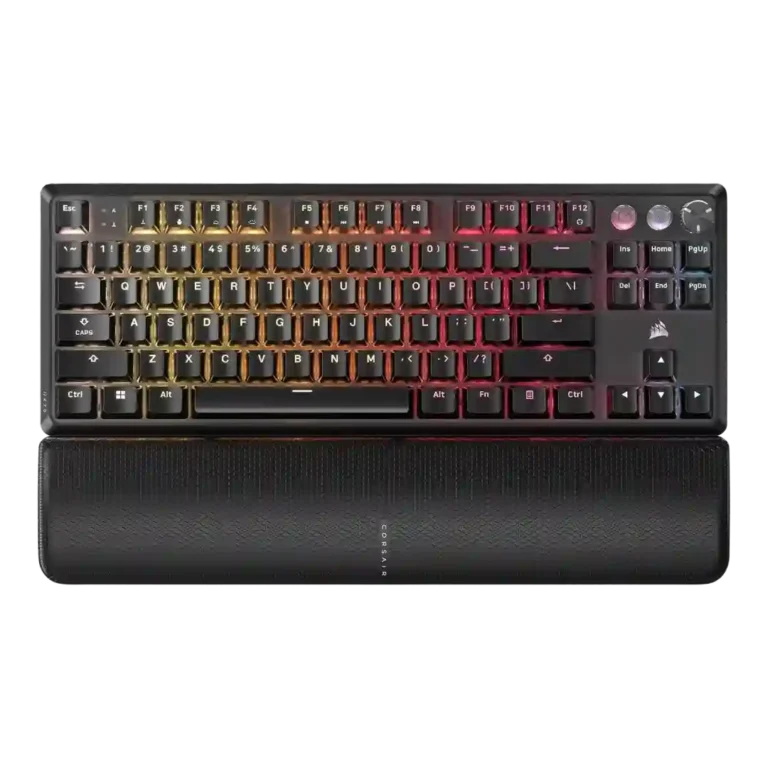
Choose the Corsair K70 PRO for fast wired gaming, deep RGB, sturdy construction, and profiles. Skip it if you need wireless freedom, quiet acoustics, hot-swap repairability, or a lower price.
Best for
Best for wired competitive gamers and Corsair/iCUE users who want fast inputs, onboard profiles, strong RGB control, media controls, and a sturdy full-size or TKL board.
Not for
Not ideal for buyers who prioritize wireless freedom, quiet typing acoustics, full hot-swap repairability, low pricing, or consistent Hall-effect coverage across every key.
Verdict
Across the supplied reviews, the Corsair K70 PRO family lands as a performance-first gaming keyboard with strong build impressions, flexible RGB, useful profile storage, and quick, responsive key input. Reviewers repeatedly liked the aluminum-heavy feel, media controls, volume wheels, PBT keycaps, and iCUE customization, and gaming performance was one of the strongest points. The tradeoff is that several reviewers found the premium price hard to ignore, while the 8,000Hz polling was often described as technically impressive but hard to feel. Acoustic complaints also recur: ping, rattly stabilizers, hollow sound, and uneven sound dampening show up across multiple reviews. The Hall-effect TKL evidence adds rapid trigger strength, but also criticism for mixed switch coverage and limited hot-swap repair flexibility.
Gaming performance was one of the strongest areas, with many reviewers calling the keyboard fast, accurate, responsive, and excellent in real gameplay.
RGB customization was a major strength, with reviewers praising iCUE control, layers, profiles, individual color control, and broad lighting flexibility.
Rapid trigger support was treated as a real competitive feature, especially for Hall-effect TKL models, though reviewers also noted the risk of accidental inputs.
Build quality was mostly praised for solidity and premium feel, though some reviews flagged simplicity, ping-related build concerns, or cost-cut corners.
Design aesthetics were generally praised for clean, simple, sleek styling, though a few reviewers found brushed aluminum or generic gaming looks less exciting.
RGB lighting quality was praised for vivid lighting, accurate whites, strong reflections, and daytime visibility, with one Mini Wireless review finding LEDs dim.
Switch selection was a consistent strength, with reviewers praising the range of Cherry MX options, though one review noted that some versions offered fewer variants.
Per-key lighting control had limited but positive evidence, with one review emphasizing individual key color programming as part of the keyboard’s main appeal.
Software quality was generally positive, with iCUE praised for depth and control, though some reviewers found it confusing, heavy, or occasionally frustrating.
Legend visibility was mostly positive thanks to crisp fonts and durable legends, but a few reviews disliked indicator visibility or reduced RGB shine-through.
Reviewers generally liked the Cherry MX and Hall-effect switch feel, praising smoothness and responsiveness, though some called Speed switches too sensitive, mixed switches distracting, or certain switches rough.
Actuation consistency was praised in mechanical-switch testing, but mixed Hall-effect and mechanical switch coverage created a more uneven feel in one TKL review.
value for money: 3.8, 23 reviews, moderate consensus
Value for money was heavily mixed: many reviewers justified the premium price, while others called it high, only reasonable, or poor against alternatives.
Customization options were strong overall, especially on Hall-effect TKL models and iCUE, but some reviews saw limits from mixed switch coverage or brand software.
Hot-swappable switch support was a major split: some models finally offered it, while many Pro/RGB Pro reviews criticized the lack of hot-swap repairability.
The 8,000Hz polling rate divided reviewers: some noticed benefits in gaming, while many called it unnoticeable, unnecessary, or only marginally useful.
Acoustics were one of the most mixed areas, with praise for low ping in one review but repeated complaints about hollow sound, harsh clacking, or ping.
Ergonomics were mixed, with comfortable angle options and wrist slopes offset by palm-rest interference in one review.
Compared With Category Average
Compared with other Gaming Keyboards, this product is above average in switch options, reliability, rapid trigger support, near average in keycap quality, value for money, below average in ease of switch replacement, battery life, sound dampening.
Summary
51 compared features
Above average0.4+ pts higher
18(35%)
Same as averagewithin 0.3 pts
18(35%)
Below average0.4+ pts lower
15(29%)
Largest category differences
Attribute
This product
Category average
Difference
ease of switch replacement
1.5
3.8
-2.3
battery life
2.0
4.0
-2.0
sound dampening
2.5
4.2
-1.7
acoustics
2.7
4.1
-1.4
hot-swappable switches
2.1
3.5
-1.4
switch options
4.4
3.2
+1.2
polling rate
2.9
3.9
-1.0
reliability
4.8
3.5
+1.2
Consider This Instead
If you want better wireless performance
Choose Logitech G515 Lightspeed. It scores 4.8 vs 2.9 for wireless performance, with a 4.1 overall score.
Alternative: wireless gaming optionRtings suggested Razer BlackWidow V3 Pro for users who want wireless gaming.
FAQ
Is the Corsair K70 PRO good for gaming?
Yes. Reviewers repeatedly praised gaming performance, fast response, accurate key registration, and competitive features such as Tournament/Game Mode, rapid trigger, and high polling.
Is the 8,000Hz polling rate worth caring about?
Evidence is mixed. Some reviewers noticed smoother split-second gaming, but many called the difference tiny, unnoticeable, or unnecessary compared with lower polling rates.
Is it quiet?
Not consistently. Some switch versions were described as quiet or acceptable, but many reviews complained about ping, hollow acoustics, rattly stabilizers, or noisy larger keys.
How good is the software?
iCUE was usually praised for deep RGB, macros, profiles, remapping, and hardware storage. Caveats include complexity, system load, and occasional frustration.
Does it support wireless use?
Many K70 RGB Pro and K70 Pro TKL reviews describe wired-only connectivity and several reviewers wished for wireless. The Mini Wireless review reported no wireless signal issues but criticized RGB-on battery life.
Is it worth the price?
Value is mixed. Positive reviews said the build, speed, customization, and keycaps justify the premium, while critical reviews pointed to price, noise, missing hot-swap, or cheaper alternatives.
Sample Expert Reviews We Analyzed
These are a few of the reviews included in our analysis.
Good if you want a premium 96% Hall Effect keyboard for work and gaming with excellent build, sound, and customization. Skip it if you need cheaper esports-first speed, 8,000Hz polling,...
Good if you want a premium, quiet TKL Hall Effect keyboard for typing and gaming. Skip it if price, portability, 8,000Hz polling, or broad switch choice matters most.
Good if you want a premium full-size Hall Effect keyboard with smooth switches, quiet sound, and deep customization. Skip it if you need a portable, budget-friendly board or broad switch...