Compare ASUS ROG Azoth vs Logitech G515 Lightspeed

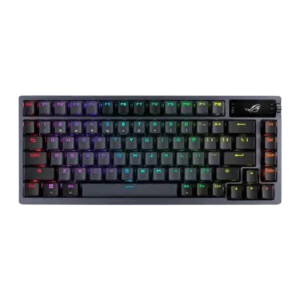
ASUS ROG Azoth
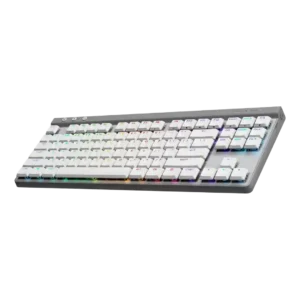
Logitech G515 Lightspeed

Quick verdict

What each product is best for

Choose ASUS ROG Azoth for ease of switch replacement and hot-swappable switches.

Choose Logitech G515 Lightspeed for onboard memory and macro customization.

Comparison Takeaways

ASUS ROG Azoth

Where It Has the Edge

  • ease of switch replacement is 4.7 vs 1.5. Switch replacement was repeatedly described as easy or low-effort, helped by hot-swap sockets and included pullers and tools.
  • hot-swappable switches is 4.7 vs 2.2. Hot-swappable switches were treated as a key enthusiast-friendly strength, making switch experiments and modifications much easier.
  • switch options is 4.6 vs 3.1. Switch options were supported by reviewer praise for a wide range of compatible switch choices and multiple NX...
  • key stability is 4.8 vs 3.5. Key stability was praised mainly through the stable spacebar and measured keystrokes, with little wobble noted in broader...

Logitech G515 Lightspeed

Where It Has the Edge

  • onboard memory is 4.5 vs 2.2. Onboard memory was positively received because it lets users carry profiles or settings without relying on G Hub...
  • macro customization is 4.6 vs 2.4. Macro customization was a standout strength, with repeated praise for KEYCONTROL, layers, per-key assignments, and up to 15...
  • software quality is 4.1 vs 2.4. Software was mostly praised for depth and polish, especially G Hub and KEYCONTROL, though some reviewers found it...
  • profile management is 4.3 vs 3.1. Profile management was viewed positively, with reviewers liking per-game or per-app profiles, shared presets, and onboard profile storage.
Average score
ASUS ROG Azoth
4.2
Logitech G515 Lightspeed
4.1
ease of switch replacement
ASUS ROG Azoth
4.7

Switch replacement was repeatedly described as easy or low-effort, helped by hot-swap sockets and included pullers and tools.

Logitech G515 Lightspeed
1.5

Switch replacement scored poorly because the switches are soldered, limiting hardware customizability.

hot-swappable switches
ASUS ROG Azoth
4.7

Hot-swappable switches were treated as a key enthusiast-friendly strength, making switch experiments and modifications much easier.

Logitech G515 Lightspeed
2.2

Hot-swap support was a clear weakness: reviewers repeatedly noted the switches are not hot-swappable or customizable at the hardware level.

onboard memory
ASUS ROG Azoth
2.2

Onboard memory was criticized because some settings did not behave as expected across connection modes despite the keyboard supposedly having onboard storage.

Logitech G515 Lightspeed
4.5

Onboard memory was positively received because it lets users carry profiles or settings without relying on G Hub on every PC.

macro customization
ASUS ROG Azoth
2.4

Macro customization was one of the weaker functional areas because reviewers criticized the lack of function-layer assignment and limited macro placement.

Logitech G515 Lightspeed
4.6

Macro customization was a standout strength, with repeated praise for KEYCONTROL, layers, per-key assignments, and up to 15 functions per key.

software quality
ASUS ROG Azoth
2.4

Software quality was the clearest weakness: Armoury Crate was repeatedly called slow, buggy, bloated, unintuitive, or harmful to otherwise strong hardware.

Logitech G515 Lightspeed
4.1

Software was mostly praised for depth and polish, especially G Hub and KEYCONTROL, though some reviewers found it dense, difficult, or resource-heavy.

switch options
ASUS ROG Azoth
4.6

Switch options were supported by reviewer praise for a wide range of compatible switch choices and multiple NX switch variants.

Logitech G515 Lightspeed
3.1

Switch options were limited in one review's view because the G515 lacks a clicky option and offers only tactile or linear.

key stability
ASUS ROG Azoth
4.8

Key stability was praised mainly through the stable spacebar and measured keystrokes, with little wobble noted in broader switch feedback.

Logitech G515 Lightspeed
3.5

Key stability was mixed: some reviews found wobble minimal or improved, while others complained about loose keycaps or rattle.

backlight brightness
ASUS ROG Azoth
4.5

Backlighting was treated as useful and bright enough for dim conditions, with one reviewer praising illumination and another finding it helpful during load-shedding.

Logitech G515 Lightspeed
3.2

Brightness impressions were mixed: some found it sufficient or excellent, while others thought parts of the legends or overall lighting were dimmer than competitors.

profile management
ASUS ROG Azoth
3.1

Profile management was split between easy profile swapping in one review and serious profile-reset problems tied to Armoury Crate in another.

Logitech G515 Lightspeed
4.3

Profile management was viewed positively, with reviewers liking per-game or per-app profiles, shared presets, and onboard profile storage.

reliability
ASUS ROG Azoth
3.0

Reliability was mostly good in short-term use but mixed long-term, with one reviewer reporting occasional repeating letters after years and others reporting firmware issues.

Logitech G515 Lightspeed
4.1

Reliability was mostly positive for actual use, especially wireless stability and gaming dependability, but one review raised a double-pressing concern.

extra gaming features
ASUS ROG Azoth
4.5

Extra gaming features were viewed positively overall, especially the OLED display, on-the-fly features, performance monitoring, and full gaming-keyboard feature set.

Logitech G515 Lightspeed
3.5

Game Mode and key-disabling options were useful, but reviewers repeatedly noted the G515 is light on extra hardware features.

legend visibility
ASUS ROG Azoth
2.3

Legend visibility was a repeated weak spot because legends were hard to see when the backlight was off or dimmed.

Logitech G515 Lightspeed
3.2

Legend visibility was uneven: shine-through legends were often readable, but some reviews found uneven lighting, darker legend areas, or non-backlit regional characters.

value for money
ASUS ROG Azoth
3.5

Value for money was mixed: many reviewers felt the premium build and features could justify the price, while others considered $250 hard to recommend.

Logitech G515 Lightspeed
4.3

Value was generally positive because reviewers saw it as cheaper than premium Logitech alternatives while preserving most everyday strengths.

typing comfort
ASUS ROG Azoth
3.8

Typing comfort was mostly positive, especially for quiet office/home use and pleasant daily typing, but one reviewer struggled with typos.

Logitech G515 Lightspeed
4.6

Typing comfort was a major strength, with reviewers adapting quickly and reporting comfortable, accurate, or error-free work sessions.

connectivity
ASUS ROG Azoth
4.7

Connectivity was praised across wired, Bluetooth, and 2.4GHz use, with reviewers reporting easy setup, reliable pairing, and no trouble in normal testing.

Logitech G515 Lightspeed
4.0

Reviewers liked the mix of Lightspeed, Bluetooth, and wired modes, but Bluetooth limitations and single-profile comments kept this from being uniformly perfect.

volume control
ASUS ROG Azoth
3.1

Volume control was mixed, with reviewers appreciating easy volume access but criticizing the rocker/knob as imprecise, finicky, or cumbersome.

Logitech G515 Lightspeed
2.4

Volume control was a frequent complaint because many reviewers wanted a dial or wheel instead of function-layer shortcuts.

materials quality
ASUS ROG Azoth
4.8

Materials quality was praised for premium-feeling metal, plastics, PBT keycaps, and high-quality components, even with a plastic bottom for wireless performance.

Logitech G515 Lightspeed
4.1

Materials quality was generally seen as good for the price, especially the plastic and PBT keycaps, though not as premium as metal-bodied models.

key spacing
ASUS ROG Azoth
3.7

Key spacing opinions were split: some liked the 75% spacing and avoided 60% compromises, while others found the crammed F-row harder to hit accurately.

Logitech G515 Lightspeed
4.4

Key spacing was generally comfortable and familiar, with reviewers saying the standard layout avoided a steep learning curve.

portability
ASUS ROG Azoth
3.5

Portability was mixed: one reviewer liked the idea of traveling with it, while another found the heft made it less portable.

Logitech G515 Lightspeed
4.2

Portability was helped by the slim TKL size, dongle storage, and light-enough weight, though the lack of a carry case limited one reviewer's enthusiasm.

build quality
ASUS ROG Azoth
4.9

Build quality was one of the strongest themes, with reviewers repeatedly describing the Azoth as solid, premium, tank-like, exceptionally built, and durable in long-term use.

Logitech G515 Lightspeed
4.3

Build quality was usually praised as sturdy and substantial despite the plastic chassis, with a smaller set of reviews noticing cost-cutting or QC drawbacks.

frame rigidity
ASUS ROG Azoth
3.9

Frame rigidity was mostly strong, with almost no flex, though some reviewers felt the gasket mount was firmer and less flexible than expected.

Logitech G515 Lightspeed
4.5

Frame rigidity was praised, with several reviewers reporting little to no flex despite the all-plastic construction.

acoustics
ASUS ROG Azoth
4.8

Reviewers consistently praised the Azoth for a refined, enthusiast-like sound, with multiple reviews calling its acoustics excellent, unique, or better than typical gaming keyboards.

Logitech G515 Lightspeed
4.2

Reviewers generally found the sound profile controlled and pleasant for a mainstream low-profile gaming board, though one noted some plastic-on-plastic character.

polling rate
ASUS ROG Azoth
4.2

Polling rate was considered sufficient for high-end wireless use, though later reviewers framed it as no longer cutting edge for elite competitive players.

Logitech G515 Lightspeed
3.8

Polling-rate evidence was mixed: one review praised the steady 1,000 Hz implementation, while others treated missing adjustable polling as a competitive-feature gap.

battery life
ASUS ROG Azoth
4.6

Battery life drew broad praise, from week-plus real-world use to long-term confidence, though reviewers noted the advertised maximum requires turning off RGB and OLED extras.

Logitech G515 Lightspeed
4.2

Battery life drew mostly positive reactions in real-world use, especially with lighting managed, but several reviewers said it trails some competing wireless boards.

ergonomics
ASUS ROG Azoth
4.0

Ergonomics were mixed: adjustable feet and stable placement helped comfort, but the high-profile, heavy design could become tiring without support.

Logitech G515 Lightspeed
4.4

Most ergonomic comments were positive, citing the low profile, usable tilt options, and comfortable angles for typing without a wrist rest.

noise level
ASUS ROG Azoth
4.7

Noise level was praised as quiet or controlled, especially with red/silent-style switches and layered internal dampening.

Logitech G515 Lightspeed
4.4

Noise levels were widely praised as quiet or muted for a mechanical gaming keyboard, helped by low-profile switches and dampening.

durability
ASUS ROG Azoth
5.0

Durability evidence was strong in long-term use, with reviewers saying the board aged well, felt built to last, and could withstand heavy daily use.

Logitech G515 Lightspeed
4.7

Durability evidence was positive, focused on confidence in the construction and long-wearing PBT keycaps or replaceable-battery longevity.

actuation consistency
ASUS ROG Azoth
4.8

Actuation consistency was supported by direct praise for consistent, measured keystrokes, especially after switch swapping and with the board’s tuned internals.

Logitech G515 Lightspeed
4.6

The strongest actuation comments described the tactile switches as consistent across keys and comfortable under repeated use.

design aesthetics
ASUS ROG Azoth
4.7

Design aesthetics were generally praised for looking refined, handsome, premium, or striking while still keeping a gaming identity.

Logitech G515 Lightspeed
4.5

The design was widely praised as slim, clean, mature, and desk-friendly, with only a few reviewers calling the plastic look more generic.

desk space efficiency
ASUS ROG Azoth
4.5

The 75% layout was praised for saving desk space and giving the mouse hand more room without becoming as restrictive as smaller compact layouts.

Logitech G515 Lightspeed
4.3

The TKL layout was treated as a useful space saver for mouse movement and cleaner desks, especially for users who do not need a numpad.

compatibility
ASUS ROG Azoth
3.3

Compatibility was mixed: basic Windows and Mac use worked, but customization and firmware support were notably more limited outside Windows.

Logitech G515 Lightspeed
3.5

Compatibility evidence centered on useful macOS support and a limitation around single-device Bluetooth, making it good but not universally flexible.

passthrough features
ASUS ROG Azoth
2.0

Passthrough features were a weakness, with reviewers criticizing the lack of extra USB ports or audio jack.

Logitech G515 Lightspeed
2.2

USB passthrough was only discussed as an absence, and that absence was framed as a potential weakness.

per-key lighting control
ASUS ROG Azoth
4.7

Per-key lighting control was positively supported by the ability to adjust the RGB backlight key by key.

Logitech G515 Lightspeed
4.5

Per-key RGB control was cited as a meaningful gamer-friendly advantage over some alternatives.

layout options
ASUS ROG Azoth
4.5

Layout options were praised for balancing compact size with retained function-row, arrow, and navigation utility.

Logitech G515 Lightspeed
4.3

The TKL layout was considered easy to adapt to and standard enough for broad use, though numpad users may miss the extra keys.

gaming performance
ASUS ROG Azoth
4.8

Gaming performance received very strong praise, with reviewers calling it responsive, reliable, brilliant, and among the best gaming keyboards they had used.

Logitech G515 Lightspeed
4.6

Gaming performance was consistently strong, with reviewers describing responsive, reliable, and enjoyable play across shooters and general gaming.

sound dampening
ASUS ROG Azoth
4.7

Sound dampening was a major strength, with reviewers praising the layered foam, silicone, and gaskets for reducing ping, hollowness, and harshness.

Logitech G515 Lightspeed
4.5

Sound dampening was one of the clearest strengths, with many reviews crediting foam and lubrication for a quieter, more refined sound.

key responsiveness
ASUS ROG Azoth
4.7

Key responsiveness was praised in both typing and gaming, with reviewers noting snappy response, fast feel, and I had no missed keypresses.

Logitech G515 Lightspeed
4.6

Responsiveness was a major strength, supported by short actuation, fast-feeling inputs, and good results in games.

stabilizer quality
ASUS ROG Azoth
4.2

Stabilizers were generally praised for smoothness and spacebar quality, though one long-term/modding review criticized stems that detached easily.

Logitech G515 Lightspeed
4.1

Stabilizer impressions were mixed-positive: several reviewers found little wobble or rattle, while one noted rattling typical of prebuilts.

RGB lighting quality
ASUS ROG Azoth
4.1

RGB lighting quality was generally pleasant and attractive, though one review noted an imperfect reddish hue in white lighting.

Logitech G515 Lightspeed
4.2

RGB lighting quality was generally praised for clean, bright, or tasteful output, though some reviews noted uneven or dimmer areas.

media controls
ASUS ROG Azoth
2.6

Media controls were mixed: reviewers liked having control options but criticized the screen/knob system as awkward or overly sensitive.

Logitech G515 Lightspeed
2.5

Media controls were one of the most repeated weaknesses because reviewers missed dedicated buttons and disliked relying on function-key shortcuts.

customization options
ASUS ROG Azoth
4.4

Customization was a major strength thanks to hot-swap support, included DIY tools, RGB/OLED options, and mod-friendly design, though software execution limited the experience.

Logitech G515 Lightspeed
4.6

Customization was one of the strongest themes, with reviewers praising broad remapping, profiles, lighting control, and KEYCONTROL depth.

switch feel
ASUS ROG Azoth
4.4

Switch feel was usually praised as smooth, tactile, satisfying, or excellent, though some reviewers found specific stock switch variants too light or merely average.

Logitech G515 Lightspeed
4.5

Switch feel was strongly praised across reviews for smooth, tactile, snappy, and comfortable low-profile action, though a few preferences varied.

wireless performance
ASUS ROG Azoth
4.9

Wireless performance was strongly praised, with reviewers reporting no lag, no dropouts, fast SpeedNova behavior, and long-term wireless reliability.

Logitech G515 Lightspeed
4.8

Wireless performance was one of the strongest consensus points, with Lightspeed repeatedly described as stable, rock solid, and essentially lag-free.

size and form factor
ASUS ROG Azoth
4.4

The form factor was praised for being compact without sacrificing as much function as 60% designs.

Logitech G515 Lightspeed
4.5

The slim low-profile TKL form factor was consistently liked for balancing compactness, desk fit, and a familiar key layout.

keycap quality
ASUS ROG Azoth
4.4

Keycap quality was broadly positive thanks to PBT texture, durability, and resistance to shine, though one reviewer found them slightly slippery.

Logitech G515 Lightspeed
4.4

Keycap quality was mostly praised for PBT material, texture, grip, and shine-through legends, with isolated complaints about smoothness, wobble, or QC.

latency
ASUS ROG Azoth
4.8

Latency was considered excellent for wireless gaming, with multiple reviewers reporting there was no noticeable lag between me pressing a key or very low-latency behavior.

Logitech G515 Lightspeed
4.8

Latency impressions were excellent over Lightspeed, with reviewers repeatedly saying the wireless connection felt indistinguishable from wired or showed no noticeable delay.

RGB customization
ASUS ROG Azoth
4.6

RGB customization was praised for per-key control, presets, custom effects, and broad adjustment options.

Logitech G515 Lightspeed
4.6

RGB customization was a strong point, with reviewers highlighting per-key color, effects, animations, presets, and deep G Hub control.

typing feel
ASUS ROG Azoth
4.7

Typing feel was one of the strongest attributes, with reviewers calling it next-level, fantastic, superb, energetic, or dreamlike, despite a few stock-feel reservations.

Logitech G515 Lightspeed
4.7

Typing feel was one of the most consistently praised attributes, often described as satisfying, superb, smooth, or excellent for productivity.

cable quality
ASUS ROG AzothNo score yet
Logitech G515 Lightspeed
4.2

The included USB-C cable was described as generous, flexible, and reasonably protected, with no major complaints about charging or wired use.

rapid trigger support
ASUS ROG AzothNo score yet
Logitech G515 Lightspeed
1.5

Rapid trigger support scored poorly because a reviewer specifically cited its absence versus similarly priced gaming boards.

wrist rest quality
ASUS ROG AzothNo score yet
Logitech G515 Lightspeed
2.2

Wrist-rest evidence was negative because several reviewers noted the G515 does not include one, even if the low profile softened the impact.