Compare ASUS ROG Azoth vs Corsair K100 RGB

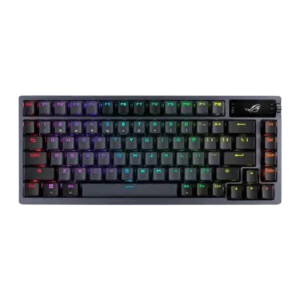
P1 ASUS ROG Azoth
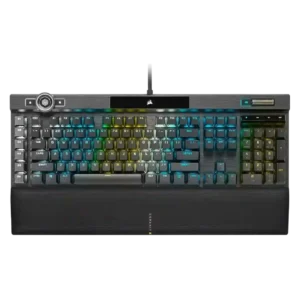
P2 Corsair K100 RGB

Comparison Takeaways

ASUS ROG Azoth

Where It Has the Edge

  • hot-swappable switches is 4.8 vs 0.5. Hot-swappable switches are a standout feature, with reviewers praising both compatibility and the enthusiast-style flexibility.
  • wireless performance is 4.8 vs 0.5. Wireless performance is a major strength, with reviewers reporting reliable Bluetooth, strong 2.4GHz performance, and no dropouts or...
  • ease of switch replacement is 4.7 vs 0.5. Switch replacement is repeatedly described as easy thanks to hot-swap sockets and the included pullers, opener, lube kit,...
  • desk space efficiency is 4.5 vs 2.4. The 75% layout is repeatedly valued for saving desk space while preserving arrows, function keys, and practical navigation...

Corsair K100 RGB

Where It Has the Edge

  • passthrough features is 4.2 vs 1.0. Passthrough features are well supported, with several reviews calling out the extra USB passthrough port.
  • wrist rest quality is 4.6 vs 2.0. The wrist rest is one of the strongest accessories, repeatedly praised for comfort, cushioning, magnets, memory foam, and...
  • legend visibility is 4.6 vs 2.6. Legend visibility is directly praised for crisp, bright legends on the doubleshot keycaps.
  • key spacing is 4.6 vs 2.8. Key spacing is praised through the standard bottom row and stable key behavior that helps avoid neighboring-key mistakes.
Average score
Product 1: ASUS ROG Azoth
4.2
Product 2: Corsair K100 RGB
3.8
acoustics
Product 1: ASUS ROG Azoth
4.6

Reviewers consistently liked the Azoth's tuned sound, describing it as quiet, marbled, and more refined than typical gaming keyboards.

Product 2: Corsair K100 RGB
3.7

Acoustics are mixed: some reviewers like the more satisfying or less metallic sound, while another hears hollow, loud resonance.

actuation consistency
Product 1: ASUS ROG Azoth
4.7

The strongest actuation-consistency evidence is positive, with one reviewer saying keystrokes felt consistent and measured after switch changes.

Product 2: Corsair K100 RGB
4.1

Actuation consistency is generally strong, with reviewers noting no lag, few response issues, and improved key stability, while some sensitive-switch evidence points to accidental presses.

analog input support
Product 1: ASUS ROG Azoth
No score yet
Product 2: Corsair K100 RGB
0.5

Analog input support is weak because the OPX switches are described as digital rather than variable analogue switches.

backlight brightness
Product 1: ASUS ROG Azoth
4.0

Backlighting is useful and bright enough for dim settings, though one review noted a slight reddish hue in white lighting.

Product 2: Corsair K100 RGB
4.7

Backlight brightness scores highly because reviewers describe the RGB as extra bright, impressively bright, and abundant.

battery life
Product 1: ASUS ROG Azoth
4.5

Battery life is one of the Azoth's clearest strengths, with reviews reporting days, weeks, or very high remaining charge depending on RGB and OLED use.

Product 2: Corsair K100 RGB
No score yet
build quality
Product 1: ASUS ROG Azoth
4.7

Build quality receives broad praise for solidity, weight, premium feel, and a sturdy top structure, even where the plastic bottom is noted.

Product 2: Corsair K100 RGB
4.5

Build quality is a major consensus strength, with aluminum construction, premium feel, sturdiness, and minimal flex cited across many reviews.

cable quality
Product 1: ASUS ROG Azoth
4.3

The included braided USB-C cable is treated as a solid premium accessory rather than a bare-minimum pack-in.

Product 2: Corsair K100 RGB
2.8

Cable quality is mixed: reviewers call it braided and sturdy, but also very thick, tethered, and non-detachable.

compatibility
Product 1: ASUS ROG Azoth
4.1

Compatibility is mostly positive across Windows, Mac, and even Linux mentions, but customization support is stronger on Windows than on Mac.

Product 2: Corsair K100 RGB
4.3

Compatibility is generally positive, with evidence for PC, Mac, Xbox One, and Stream Deck/Elgato integration.

connectivity
Product 1: ASUS ROG Azoth
4.8

Connectivity is repeatedly praised for offering wired, Bluetooth, and 2.4GHz modes with easy switching and dependable operation.

Product 2: Corsair K100 RGB
3.4

Connectivity is functional but wired-focused, supported by USB passthrough and the thick braided cable.

customization options
Product 1: ASUS ROG Azoth
4.6

Customization is a major selling point, spanning switch work, lighting, OLED/dial controls, profiles, and included enthusiast tools.

Product 2: Corsair K100 RGB
4.7

Customization options are broad, with reviewers noting highly customizable keys, actions, lighting, and software-level control.

desk space efficiency
Product 1: ASUS ROG Azoth
4.5

The 75% layout is repeatedly valued for saving desk space while preserving arrows, function keys, and practical navigation keys.

Product 2: Corsair K100 RGB
2.4

Desk space efficiency is a weakness because reviewers call out the large desk footprint and the need to sacrifice desk space.

durability
Product 1: ASUS ROG Azoth
4.8

Durability evidence is strong, including long-term use reports and reviewer impressions that the keyboard feels built to last.

Product 2: Corsair K100 RGB
4.8

Durability is supported by the stated 150 million keystroke rating and wear-resistant keycap evidence.

ease of switch replacement
Product 1: ASUS ROG Azoth
4.7

Switch replacement is repeatedly described as easy thanks to hot-swap sockets and the included pullers, opener, lube kit, and tools.

Product 2: Corsair K100 RGB
0.5

Ease of switch replacement is poor for the same reason: the cited review says the switches are not hot-swappable.

ergonomics
Product 1: ASUS ROG Azoth
3.7

Ergonomics are mixed: adjustable feet help comfort, but the high-profile design can become tiring without a wrist rest.

Product 2: Corsair K100 RGB
4.4

Ergonomics are helped by the wrist support, typing angle, and wrist-rest height, though this depends on using the included rest.

extra gaming features
Product 1: ASUS ROG Azoth
4.0

Extra gaming features are strong overall, including OLED/dial functions, stealth mode, Windows lock, macro recording, and software-backed key control, though one reviewer disliked the screen/knob implementation.

Product 2: Corsair K100 RGB
3.8

Extra gaming features are abundant, especially the iCUE wheel and G keys, but the wheel is divisive and sometimes called janky or limited.

frame rigidity
Product 1: ASUS ROG Azoth
4.7

Frame rigidity is excellent in the available evidence, with a reviewer noting almost no flex.

Product 2: Corsair K100 RGB
4.8

Frame rigidity is excellent in the cited reviews, with multiple reviewers noting little to no flex in the frame.

gaming performance
Product 1: ASUS ROG Azoth
4.7

Gaming performance is repeatedly praised for responsiveness, smooth gameplay, reliability, and no noticeable lag or missed inputs.

Product 2: Corsair K100 RGB
4.4

Gaming performance is broadly praised as fast, responsive, and capable, but a few reviewers say the 4,000 Hz advantage is not always obvious in play.

hot-swappable switches
Product 1: ASUS ROG Azoth
4.8

Hot-swappable switches are a standout feature, with reviewers praising both compatibility and the enthusiast-style flexibility.

Product 2: Corsair K100 RGB
0.5

Hot-swappable switches are a clear weakness because one review explicitly says the switches are not hot-swappable.

keycap quality
Product 1: ASUS ROG Azoth
4.4

Keycap quality is generally strong thanks to PBT doubleshot construction, texture, and durability, though one reviewer found them a little slippery.

Product 2: Corsair K100 RGB
4.5

Keycap quality is one of the clearest strengths: reviewers repeatedly cite double-shot PBT, durability, clean looks, and premium feel.

key responsiveness
Product 1: ASUS ROG Azoth
4.6

Responsiveness evidence is strongly positive, with reviews describing snappy typing, fast inputs, and low-latency operation.

Product 2: Corsair K100 RGB
4.6

Responsiveness is a major strength: reviewers cite fast inputs, quick reaction, high responsiveness, and optical signaling, with only minor caveats around whether that speed changes gameplay for everyone.

key spacing
Product 1: ASUS ROG Azoth
2.8

Key spacing has a specific drawback: one reviewer found the compressed F-row harder to hit without looking.

Product 2: Corsair K100 RGB
4.6

Key spacing is praised through the standard bottom row and stable key behavior that helps avoid neighboring-key mistakes.

key stability
Product 1: ASUS ROG Azoth
4.6

Key stability is positive, especially around the spacebar, stabilized keys, and shorter stems intended to reduce wobble.

Product 2: Corsair K100 RGB
4.8

Key stability is praised through near-zero tilt and zero-rattle comments, helping the keyboard feel steadier than many mechanical boards.

latency
Product 1: ASUS ROG Azoth
4.7

Latency is repeatedly praised, with reviews reporting no noticeable delay and test-based references to very low 2.4GHz latency.

Product 2: Corsair K100 RGB
4.6

Latency evidence is strongly positive, with reviewers pointing to sub-millisecond input claims, optical signaling, and instantaneous-feeling response.

layout options
Product 1: ASUS ROG Azoth
4.5

The compact layout is praised for keeping a function row and dedicated everyday keys while avoiding the restrictions of smaller boards.

Product 2: Corsair K100 RGB
3.2

Layout options are limited: the evidence supports a full-size/US ANSI style layout and reviewer desire for a TKL version, not broad form-factor choice.

legend visibility
Product 1: ASUS ROG Azoth
2.6

Legend visibility is a repeated weakness when lighting is off or dim, even though the shine-through caps support RGB.

Product 2: Corsair K100 RGB
4.6

Legend visibility is directly praised for crisp, bright legends on the doubleshot keycaps.

macro customization
Product 1: ASUS ROG Azoth
3.3

Macro customization is useful but limited: reviews praise on-the-fly recording and software assignment while criticizing the lack of function-layer remapping.

Product 2: Corsair K100 RGB
4.6

Macro customization is strong thanks to dedicated G keys, full-keyboard remapping, Stream Deck integration, and programmable actions.

materials quality
Product 1: ASUS ROG Azoth
4.8

Materials quality is high, with reviews pointing to aluminum, steel, durable PBT, and premium-feeling construction.

Product 2: Corsair K100 RGB
4.4

Materials quality is strong due to repeated aluminum, PBT, and durable-frame evidence, though one review notes a plastic base beneath the aluminum top.

media controls
Product 1: ASUS ROG Azoth
4.3

Media controls are useful through the OLED/dial system, though some reviewers prefer a simpler dedicated knob.

Product 2: Corsair K100 RGB
4.3

Media controls are consistently useful, with reviewers noting dedicated media buttons, mute, and metal scroll/volume controls.

noise level
Product 1: ASUS ROG Azoth
4.7

Noise level is a strength, especially with NX Red or dampened builds, with multiple reviewers describing the board as quiet or nearly silent.

Product 2: Corsair K100 RGB
2.9

Noise level is mixed to negative: some evidence says the keyboard is loud, while one review says the K100 sounds more muted and pleasant.

onboard memory
Product 1: ASUS ROG Azoth
4.6

Onboard memory is supported by evidence of stored default and custom profiles, making profile use possible without constant software interaction.

Product 2: Corsair K100 RGB
4.7

Onboard memory is a clear strength, with repeated references to 8MB storage and up to 200 profiles.

passthrough features
Product 1: ASUS ROG Azoth
1.0

Passthrough features are weak: reviews explicitly note the lack of extra USB ports, audio jacks, or similar passthrough hardware.

Product 2: Corsair K100 RGB
4.2

Passthrough features are well supported, with several reviews calling out the extra USB passthrough port.

per-key lighting control
Product 1: ASUS ROG Azoth
4.6

Per-key lighting control is strong in the software evidence, with direct support for key-by-key backlight adjustment.

Product 2: Corsair K100 RGB
4.8

Per-key lighting control is well supported through reviewer comments about per-switch effects and granular iCUE lighting customization.

polling rate
Product 1: ASUS ROG Azoth
4.0

Polling-rate evidence confirms a mainstream 1,000 Hz rate over wired or 2.4GHz modes, which reviewers generally considered sufficient.

Product 2: Corsair K100 RGB
4.6

The 4,000 Hz polling rate is one of the most repeated features, though several reviewers say its real-world advantage is subtle or mostly useful for very demanding players.

portability
Product 1: ASUS ROG Azoth
3.1

Portability is mixed: the compact layout helps, but the heavy, sturdy chassis makes it less travel-friendly for some users.

Product 2: Corsair K100 RGB
2.0

Portability is weak because reviewers emphasize the keyboard's large footprint, heavy build, and desk-bound design.

profile management
Product 1: ASUS ROG Azoth
4.4

Profile management is useful, with evidence of quick profile switching and software profile setup, though execution depends on Armoury Crate.

Product 2: Corsair K100 RGB
4.6

Profile management is strong but not heavily discussed; evidence supports hardware profile switching and quick RGB profile access.

reliability
Product 1: ASUS ROG Azoth
4.3

Reliability is mostly positive in gaming use, but long-term evidence includes occasional double or triple letters from aging switches.

Product 2: Corsair K100 RGB
3.0

Reliability is mixed: optical switches may reduce chatter, but reviewers also report a bad sample and one freezing/crashing experience.

RGB customization
Product 1: ASUS ROG Azoth
4.7

RGB customization is strong, with keyboard shortcuts, software control, and multiple built-in lighting modes.

Product 2: Corsair K100 RGB
4.6

RGB customization is strong, with per-zone and layered lighting control, although some reviewers find the software workflow clunky.

RGB lighting quality
Product 1: ASUS ROG Azoth
4.6

RGB lighting quality is generally praised for sharp per-key lighting and attractive effects, with minor caveats around color tint elsewhere.

Product 2: Corsair K100 RGB
4.7

RGB lighting quality is consistently praised as vibrant, bright, extensive, and visually premium, with repeated mentions of the 44-zone lighting.

size and form factor
Product 1: ASUS ROG Azoth
4.5

The 75% form factor is repeatedly seen as a good compact size that keeps everyday usability.

Product 2: Corsair K100 RGB
2.8

Size and form factor skew bulky: reviewers repeatedly describe a full-size, big, sprawling, or heavy board, even when they like the streamlined styling.

software quality
Product 1: ASUS ROG Azoth
2.4

Software quality is the most consistent complaint: Armoury Crate is often described as bloated, slow, buggy, or limiting despite some positive experiences.

Product 2: Corsair K100 RGB
3.3

Software quality is mixed: iCUE and Stream Deck provide deep control, but many reviewers describe the workflow as clunky, confusing, or hard to use.

sound dampening
Product 1: ASUS ROG Azoth
4.8

Sound dampening is one of the board's strongest enthusiast traits, with foam, silicone, and gasket layers repeatedly credited for the sound and feel.

Product 2: Corsair K100 RGB
4.7

Sound dampening is praised in the direct evidence, especially compared with the noisier K95.

stabilizer quality
Product 1: ASUS ROG Azoth
4.7

Stabilizer quality is strong, with reviews praising pre-lubed stabilizers, spacebar treatment, and good out-of-box behavior.

Product 2: Corsair K100 RGB
4.3

Stabilizer quality is generally positive, with reviewers citing improved or factory-lubed stabilizers, though there is still some rattling in one review.

switch feel
Product 1: ASUS ROG Azoth
4.7

Switch feel is praised across switch variants for smoothness, tactile feedback, and strong factory tuning.

Product 2: Corsair K100 RGB
4.5

Reviewers consistently describe the OPX or Speed Silver switches as fast linear switches, with praise for smoothness and sensitivity; a few note the feel is very light or an acquired taste.

switch options
Product 1: ASUS ROG Azoth
4.6

Switch options are good, with reviewer evidence for red, brown, blue, linear, tactile, and clicky variants.

Product 2: Corsair K100 RGB
4.1

The K100 is repeatedly described as available with Corsair OPX optical-mechanical switches or Cherry MX Speed/Silver switches, but there is no tactile option in the cited evidence.

typing comfort
Product 1: ASUS ROG Azoth
4.7

Typing comfort is strong where reviewers focus on cushioned feel, pleasant travel, and long-form typing satisfaction.

Product 2: Corsair K100 RGB
3.8

Typing comfort is mostly positive when acclimated, but several reviewers note the sensitive switches can be unforgiving or require posture support.

typing feel
Product 1: ASUS ROG Azoth
4.5

Typing feel is one of the Azoth's standout strengths, though one review found the stock gasket feel firmer than expected.

Product 2: Corsair K100 RGB
4.7

Typing feel is reviewed positively overall, with evidence of a near-perfect feel mix and fewer mistypes, especially after acclimating to the sensitive switches.

value for money
Product 1: ASUS ROG Azoth
3.4

Value is divisive: some reviewers justify the premium through features and quality, while others say the price remains prohibitive.

Product 2: Corsair K100 RGB
3.3

Value for money is mixed: reviewers often like the feature set, but the high price repeatedly limits the recommendation.

volume control
Product 1: ASUS ROG Azoth
3.5

Volume control is mixed because the OLED/dial can handle volume and media, but several reviewers found the control less precise or easy to mispress.

Product 2: Corsair K100 RGB
4.6

Volume control is a strong physical feature, with reviewers praising the metal roller, resistance, and premium feel.

wireless performance
Product 1: ASUS ROG Azoth
4.8

Wireless performance is a major strength, with reviewers reporting reliable Bluetooth, strong 2.4GHz performance, and no dropouts or input lag.

Product 2: Corsair K100 RGB
0.5

Wireless performance is effectively absent in the evidence because the keyboard is described as sticking to a thick braided cable.

wrist rest quality
Product 1: ASUS ROG Azoth
2.0

Wrist-rest evidence is negative because reviewers note the high-profile board can tire users and no wrist rest is included.

Product 2: Corsair K100 RGB
4.6

The wrist rest is one of the strongest accessories, repeatedly praised for comfort, cushioning, magnets, memory foam, and a premium feel.