Review: Corsair K100 RGB

Updated: 5 hours ago
4.2
Based on methodology below
216
Insights analyzed
46
Grouped by key features
21
From expert reviews
Scores below reflect consolidated expert coverage across these features.
Bottom Line

Choose the K100 if you want a full-size flagship with fast switches, standout RGB, and deep macro features. Skip it if you want better value, easier software, or a smaller desk footprint.

Best for

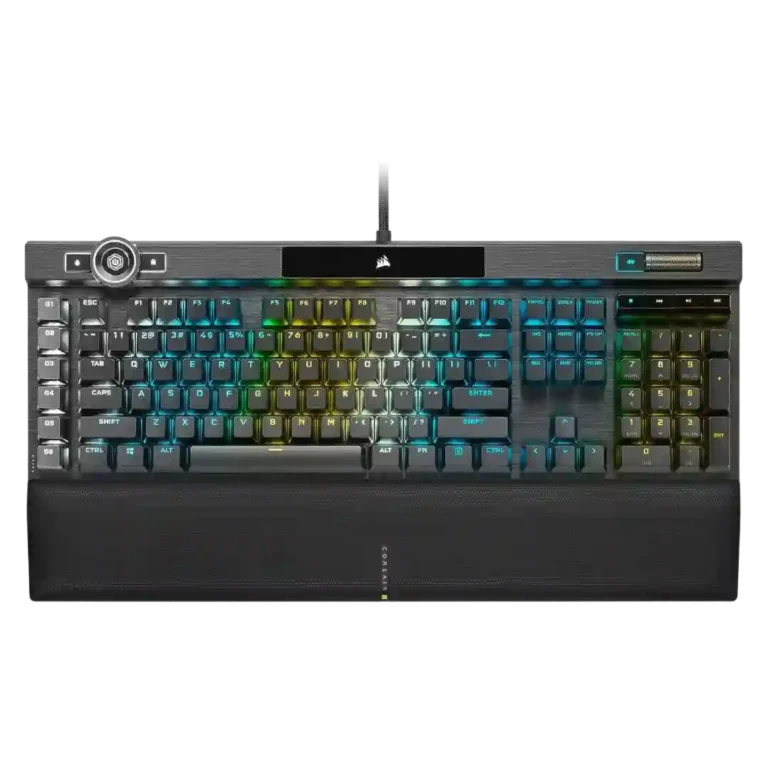
Gamers, streamers, and power users who want a wired full-size keyboard with fast linear switches, rich RGB, dedicated macros, and strong onboard profile support. It especially suits buyers who will actually use the control wheel, G-keys, and deep customization.

Not for

Anyone seeking compact size, wireless freedom, hot-swappable switches, or plug-and-play simplicity. It is also a hard sell for value shoppers who do not need its extra controls and premium feature set.

Verdict

The Corsair K100 RGB earns strong marks for smooth, extremely fast switches, vivid per-key and edge lighting, generous macro and profile support, a sturdy premium chassis, and an excellent magnetic wrist rest. It feels like a true flagship, and many reviews highlight its responsiveness and feature depth as standout strengths. The tradeoff is easy to spot: this board is expensive, physically large, and often held back by clunky iCUE workflows or niche extras that not everyone will use. The 4000Hz polling rate is impressive on paper, but many reviewers found its real-world benefit subtle. For buyers who want a wired full-size luxury gaming keyboard, it delivers; for everyone else, it can feel overbuilt and overpriced.

Pros

  • 5.0
    based on 4 reviews
    customization options: 5.0, based on 4 reviews
    Multiple reviews emphasize deep remapping, lighting, macro, and control-wheel customization, even if setup can take effort.
  • 5.0
    based on 3 reviews
    frame rigidity: 5.0, based on 3 reviews
    Reviews repeatedly mention minimal flex and a sturdy frame.
  • 5.0
    based on 3 reviews
    key responsiveness: 5.0, based on 3 reviews
    Reviews consistently describe the board as very fast and responsive to input.
  • 5.0
    based on 3 reviews
    layout options: 5.0, based on 3 reviews
    Reviews praise the move to a standard bottom row, which broadens keycap compatibility.
  • 5.0
    based on 2 reviews
    onboard memory: 5.0, based on 2 reviews
    Onboard storage is repeatedly praised for holding many profiles or lighting layers.
  • 5.0
    based on 1 review
    actuation consistency: 5.0, based on 1 review
    One gaming-focused review says the board kept up even under rapid input, suggesting consistent key registration.
  • 5.0
    based on 1 review
    durability: 5.0, based on 1 review
    The OPX version is repeatedly framed as long-lasting, backed by durable PBT caps and very high switch lifespan claims.
  • 5.0
    based on 1 review
    key stability: 5.0, based on 1 review
    One review specifically praises the keys for having almost no tilt, helping presses feel more controlled.
  • 5.0
    based on 1 review
    latency: 5.0, based on 1 review
    The strongest gaming review reports effectively no lag in use.
  • 5.0
    based on 1 review
    media controls: 5.0, based on 1 review
    Dedicated media buttons and rollers are seen as useful, polished, and in some cases highly configurable.
  • 4.9
    based on 8 reviews
    profile management: 4.9, based on 8 reviews
    Large onboard profile storage and easy profile switching are mentioned often.
  • 4.8
    based on 9 reviews
    keycap quality: 4.8, based on 9 reviews
    Double-shot PBT caps are praised across reviews for feel, durability, and improved aftermarket compatibility.
  • 4.8
    based on 3 reviews
    build quality: 4.8, based on 3 reviews
    Reviews that address construction describe the K100 as sturdy, premium, and clearly flagship-grade.
  • 4.8
    based on 2 reviews
    per-key lighting control: 4.8, based on 2 reviews
    Per-key lighting control is explicitly supported and treated as a premium feature.
  • 4.8
    based on 8 reviews
    RGB lighting quality: 4.8, based on 8 reviews
    RGB presentation is one of the board’s clearest strengths, with vivid per-key and edge lighting praised often.
  • 4.8
    based on 4 reviews
    RGB customization: 4.8, based on 4 reviews
    Lighting customization is deep and flexible, though some reviews find the setup process clunky.
  • 4.8
    based on 4 reviews
    volume control: 4.8, based on 4 reviews
    The volume wheel or roller is widely praised for feel and usefulness.
  • 4.7
    based on 7 reviews
    macro customization: 4.7, based on 7 reviews
    Dedicated G-keys, Elgato support, and broad remapping options make macro control one of the K100’s strengths.
  • 4.7
    based on 2 reviews
    legend visibility: 4.7, based on 2 reviews
    Reviewers call out the cleaner font and bright, crisp legends as improvements.
  • 4.6
    based on 17 reviews
    wrist rest quality: 4.6, based on 17 reviews
    The magnetic cushioned wrist rest is one of the most consistently praised parts of the keyboard.
  • 4.6
    based on 15 reviews
    materials quality: 4.6, based on 15 reviews
    Brushed or anodized aluminum and other premium-feeling materials are highlighted repeatedly.
  • 4.6
    based on 8 reviews
    gaming performance: 4.6, based on 8 reviews
    Gaming performance is broadly praised for fast, dependable input, though several reviewers say the 4000Hz advantage is subtle in practice.
  • 4.5
    based on 2 reviews
    sound dampening: 4.5, based on 2 reviews
    A few reviews say the K100 sounds more muted or damped than earlier Corsair boards, though this is not universal.
  • 4.5
    based on 2 reviews
    stabilizer quality: 4.5, based on 2 reviews
    Reviews that mention stabilizers say Corsair improved them noticeably versus older boards.
  • 4.5
    based on 2 reviews
    typing comfort: 4.5, based on 2 reviews
    Reviews note good wrist support and low-fatigue typing once users adjust to the switches.
  • 4.5
    based on 1 review
    acoustics: 4.5, based on 1 review
    The few reviews that discuss sound describe the K100 as more solid and low-rattle than older Corsair boards, though not silent.
  • 4.5
    based on 1 review
    backlight brightness: 4.5, based on 1 review
    RGB brightness is described as extra bright, and the control wheel can adjust brightness directly.
  • 4.5
    based on 1 review
    compatibility: 4.5, based on 1 review
    One review explicitly confirms support for PC, Mac, and Xbox One.
  • 4.4
    based on 13 reviews
    extra gaming features: 4.4, based on 13 reviews
    Macro keys, the control wheel, profile switching, Windows lock, and Stream Deck support are recurring standout extras.
  • 4.3
    based on 2 reviews
    switch options: 4.3, based on 2 reviews
    Reviews confirm OPX and Cherry MX Speed variants are available.
  • 4.2
    based on 13 reviews
    polling rate: 4.2, based on 13 reviews
    The 4000Hz polling rate is a headline feature, but reviews split between future-proof enthusiasm and skepticism about real-world gains.
  • 4.2
    based on 11 reviews
    switch feel: 4.2, based on 11 reviews
    OPX and Speed switches are usually praised for speed and smoothness, but several reviewers note the feel is very sensitive or taste-dependent.
  • 4.2
    based on 6 reviews
    typing feel: 4.2, based on 6 reviews
    Typing feel is generally positive and quick, though some reviewers found the shallow actuation unforgiving at first.
  • 4.2
    based on 1 review
    ergonomics: 4.2, based on 1 review
    One review highlights the board angle and wrist support as helping create a more comfortable typing posture.
  • 4.0
    based on 5 reviews
    passthrough features: 4.0, based on 5 reviews
    USB passthrough is regularly described as a convenient extra.
  • 3.7
    based on 5 reviews
    cable quality: 3.7, based on 5 reviews
    The cable is consistently described as thick and braided, but several reviews note that it is fixed and bulky.

Cons

  • 3.3
    based on 14 reviews
    software quality: 3.3, based on 14 reviews
    iCUE and related software offer lots of control, but many reviews call the experience clunky, unintuitive, or overly complex.
  • 3.3
    based on 2 reviews
    connectivity: 3.3, based on 2 reviews
    The K100 is presented as a wired dual-USB keyboard, favoring stable desktop use over flexibility.
  • 3.1
    based on 13 reviews
    value for money: 3.1, based on 13 reviews
    Value is the main tradeoff: many reviewers like the features, but several question the premium price.
  • 3.1
    based on 4 reviews
    size and form factor: 3.1, based on 4 reviews
    This is a large full-size flagship board; some reviews like its streamlined look, but it remains sizable.
  • 2.5
    based on 4 reviews
    noise level: 2.5, based on 4 reviews
    Noise is mixed to negative overall: some reviews call the board loud, while others say it sounds better than past Corsair boards.
  • 2.3
    based on 2 reviews
    reliability: 2.3, based on 2 reviews
    Reliability is mixed because a few reviews report hardware or crash issues even though others praise the hardware overall.
  • 2.0
    based on 2 reviews
    desk space efficiency: 2.0, based on 2 reviews
    Reviews describe the K100 as large and desk-hungry, especially once the wrist rest is attached.
  • 2.0
    based on 1 review
    portability: 2.0, based on 1 review
    The K100’s weight and full-size build make it a poor choice for portable use.
  • 1.5
    based on 1 review
    ease of switch replacement: 1.5, based on 1 review
    The switches are explicitly described as non-hot-swappable, so replacement flexibility is poor.
  • 1.0
    based on 1 review
    hot-swappable switches: 1.0, based on 1 review
    At least one review directly states the switches are not hot-swappable, making this a weak point.

FAQ

Is the 4000Hz polling rate actually noticeable in games?

Usually only a little. Several reviews praise the spec, but many say the real-world difference versus 1000Hz is subtle for most players right now.

Are the OPX switches good for typing as well as gaming?

Generally yes, but with a caveat. Multiple reviews liked the smooth, fast feel once adjusted, while others found the 1mm actuation overly sensitive at first.

Is the Corsair K100 RGB hot-swappable?

No. One review explicitly states that the switches are not hot-swappable.

Can the K100 store profiles on the keyboard itself?

Yes. Multiple reviews mention large onboard storage for many profiles, macros, or lighting layers.

Is the wrist rest one of the stronger parts of the keyboard?

Yes. The magnetic cushioned wrist rest is one of the most consistently praised features across the review set.

Reviews we analyzed

Video Reviews

Article Reviews

#1
4.5
Choose the Q3 HE for premium build, smooth Hall Effect typing, and flexible connectivity. Skip it if you want broader switch compatibility or...
Pros: rapid trigger support, build quality, durability, materials quality, desk space efficiency, customization options, compatibility
Cons: portability, switch options, reliability
#2
4.5
Choose the Keychron Q5 HE for premium build, flexible Hall Effect controls, and strong wireless versatility. Skip it if you want a lighter...
Pros: frame rigidity, customization options, compatibility, key responsiveness, materials quality, macro customization, extra gaming features
Cons: portability, switch options, value for money
#3
4.4
Choose the Keychron Q6 HE if you want a full-size premium Hall Effect keyboard with smooth typing and strong gaming tools. Skip it...
Pros: key responsiveness, key stability, frame rigidity, connectivity, volume control, switch feel, RGB customization
Cons: portability, switch options, ease of switch replacement
#4
4.4
Choose the GMMK 2 for smooth typing, bright RGB, and rare hot-swap flexibility at this price. Skip it if you want wireless features,...
Pros: frame rigidity, durability, customization options, hot-swappable switches, compatibility, per-key lighting control, value for money
Cons: actuation consistency