Compare ASUS ROG Azoth vs HyperX Alloy Rise

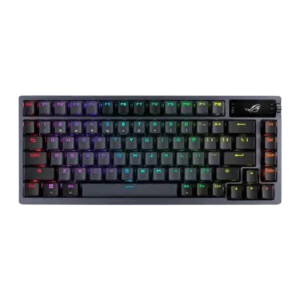
ASUS ROG Azoth
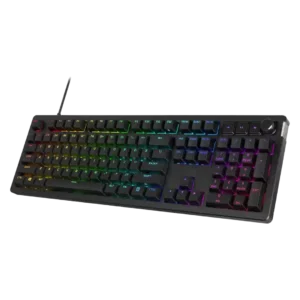
HyperX Alloy Rise

Quick verdict

What each product is best for

Choose ASUS ROG Azoth for ease of switch replacement and extra gaming features.

Choose HyperX Alloy Rise for onboard memory and legend visibility.

Comparison Takeaways

ASUS ROG Azoth

Where It Has the Edge

  • ease of switch replacement is 4.7 vs 2.8. Switch replacement was repeatedly described as easy or low-effort, helped by hot-swap sockets and included pullers and tools.
  • extra gaming features is 4.5 vs 3.1. Extra gaming features were viewed positively overall, especially the OLED display, on-the-fly features, performance monitoring, and full gaming-keyboard...
  • portability is 3.5 vs 2.3. Portability was mixed: one reviewer liked the idea of traveling with it, while another found the heft made...
  • acoustics is 4.8 vs 3.9. Reviewers consistently praised the Azoth for a refined, enthusiast-like sound, with multiple reviews calling its acoustics excellent, unique,...

HyperX Alloy Rise

Where It Has the Edge

  • onboard memory is 4.7 vs 2.2. Onboard memory is praised where discussed because settings or configurations can be saved directly to the keyboard.
  • legend visibility is 4.7 vs 2.3. Legend visibility is praised for dark-room use and clear readability, with one reviewer also liking the visible function...
  • macro customization is 4.3 vs 2.4. Macro customization is useful and appreciated, with reviewers noting key remaps, macro setup, and enough flexibility for game...
  • compatibility is 4.8 vs 3.3. Compatibility is positive where evaluated, with reviewers noting broad switch/keycap support and device versatility.
Average score
ASUS ROG Azoth
4.2
HyperX Alloy Rise
4.0
onboard memory
ASUS ROG Azoth
2.2

Onboard memory was criticized because some settings did not behave as expected across connection modes despite the keyboard supposedly having onboard storage.

HyperX Alloy Rise
4.7

Onboard memory is praised where discussed because settings or configurations can be saved directly to the keyboard.

legend visibility
ASUS ROG Azoth
2.3

Legend visibility was a repeated weak spot because legends were hard to see when the backlight was off or dimmed.

HyperX Alloy Rise
4.7

Legend visibility is praised for dark-room use and clear readability, with one reviewer also liking the visible function legends.

macro customization
ASUS ROG Azoth
2.4

Macro customization was one of the weaker functional areas because reviewers criticized the lack of function-layer assignment and limited macro placement.

HyperX Alloy Rise
4.3

Macro customization is useful and appreciated, with reviewers noting key remaps, macro setup, and enough flexibility for game profiles.

ease of switch replacement
ASUS ROG Azoth
4.7

Switch replacement was repeatedly described as easy or low-effort, helped by hot-swap sockets and included pullers and tools.

HyperX Alloy Rise
2.8

Ease of switch replacement is mixed: Tom's Hardware finds the keyboard easy to customize, while Noisy Pixel reports stiff, challenging switch removal.

compatibility
ASUS ROG Azoth
3.3

Compatibility was mixed: basic Windows and Mac use worked, but customization and firmware support were notably more limited outside Windows.

HyperX Alloy Rise
4.8

Compatibility is positive where evaluated, with reviewers noting broad switch/keycap support and device versatility.

media controls
ASUS ROG Azoth
2.6

Media controls were mixed: reviewers liked having control options but criticized the screen/knob system as awkward or overly sensitive.

HyperX Alloy Rise
4.0

Media controls are mixed: reviewers often praise tactile dedicated buttons, but Tom's Hardware finds onboard controls limited and TechRadar finds the buttons cheap.

extra gaming features
ASUS ROG Azoth
4.5

Extra gaming features were viewed positively overall, especially the OLED display, on-the-fly features, performance monitoring, and full gaming-keyboard feature set.

HyperX Alloy Rise
3.1

Extra gaming features are mixed: anti-ghosting and game mode are useful, but some reviewers say the board lacks truly gamer-specific enhancements or sensitive actuation options.

portability
ASUS ROG Azoth
3.5

Portability was mixed: one reviewer liked the idea of traveling with it, while another found the heft made it less portable.

HyperX Alloy Rise
2.3

Portability is a weakness because the magnetic top cover can come off when lifting or require a special grip.

reliability
ASUS ROG Azoth
3.0

Reliability was mostly good in short-term use but mixed long-term, with one reviewer reporting occasional repeating letters after years and others reporting firmware issues.

HyperX Alloy Rise
4.2

Reliability is mixed: some reviews describe consistent, reliable operation, while Windows Central reports intermittent inconsistency.

volume control
ASUS ROG Azoth
3.1

Volume control was mixed, with reviewers appreciating easy volume access but criticizing the rocker/knob as imprecise, finicky, or cumbersome.

HyperX Alloy Rise
4.1

Volume control is generally good, with praise for tactile or notched feel, though Noisy Pixel wanted smoother rotation.

software quality
ASUS ROG Azoth
2.4

Software quality was the clearest weakness: Armoury Crate was repeatedly called slow, buggy, bloated, unintuitive, or harmful to otherwise strong hardware.

HyperX Alloy Rise
3.4

Software quality is divisive: some reviewers find NGENUITY easy or even great, while many call it basic, limited, buggy, or frustrating.

acoustics
ASUS ROG Azoth
4.8

Reviewers consistently praised the Azoth for a refined, enthusiast-like sound, with multiple reviews calling its acoustics excellent, unique, or better than typical gaming keyboards.

HyperX Alloy Rise
3.9

Acoustics are mixed but mostly positive: several reviews praise clean or dampened sound, while IGN and Windows Central hear sharper, metallic, or clacky notes.

frame rigidity
ASUS ROG Azoth
3.9

Frame rigidity was mostly strong, with almost no flex, though some reviewers felt the gasket mount was firmer and less flexible than expected.

HyperX Alloy Rise
3.1

Frame rigidity is mixed: reviewers praise flex-free construction, but several criticize the magnetic top plate for looseness or easy removal.

actuation consistency
ASUS ROG Azoth
4.8

Actuation consistency was supported by direct praise for consistent, measured keystrokes, especially after switch swapping and with the board’s tuned internals.

HyperX Alloy Rise
4.0

Actuation consistency is mixed: some reviews praise consistent, controlled keypresses, while TechRadar reports misinputs from the sensitive switches.

profile management
ASUS ROG Azoth
3.1

Profile management was split between easy profile swapping in one review and serious profile-reset problems tied to Armoury Crate in another.

HyperX Alloy Rise
3.9

Profile management is mixed: onboard/profile switching is praised, but Tom's Hardware and How-To Geek found profile or lighting control limitations.

noise level
ASUS ROG Azoth
4.7

Noise level was praised as quiet or controlled, especially with red/silent-style switches and layered internal dampening.

HyperX Alloy Rise
3.9

Noise level is context-dependent: some reviewers call it quieter than peers, while IGN found it louder than a typical linear mechanical board.

design aesthetics
ASUS ROG Azoth
4.7

Design aesthetics were generally praised for looking refined, handsome, premium, or striking while still keeping a gaming identity.

HyperX Alloy Rise
4.0

Design aesthetics are subjective: several reviewers like the clean, understated look, while others find the stock design plain or unremarkable.

wireless performance
ASUS ROG Azoth
4.9

Wireless performance was strongly praised, with reviewers reporting no lag, no dropouts, fast SpeedNova behavior, and long-term wireless reliability.

HyperX Alloy Rise
4.2

Wireless performance is mostly strong, with praise for low latency and no input delay, but Windows Central experienced occasional disconnects.

layout options
ASUS ROG Azoth
4.5

Layout options were praised for balancing compact size with retained function-row, arrow, and navigation utility.

HyperX Alloy Rise
3.8

Layout options are mixed: reviewers value the 75% balance and full-size choice, but some dislike missing or remapped keys.

gaming performance
ASUS ROG Azoth
4.8

Gaming performance received very strong praise, with reviewers calling it responsive, reliable, brilliant, and among the best gaming keyboards they had used.

HyperX Alloy Rise
4.2

Gaming performance is broadly solid to excellent, with reviewers finding it competitive and responsive, though Noisy Pixel felt it lacked distinct gamer-focused behavior.

connectivity
ASUS ROG Azoth
4.7

Connectivity was praised across wired, Bluetooth, and 2.4GHz use, with reviewers reporting easy setup, reliable pairing, and no trouble in normal testing.

HyperX Alloy Rise
4.1

Connectivity is strong on wireless models thanks to tri-mode and multi-device support, while wired-only versions are treated as a limitation.

key responsiveness
ASUS ROG Azoth
4.7

Key responsiveness was praised in both typing and gaming, with reviewers noting snappy response, fast feel, and I had no missed keypresses.

HyperX Alloy Rise
4.2

Responsiveness is a major strength, with multiple reviewers calling inputs instant or highly responsive; a few noted deep actuation or misfires depending on switch sensitivity.

switch options
ASUS ROG Azoth
4.6

Switch options were supported by reviewer praise for a wide range of compatible switch choices and multiple NX switch variants.

HyperX Alloy Rise
4.1

Switch choice is positive but limited: reviewers appreciated linear/tactile options and replaceable kits, with most praise tied to the ability to tune feel.

key spacing
ASUS ROG Azoth
3.7

Key spacing opinions were split: some liked the 75% spacing and avoided 60% compromises, while others found the crammed F-row harder to hit accurately.

HyperX Alloy Rise
4.1

Key spacing is mostly positive, with one reviewer calling it perfect, though TechRadar disliked the subtle F/J bumps.

polling rate
ASUS ROG Azoth
4.2

Polling rate was considered sufficient for high-end wireless use, though later reviewers framed it as no longer cutting edge for elite competitive players.

HyperX Alloy Rise
3.8

The 8,000Hz polling rate is recognized as high-end, but reviewers are split on practical benefit because some found the returns negligible.

per-key lighting control
ASUS ROG Azoth
4.7

Per-key lighting control was positively supported by the ability to adjust the RGB backlight key by key.

HyperX Alloy Rise
4.4

Per-key lighting control is generally well received, with reviewers noting individual key assignment and easier multi-key selection workflows.

RGB lighting quality
ASUS ROG Azoth
4.1

RGB lighting quality was generally pleasant and attractive, though one review noted an imperfect reddish hue in white lighting.

HyperX Alloy Rise
4.4

RGB lighting quality is often praised as bright, vibrant, sharp, or evenly distributed, but Windows Central reported occasional lighting shutoffs.

desk space efficiency
ASUS ROG Azoth
4.5

The 75% layout was praised for saving desk space and giving the mouse hand more room without becoming as restrictive as smaller compact layouts.

HyperX Alloy Rise
4.2

Desk space efficiency is strongest on the 75% model, which reviewers say saves space while retaining important keys and improving wrist placement.

build quality
ASUS ROG Azoth
4.9

Build quality was one of the strongest themes, with reviewers repeatedly describing the Azoth as solid, premium, tank-like, exceptionally built, and durable in long-term use.

HyperX Alloy Rise
4.5

Build quality is generally strong, with reviewers calling the keyboard solid, sturdy, high-grade, or robust despite some concerns around magnetic pieces.

durability
ASUS ROG Azoth
5.0

Durability evidence was strong in long-term use, with reviewers saying the board aged well, felt built to last, and could withstand heavy daily use.

HyperX Alloy Rise
4.7

Durability is supported by PBT wear resistance, long-lasting keycaps, and reviewers' sense that the keyboard is built to last.

stabilizer quality
ASUS ROG Azoth
4.2

Stabilizers were generally praised for smoothness and spacebar quality, though one long-term/modding review criticized stems that detached easily.

HyperX Alloy Rise
4.5

Stabilizer quality is praised in the detailed reviews, especially for reduced rattle, stability, and factory lubrication.

value for money
ASUS ROG Azoth
3.5

Value for money was mixed: many reviewers felt the premium build and features could justify the price, while others considered $250 hard to recommend.

HyperX Alloy Rise
3.2

Value for money is the biggest split: reviewers like the keyboard more on sale, but many criticize full MSRP against strong alternatives.

customization options
ASUS ROG Azoth
4.4

Customization was a major strength thanks to hot-swap support, included DIY tools, RGB/OLED options, and mod-friendly design, though software execution limited the experience.

HyperX Alloy Rise
4.2

Customization options are a core strength, with broad praise for plates, badges, switches, RGB, and profiles, though some reviewers felt the ecosystem was premature or overpriced.

key stability
ASUS ROG Azoth
4.8

Key stability was praised mainly through the stable spacebar and measured keystrokes, with little wobble noted in broader switch feedback.

HyperX Alloy Rise
4.6

Key stability is praised where discussed, with reviewers noting stable switches and keys that stay in place even after customization.

latency
ASUS ROG Azoth
4.8

Latency was considered excellent for wireless gaming, with multiple reviewers reporting there was no noticeable lag between me pressing a key or very low-latency behavior.

HyperX Alloy Rise
4.6

Latency is usually praised as essentially unnoticeable or extremely low, though Dexerto notes it cannot match faster hall-effect gaming boards.

ergonomics
ASUS ROG Azoth
4.0

Ergonomics were mixed: adjustable feet and stable placement helped comfort, but the high-profile, heavy design could become tiring without support.

HyperX Alloy Rise
3.8

Ergonomics are mixed: compact models are praised for reach and wrist placement, while full-size or tall versions drew complaints about discomfort.

typing feel
ASUS ROG Azoth
4.7

Typing feel was one of the strongest attributes, with reviewers calling it next-level, fantastic, superb, energetic, or dreamlike, despite a few stock-feel reservations.

HyperX Alloy Rise
4.5

Typing feel is one of the strongest themes, ranging from outstanding and premium to smooth and satisfying, though IGN found the keystroke harsher than rivals.

hot-swappable switches
ASUS ROG Azoth
4.7

Hot-swappable switches were treated as a key enthusiast-friendly strength, making switch experiments and modifications much easier.

HyperX Alloy Rise
4.5

Hot-swappable switches are consistently positive, giving users functional flexibility and easy future upgrades without soldering.

sound dampening
ASUS ROG Azoth
4.7

Sound dampening was a major strength, with reviewers praising the layered foam, silicone, and gaskets for reducing ping, hollowness, and harshness.

HyperX Alloy Rise
4.5

Sound dampening is widely praised, with reviewers crediting foam, gaskets, or integrated dampening for reduced harshness and better sound.

typing comfort
ASUS ROG Azoth
3.8

Typing comfort was mostly positive, especially for quiet office/home use and pleasant daily typing, but one reviewer struggled with typos.

HyperX Alloy Rise
4.0

Typing comfort is usually strong thanks to softness and reduced fatigue, but some reviewers found the board harsh or palm pressure problematic.

keycap quality
ASUS ROG Azoth
4.4

Keycap quality was broadly positive thanks to PBT texture, durability, and resistance to shine, though one reviewer found them slightly slippery.

HyperX Alloy Rise
4.6

Keycap quality is consistently strong, with praise for thick or textured PBT, grip, clean aesthetics, and long-wearing materials.

materials quality
ASUS ROG Azoth
4.8

Materials quality was praised for premium-feeling metal, plastics, PBT keycaps, and high-quality components, even with a plastic bottom for wireless performance.

HyperX Alloy Rise
4.6

Materials quality is positive where evaluated, especially for the aluminum top plate and sturdy, flex-free frame construction.

RGB customization
ASUS ROG Azoth
4.6

RGB customization was praised for per-key control, presets, custom effects, and broad adjustment options.

HyperX Alloy Rise
4.5

RGB customization is a strength, with reviewers liking layered effects, presets, per-user patterns, and broad software control.

battery life
ASUS ROG Azoth
4.6

Battery life drew broad praise, from week-plus real-world use to long-term confidence, though reviewers noted the advertised maximum requires turning off RGB and OLED extras.

HyperX Alloy Rise
4.7

Battery life is a clear wireless-model strength, with reviewers reporting long runtime and being impressed by endurance.

size and form factor
ASUS ROG Azoth
4.4

The form factor was praised for being compact without sacrificing as much function as 60% designs.

HyperX Alloy Rise
4.3

Size and form factor are mostly positive, especially the compact 75% model, though full-size reviewers warn about reduced mouse space.

switch feel
ASUS ROG Azoth
4.4

Switch feel was usually praised as smooth, tactile, satisfying, or excellent, though some reviewers found specific stock switch variants too light or merely average.

HyperX Alloy Rise
4.4

Reviewers generally liked the HyperX switches for their smooth, satisfying, responsive feel, though IGN and TechRadar found them harsher or too sensitive for some users.

backlight brightness
ASUS ROG Azoth
4.5

Backlighting was treated as useful and bright enough for dim conditions, with one reviewer praising illumination and another finding it helpful during load-shedding.

HyperX Alloy Rise
4.5

Backlight brightness is praised for strong saturation and non-dim maximum brightness without becoming irritating.

cable quality
ASUS ROG AzothNo score yet
HyperX Alloy Rise
2.0

Cable quality is criticized by Noisy Pixel, which found the USB cable and mounting area poorly integrated into the keyboard's design.

passthrough features
ASUS ROG Azoth
2.0

Passthrough features were a weakness, with reviewers criticizing the lack of extra USB ports or audio jack.

HyperX Alloy RiseNo score yet
wrist rest quality
ASUS ROG AzothNo score yet
HyperX Alloy Rise
2.0

Wrist rest quality is effectively a weakness because multiple reviewers specifically wished one was included or needed for comfort.