Review: HyperX Alloy Rise

Updated: 13 hours ago
4.2
Based on methodology below
361
Insights analyzed
48
Grouped by key features
15
From expert reviews
Scores below reflect consolidated expert coverage across these features.
Bottom Line

Choose the HyperX Alloy Rise for smooth typing, modular customization, and fast gaming response. Skip it if you need stronger software, included wrist support, or the best value at full price.

Best for

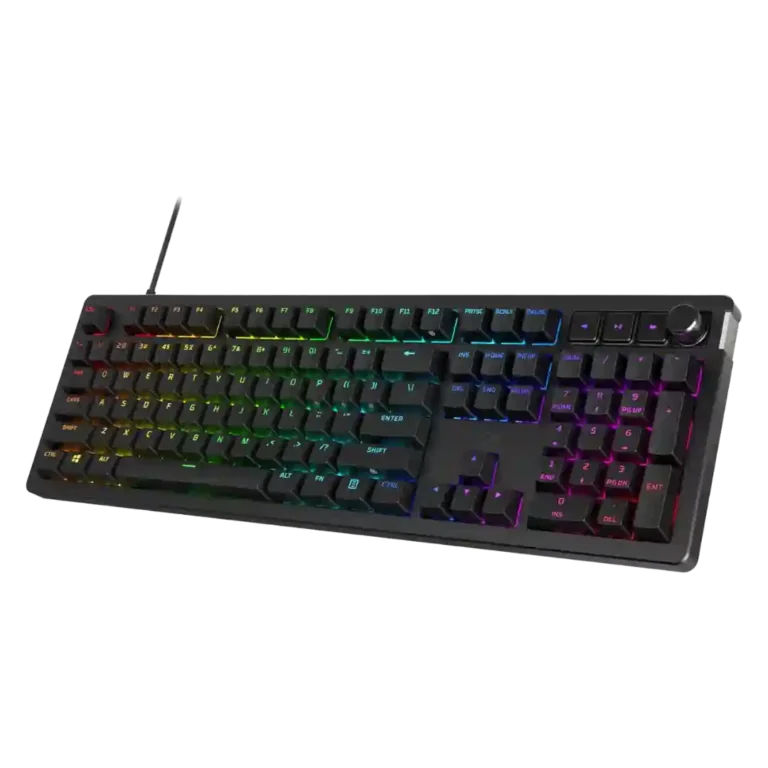
Best for gamers, typists, and desk-setup enthusiasts who want a premium-feeling mechanical keyboard with hot-swappable switches, strong RGB, and lots of physical customization.

Not for

Not for buyers who want the best full-price value, deep software control, an included wrist rest, or advanced analog/rapid-trigger switch features.

Verdict

The HyperX Alloy Rise earns its strongest praise as a typing-first gaming keyboard: reviewers repeatedly call out its smooth switches, dampened sound, sturdy feel, hot-swappable design, and extensive physical/RGB customization. Gaming performance is also well supported, with fast response, high polling on wired models, and reliable wireless options on the 75 Wireless. The tradeoff is that the experience is not equally polished everywhere. NGENUITY is often described as basic or buggy, some reviewers disliked the tall chassis without a wrist rest, and value depends heavily on price because competing boards can offer similar or better features. It makes the most sense for buyers who want a premium-feeling, customizable keyboard and can accept software and comfort compromises.

What Reviewers Agree On

Across the review set, the HyperX Alloy Rise is strongest when judged as a comfortable, customizable mechanical keyboard rather than a pure value play. The most repeated praise centers on typing feel: multiple reviews describe the switches as smooth or responsive, the gasket/dampening approach as softening the experience, and the keycaps as durable or pleasantly textured. Customization is the other consistent theme. The magnetic top plate, swappable badge, hot-swappable switches, RGB controls, profiles, and optional accessories make the board feel more personal than a standard gaming keyboard. Several wireless-focused reviews also praise the 75 Wireless for strong battery life, flexible Bluetooth/2.4GHz/USB-C connectivity, and reliable everyday use.

The mixed areas are just as clear. Software comes up often, but not always positively. Some reviews find NGENUITY easy enough for lighting, macros, remapping, and profiles, while others call it basic, limited, or buggy. Comfort also depends on the user and model: several reviews like the compact layout and typing ergonomics, but others complain about the tall chassis and missing wrist rest. Gaming performance is consistently described as capable, fast, or reliable, especially with high polling on wired models, but a few reviewers say it does not offer the advanced actuation features or standout feel found on some enthusiast or Hall Effect competitors.

The biggest tradeoff before buying is price versus polish. At a discount, the Alloy Rise 75 Wireless is framed as much easier to recommend because its feature set, build, battery life, and customization feel premium. At full price, the same product becomes more debatable because the software, wrist-rest omission, magnetic plate quirks, and competition weaken the value story. Buyers most likely to be satisfied are those who want a compact or full-size HyperX board with a refined typing feel, bright RGB, and lots of physical customization, and who are willing to tolerate some software limitations.

Pros

  • 5.0
    based on 1 review
    key spacing: 5.0, based on 1 review
    Direct spacing evidence is narrow but positive, with one reviewer stating the spacing between keys felt perfect during long typing use.
  • 4.9
    based on 11 reviews
    hot-swappable switches: 4.9, based on 11 reviews
    Hot-swappable switch support is widely documented, with multiple reviews confirming support for 3-pin or 5-pin switches and easy mechanical switch replacement.
  • 4.8
    based on 6 reviews
    battery life: 4.8, based on 6 reviews
    Wireless reviews are positive on battery life, repeatedly referencing long runtime claims around 80 hours with RGB and up to 1,500 hours without lighting, with some reviewers reporting long real-world use between charges.
  • 4.8
    based on 2 reviews
    compatibility: 4.8, based on 2 reviews
    The limited direct compatibility evidence points to broad device support, including PC and several game consoles in the cited reviews.
  • 4.7
    based on 7 reviews
    latency: 4.7, based on 7 reviews
    Latency evidence is strong across wired and wireless reviews: high polling, low-latency 2.4 GHz, no noticeable input delay, and instant transmission are repeatedly mentioned.
  • 4.6
    based on 4 reviews
    stabilizer quality: 4.6, based on 4 reviews
    Stabilizer feedback is positive where mentioned, with reviews describing them as well-tuned, lubricated, stable, and not rattly.
  • 4.6
    based on 9 reviews
    typing comfort: 4.6, based on 9 reviews
    Typing comfort is one of the product’s strongest areas, with many reviewers praising soft, dampened, responsive typing, though wrist comfort depends on chassis height and wrist-rest use.
  • 4.6
    based on 7 reviews
    per-key lighting control: 4.6, based on 7 reviews
    Per-key RGB is well supported, with reviewers noting fully per-key lighting, individual-key color control, and side lighting on some models.
  • 4.6
    based on 7 reviews
    polling rate: 4.6, based on 7 reviews
    Polling-rate coverage is strong for wired models, with repeated 8,000 Hz references; one wireless review notes a 1,000 Hz polling rate for Bluetooth/wireless use.
  • 4.5
    based on 10 reviews
    switch feel: 4.5, based on 10 reviews
    Switch feel is generally praised for smooth, soft, responsive, pre-lubed red linear performance, though some reviews found the feel harsh or too sensitive.
  • 4.5
    based on 8 reviews
    key responsiveness: 4.5, based on 8 reviews
    Responsiveness is a recurring strength, with reviewers citing fast input registration, rapid strokes, reliable gaming response, and minimal input delay.
  • 4.5
    based on 7 reviews
    sound dampening: 4.5, based on 7 reviews
    Sound dampening is a repeated strength, with foam, gasket mounting, and dampening layers credited for softer keystrokes and reduced resonance.
  • 4.5
    based on 5 reviews
    switch options: 4.5, based on 5 reviews
    Switch options are supported through linear and tactile choices and compatibility with 3-pin or 5-pin switch replacements; one Dutch review also confirms Red Linear switches.
  • 4.5
    based on 2 reviews
    key stability: 4.5, based on 2 reviews
    The limited direct evidence is positive, with box-style stems intended to reduce wobble and another review noting the keys remained stable and in place.
  • 4.4
    based on 7 reviews
    build quality: 4.4, based on 7 reviews
    The board is generally described as sturdy, well-built, or high-grade, with several reviews pointing to a solid chassis and premium-feeling construction; the praise is stronger for overall structure than for every removable part.
  • 4.4
    based on 12 reviews
    typing feel: 4.4, based on 12 reviews
    Typing feel is broadly praised as premium, smooth, soft, or satisfying, but a few reviews describe harsher keystrokes or less pleasing feel versus high-end competitors.
  • 4.4
    based on 11 reviews
    keycap quality: 4.4, based on 11 reviews
    Keycap quality is frequently praised, especially double-shot or PBT construction, texture, durability, grip, and clean legends.
  • 4.3
    based on 3 reviews
    legend visibility: 4.3, based on 3 reviews
    Legend visibility is supported by backlit legends, side-printed secondary legends, and clean readable keycap fonts, with the strongest comments coming from typing and lighting-focused reviews.
  • 4.3
    based on 10 reviews
    RGB customization: 4.3, based on 10 reviews
    RGB customization is consistently supported, with reviewers mentioning software-controlled effects, per-key setup, presets, layering, and detailed backlight adjustments.
  • 4.3
    based on 5 reviews
    durability: 4.3, based on 5 reviews
    Durability evidence centers on thick or double-shot PBT keycaps, wear resistance, oil-mark resistance, and comments that the board is built to last.
  • 4.3
    based on 14 reviews
    customization options: 4.3, based on 14 reviews
    Customization is one of the clearest strengths, with repeated support for magnetic top plates, removable badges, hot-swappable switches, keycaps, RGB effects, macros, profiles, and optional accessories.
  • 4.3
    based on 8 reviews
    backlight brightness: 4.3, based on 8 reviews
    Brightness is generally treated as a strength, with ambient auto-adjustment, vivid output, and multiple brightness stages; reviewers also note RGB backlighting as a visible part of the board’s identity.
  • 4.3
    based on 4 reviews
    onboard memory: 4.3, based on 4 reviews
    Onboard memory and saved configurations are supported in wireless-focused reviews, with mentions of saving profiles or settings directly to the keyboard.
  • 4.2
    based on 13 reviews
    RGB lighting quality: 4.2, based on 13 reviews
    RGB lighting quality is broadly praised as bright, vibrant, sharp, evenly distributed, or visually impressive, though a few reviewers note side/underglow limitations or occasional lighting issues.
  • 4.2
    based on 11 reviews
    media controls: 4.2, based on 11 reviews
    Media controls are a repeated strength, with volume dials, media keys, tactile buttons, and programmable knobs called out across several reviews.
  • 4.2
    based on 12 reviews
    volume control: 4.2, based on 12 reviews
    Volume control is widely supported, with reviewers noting click-to-mute dials, notched rotary knobs, and convenient volume controls.
  • 4.2
    based on 6 reviews
    reliability: 4.2, based on 6 reviews
    Reliability is mostly positive for core typing and gaming performance, but one wireless review reports occasional inconsistency and disconnections.
  • 4.2
    based on 13 reviews
    gaming performance: 4.2, based on 13 reviews
    Gaming performance is broadly positive, with reviewers describing responsive, capable, competitive-ready use; the main caveat is that some did not find it exceptional versus more advanced gaming keyboards.
  • 4.1
    based on 11 reviews
    connectivity: 4.1, based on 11 reviews
    Connectivity depends heavily on model: wired reviews note the lack of wireless as a drawback, while Alloy Rise 75 Wireless reviews praise tri-mode support across USB-C, 2.4 GHz, and Bluetooth.
  • 4.1
    based on 11 reviews
    size and form factor: 4.1, based on 11 reviews
    The product is covered in both full-size and 75% contexts; reviewers generally like the compact 75% footprint, while full-size coverage values the numpad for productivity.
  • 4.1
    based on 8 reviews
    profile management: 4.1, based on 8 reviews
    Profile support is well covered through ten profiles, profile storage, onboard profile switching, Bluetooth profiles, and software-managed profiles.
  • 4.1
    based on 9 reviews
    materials quality: 4.1, based on 9 reviews
    Materials feedback is mostly positive, including metal or aluminum top pieces, PBT keycaps, and metallic removable plates, though some reviews note plastic bases or less refined cable integration.
  • 4.1
    based on 10 reviews
    macro customization: 4.1, based on 10 reviews
    Macro customization is well supported through NGENUITY, with reviewers mentioning macro recording, key remapping, secondary functions, and programming options.
  • 4.1
    based on 7 reviews
    layout options: 4.1, based on 7 reviews
    Reviewers confirm multiple layout options and tradeoffs, including full-size and 75% versions; the compact layout saves room but can move some keys to function layers.
  • 4.0
    based on 5 reviews
    desk space efficiency: 4.0, based on 5 reviews
    The 75% model is praised for saving desk space and keeping essential keys within reach, while full-size coverage notes the numpad can reduce mousing room.
  • 4.0
    based on 5 reviews
    ease of switch replacement: 4.0, based on 5 reviews
    Most reviews describe switch replacement as a major benefit because the board supports compatible mechanical switches without soldering, though one review found switch removal stiff and challenging.
  • 4.0
    based on 1 review
    extra gaming features: 4.0, based on 1 review
    Direct evidence is limited but positive, with one review calling out 100% anti-ghosting and game-mode behavior as gaming-focused extras.
  • 3.9
    based on 11 reviews
    acoustics: 3.9, based on 11 reviews
    Most coverage describes a cleaner, dampened sound profile, with foam, gasket mounting, and lubrication helping reduce harshness; a minority of reviews still found the sound sharp, hollow, metallic, or clacky.
  • 3.9
    based on 7 reviews
    wireless performance: 3.9, based on 7 reviews
    Wireless performance is generally praised on the 75 Wireless for smooth connections, low latency, Bluetooth/2.4 GHz flexibility, and strong autonomy, though some reviews note disconnections or model limits.
  • 3.8
    based on 6 reviews
    noise level: 3.8, based on 6 reviews
    Noise is mixed but generally better than many mechanical boards: some call it quiet or not too loud, while others describe it as louder, sharp, or less refined.
  • 3.8
    based on 7 reviews
    actuation consistency: 3.8, based on 7 reviews
    Reviewers cite fast 1.8 mm actuation and consistent keypresses, but the experience is mixed: some found the switches responsive, while others mentioned deep presses, misinputs, or sensitivity that takes adjustment.
  • 3.6
    based on 8 reviews
    ergonomics: 3.6, based on 8 reviews
    Ergonomics are mixed: the gasket structure, compact reach, and wrist placement help comfort for some reviewers, but the tall chassis and lack of an included wrist rest caused discomfort for others.
  • 3.5
    based on 2 reviews
    portability: 3.5, based on 2 reviews
    Portability evidence is mixed: the 75% model is compact in dimensions, but at least one review notes its weight is over a kilogram.

Cons

  • 3.4
    based on 15 reviews
    software quality: 3.4, based on 15 reviews
    Software quality is one of the most divided areas: NGENUITY is described as easy, lightweight, or functional by some, but basic, limited, inconsistent, or buggy by others.
  • 3.4
    based on 5 reviews
    frame rigidity: 3.4, based on 5 reviews
    Frame feedback is mixed: one review praises a sturdy, flex-free build, but several reviews say the magnetic top plate can feel loose or detach too easily.
  • 3.3
    based on 3 reviews
    cable quality: 3.3, based on 3 reviews
    The wired model’s detachable braided USB-C cable is noted positively in one review, while other coverage criticizes the cable area or describes the cable as only moderately premium.
  • 3.3
    based on 12 reviews
    value for money: 3.3, based on 12 reviews
    Value is heavily price-dependent: several reviewers find the keyboard expensive or weak at full price, while others say its premium features or sale pricing make it easier to recommend.
  • 2.3
    based on 3 reviews
    wrist rest quality: 2.3, based on 3 reviews
    The wrist-rest evidence is negative: multiple reviewers note that no wrist rest is included and that this omission can hurt comfort at the keyboard’s height or price.

FAQ

Is the HyperX Alloy Rise worth buying?

It is easiest to justify if you value smooth typing, hot-swappable switches, RGB, and physical customization. Reviewers were more cautious at full price because software limitations, comfort issues, and strong competition weaken the value.

Who is the HyperX Alloy Rise best for?

It fits buyers who want a premium-feeling mechanical keyboard that works for typing and gaming and can be personalized with plates, badges, switches, keycaps, lighting, and profiles.

What is the main drawback of the HyperX Alloy Rise?

The most repeated drawbacks are price, NGENUITY software limitations or bugs, and wrist comfort concerns from the taller chassis without an included wrist rest.

Is the HyperX Alloy Rise good for gaming?

Yes. Reviews repeatedly describe it as responsive and capable for gaming, with high polling on wired models and strong wireless performance on the 75 Wireless, though some reviewers wanted more advanced actuation features.

How good is the typing experience?

Typing is one of its strongest areas. Reviewers praise the smooth switches, dampened feel, PBT keycaps, gasket structure, and generally comfortable key feel, though a few found the keystroke harsher than competitors.

Does the HyperX Alloy Rise have good RGB customization?

Yes. Reviewers mention bright RGB, per-key lighting, side lighting on some models, presets, effects, and software customization, although software reliability varies by review.

Should I get the wired or wireless version?

The wired version gets the highest polling-rate coverage, while the 75 Wireless gets praise for Bluetooth, 2.4 GHz, USB-C, and long battery life. The better choice depends on whether maximum polling or cable-free flexibility matters more.

Reviews we analyzed

Video Reviews

Article Reviews

#1
4.5
Choose the Q3 HE for premium build, smooth Hall Effect typing, and flexible connectivity. Skip it if you want broader switch compatibility or...
Pros: rapid trigger support, build quality, durability, materials quality, desk space efficiency, customization options, compatibility
Cons: portability, switch options, reliability
#2
4.5
Choose the Keychron Q5 HE for premium build, flexible Hall Effect controls, and strong wireless versatility. Skip it if you want a lighter...
Pros: frame rigidity, customization options, compatibility, key responsiveness, materials quality, macro customization, extra gaming features
Cons: portability, switch options, value for money
#3
4.4
Choose the Keychron Q6 HE if you want a full-size premium Hall Effect keyboard with smooth typing and strong gaming tools. Skip it...
Pros: key responsiveness, key stability, frame rigidity, connectivity, volume control, switch feel, RGB customization
Cons: portability, switch options, ease of switch replacement
#4
4.4
Choose the GMMK 2 for smooth typing, bright RGB, and rare hot-swap flexibility at this price. Skip it if you want wireless features,...
Pros: frame rigidity, durability, customization options, hot-swappable switches, compatibility, per-key lighting control, value for money
Cons: actuation consistency