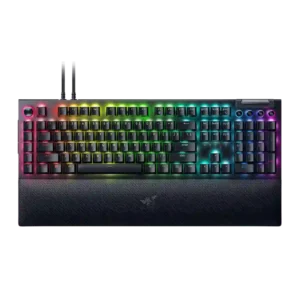
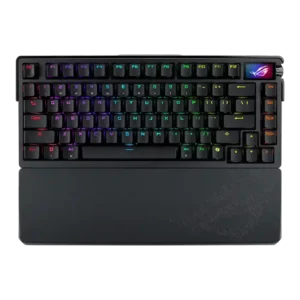
Average score
Product 1: Razer BlackWidow V4 Pro
3.9
Product 2: ASUS ROG Azoth Extreme
4.2
acoustics
Product 1: Razer BlackWidow V4 Pro
3.8

Acoustics are solid but switch-dependent. Yellow builds are described as pleasing and controlled, while Green builds can sound louder and more plasticky.

Product 2: ASUS ROG Azoth Extreme
4.7

Reviews describe enthusiast-level acoustics with a refined, muted sound profile rather than hollow or harsh output.

actuation consistency
Product 1: Razer BlackWidow V4 Pro
4.5

For the tested Yellow switches, reviewers describe consistent fast reset behavior that keeps repeated presses from dropping inputs.

Product 2: ASUS ROG Azoth Extreme
4.7

One review specifically calls the NX Snow implementation quick and consistent in actuation.

analog input support
Product 1: Razer BlackWidow V4 Pro
No score yet
Product 2: ASUS ROG Azoth Extreme
1.0

Reviewers note the board uses standard mechanical switches and lacks hall-effect-style analog input features.

backlight brightness
Product 1: Razer BlackWidow V4 Pro
4.3

Brightness is strong and flexible enough to stand out in normal use, with reviewers specifically praising how bright and focused the lighting looks.

Product 2: ASUS ROG Azoth Extreme
3.5

Lighting is considered visible enough for use, but not especially bright for a premium board.

battery life
Product 1: Razer BlackWidow V4 Pro
No score yet
Product 2: ASUS ROG Azoth Extreme
4.5

Across reviews, battery life is repeatedly described as strong, with quoted figures around 1,600 hours with lighting and OLED off plus solid real-world endurance.

build quality
Product 1: Razer BlackWidow V4 Pro
4.6

Build quality is widely praised. Reviewers consistently describe the board as premium, sturdy, and well assembled despite some plastic in the chassis.

Product 2: ASUS ROG Azoth Extreme
4.8

Reviews consistently portray the chassis as exceptionally premium, rigid, and well finished.

cable quality
Product 1: Razer BlackWidow V4 Pro
4.0

Cable quality is good, with braided detachable cables repeatedly noted, though the dual-cable setup adds clutter if passthrough is enabled.

Product 2: ASUS ROG Azoth Extreme
4.2

One review highlights the included long braided USB cable, suggesting solid included cabling.

compatibility
Product 1: Razer BlackWidow V4 Pro
2.5

Compatibility is limited by platform support; one review specifically calls out weak Mac support and points users toward Windows for the full experience.

Product 2: ASUS ROG Azoth Extreme
4.6

A review found wireless use seamless across both PC and Mac.

connectivity
Product 1: Razer BlackWidow V4 Pro
3.3

Connectivity is functional but not especially flexible: the board is wired, supports passthrough, and benefits from that for low latency, but several reviews note the loss of wireless.

Product 2: ASUS ROG Azoth Extreme
4.7

Reviews repeatedly confirm tri-mode use with wired, 2.4 GHz, and Bluetooth multi-device support.

customization options
Product 1: Razer BlackWidow V4 Pro
4.8

Overall customization is exceptional, especially around key remapping, dial modes, lighting, and workflow tuning.

Product 2: ASUS ROG Azoth Extreme
4.7

Reviews emphasize deep customization via key remapping, OLED tweaks, macros, lighting sync, and the adjustable gasket system.

desk space efficiency
Product 1: Razer BlackWidow V4 Pro
2.0

Desk-space efficiency is poor. Reviewers repeatedly note that the macro column and large wrist rest make the board hard to justify on tighter setups.

Product 2: ASUS ROG Azoth Extreme
4.5

Reviews say the 75% layout balances compactness with retained function keys and navigation access.

durability
Product 1: Razer BlackWidow V4 Pro
4.5

Durability evidence centers on the rated 100 million keystroke lifespan and the generally robust construction.

Product 2: ASUS ROG Azoth Extreme
4.6

One review directly links the heavy full-aluminum build with a strong sense of durability.

ease of switch replacement
Product 1: Razer BlackWidow V4 Pro
2.0

Switch replacement is not especially easy because the board is not hot-swappable, so changing switches is more restrictive than on enthusiast-oriented alternatives.

Product 2: ASUS ROG Azoth Extreme
4.5

Reviews say hot-swap support and included tools make switch changes relatively easy.

ergonomics
Product 1: Razer BlackWidow V4 Pro
3.8

Ergonomics are good in some respects thanks to the wrist rest and comfortable key shapes, but the added side and left macro controls can interfere with hand placement until you adapt.

Product 2: ASUS ROG Azoth Extreme
4.4

Included comfort features and positive typing/gaming comfort comments support a good ergonomic experience.

extra gaming features
Product 1: Razer BlackWidow V4 Pro
4.5

Extra gaming features are plentiful, including macro keys, command-dial functions, polling-rate options, and other gaming-focused controls.

Product 2: ASUS ROG Azoth Extreme
4.6

Reviews highlight the color OLED touch display, 8,000 Hz support, and other enthusiast-focused extras.

frame rigidity
Product 1: Razer BlackWidow V4 Pro
4.7

Frame rigidity is excellent, with the board repeatedly described as heavy, planted, and difficult to shift once it is on the desk.

Product 2: ASUS ROG Azoth Extreme
4.8

One review explicitly says the body shows no bend, reinforcing a very rigid frame.

gaming performance
Product 1: Razer BlackWidow V4 Pro
4.5

Gaming performance is consistently strong, with reviewers praising smooth inputs, macro advantages, and dependable action across shooters, MMOs, and general gaming.

Product 2: ASUS ROG Azoth Extreme
4.5

Reviews say the NX Snow setup performs well for gaming, though it is not a hall-effect speed board.

hot-swappable switches
Product 1: Razer BlackWidow V4 Pro
1.2

Hot-swappable switches are a clear weakness. Multiple reviewers explicitly note that the full-size V4 Pro does not support hot-swap.

Product 2: ASUS ROG Azoth Extreme
4.5

Multiple reviews confirm the PCB or sockets are hot-swappable for switch changes.

keycap quality
Product 1: Razer BlackWidow V4 Pro
3.5

Keycap quality is decent rather than class-leading: reviewers like the shine-through look and texture, but several note the premium price makes the ABS choice harder to forgive.

Product 2: ASUS ROG Azoth Extreme
4.3

Reviews consistently describe durable doubleshot PBT caps with decent feel, even if texture preferences vary.

key responsiveness
Product 1: Razer BlackWidow V4 Pro
4.5

Where responsiveness is discussed directly, presses are described as immediate and dependable, with fast recovery under repeated inputs.

Product 2: ASUS ROG Azoth Extreme
4.7

Reviews describe fast response and responsive input, especially alongside the high polling option.

key spacing
Product 1: Razer BlackWidow V4 Pro
4.3

Key spacing is generally favorable, with reviewers noting enough separation and room to reduce accidental presses once they adjust to the macro-heavy layout.

Product 2: ASUS ROG Azoth Extreme
4.4

One review praises the more properly spaced function row.

key stability
Product 1: Razer BlackWidow V4 Pro
4.5

Stability is strong where reviewers examined wobble directly, with switches and keycaps described as very tight and controlled.

Product 2: ASUS ROG Azoth Extreme
4.6

Reviews say wobble is reduced and overall key stability is strong.

latency
Product 1: Razer BlackWidow V4 Pro
4.8

Latency is a clear strength in the full-size model, with reviewers repeatedly describing inputs as instantaneous, lag-free, and especially strong for wired competitive play.

Product 2: ASUS ROG Azoth Extreme
4.7

Reviews portray the wireless link as low-latency and highly stable.

layout options
Product 1: Razer BlackWidow V4 Pro
No score yet
Product 2: ASUS ROG Azoth Extreme
3.5

One review mentions that layouts and languages vary by region, but evidence for broader layout choice is limited.

legend visibility
Product 1: Razer BlackWidow V4 Pro
3.0

Legend visibility is mixed. Main legends are praised for shine-through readability, but several reviewers say the media-button legends are too dark or hard to see.

Product 2: ASUS ROG Azoth Extreme
4.3

Shine-through legends are present and generally readable.

macro customization
Product 1: Razer BlackWidow V4 Pro
4.6

Macro customization is a major strength. Across many reviews, the board’s macro keys and remapping options are described as flexible, powerful, and useful for both games and productivity.

Product 2: ASUS ROG Azoth Extreme
4.4

Macro recording and remapping support are explicitly mentioned.

materials quality
Product 1: Razer BlackWidow V4 Pro
4.3

Material quality is strong overall thanks to the aluminum top case and premium-feeling finishes, though the plastic lower shell keeps it from feeling fully top-tier throughout.

Product 2: ASUS ROG Azoth Extreme
4.8

Reviews repeatedly highlight high-quality aluminum and other premium internal materials.

media controls
Product 1: Razer BlackWidow V4 Pro
4.5

Media controls are widely praised for convenience and feel, making everyday playback adjustments easier.

Product 2: ASUS ROG Azoth Extreme
4.5

Multiple reviews confirm onboard media control through the side control system.

noise level
Product 1: Razer BlackWidow V4 Pro
2.0

Noise level depends heavily on switch choice, but the Green version is explicitly described as very loud.

Product 2: ASUS ROG Azoth Extreme
4.6

Reviews describe the sound as muted with very little unwanted ping.

onboard memory
Product 1: Razer BlackWidow V4 Pro
3.8

Onboard memory exists and stores profiles, but some custom behavior still depends on Synapse, so the onboard implementation is useful without being fully self-sufficient.

Product 2: ASUS ROG Azoth Extreme
No score yet
passthrough features
Product 1: Razer BlackWidow V4 Pro
3.6

USB passthrough is useful for low-power accessories and convenient desk routing, but reviewers note bandwidth or power limitations and the need for a second cable.

Product 2: ASUS ROG Azoth Extreme
No score yet
per-key lighting control
Product 1: Razer BlackWidow V4 Pro
4.5

Per-key lighting control is supported and called out directly, alongside underglow zones for a more elaborate lighting setup.

Product 2: ASUS ROG Azoth Extreme
4.5

Source specs explicitly mention per-key RGB lighting.

polling rate
Product 1: Razer BlackWidow V4 Pro
4.5

The board’s adjustable polling rate and 8,000Hz ceiling are repeatedly highlighted as premium gaming features, even if some reviewers note many players may not fully notice the difference.

Product 2: ASUS ROG Azoth Extreme
4.3

Reviews repeatedly mention 8,000 Hz support, though not all think it matters much for a keyboard.

portability
Product 1: Razer BlackWidow V4 Pro
1.8

Portability is poor. The full-size body, added macro column, and overall heft make this a desk board rather than a travel-friendly one.

Product 2: ASUS ROG Azoth Extreme
1.6

The board is repeatedly described as heavy, making portability a clear weakness.

profile management
Product 1: Razer BlackWidow V4 Pro
4.2

Profile management is solid, with multiple reviews confirming onboard profiles and quick switching for different tasks.

Product 2: ASUS ROG Azoth Extreme
No score yet
rapid trigger support
Product 1: Razer BlackWidow V4 Pro
No score yet
Product 2: ASUS ROG Azoth Extreme
1.0

Reviews explicitly say rapid trigger is not supported.

reliability
Product 1: Razer BlackWidow V4 Pro
2.9

Reliability is mixed. Reviews mention lighting glitches, occasional wrist-rest connection issues, accidental side-button presses, and some software inconsistency.

Product 2: ASUS ROG Azoth Extreme
4.8

Wireless use is described as lag-free and dependable.

RGB customization
Product 1: Razer BlackWidow V4 Pro
4.5

RGB customization is robust through Synapse and Chroma, including synchronized effects and game-aware lighting options.

Product 2: ASUS ROG Azoth Extreme
4.5

Reviews note lighting effect changes and Asus lighting sync support.

RGB lighting quality
Product 1: Razer BlackWidow V4 Pro
4.6

RGB lighting quality is one of the board’s standout features, with reviewers repeatedly praising the brightness, underglow, wrist-rest lighting, and overall presentation.

Product 2: ASUS ROG Azoth Extreme
3.9

RGB shines through clearly, but some reviewers wish it were brighter.

size and form factor
Product 1: Razer BlackWidow V4 Pro
3.1

The full-size form factor gives buyers every control they could want, but several reviewers stress that it is undeniably big and best suited to larger desks.

Product 2: ASUS ROG Azoth Extreme
4.4

Reviews consistently identify the board as a 75% design.

software quality
Product 1: Razer BlackWidow V4 Pro
3.4

Software quality is mixed. Synapse is often called easy enough to use, but many reviews criticize its background dependency, resource use, or occasional inconsistency.

Product 2: ASUS ROG Azoth Extreme
2.1

Armoury Crate is feature-rich but repeatedly criticized for being frustrating or sluggish.

sound dampening
Product 1: Razer BlackWidow V4 Pro
4.3

Sound dampening is a genuine plus, with multiple reviewers noticing that the internal foam cuts down ping, reverb, and harsher case noise.

Product 2: ASUS ROG Azoth Extreme
4.7

Reviews consistently reference multiple dampening layers and reduced ping or hollow echo.

stabilizer quality
Product 1: Razer BlackWidow V4 Pro
4.3

Stabilizers are better than expected for a mainstream gaming board, with reviewers noting improved stability, low rattle, and effective factory lubrication.

Product 2: ASUS ROG Azoth Extreme
4.5

Stabilizer tuning is described as strong, with only minor rattle noted.

switch feel
Product 1: Razer BlackWidow V4 Pro
4.3

Across multiple switch variants, reviewers describe the switch feel as smooth, fast, and satisfying, with Yellow switches especially easy to game on and Green switches still enjoyable for clicky fans.

Product 2: ASUS ROG Azoth Extreme
4.6

Reviews generally like the pre-lubed NX Snow feel, describing it as smooth and refined.

switch options
Product 1: Razer BlackWidow V4 Pro
4.0

Reviews confirm two stock switch choices, Green clicky and Yellow linear, which gives buyers a basic choice but not a broad menu of switch options.

Product 2: ASUS ROG Azoth Extreme
4.4

Evidence supports at least Snow and Storm switch variants.

typing comfort
Product 1: Razer BlackWidow V4 Pro
4.0

Typing comfort is generally good for long sessions, though not every switch variant feels equally cushioned for extended writing.

Product 2: ASUS ROG Azoth Extreme
4.5

Reviews say the adjustable soft mode and included ergonomics help long typing sessions.

typing feel
Product 1: Razer BlackWidow V4 Pro
4.0

Typing feel is generally praised for being fast and satisfying, though it depends somewhat on switch choice and the board’s larger layout.

Product 2: ASUS ROG Azoth Extreme
4.6

Reviews repeatedly praise the typing experience as crisp, satisfying, and good enough for daily work.

value for money
Product 1: Razer BlackWidow V4 Pro
3.9

Value depends on whether you will use the extra features. Many reviewers think the feature set helps justify the price, but several still call the board expensive.

Product 2: ASUS ROG Azoth Extreme
1.7

Despite the quality, reviews consistently treat the price as very hard to justify.

volume control
Product 1: Razer BlackWidow V4 Pro
4.5

Volume control is a strong point, with the roller or dial repeatedly described as smooth, satisfying, and easy to use.

Product 2: ASUS ROG Azoth Extreme
4.5

Multiple reviews confirm dedicated onboard volume adjustment.

wireless performance
Product 1: Razer BlackWidow V4 Pro
No score yet
Product 2: ASUS ROG Azoth Extreme
4.8

Reviews repeatedly describe the wireless connection as stable and strong.

wrist rest quality
Product 1: Razer BlackWidow V4 Pro
4.4

Wrist rest quality is one of the most praised parts of the package, with reviewers repeatedly calling it soft, comfortable, and premium, even if a few mention connection or height quirks.

Product 2: ASUS ROG Azoth Extreme
4.0

Wrist rest comfort is usually praised, though one review noted cosmetic wear over time.